
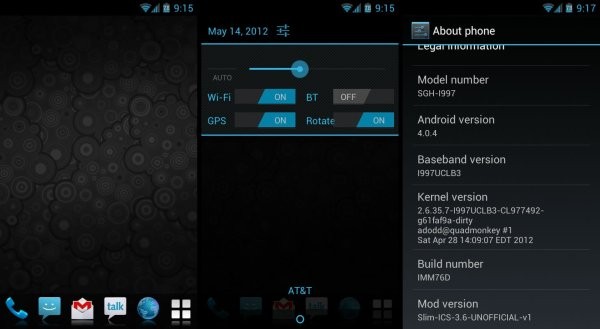
Slim ICS is an Ice Cream Sandwich Android 4.0 based custom ROM for the AT&T Infuse 4G, ported over from the Slim ICS ROM for the Galaxy S, by XDA Forum Member mg2195. The slim moniker comes from the fact that the ROM is extremely small in size, weighing in at just around 80 MB. It gives you a stock Android 4.0 experience as opposed to the TouchWiz sprinkled stock ROMs, along with improved performance.
Here’s a look at the key features of the ROM:
- Fully built from AOSP sources with some cherry picks from CM and AOKP team,
- Easy to customize features (thanks to AOKP team) via ASS (Advanced Slim Settings)
- Common Base ROM – 60MB
- Device Essentials – ~20MB
- 5 languages (en, fr, de, it and es)
- Zeam Launcher
NOTE, Please Read: Since this is an AOSP based ROM, some features like 3G video calling will be unavailable as those are only possible on stock Samsung ROMs (video calls using 3rd party apps like Skype will work fine though). Also, if you use Swype as your preferred keyboard, you will need to download the beta version from beta.swype.com as Swype is also not included in the ROM.
Read on to find out how Slim ICS ROM can be installed on your AT&T Infuse 4G.
Compatibility
This ROM and the guide below is compatible only and only with AT&T Infuse 4G, model number I997. It’s not compatible with any other device. Do not try this even on the Rogers Infuse 4G. Check your device’s model number in: Settings » About phone. If it’s not I997, please do not attempt this.
Warning!
The methods and procedures discussed here are considered risky and you should not attempt anything if you don’t know completely what it is. If any damage occurs to your device, we won’t be held liable.
How to Install Slim ICS ROM on the AT&T Infuse 4G
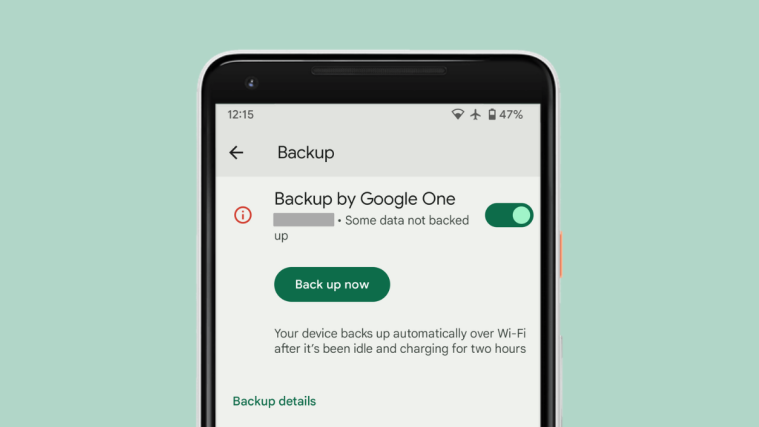
- This procedure will wipe all your apps, data and settings (but it will NOT touch your SD cards, so don’t worry about those). Backup your Apps and important data — bookmarks, contacts, SMS, APNs (internet settings), etc. This Android backup guide would help you.
Important! Don’t forget to at least make a backup of your APN settings, which you can restore later if your data connection does not work after installing the ROM. Use the backup guide to find out how. - Install the UCLB3 firmware on your phone by following the guide → here.
- Download the latest version of the Slim ICS ROM from the official development page.
- Copy the downloaded .zip file from step 3 to the internal SD card.
- Now, turn off your phone, then boot into ClockworkMod recovery. To do this, turn the phone off, disconnect USB cable, hold the Volume Up + Volume Down + Power buttons together, release the power button when Samsung logo appears, but continue to hold volume buttons until recovery screen appears, then let go of them.
In recovery, use Volume buttons to navigate and Power button to select. - [Optional] Perform a Nandroid Backup of your existing ROM, so that you can always restore it from recovery if something does not work out with this rom. To perform a backup, select Backup and Restore –> On the next screen, select Backup again. Go back to main recovery menu after backup is complete.
- Perform a wipe:
- Select wipe data/factory reset, then select Yes on next screen to confirm. Wait a while till the data wipe is complete.
- Select wipe cache then select Yes on next screen to confirm.
- Select advanced, and then select wipe dalvik cache » Yes – wipe dalvik. Then go back to the main recovery menu by selecting go back.
- Select install zip from sdcard, then select choose zip from sdcard. Scroll to the ROM file on the sdcard and select it. Confirm installation by selecting Yes – Install _____.zip on the next screen. The ROM will start installing.
- The phone will reboot into recovery in the middle of installation and get stuck at the Samsung logo. When that happens, remove the battery, re-insert it, then enter recovery again as explained in step 5.
- Then, repeat step 8 to start installing the ROM again.
- After the installation is complete, select go back then select reboot system now to reboot the phone.
The Slim ICS ROM is now installed and running on your AT&T Infuse 4G. Visit the official development page for more info and to get the latest updates on the ROM. Share your thoughts on the ROM in the comments below.
Screenshots





Already pulled out? 🙁 I need it bad
Already pulled out? 🙁 I need it bad
Already pulled out? 🙁 I need it bad
Here is a mirror i just uploaded…i love this rom, sucks it was pulled…but now others can enjoy its good ness 🙂 http://www.mediafire.com/?gq88qn2apc1jw76 Make more mirrors of this!!! android should be free and open not locked down like iOS…
Here is a mirror i just uploaded…i love this rom, sucks it was pulled…but now others can enjoy its good ness 🙂 http://www.mediafire.com/?gq88qn2apc1jw76 Make more mirrors of this!!! android should be free and open not locked down like iOS…
Here is a mirror i just uploaded…i love this rom, sucks it was pulled…but now others can enjoy its good ness 🙂 http://www.mediafire.com/?gq88qn2apc1jw76 Make more mirrors of this!!! android should be free and open not locked down like iOS…
Why should I not use this on a Rogers infuse?
Why should I not use this on a Rogers infuse?
Why should I not use this on a Rogers infuse?
send me for a samsung galaxy y
thanking you
send me for a samsung galaxy y
thanking you
send me for a samsung galaxy y
thanking you
would this work on a galaxy ace S5830?
Please I want to upgrade from 2.3.6 to 4.0.2 .please how can I do it.
At&t huawai u8665
would this work on a galaxy ace S5830?
Please I want to upgrade from 2.3.6 to 4.0.2 .please how can I do it.
At&t huawai u8665
would this work on a galaxy ace S5830?
Hey, can you send me all the links for the T-Mobile Samsung Galaxy S 4G? I’m at [email protected] too, thx.
Hey, can you send me all the links for the T-Mobile Samsung Galaxy S 4G? I’m at [email protected] too, thx.
Hey, can you send me all the links for the T-Mobile Samsung Galaxy S 4G? I’m at [email protected] too, thx.
has anyone seen or experienced any bugs with this version…. what works and what doesn’t?
has anyone seen or experienced any bugs with this version…. what works and what doesn’t?
has anyone seen or experienced any bugs with this version…. what works and what doesn’t?
O idioma português do brasil está disponível?
O idioma português do brasil está disponível?
O idioma português do brasil está disponível?
can you make one for the lg optimus slider
can you make one for the lg optimus slider
can you make one for the lg optimus slider
send me for a samsung galaxy y duos gt6102 plz [email protected]
hey guys this is khan i want ur help regarding ma cell phone actually i hav installed android 4.1.1 version on my samsung galaxy s5380i all done good but my ph is on emergrncy mood only i havv done all things in network settings i cant make a call n cant get incomming calls i need to fix it how i hav to do it..n how to reinstal ma previous version…pllzzz helpp me guysss
send me for a samsung galaxy y duos gt6102 plz [email protected]
hey guys this is khan i want ur help regarding ma cell phone actually i hav installed android 4.1.1 version on my samsung galaxy s5380i all done good but my ph is on emergrncy mood only i havv done all things in network settings i cant make a call n cant get incomming calls i need to fix it how i hav to do it..n how to reinstal ma previous version…pllzzz helpp me guysss
send me for a samsung galaxy y duos gt6102 plz [email protected]
will it work for a samsung admire metro pcs
will it work for a samsung admire metro pcs
will it work for a samsung admire metro pcs
is this Work On Gt-s5302
is this Work On Gt-s5302
is this Work On Gt-s5302
does it work 4 huawei acsend y200?
No dude it will only work on Samsung Infuse 4G.
does it work 4 huawei acsend y200?
No dude it will only work on Samsung Infuse 4G.
does it work 4 huawei acsend y200?
No dude it will only work on Samsung Infuse 4G.
hey guys this is khan i want ur help regarding ma cell phone actually i hav installed android 4.1.1 version on my samsung galaxy s5380i all done good but my ph is on emergrncy mood only i havv done all things in network settings i cant make a call n cant get incomming calls i need to fix it how i hav to do it..n how to reinstal ma previous version…pllzzz helpp me guysss
hey guys this is khan i want ur help regarding ma cell phone actually i hav installed android 4.1.1 version on my samsung galaxy s5380i all done good but my ph is on emergrncy mood only i havv done all things in network settings i cant make a call n cant get incomming calls i need to fix it how i hav to do it..n how to reinstal ma previous version…pllzzz helpp me guysss
Please I want to upgrade from 2.3.6 to 4.0.2 .please how can I do it.
At&t huawai u8665
Please I want to upgrade from 2.3.6 to 4.0.2 .please how can I do it.
At&t huawai u8665