
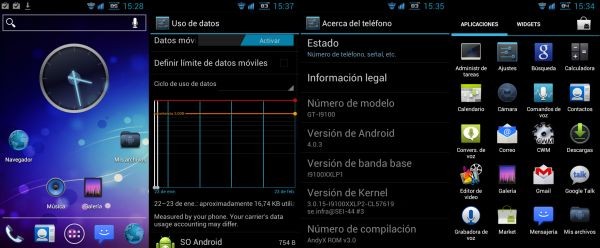
There’s a brand new Custom Ice Cream Sandwich ROM out for the Galaxy S2. It’s called AndyX v3.0 ROM, and it comes to us from XDA member adesirello, who also gave us the awesome looking and stable, Gingerbread based AndyX ROM. Having used the earlier iteration of AndyX, this is definitely worth a flash, and is on my agenda for tonight.
So what’s different about this custom ICS ROM? For starters, the ROM does not feature the standard Touchwiz interface, and adesirello has included the stock ICS launcher in place of Touchwiz; and I must say that it gives the ROM a very AOSPish feel. AndyX 3.o is based on the latest Stock Firmware XXLP2 Android 4.0.3, and comes pre-rooted. Personally, I think the stock ICS launcher looks a lot cleaner and more elegant than Touchwiz, but that’s just my two cents. Have a look at the screenshots above.
Without wasting any more time, and words, lets move on to see how we can get your Galaxy S2s up and running with this beauty of a ROM.
Warning
The steps and methods included in this guide are considered risky. Please do not attempt to try this unless you know exactly what you are doing, as it may render your device unusable, and your pocket lighter by the amount it takes to replace it. You have been forewarned!!!
Compatibility
This ROM is compatible only and only with the Samsung Galaxy S2 — GT-i9100. Please do not attempt to flash it on any other device. We are not responsible for any damage that may be caused to your device.
Download Link
- AndyX v3.0 Ice Cream Sandwich ROM File Name: AndyX_ Rom_v3.0_ICS_4.0.3_XXLP2.zip | Size: 224 MB
Pre-Installation Requirements
- Rooted galaxy S2 running XXLP2 firmware. You can use this guide to download and install XXLP2. And this guide to root your Galaxy S2 after installing XXLP2
- Installing/Flashing this ROM will erase your apps and data. So, it’s very important you back them up, before proceeding further. To backup your apps and important data — bookmarks, contacts, SMS, APNs (internet settings), etc. Restore APN settings if Internet isn’t working for you. You can refer to this excellent Android Backup Guide to back up all your data and settings.
- Make sure your phone battery is fully charged
How To Install AndyX v3.0 Ice Cream Sandwich ROM on the Galaxy S2
- Download the AndyX v3.0 ROM (link provided above) to your PC
- Connect your phone to PC via USB cable and transfer the ROM zip file to the root of internal SDcard on the phone
- Disconnect the phone & power it off
- Reboot to Recovery (Press and hold Volume up button, the Home button and the Power button at the same time. Keep holding the buttons until you have reached the recovery mode.)
- Once you are in Recovery, scroll down to Wipe Data/Factory reset and select it using the Power button
- On the next screen, Select Yes — Wipe Data. Let CWM complete the wipe
- Now Select Wipe Cache partition. On the next screen, Select Yes — Wipe Cache. Wait for the wipe to complete
- Now scroll down to Advanced & select it using the Power button.
- On the next screen, Select Wipe Dalvik Cache, and then Yes — Wipe Dalvik. Wait for the wipe to complete.
- Once the Dalvik cache wipe is complete, Select ‘Wipe Battery Stats’ from the Advanced Menu, and confirm wipe.
- Now go back to the Main menu, and select ‘Install zip from SDcard’
- On the next screen select ‘Choose zip from Sdcard’ & Navigate to the ‘AndyX_ Rom_v3.0_ICS_4.0.3_XXLP2.zip’ file you transferred to the Sdcard in Step 2 above –> and confirm installation on the next screen
- CWM will start flashing your ROM now. Wait for the installation to complete.
- Once the installation is complete, select ‘Reboot System’ and let the phone reboot.
- You’re done!! Once your phone boots up, Enjoy the AndyX Ice Cream Sandwich ROM on your device.
You can visit the original development thread here to check for updates and improvements to the ROM, as well as to read about what other users are saying about this ROM. If you want to share your thoughts with us, or need help with flashing this ROM, give us a shout in comments below, and we’ll be glad to help you out.



will the root for XXLP2 work for this ROM too ?
This ROM is pre-rooted. You wouldn’t need to root it after flashing. Cheers!!
lol thats great :)). Thanks
will the root for XXLP2 work for this ROM too ?
This ROM is pre-rooted. You wouldn’t need to root it after flashing. Cheers!!
lol thats great :)). Thanks
@hristo. You’re welcome…do tell your friends on twitter and Facebook about our weblog.
is there a way to remove home screens as you cannot pinch the screen to show all home screens? also can you remove the google search bar at the top of the screen?
awesome rom so far by the way.
@hristo. You’re welcome…do tell your friends on twitter and Facebook about our weblog.
is there a way to remove home screens as you cannot pinch the screen to show all home screens? also can you remove the google search bar at the top of the screen?
awesome rom so far by the way.
You can just long press the Google Search bar at the top and move it to the part of the screen which says “remove”
Not the one that is fixed to the top of the screen u can’t but its OK now I’ll leave it on
Not the one that is fixed to the top of the screen u can’t but its OK now I’ll leave it on
You can just long press the Google Search bar at the top and move it to the part of the screen which says “remove”
Not the one that is fixed to the top of the screen u can’t but its OK now I’ll leave it on
Not the one that is fixed to the top of the screen u can’t but its OK now I’ll leave it on
Not the one that is fixed to the top of the screen u can’t but its OK now I’ll leave it on
is this really stable for daily use??
is this really stable for daily use??
I keep getting an error when I click the download link saying it’s not available in my country, but I’m in the US? Is this because of recent legislation/megaupload issues, or can someone re-link this from another location? I’d love to get this on my Epic 4G Touch!
Dude… it’s not for Epic 4G touch. It’s for international Galaxy S2, i9100. So, don’t try this. Would have gotten you download link otherwise.
Dammit. Thanks for the info, Kapil. I didn’t realize this was one of those ROMs. I wish they’d put it in the title! Every time I see something pop up for an ICS ROM for GS2 it gets my hopes up… only to have them dashed upon the jagged rocks of the i9100.
Sidenote: The initial root I did for my Epic 4G Touch makes it display an i9100 logo when it boots. I also assume the two devices must be cousins of some sort. So why are the ROMs for one always so unusable for the other (minor hardware difference aside)?
I keep getting an error when I click the download link saying it’s not available in my country, but I’m in the US? Is this because of recent legislation/megaupload issues, or can someone re-link this from another location? I’d love to get this on my Epic 4G Touch!
Dude… it’s not for Epic 4G touch. It’s for international Galaxy S2, i9100. So, don’t try this. Would have gotten you download link otherwise.
Dammit. Thanks for the info, Kapil. I didn’t realize this was one of those ROMs. I wish they’d put it in the title! Every time I see something pop up for an ICS ROM for GS2 it gets my hopes up… only to have them dashed upon the jagged rocks of the i9100.
Sidenote: The initial root I did for my Epic 4G Touch makes it display an i9100 logo when it boots. I also assume the two devices must be cousins of some sort. So why are the ROMs for one always so unusable for the other (minor hardware difference aside)?