
It was a great time last year, when HTC announced an official way for users to unlock bootloader of their Android phones. Although, not all the phones were supported, the famous and the latest ones did make it to the list of supported devices.
HTC launched a new site (htcdev.com) for that purpose. And it sounds like a developer only resource, which is true ─ it indeed is a developer only site, but the fact is that it’s used more by normal people than the developers. All thanks to the great community of pro users we’ve in the Android world.
Kudos! Android people.
Okay. Now lets get to the point of this post ─ Unlock HTC One X bootloader. And here we go..
Warning!
The methods and procedures discussed here are considered risky and you should not attempt anything if you don’t know exactly what you are doing. If any damage occurs to your device, we won’t be held liable.
Compatibility
This bootloader unlocking guide below may only be compatible with the HTC One X. Check your device model in Settings » About phone.
Pre-requisites [Important!]
- Sufficiently charged battery, at least 50% is recommended
- This procedure will wipe all your apps, data and settings (but it will NOT touch your SD card, so don’t worry about those). Backup your apps and important data — bookmarks, contacts, SMS, APNs (internet settings), etc. This Android backup guide would help you.
How To Unlock HTC One X Bootloader
VIDEO
[youtube video_id=”pVCcPYvBly8″ width=”640″ height=”400″ /]STEP BY STEP INSTRUCTIONS
- Download the following two files:
- HTC Sync software → download link
You’ll need it for installing proper drivers for your phone - Fastboot files → download link
These are the files required to run fastboot commands on your Windows PC
- HTC Sync software → download link
- Now install the HTC Sync software you downloaded in Step 1.1 on your PC
- Extract the “fastboot.zip” file you downloaded in Step 1.2 on your PC and you’ll see the following four files inside a folder named “fastboot”:
- adb.exe
- AdbWinApi.dll
- AdbWinUsbApi.dll
- fastboot.exe
- Now open your Internet browser and go to this URL → http://www.htcdev.com and create a account for yourself using the Register link.
- After completing the registration and verifying your e-mail, login with your new account and open the “unlock bootloader” page.
Here’s the direct link to the unlock bootloader page → link. - Now select “All Other Supported Models” from the dropdown menu in the right and then click on the “Begin Unlock Bootloader” page.
- You’ll get a pop-up warning, read it if you care, and hit the “Yes” button.
- Now you’ll be asked to accept some legal terms, tick on both the check boxes and hit the “Proceed to Unlock Instructions” button
- You’ll see Four steps on the next page, below’s a more simple explanation to those steps:
- Switch OFF your phone.
- Press and hold “Volume down + Power button” together until your phone boots into bootloader mode.
- Select Fastboot using the Power button.
You can use the Volume buttons to go up & down and Power button to select the highlighted option in the bootloader mode. - Connect your phone to the PC with a USB Cable.
- Go to the second page on the htcdev site, click the “Proceed to Step 5” button
- Now on the second page, you really don’t have to follow anything htcdev site is saying, instead, do this:
- Open the fastboot folder that you extracted in Step 3.
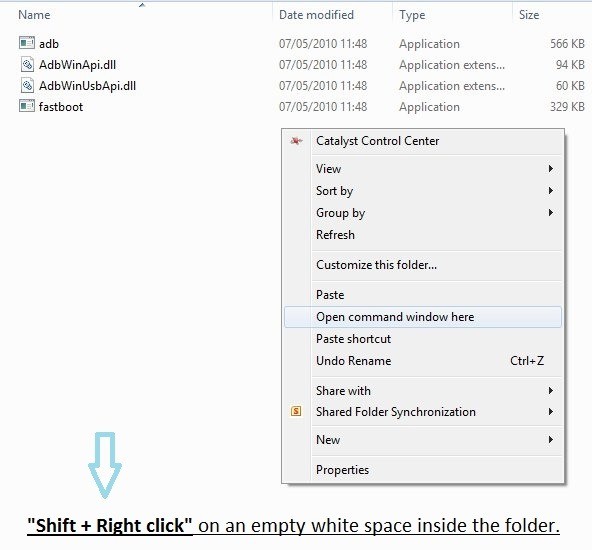
- Then open a Command prompt window inside the fastboot folder. To do that: “Shift + Right Click” on any empty white space inside the folder and select the ‘Open command window here’. See image below:
- Now type the following in the command prompt window:
fastboot devices
This is to ensure that your device is detected, if nothing appears on screen with this command, then it means you don’t have the proper drivers installed on your PC. And if that’s the case you should download and install/re-install the HTC Sync software given in Step 1.1. And also restart your PC if required.
- That’s all you’ve to do on the second page. Now go to the third page on the htcdev site by clicking the “Proceed to Step 8” button at the bottom of the page.
- On the third page, follow all the Steps given on the htcdev site very carefully. And click on the “Submit” button when you’re done [You may watch the video given above for help]
- If you’ve followed the steps correctly, you will see a “Token Submitted Succesfully!” message on the next page. And also receive an e-mail with the unlock key attached as a file.
- Open the e-mail you received from HTC, and download the “Unlock_code.bin” file attached to it.
- Copy/transfer the “Unlock_code.bin” to the fastboot folder (extracted in Step 3) along with the other four fastboot files.
- Open the link given in the e-mail for further instructions.
- Flash the Unlock_code.bin file on your phone using fastboot:
- Type the following command in the command prompt window we opened in Step 11.2
fastboot flash unlocktoken Unlock_code.bin - Now on your phone you’ll receive an Unlock bootloader request. Use Volume Up button to select Yes and Power button to confirm and continue
- Your phone will reboot and will factory reset itself
- Type the following command in the command prompt window we opened in Step 11.2
- That’s all. Congratulations, your HTC One X’s Bootloader is now unlocked.
To confirm, boot into bootloader mode (follow Step 9.1 & 9.2) and you’ll see “UNLOCKED” written with a pink highlight at the top of the screen
Let us know how it goes for you in the comments below.





Oooo nice guide, I am getting one of these very soon to replace my iPhone 4 and need to get it unlocked so I can use it on a different network.
Thank you so much 😀
Oooo nice guide, I am getting one of these very soon to replace my iPhone 4 and need to get it unlocked so I can use it on a different network.
Thank you so much 😀
Oooo nice guide, I am getting one of these very soon to replace my iPhone 4 and need to get it unlocked so I can use it on a different network.
Thank you so much 😀
Will this unlock the sim as well?
Nope… it just unlocks the bootloader :/
So if I unlock the bootloader, I can upload custom ROM. Will it affect any functions on the phone such as LTE?
To flash custom roms, you need clockworkmod recovery, which you can get only after you’ve unlocked bootloader. So, if you want to flash custom roms, unlock the bootloader as given above, and then install clockworkmod (cwm) recovery on your One X from here — http://nerdschalk.com/how-to-install-official-clockworkmod-cwm-recovery-on-one-x/
Here are some custom roms you can try: http://nerdschalk.com/insertcoin-custom-rom-for-htc-one-x-launched/ http://nerdschalk.com/htc-one-x-custom-rom-android-revolution-hd/ http://nerdschalk.com/htc-one-x-custom-rom-leedroid-one-xtreme-launched/ http://nerdschalk.com/coredroid-for-one-x-ics-aroma-installer-boatware-removed-themed-and-other-cool-features/
Btw, all of the above is for global HTC One X, and not for another version of One X, the AT&T One X.
To flash custom roms, you need clockworkmod recovery, which you can get only after you’ve unlocked bootloader. So, if you want to flash custom roms, unlock the bootloader as given above, and then install clockworkmod (cwm) recovery on your One X from here — https://nerdschalk.com/how-to-install-official-clockworkmod-cwm-recovery-on-one-x/
Here are some custom roms you can try: https://nerdschalk.com/insertcoin-custom-rom-for-htc-one-x-launched/ https://nerdschalk.com/htc-one-x-custom-rom-android-revolution-hd/ https://nerdschalk.com/htc-one-x-custom-rom-leedroid-one-xtreme-launched/ https://nerdschalk.com/coredroid-for-one-x-ics-aroma-installer-boatware-removed-themed-and-other-cool-features/
Btw, all of the above is for global HTC One X, and not for another version of One X, the AT&T One X.
Will this unlock the sim as well?
Nope… it just unlocks the bootloader :/
So if I unlock the bootloader, I can upload custom ROM. Will it affect any functions on the phone such as LTE?
To flash custom roms, you need clockworkmod recovery, which you can get only after you’ve unlocked bootloader. So, if you want to flash custom roms, unlock the bootloader as given above, and then install clockworkmod (cwm) recovery on your One X from here — https://nerdschalk.com/how-to-install-official-clockworkmod-cwm-recovery-on-one-x/
Here are some custom roms you can try: https://nerdschalk.com/insertcoin-custom-rom-for-htc-one-x-launched/ https://nerdschalk.com/htc-one-x-custom-rom-android-revolution-hd/ https://nerdschalk.com/htc-one-x-custom-rom-leedroid-one-xtreme-launched/ https://nerdschalk.com/coredroid-for-one-x-ics-aroma-installer-boatware-removed-themed-and-other-cool-features/
Btw, all of the above is for global HTC One X, and not for another version of One X, the AT&T One X.
Will this unlock the sim as well?
Nope… it just unlocks the bootloader :/
So if I unlock the bootloader, I can upload custom ROM. Will it affect any functions on the phone such as LTE?
To flash custom roms, you need clockworkmod recovery, which you can get only after you’ve unlocked bootloader. So, if you want to flash custom roms, unlock the bootloader as given above, and then install clockworkmod (cwm) recovery on your One X from here — http://nerdschalk.com/how-to-install-official-clockworkmod-cwm-recovery-on-one-x/
Here are some custom roms you can try: http://nerdschalk.com/insertcoin-custom-rom-for-htc-one-x-launched/ http://nerdschalk.com/htc-one-x-custom-rom-android-revolution-hd/ http://nerdschalk.com/htc-one-x-custom-rom-leedroid-one-xtreme-launched/ http://nerdschalk.com/coredroid-for-one-x-ics-aroma-installer-boatware-removed-themed-and-other-cool-features/
Btw, all of the above is for global HTC One X, and not for another version of One X, the AT&T One X.
Every time I try this I get…
We’re sorry, but it appears your attempt to unlock the bootloader on this device has failed. This could be caused by several factors including simple errors in the entry of the unlock token, problems with your device, or a lack of manufacturer support for the unlocking process. Please see the specific error code listed below, andtry again if necessary.Error Code: 160.
Error Reason: MID Not Allowed.
what do I do?
Every time I try this I get…
We’re sorry, but it appears your attempt to unlock the bootloader on this device has failed. This could be caused by several factors including simple errors in the entry of the unlock token, problems with your device, or a lack of manufacturer support for the unlocking process. Please see the specific error code listed below, andtry again if necessary.Error Code: 160.
Error Reason: MID Not Allowed.
what do I do?
Every time I try this I get…
We’re sorry, but it appears your attempt to unlock the bootloader on this device has failed. This could be caused by several factors including simple errors in the entry of the unlock token, problems with your device, or a lack of manufacturer support for the unlocking process. Please see the specific error code listed below, andtry again if necessary.Error Code: 160.
Error Reason: MID Not Allowed.
what do I do?
I am also getting the message Unlocking Bootloader Failed
Error Code: 160.
Error Reason: MID Not Allowed.
Is this phone prohibited from unlocking? Any way to get the phone unlocked from here?
same with me.. its not being clicked
Does this also root the phone?
I am also getting the message Unlocking Bootloader Failed
Error Code: 160.
Error Reason: MID Not Allowed.
Is this phone prohibited from unlocking? Any way to get the phone unlocked from here?
same with me.. its not being clicked
I am also getting the message Unlocking Bootloader Failed
Error Code: 160.
Error Reason: MID Not Allowed.
Is this phone prohibited from unlocking? Any way to get the phone unlocked from here?
same with me.. its not being clicked
Does this also root the phone?
Does this also root the phone?
So with this process it enables me to take a Rogers One X to Bell correct?
So with this process it enables me to take a Rogers One X to Bell correct?
So with this process it enables me to take a Rogers One X to Bell correct?
Try again. So my HTC Vivid’s ICS bootloader is now unlocked, Simple. Fast. Now to unlock the SIM and root this bad boy!!
So my HTC Vivid’s ICS bootloader is now unlocked, Simple. Fast. Now to unlock the SIM and root this bad boy!!
So I just rooted my HTC Vivid using a diff article on Android Soul. Just need to send 7.99 to cellunlocker and I am done!!
Try again. So my HTC Vivid’s ICS bootloader is now unlocked, Simple. Fast. Now to unlock the SIM and root this bad boy!!
So my HTC Vivid’s ICS bootloader is now unlocked, Simple. Fast. Now to unlock the SIM and root this bad boy!!
So I just rooted my HTC Vivid using a diff article on Android Soul. Just need to send 7.99 to cellunlocker and I am done!!
So I just rooted my HTC Vivid using a diff article on Android Soul. Just need to send 7.99 to cellunlocker and I am done!!
how matter what happen ,,, i will THANK U.i m not yet try this bootloader .i m just learning because i m interesting repair the phone..anyway THANK U SO MUCH.
how matter what happen ,,, i will THANK U.i m not yet try this bootloader .i m just learning because i m interesting repair the phone..anyway THANK U SO MUCH.
how matter what happen ,,, i will THANK U.i m not yet try this bootloader .i m just learning because i m interesting repair the phone..anyway THANK U SO MUCH.
When I did this my phone now says ***TAMPERED*** ***UNLOCKED*** what does this mean? Running Rogers HTC One X software 1.94.631.6
Um, did you try anything else too (any other way to unlock it), apart from the official way to unlock given above? That might be causing it. But anyway, you’re good to install cwm recovery, root your One X, and do more stuff. No problem with custom stuff.
If for a reason, you take your One X to HTC service center, and the guy is knowledgeable enough to check bootloader status, he might deny you warranty. But that happens with official HTC unlock bootloader method too, with just Unlocked (no tampered thing here) written over there. So, it’s okay. Have fun with your unlocked HTC One X super phone.
The thing is now it won’t let me flash the Clockwork recovery so I cannot flash anything on my phone… when I flash the partition it only says
“C:Android>fastboot flash recovery recovery.img
sending ‘recovery’ (5452 KB)… OKAY
writing ‘recovery’… OKAY”
and it won’t let me boot into Clockwork. Do you have any ideas?
Yeah but the thing now is that it won’t let me flash the Clockwork recovery onto my phone. It only says,
“C:Android>fastboot flash recovery recovery.img
sending ‘recovery’ (5452 KB)… OKAY
writing ‘recovery’… OKAY”
And won’t let me boot into recovery. Do you have and ideas?
I already tried “clearing the cache”. With no avail…
Thanks
The one problem now is that my phone will not allow me to flash the Clockwork recovery. When I follow the instructions all it says it,
“C:Android>fastboot flash recovery recovery.img
sending ‘recovery’ (5452 KB)… OKAY
writing ‘recovery’… OKAY”
But it will not allow me boot into recovery. I already tried to “fastboot erase cache” with no luck. Do you have any ideas?
Thanks
As well if I relock the bootloader will it erase all of my data?
When I did this my phone now says ***TAMPERED*** ***UNLOCKED*** what does this mean? Running Rogers HTC One X software 1.94.631.6
Um, did you try anything else too (any other way to unlock it), apart from the official way to unlock given above? That might be causing it. But anyway, you’re good to install cwm recovery, root your One X, and do more stuff. No problem with custom stuff.
If for a reason, you take your One X to HTC service center, and the guy is knowledgeable enough to check bootloader status, he might deny you warranty. But that happens with official HTC unlock bootloader method too, with just Unlocked (no tampered thing here) written over there. So, it’s okay. Have fun with your unlocked HTC One X super phone.
The thing is now it won’t let me flash the Clockwork recovery so I cannot flash anything on my phone… when I flash the partition it only says
“C:Android>fastboot flash recovery recovery.img
sending ‘recovery’ (5452 KB)… OKAY
writing ‘recovery’… OKAY”
and it won’t let me boot into Clockwork. Do you have any ideas?
Yeah but the thing now is that it won’t let me flash the Clockwork recovery onto my phone. It only says,
“C:Android>fastboot flash recovery recovery.img
sending ‘recovery’ (5452 KB)… OKAY
writing ‘recovery’… OKAY”
And won’t let me boot into recovery. Do you have and ideas?
I already tried “clearing the cache”. With no avail…
Thanks
The one problem now is that my phone will not allow me to flash the Clockwork recovery. When I follow the instructions all it says it,
“C:Android>fastboot flash recovery recovery.img
sending ‘recovery’ (5452 KB)… OKAY
writing ‘recovery’… OKAY”
But it will not allow me boot into recovery. I already tried to “fastboot erase cache” with no luck. Do you have any ideas?
Thanks
As well if I relock the bootloader will it erase all of my data?
When I did this my phone now says ***TAMPERED*** ***UNLOCKED*** what does this mean? Running Rogers HTC One X software 1.94.631.6
Um, did you try anything else too (any other way to unlock it), apart from the official way to unlock given above? That might be causing it. But anyway, you’re good to install cwm recovery, root your One X, and do more stuff. No problem with custom stuff.
If for a reason, you take your One X to HTC service center, and the guy is knowledgeable enough to check bootloader status, he might deny you warranty. But that happens with official HTC unlock bootloader method too, with just Unlocked (no tampered thing here) written over there. So, it’s okay. Have fun with your unlocked HTC One X super phone.
The thing is now it won’t let me flash the Clockwork recovery so I cannot flash anything on my phone… when I flash the partition it only says
“C:Android>fastboot flash recovery recovery.img
sending ‘recovery’ (5452 KB)… OKAY
writing ‘recovery’… OKAY”
and it won’t let me boot into Clockwork. Do you have any ideas?
Yeah but the thing now is that it won’t let me flash the Clockwork recovery onto my phone. It only says,
“C:Android>fastboot flash recovery recovery.img
sending ‘recovery’ (5452 KB)… OKAY
writing ‘recovery’… OKAY”
And won’t let me boot into recovery. Do you have and ideas?
I already tried “clearing the cache”. With no avail…
Thanks
The one problem now is that my phone will not allow me to flash the Clockwork recovery. When I follow the instructions all it says it,
“C:Android>fastboot flash recovery recovery.img
sending ‘recovery’ (5452 KB)… OKAY
writing ‘recovery’… OKAY”
But it will not allow me boot into recovery. I already tried to “fastboot erase cache” with no luck. Do you have any ideas?
Thanks
As well if I relock the bootloader will it erase all of my data?
Hi, I have the same problem than HEALTH i attempt to unlock the bootloader on this device has failed. This could be caused by several factors including simple errors in the entry of the unlock token, problems with your device, or a lack of manufacturer support for the unlocking process. Please see the specific error code listed below, and try again if necessary.Error Code: 160.
Error Reason: MID Not Allowed.
what do I do?
Hi, I have the same problem than HEALTH i attempt to unlock the bootloader on this device has failed. This could be caused by several factors including simple errors in the entry of the unlock token, problems with your device, or a lack of manufacturer support for the unlocking process. Please see the specific error code listed below, and try again if necessary.Error Code: 160.
Error Reason: MID Not Allowed.
what do I do?
Hi, I have the same problem than HEALTH i attempt to unlock the bootloader on this device has failed. This could be caused by several factors including simple errors in the entry of the unlock token, problems with your device, or a lack of manufacturer support for the unlocking process. Please see the specific error code listed below, and try again if necessary.Error Code: 160.
Error Reason: MID Not Allowed.
what do I do?
Every time I try this I get…
We’re sorry, but it appears your attempt to unlock the bootloader on this device has failed. This could be caused by several factors including simple errors in the entry of the unlock token, problems with your device, or a lack of manufacturer support for the unlocking process. Please see the specific error code listed below, andtry again if necessary.Error Code: 160.
Error Reason: MID Not Allowed.
what do I do?
10 months later, I have the same problem as you did
The AT&T carrier ID is blocking you with this MID problem. Instructions to circumvent this are here:
http://forum.xda-developers.com/showthread.php?t=2285086
But it requires a good knowledge of using adb, adb shell, etc. But it did work for me.
Every time I try this I get…
We’re sorry, but it appears your attempt to unlock the bootloader on this device has failed. This could be caused by several factors including simple errors in the entry of the unlock token, problems with your device, or a lack of manufacturer support for the unlocking process. Please see the specific error code listed below, andtry again if necessary.Error Code: 160.
Error Reason: MID Not Allowed.
what do I do?
10 months later, I have the same problem as you did
The AT&T carrier ID is blocking you with this MID problem. Instructions to circumvent this are here:
http://forum.xda-developers.com/showthread.php?t=2285086
But it requires a good knowledge of using adb, adb shell, etc. But it did work for me.
Every time I try this I get…
We’re sorry, but it appears your attempt to unlock the bootloader on this device has failed. This could be caused by several factors including simple errors in the entry of the unlock token, problems with your device, or a lack of manufacturer support for the unlocking process. Please see the specific error code listed below, andtry again if necessary.Error Code: 160.
Error Reason: MID Not Allowed.
what do I do?
10 months later, I have the same problem as you did
The AT&T carrier ID is blocking you with this MID problem. Instructions to circumvent this are here:
http://forum.xda-developers.com/showthread.php?t=2285086
But it requires a good knowledge of using adb, adb shell, etc. But it did work for me.
the links given for the downloads are invalid like the link for fastboot file.. please give a proper link that works
the links given for the downloads are invalid like the link for fastboot file.. please give a proper link that works
thank you
thank you
thank you
I can’t
Unlock Bootloader, how to fix usb not recognize wen put the phone on fastboot and connect to computer, please help me i wan to unlock bootloader.
i have install and unistall drivers like 5 time don’t know what to do.
I can’t
Unlock Bootloader, how to fix usb not recognize wen put the phone on fastboot and connect to computer, please help me i wan to unlock bootloader.
i have install and unistall drivers like 5 time don’t know what to do.
I can’t
Unlock Bootloader, how to fix usb not recognize wen put the phone on fastboot and connect to computer, please help me i wan to unlock bootloader.
i have install and unistall drivers like 5 time don’t know what to do.