
UPDATE 1: If you’re experiencing graphics related problem, then that’s probably because you’re upgrading from an Android 2.2 Froyo build. So to solve your graphical issues you’ll have to flash XXJVK with bootloaders, you can download it from here. Installation process is similar, just use the file with bootloaders.
UPDATE 2: For everyone who is having graphical issues, download & flash the ROM with bootloaders from here — named “GT_I9000_XXJVK_XXJVK_OXAJVK_Sbl.exe”, Size: 146.72 MB. Installation process is similar.
UPDATE 3: The post has been edited to replace the JVK Download links with the its with_bootloaders version. It’s been said that the with_bootloaders version is a bit risky, but if you want to install the custom ROMs and do other stuff, you’re gonna need it anyway. Also, users who tried the without_bootloaders version of XXJVK are facing lot of problems (like graphical issues as told in the comments below) and it’s said that the with_bootloaders version takes care of that too.
UPDATE 4: A new official ROM — XWJVB (final release for Europe) — is available too. We’ve already covered it. Here’s How to Install XWJVB and How to Root XWJVB and install CWM. Enjoy!
For more clarity of versions, here are the file names of two version with respective size:
- JVK_with_bootloaders —
GT_I9000_XXJVK_XXJVK_OXAJVK_Sbl.exe (size 146.72 MB)
-
JVK_without_bootloaders — GT_I9000_XXJVK_XXJVK_OXAJVK.exe (size 146 MB)
So, we would suggest you to download the with_bootloaders version — size: 146.72 MB — so that you don’t face graphical and other issues and also are able to apply custom ROMs made on JVK — we’ll covering these ROMs too, soon.
In case you want to download the without_bootloaders version of XXJVK, here’s the download link. Install Instructions same as for with_bootloaders version given below.
The instructions below (together with links have been updated, to install with_bootloaders version.
[info]This guide is applicable only for Samsung’s Galaxy S international version (i9000). If yours is Vibrant/Captivate/Fascinate/Epic 4G or any other Galaxy S variant, then this ROM — and Guide — is not for you, and that’s for definite.[/info] Warning: Warranty may be void of your device if you follow the procedures given on this page. You only are responsible for your device. We won�t be liable if any damage occurs to your device and/or its components.Follow these step-by-step directions to install XXJVK Android 2.3.3 ROM on your Galaxy S:
- Download XXJVK with_bootloaders. File name — GT_I9000_XXJVK_XXJVK_OXAJVK_Sbl.exe. Download Link. [Whether you’re coming from Froyo or have already tried XXJV1 we would suggest with_bootloades version.]
- Extract the self-extracting ‘GT_I9000_XXJVK_XXJVK_OXAJVK_Sbl.exe’ file by double clicking on it. You’ll get 3 files:
- CSC_OXAJVK.tar.md5,
- PDA_XXJVK.tar.md5 and
- PHONE_XXJVK.tar.md5.
- Download the file: Odin-1.7with.pit.512.803.zip from here. Extract it to get these files:
- Odin3 v1.7,
- s1_odin_20100512.pit and (No use in this guide)
- s1_odin_20100803.pit. (No use in this guide)
- Switch Off your Galaxy S. Make sure it’s disconnected from PC and connect it only when told.
- Now, put it in Download Mode. For that, press and hold these keys together – Volume Down + Power Button + Home Button.
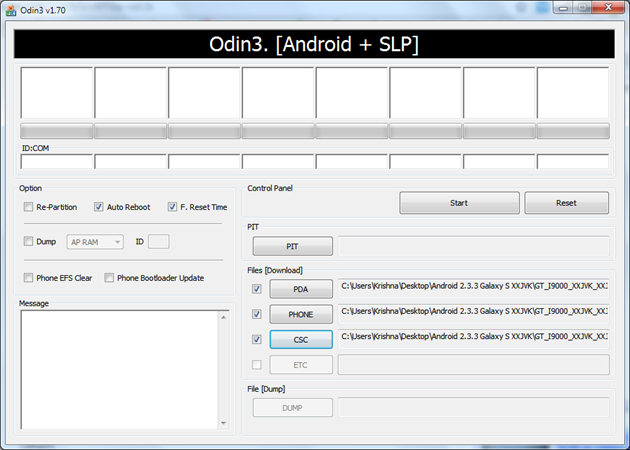
- Now, head over to Odin (from step 3.1, double-click to run the program on computer) and place the files as per the instructions given in steps 8, 9 and 10. Also, for reference, check the image at the top.
- Leave the PIT box empty.
- In the PDA box, select this file (from step 2.2) — PDA_XXJVK.tar.md5
- In the Phone box, select this file (from step 2.3) — PHONE_XXJVK.tar.md5
- In the CSC box, select this file (from step 2.1) — CSC_OXAJVK.tar.md5
- Make sure to uncheck ‘Re-Partition’.
- Keep ‘Auto Reboot’ & ‘F. Reset Time’ boxes checked.
- Now connect your phone (which is in Download Mode since step 5) to computer.
- Upon connecting, Odin will show “Added” under the message box.
- Now, hit the START button to let the process begin.
- When process at Odin finishes your phone will automatically reboot. You can unplug the cable now. That is, disconnect your phone from PC now, when reboot starts.
- When your phone has restarted, you are on the XXJVK Android 2.3.3 Gingerbread ROM of Galaxy S. Congrats!
- Check your phone’s version by here: Press Options -> Settings -> Scroll down and select About Phone -> Scroll down and check your version.
Video guide
[youtube video_id=”4PF6w-raK2k” width=”630″ height=”400″ /] [valid] Want to get root access on XXJVK?Well I’ve posted a rooting guide too, follow the link below:
Root XXJVK – Android 2.3.3 ROM for Galaxy S i9000 [/valid] [info]If you experience a problem in getting the ROM flashed with the steps given above, try flashing the ROM again, but with 512 PIT file this time, and keep the ‘Re-Partition’ box checked. All other things same as in steps given above.[/info]
To read the differences in “bootloader” version and “without bootloader” version, go here. Or below is the quoted summary from the link:
- XXJVK firmware with-out bootloaders + Froyo/Eclair bootloaders on device = Graphics/Screen corruption + Can’t enter Recovery Mode
- XXJVK firmware with-out bootloaders + XWJV1(GB Beta) bootloaders on device = OK!
- XWJV1(GB Beta) firmware with-out bootloaders + XXJVK bootloaders on device = OK!
- Froyo firmware with-out bootloaders + XXJVK or XWJV1(GB Beta) bootloaders on device = OK!
Let us know in comments below how XXJVK Android 2.3.3 ROM works on your Galaxy S (i9000).



Hey guys just after flashing my Galaxy S with this method and it worked a treat!!! Thanks for the instructions….
Glad!
plz guys tell that this rom can be in frensh languge
Hey….. this ROM is European, so I think it supports French. Check out the installation video (4 mins 55 seconds), there is a proof that it supports way too many languages and so, I think French should be there.
Will this work on a Canadian i9000m?
I don’t think so. And I don’t recommend it.
woowww realy fast!thanks
perfect! :)))
cannot go into download mode?? help
Make sure your phone has completely switched off. Wait for it to vibrate a little after the screen goes off.
Plus, make sure you’re holding the correct buttons together — volumedown+home+power.
If you can’t enter the download mode, you really shouldn’t try this.
Can i update my i9000 without it being rooted??
This is a stock ROM and isn’t pre-rooted. So, applying this ROM doesn’t result in Rooting unless you do it manually separately. But if you want to play it very safe, wait for Samsung to roll the update out via its Kies PC software.
My Odin stopped at:
Added!!
Enter CS for MD5..
Check MD5.. Do not unplug the cable..
Please wait..
PDA_XXJVK_Sbl.tar.md5 is valid.
PHONE_XXJVK.tar.md5 is valid.
CSC_OXAJVK.tar.md5 is valid.
Checking MD5 finished Sucessfully..
Leave CS..
Odin v.3 engine (ID:5)..
File analysis..
SetupConnection..
Do I have a bricked Galaxy S?
Well, if you can enter the download mode, your phone isn’t bricked, I guess. What’s your phone’s version? This ROM is only for Galaxy S i9000.
And if yours is i9000, make sure you’re doing everything right. Check the video for assistance.
Hey guys just after flashing my Galaxy S with this method and it worked a treat!!! Thanks for the instructions….
Glad!
It seems I made a mistake and connected the phone in recovery mode instead of download mode.
Now it is installing the package after the reboot.
Thanx a lot for the instructions!
Just installed it on my t-mobile UK bog standard GT-I9000, works perfectly, although not a lot of change with system…thanks a lot, just couldn’t be bothered for kies….. ;>
Galaxy S GT-I9000 England..
Cool!
plz guys tell that this rom can be in frensh languge
Hey….. this ROM is European, so I think it supports French. Check out the installation video (4 mins 55 seconds), there is a proof that it supports way too many languages and so, I think French should be there.
Will this work on a Canadian i9000m?
I don’t think so. And I don’t recommend it.
woowww realy fast!thanks
perfect! :)))
cannot go into download mode?? help
Make sure your phone has completely switched off. Wait for it to vibrate a little after the screen goes off.
Plus, make sure you’re holding the correct buttons together — volumedown+home+power.
If you can’t enter the download mode, you really shouldn’t try this.
Can i update my i9000 without it being rooted??
This is a stock ROM and isn’t pre-rooted. So, applying this ROM doesn’t result in Rooting unless you do it manually separately. But if you want to play it very safe, wait for Samsung to roll the update out via its Kies PC software.
My Odin stopped at:
Added!!
Enter CS for MD5..
Check MD5.. Do not unplug the cable..
Please wait..
PDA_XXJVK_Sbl.tar.md5 is valid.
PHONE_XXJVK.tar.md5 is valid.
CSC_OXAJVK.tar.md5 is valid.
Checking MD5 finished Sucessfully..
Leave CS..
Odin v.3 engine (ID:5)..
File analysis..
SetupConnection..
Do I have a bricked Galaxy S?
Well, if you can enter the download mode, your phone isn’t bricked, I guess. What’s your phone’s version? This ROM is only for Galaxy S i9000.
And if yours is i9000, make sure you’re doing everything right. Check the video for assistance.
It seems I made a mistake and connected the phone in recovery mode instead of download mode.
Now it is installing the package after the reboot.
Thanx a lot for the instructions!
Added!!
Enter CS for MD5..
Check MD5.. Do not unplug the cable..
Please wait..
PDA_XXJVK.tar.md5 is valid.
PHONE_XXJVK.tar.md5 is valid.
CSC_OXAJVK.tar.md5 is valid.
Checking MD5 finished Sucessfully..
Leave CS..
Odin v.3 engine (ID:7)..
File analysis..
SetupConnection..
then stopped then after i try to restart the phone it just showed me an icon with a phone connecting to computer.. what does that means….
Hi man, if I’m using the other non official version for 2.2. 1, should I flash it to the origianl official version or just flash it?
You can flash it right away.
I found it better than the previous version, the phone is more responsive, I have not the time to bug out for the main functions.
I agree with you. It’s a lot better than Android 2.3.2 ROM, XWJV1.
Just installed it on my t-mobile UK bog standard GT-I9000, works perfectly, although not a lot of change with system…thanks a lot, just couldn’t be bothered for kies….. ;>
Galaxy S GT-I9000 England..
Cool!
Chinese passing
Downloaded from samfirmware.com. Install is all ok.. works fine but… No 3G access!! Internet only via wifi.
excellent…the updating instructions are great and process took very little time 🙂
Thanks a lot
i cant go in recovery mode. it hangs on galaxy s screen and it wont go in recovery mode, and something wired is happening with the screen while booting.
You don’t need to go to recovery mod to apply this ROM. Is it this that you’ve applied the ROM successfully and after that, you’re having trouble with recovery mod??
works perfectly,I found it better than the previous version, the phone is more responsive.cheers.!
should I change file system to rfs before flashing?
Yes. You should remove any lagfix you have. Go to recovery for that.
Added!!
Enter CS for MD5..
Check MD5.. Do not unplug the cable..
Please wait..
PDA_XXJVK.tar.md5 is valid.
PHONE_XXJVK.tar.md5 is valid.
CSC_OXAJVK.tar.md5 is valid.
Checking MD5 finished Sucessfully..
Leave CS..
Odin v.3 engine (ID:7)..
File analysis..
SetupConnection..
then stopped then after i try to restart the phone it just showed me an icon with a phone connecting to computer.. what does that means….
My Camera has problem when up this room. Please help
Hi man, if I’m using the other non official version for 2.2. 1, should I flash it to the origianl official version or just flash it?
You can flash it right away.
I found it better than the previous version, the phone is more responsive, I have not the time to bug out for the main functions.
I agree with you. It’s a lot better than Android 2.3.2 ROM, XWJV1.
Chinese passing
Hi,
This is my first time flashing, your instructions helped me alot. I have got Gingerbread on my phone and working flawlessly.
One problem, during boot up, my screen goes into like a white noise, pixely type look, Im worried that it’ll screw up my phone, is there anyway to remove it?
I guess, the problem with screen is of Android, I think even Nexus S on Android 2.3.3 suffers from that. So, cannot really do anything with that. Hope Google fixes that and Samsung integrates the same for us too. 🙂
Oh okay, but it did occur while in camera mode. Also my phone restarts when listening to music but they’re gone now.
I need help with this one since it’s really urgent. My recovery mode is not on my phone anymore, after the flash, it dissapeared. I seriously need it back but I don’t know how.
Thanks for your help anyway 🙂
Downloaded from samfirmware.com. Install is all ok.. works fine but… No 3G access!! Internet only via wifi.
Guys, I’ve purchased my SGS in Saudi Arabia and I’m sick of it’s branded software – I can’t run Android Market on it even!!! And there is a few useless programs like Quran and Prayer Times. Also I can’t have my mother language installed which is Polish.
Uploading your ROM is the only chance for me – please tell me if you think it’s (relatively) secure to upgrade my phone:
Model: GT-I9000
Firmware: 2.2
Baseband: I9000JXJPE
Kernel: 2.6.32.9 root@se0s606 #91
Build: FROYO.JPJPG
Hello Andrew, this is a leaked ROM based on Android 2.3.3. if you want to keep things very safe, I recommend you wait for Samsung to roll out the update officially (via kies).
That apart, I’ve noted your phone’s details and it seems to me your phone is compatible with XXJVK. You can try it if it’s urgent to you but this is always a bit risky. So, you’ve to take a decision and you only will be responsible.
BTW, if Polish language is all you want, I recommend you to go to Settings -> Locale and Text -> Select locale. I think you will get the polish language there. As for this Android 2.3.3 ROM, it has polish language, I’ve just checked it on my phone.
Hope everything is clear to you. Good Luck!
Thanks for the information, however who doesn’t risk doesn’t have any gains/achievements 😉
I looked for LOCALE and there are only a few strange languages on it like Urdu, Hindu and Arabic :(. I have also downloaded MORE LOCALE but somehow it wouldn’t help apart from changing program/icon names to Polish. I’d love to have SWYPE in Polish though.
Also I think that if I wait for KIES all I get will be another version of the arabic soft.
Please tell me – is there any possibility to back up the current ROM of my phone? And what if things go wrong? Do I need to pay Samsung service to install the software for me or simply the phone is dead?
Cool. And your view abt Kies update doesn’t look misplaced to me.
You can backup your ROM using the ROM Manager free app from market. But that will require your phone to be rooted. You can use the z4root android app to root your phone — search for it on our website.
Btw, know that these procedures and methods are considered risky and you onlu will be responsible for your device.
Lastly, I don’t know for sure, but I think Samsung guys will charge you to repair your phone if anything goes unexpected. That’s just what I think.
Works on Saudi Arabia Samsung Galaxy S.
No more Quran in my phone, Android Market works now and a full set of the most popular languages/locales added.Phone seems to be a lot faster. Automatically updated the STC mobile internet setup as well. Update process as easy as piece of a cake – and I am a rookie in these things.
I had a problem with the camera at first but somehow everything seems to be working now without any action from my side. The only problem I can see after a day of testing is this graphic crash screen on startup but it’s merely aesthetic thing.
Hi I just bought a GT i900 from dubai and its only a month old. Now its not booting up after I powered it off yesterday. I came across this site and at the very top its mentioned that I can fix the ROM for international i900 and not for Vibrant/Captivate/Fascinate/Epic 4G. So how do I figure out which model is mine? and if I can update my fone?
please help.
This RON isn’t meant to repair stuff. I won’t suggest you to try this ROM. I think you should visit the Samsung Store.
excellent…the updating instructions are great and process took very little time 🙂
Thanks a lot
Hi, my galaxy s is 2.2.1 Baseband I9000XXJPW Kernel Version 2.6.32.9 root@SEP-51 #1 Build Number FROYO.XXJPW………… Do you know if this version can be upgraded to 2.3.3? Thanks
Works like a treat! Just enter your APN settings and you’re golden!
i cant go in recovery mode. it hangs on galaxy s screen and it wont go in recovery mode, and something wired is happening with the screen while booting.
You don’t need to go to recovery mod to apply this ROM. Is it this that you’ve applied the ROM successfully and after that, you’re having trouble with recovery mod??
works perfectly,I found it better than the previous version, the phone is more responsive.cheers.!
Hi, will it work on Galaxy I9003?
thank You!
It is said to be specifically for i9000. With i9003, it’s gamble, even more than normal. I won’t suggest you trying this ROM.
should I change file system to rfs before flashing?
Yes. You should remove any lagfix you have. Go to recovery for that.
This version supports the Chinese do
No!
can I use this way to my korea version galaxyS(SHW-M110S)?
I think you should not try this. XXJVK is only for Galaxy S i9000 version.
My Camera has problem when up this room. Please help
Just upgraded.. Ireland. very easy and noticeably faster. Thank you
The flashing worked like a charm, but there are some missing pieces.
Until now I’ve noticed that some startup screens are scrambled, they look like a graphics failure and also very important 3G internet connection does not work on this firmware.
my HSPA works fine.
anybody can check for me if this ROM include a HEBREW language?
From what I can see there isn’t one that’s called hebrew or something similar. There are a lot of languages, though.
UK
had to use ADB to get into download mode.
odin worked like a charm. and root too.
more responsive and so far no glitches.
Hi,
This is my first time flashing, your instructions helped me alot. I have got Gingerbread on my phone and working flawlessly.
One problem, during boot up, my screen goes into like a white noise, pixely type look, Im worried that it’ll screw up my phone, is there anyway to remove it?
I guess, the problem with screen is of Android, I think even Nexus S on Android 2.3.3 suffers from that. So, cannot really do anything with that. Hope Google fixes that and Samsung integrates the same for us too. 🙂
Oh okay, but it did occur while in camera mode. Also my phone restarts when listening to music but they’re gone now.
I need help with this one since it’s really urgent. My recovery mode is not on my phone anymore, after the flash, it dissapeared. I seriously need it back but I don’t know how.
Thanks for your help anyway 🙂
Guys, I’ve purchased my SGS in Saudi Arabia and I’m sick of it’s branded software – I can’t run Android Market on it even!!! And there is a few useless programs like Quran and Prayer Times. Also I can’t have my mother language installed which is Polish.
Uploading your ROM is the only chance for me – please tell me if you think it’s (relatively) secure to upgrade my phone:
Model: GT-I9000
Firmware: 2.2
Baseband: I9000JXJPE
Kernel: 2.6.32.9 root@se0s606 #91
Build: FROYO.JPJPG
Hello Andrew, this is a leaked ROM based on Android 2.3.3. if you want to keep things very safe, I recommend you wait for Samsung to roll out the update officially (via kies).
That apart, I’ve noted your phone’s details and it seems to me your phone is compatible with XXJVK. You can try it if it’s urgent to you but this is always a bit risky. So, you’ve to take a decision and you only will be responsible.
BTW, if Polish language is all you want, I recommend you to go to Settings -> Locale and Text -> Select locale. I think you will get the polish language there. As for this Android 2.3.3 ROM, it has polish language, I’ve just checked it on my phone.
Hope everything is clear to you. Good Luck!
Thanks for the information, however who doesn’t risk doesn’t have any gains/achievements 😉
I looked for LOCALE and there are only a few strange languages on it like Urdu, Hindu and Arabic :(. I have also downloaded MORE LOCALE but somehow it wouldn’t help apart from changing program/icon names to Polish. I’d love to have SWYPE in Polish though.
Also I think that if I wait for KIES all I get will be another version of the arabic soft.
Please tell me – is there any possibility to back up the current ROM of my phone? And what if things go wrong? Do I need to pay Samsung service to install the software for me or simply the phone is dead?
Cool. And your view abt Kies update doesn’t look misplaced to me.
You can backup your ROM using the ROM Manager free app from market. But that will require your phone to be rooted. You can use the z4root android app to root your phone — search for it on our website.
Btw, know that these procedures and methods are considered risky and you onlu will be responsible for your device.
Lastly, I don’t know for sure, but I think Samsung guys will charge you to repair your phone if anything goes unexpected. That’s just what I think.
Works on Saudi Arabia Samsung Galaxy S.
No more Quran in my phone, Android Market works now and a full set of the most popular languages/locales added.Phone seems to be a lot faster. Automatically updated the STC mobile internet setup as well. Update process as easy as piece of a cake – and I am a rookie in these things.
I had a problem with the camera at first but somehow everything seems to be working now without any action from my side. The only problem I can see after a day of testing is this graphic crash screen on startup but it’s merely aesthetic thing.
Hi!
i have galaxy s GT-I9000 (Dubai Version). i have installed the update by given instructions. its fast enough from previous version. good work done.
i am glad.
Thnx!
I did the update last night on my non rooted i9000 & it works great on 2.3.3 gingerbread, fast & pretty much stable, only prob is the multicoloured pixeled screen on boot up which isnt really a problem. Wld like to thank say thanks for this post & well done
We’ve updated the post for matter related to your query.
Hi I just bought a GT i900 from dubai and its only a month old. Now its not booting up after I powered it off yesterday. I came across this site and at the very top its mentioned that I can fix the ROM for international i900 and not for Vibrant/Captivate/Fascinate/Epic 4G. So how do I figure out which model is mine? and if I can update my fone?
please help.
This RON isn’t meant to repair stuff. I won’t suggest you to try this ROM. I think you should visit the Samsung Store.
Hi, my galaxy s is 2.2.1 Baseband I9000XXJPW Kernel Version 2.6.32.9 root@SEP-51 #1 Build Number FROYO.XXJPW………… Do you know if this version can be upgraded to 2.3.3? Thanks
Works like a treat! Just enter your APN settings and you’re golden!
BEAUTIFULL :))
Everything is working perfect here in Slovakia on my SGS i9000.
My phone is booted up and ready for use after maybe 20 seconds.. On 2.2.1 JS8 it was booting maybe around 40-50sec ? WTF LOL :O. And everything is very smooth and without lags.
Really, thumbs up
Hi, will it work on Galaxy I9003?
thank You!
It is said to be specifically for i9000. With i9003, it’s gamble, even more than normal. I won’t suggest you trying this ROM.
This version supports the Chinese do
No!
The post has been updated with new instructions for people who were experiencing graphical issues.
can I use this way to my korea version galaxyS(SHW-M110S)?
I think you should not try this. XXJVK is only for Galaxy S i9000 version.
Just upgraded.. Ireland. very easy and noticeably faster. Thank you
The flashing worked like a charm, but there are some missing pieces.
Until now I’ve noticed that some startup screens are scrambled, they look like a graphics failure and also very important 3G internet connection does not work on this firmware.
my HSPA works fine.
anybody can check for me if this ROM include a HEBREW language?
From what I can see there isn’t one that’s called hebrew or something similar. There are a lot of languages, though.
Perfect… working smoothly…. but my old application doesn’t show..
anyone can help me please…..
UK
had to use ADB to get into download mode.
odin worked like a charm. and root too.
more responsive and so far no glitches.
Hi!
i have galaxy s GT-I9000 (Dubai Version). i have installed the update by given instructions. its fast enough from previous version. good work done.
i am glad.
Thnx!
Hi I have a GT-I9000B galaxys Brazil digital tv. Version: I9000XXJVE, Kernel 2.6.32.9 not mind losing if everything is going digital tv optimum. thanks
I did the update last night on my non rooted i9000 & it works great on 2.3.3 gingerbread, fast & pretty much stable, only prob is the multicoloured pixeled screen on boot up which isnt really a problem. Wld like to thank say thanks for this post & well done
We’ve updated the post for matter related to your query.
BEAUTIFULL :))
Everything is working perfect here in Slovakia on my SGS i9000.
My phone is booted up and ready for use after maybe 20 seconds.. On 2.2.1 JS8 it was booting maybe around 40-50sec ? WTF LOL :O. And everything is very smooth and without lags.
Really, thumbs up
The post has been updated with new instructions for people who were experiencing graphical issues.
Works on Saudi Arabia Samsung Galaxy S.
Update process as easy as piece of a cake – and I am a rookie in these things. The only problem I can see after a day of testing is this graphic crash screen on startup but it’s merely aesthetic thing.
THANK YOU !!!!
hey this is a BETA Version. because i installed it last Monday. but i noticed my SGS Light detector , Compass, GPS, Accelerometer, and Gyro sensors are not working. But 2.3.3 Rom is Super Fast and Very SMOOTH. Multitouch is Capable. Super ROM but My sensors are not working. so I Downgrade to my Original DDJP6. But Great work. I’m Waiting For The Final Release…….
Perfect… working smoothly…. but my old application doesn’t show..
anyone can help me please…..
Hi I have a GT-I9000B galaxys Brazil digital tv. Version: I9000XXJVE, Kernel 2.6.32.9 not mind losing if everything is going digital tv optimum. thanks
Works on Saudi Arabia Samsung Galaxy S.
Update process as easy as piece of a cake – and I am a rookie in these things. The only problem I can see after a day of testing is this graphic crash screen on startup but it’s merely aesthetic thing.
THANK YOU !!!!
hey this is a BETA Version. because i installed it last Monday. but i noticed my SGS Light detector , Compass, GPS, Accelerometer, and Gyro sensors are not working. But 2.3.3 Rom is Super Fast and Very SMOOTH. Multitouch is Capable. Super ROM but My sensors are not working. so I Downgrade to my Original DDJP6. But Great work. I’m Waiting For The Final Release…….
I need help with this one since it’s really urgent. My recovery mode is not on my phone anymore, after the flash, it dissapeared. I seriously need it back but I don’t know how.
Thanks for your help anyway, really needed it 🙂
Hey David, try flashing the ROM again, but this time flash the other version of the ROM, which is with bootloaders. That should bring you back your recovery.
Thing is, don’t you need Recovery Mode to flash anyway??
And… I’m too afried to brick my phone since I hear that Bootloaders version are very risky… :/
Same here worked fine on an Austrian i9000 but no more 3G access only wifi :S how to fix that?
You need to add your APN-Settings manualy.
Contact the operators website.
E.G.
APN: a1.net
User Name: [email protected]
Password: ppp (oder leer)
T-Mobile:
APN Static: gprsinternet
User Name und Password leer lassen!
Drei:
APN Static: drei.at
User Name und Password leer lassen!
One:
APN Static: web.one.at
User Name: web
Password: web
Yesss:
APN Static: web.yesss.at
User Name und Password leer lassen
WOOHOO!!!! re-flashed it with the bootloader & now is running perfect no fuzzy coloured screen at start up, thanks once again
I need help with this one since it’s really urgent. My recovery mode is not on my phone anymore, after the flash, it dissapeared. I seriously need it back but I don’t know how.
Thanks for your help anyway, really needed it 🙂
Hey David, try flashing the ROM again, but this time flash the other version of the ROM, which is with bootloaders. That should bring you back your recovery.
Thing is, don’t you need Recovery Mode to flash anyway??
And… I’m too afried to brick my phone since I hear that Bootloaders version are very risky… :/
thanks that worked for me 🙂
Hi thank you very much. Well Very well explained! Great rom too! Just used odin 1.3, because 1.7 didnt do anything. ty again
i used this method and it worked . its good but now i want to return to my old version . any sugestions ? if you wanna help me send me a email at [email protected]
Same here worked fine on an Austrian i9000 but no more 3G access only wifi :S how to fix that?
You need to add your APN-Settings manualy.
Contact the operators website.
E.G.
APN: a1.net
User Name: [email protected]
Password: ppp (oder leer)
T-Mobile:
APN Static: gprsinternet
User Name und Password leer lassen!
Drei:
APN Static: drei.at
User Name und Password leer lassen!
One:
APN Static: web.one.at
User Name: web
Password: web
Yesss:
APN Static: web.yesss.at
User Name und Password leer lassen
WOOHOO!!!! re-flashed it with the bootloader & now is running perfect no fuzzy coloured screen at start up, thanks once again
Hi people. Have galaxy s from finland. No 3G works. Who can give advice?
APN setting added, no luck.
Finland Elisa Android APN settings:
http://robopupu.blogspot.com/2010/07/elisa-access-point-settings-for-android.html
2 Flandro: I have another operator (Saunalahti), made settings from operator page … don’t work still 3G.
thanks that worked for me 🙂
Hi thank you very much. Well Very well explained! Great rom too! Just used odin 1.3, because 1.7 didnt do anything. ty again
i used this method and it worked . its good but now i want to return to my old version . any sugestions ? if you wanna help me send me a email at [email protected]
Hi people. Have galaxy s from finland. No 3G works. Who can give advice?
APN setting added, no luck.
Finland Elisa Android APN settings:
http://robopupu.blogspot.com/2010/07/elisa-access-point-settings-for-android.html
2 Flandro: I have another operator (Saunalahti), made settings from operator page … don’t work still 3G.
“When process at Odin finishes your phone will automatically reboot”
Then in the first time in System Recovery, it has some problems :
— Copying Media files…
E:failed to mount /dbdata ( Invailed argument )
E:copy_dbdata_media: Can’t mount /dbdata
your storage not prepare yet. Pls use UI menu for format and reboot actions.
=> Media file copy failed.
=> Data wipe failed
I see this report is not look like your video, pls help me.
Hey…. that shouldn’t happen. Make sure you followed the steps fully and correctly, especially steps number 11 and 12. Plus, watch the video carefully to get the steps as done by me. I guess, you can retry it. Good Luck!
HI,
Nice work folks. I flashed using the above method and XXJVK ROM on my SGS I9000 bought in India, everything’s fine except that when I use the native music player, the phone Crashes and goes into a reboot…It happened the first day and thrice today…..Let me know if there is any solution to this problem.
Prax
Yeah this happened to me..
It just “Dissapeared” to me. I might’ve fixed it by rebooting it.
To all who have troubles with 3G – it’s not android trouble, it’s in operators setting something wrong. Tested on different sim-cards (some works and some dont).
Hi
Can I update to 2.3.3 with this method my SGS with android 2.1 (ECLAIR.XWJG4)?
Well, don’t know for sure bcoz I tried it only from Android 2.2. I think you can try it but know that it’s risky. I would suggest you to wait a little bit till we publish our WUP article on how to install darky resurrection ROM – which will install Android 2.2 for you. once you apply the Darky resurrection ROM, you’re good for XXJVK (android 2.3.3) too. Okay!
It’s hard to believe that this 3G problem is in operator – 3G works fine with older firmware-version. Now phone doesn’t even show the 3G symbol, even if wi-fi not available.
2 Henry: Belive me, I tried change my saunalahti card on elisa …. elisa works fine, same time phone automaticaly found assets for elisa …., back to saunalahti and 3g don’t works.
“When process at Odin finishes your phone will automatically reboot”
Then in the first time in System Recovery, it has some problems :
— Copying Media files…
E:failed to mount /dbdata ( Invailed argument )
E:copy_dbdata_media: Can’t mount /dbdata
your storage not prepare yet. Pls use UI menu for format and reboot actions.
=> Media file copy failed.
=> Data wipe failed
I see this report is not look like your video, pls help me.
Hey…. that shouldn’t happen. Make sure you followed the steps fully and correctly, especially steps number 11 and 12. Plus, watch the video carefully to get the steps as done by me. I guess, you can retry it. Good Luck!
2 All who have troubless with 3G … add apn configuration from yours operator, Than check on rouming thing, sounds like use data in roumming . Some operators sims think you are in the rouming. In my case this helps. For finnish readers link here http://blog.androidsuomi.fi/2010/10/helpot-mms-ja-3g-asetus-ohjeet-yleisimmille-operaattoreille/ read troubleshotting.
HI,
Nice work folks. I flashed using the above method and XXJVK ROM on my SGS I9000 bought in India, everything’s fine except that when I use the native music player, the phone Crashes and goes into a reboot…It happened the first day and thrice today…..Let me know if there is any solution to this problem.
Prax
Yeah this happened to me..
It just “Dissapeared” to me. I might’ve fixed it by rebooting it.
Dear Shivam & David
I see it doesn’t happend when I reboot but I tried 5 times to do it again, it can’t be looked like your video so I worry about it…
Crap…
I actually wanted to flash back to my stock Froyo, so I can wait until the offcial Gingerbread is out for Kies, but with no Recovery Mode, I’m stuck here.
You can go back safely to Froyo with Darky’s ROM Resurrection Edition. Here’s the link — https://nerdschalk.com/how-to-install-darky-rom-resurrection-edition-galaxy-s-i9000/
To all who have troubles with 3G – it’s not android trouble, it’s in operators setting something wrong. Tested on different sim-cards (some works and some dont).
Hi
Can I update to 2.3.3 with this method my SGS with android 2.1 (ECLAIR.XWJG4)?
Well, don’t know for sure bcoz I tried it only from Android 2.2. I think you can try it but know that it’s risky. I would suggest you to wait a little bit till we publish our WUP article on how to install darky resurrection ROM – which will install Android 2.2 for you. once you apply the Darky resurrection ROM, you’re good for XXJVK (android 2.3.3) too. Okay!
It’s hard to believe that this 3G problem is in operator – 3G works fine with older firmware-version. Now phone doesn’t even show the 3G symbol, even if wi-fi not available.
2 Henry: Belive me, I tried change my saunalahti card on elisa …. elisa works fine, same time phone automaticaly found assets for elisa …., back to saunalahti and 3g don’t works.
2 All who have troubless with 3G … add apn configuration from yours operator, Than check on rouming thing, sounds like use data in roumming . Some operators sims think you are in the rouming. In my case this helps. For finnish readers link here http://blog.androidsuomi.fi/2010/10/helpot-mms-ja-3g-asetus-ohjeet-yleisimmille-operaattoreille/ read troubleshotting.
Dear Shivam & David
I see it doesn’t happend when I reboot but I tried 5 times to do it again, it can’t be looked like your video so I worry about it…
Crap…
I actually wanted to flash back to my stock Froyo, so I can wait until the offcial Gingerbread is out for Kies, but with no Recovery Mode, I’m stuck here.
You can go back safely to Froyo with Darky’s ROM Resurrection Edition. Here’s the link — https://nerdschalk.com/how-to-install-darky-rom-resurrection-edition-galaxy-s-i9000/
2.3.3 looks more smarter interms of process managment.
Just downloaded my emails and APN settings and working fine with browsing.
Still doesn’t contain proxy settings like 2.2 🙁
more faster then 2.3.2
Thanks
Hi,
first of all… thank you Kapil for doing a great job with updates and instructions..
I have 2.5 juwe’s rom installed on my sgs, to get 2.3.3 do i need to any additional steps?
thanks.
Hey, just follow the full guide. It would be fine, and safer too.
2.3.3 looks more smarter interms of process managment.
Just downloaded my emails and APN settings and working fine with browsing.
Still doesn’t contain proxy settings like 2.2 🙁
more faster then 2.3.2
Thanks
Hi,
first of all… thank you Kapil for doing a great job with updates and instructions..
I have 2.5 juwe’s rom installed on my sgs, to get 2.3.3 do i need to any additional steps?
thanks.
Hey, just follow the full guide. It would be fine, and safer too.
Nice fast ROM, much better battery life, much much better…………
until I used live wallpapers! Battery only lasted around 8 hrs then.
Anyone else find that?
Or is there a cure please?
battery life is a problem…. no cure is really available. Here are some tips that you might be already knowing — keep sync off (use manually), live wallpapers OFF, WiFi and 3G/H Off when not required. Make sure you don’t have too many apps running in the background. Task killers won’t help too much unless you don’t uninstall the apps you don’t really need.
That’s it.
And great site by the way, thanks
I installed Gingerbread on March 29. I played a few days with it and really everything works just fine for me. Upgraded from Froyo.
The two “problems” I have, are that the cracked version of Navigon doesn’t work anymore and a purchased game from Gameloft, NOVA, doesn’t work. But that’s not really a problem, since I still have Google’s Nav and a lot of other games. What’s really cool, is the speed increase!
So I’m very happy with this update and other than this two minor bugs, it really works great!! Thanks to everybody who made this possible and thank you Shivam for the installation guide!
Samsung Galaxy S, Netherlands, Vodafone, unrooted.
Thanks for thanking everybody for the ROM!
I’m loving it too but I guess, the real FUN will be when custom ROM devs get the best outta Android 2.3 builds….it’s hard to live without custom ROMs (themes, etc), and with just Sammy’s stock ROM, even if it’s as good as JVK.
BTW, I just tried the MIUI ROM, which is based on Android 2.3.3 and it’s just amazing!
Nice fast ROM, much better battery life, much much better…………
until I used live wallpapers! Battery only lasted around 8 hrs then.
Anyone else find that?
Or is there a cure please?
battery life is a problem…. no cure is really available. Here are some tips that you might be already knowing — keep sync off (use manually), live wallpapers OFF, WiFi and 3G/H Off when not required. Make sure you don’t have too many apps running in the background. Task killers won’t help too much unless you don’t uninstall the apps you don’t really need.
That’s it.
just flashed it and unbelievable what the fuck
so smooth and fast.
above all expectations
(finally got rid off the hangups)
Yep! It’s the best work Sammy’s soft team has done so far. You think the Nexus S partnership with Google helped the S team? I guess so.
And great site by the way, thanks
Absolutely first class instructions. Installation was very smooth (following all steps).
On initial boot, WOW factor kicked in as I could not believe how fast it booted and it was very fast.
DISAPPOINTMENT returned after restoring Titanium app backup. Reboot and it took just as long as my previous ROM. More disappointment after closely inspecting it for a day, ROM just felt naked and not polished. Features that I’ve grown accustomed to were missing – theming, app functionality ie, phone call recording, etc.
Decided that for the time being, I would return to using Darky’s ROM v9.5 with the Black Android theme.
I’m glad you like the guide. I would agree with you on the ‘missing features’ one often get so used to. It’s the official leak right now — nothing more than that, so I hope the fav devs of ours get us a good and solid Android 2.3 builds of their great Android 2.2 ROMs soon!
I installed Gingerbread on March 29. I played a few days with it and really everything works just fine for me. Upgraded from Froyo.
The two “problems” I have, are that the cracked version of Navigon doesn’t work anymore and a purchased game from Gameloft, NOVA, doesn’t work. But that’s not really a problem, since I still have Google’s Nav and a lot of other games. What’s really cool, is the speed increase!
So I’m very happy with this update and other than this two minor bugs, it really works great!! Thanks to everybody who made this possible and thank you Shivam for the installation guide!
Samsung Galaxy S, Netherlands, Vodafone, unrooted.
Thanks for thanking everybody for the ROM!
I’m loving it too but I guess, the real FUN will be when custom ROM devs get the best outta Android 2.3 builds….it’s hard to live without custom ROMs (themes, etc), and with just Sammy’s stock ROM, even if it’s as good as JVK.
BTW, I just tried the MIUI ROM, which is based on Android 2.3.3 and it’s just amazing!
just flashed it and unbelievable what the fuck
so smooth and fast.
above all expectations
(finally got rid off the hangups)
Yep! It’s the best work Sammy’s soft team has done so far. You think the Nexus S partnership with Google helped the S team? I guess so.
In reply to Shivam to my response… The instruction said to go into boot mode and apply the thing… That’s just it.. I don’t even have recovery mode at all, can’t access it.
Sorta have been saying this a lot :/
Mate, if you don’t have a 3-button combo, don’t play! Go here and learn how to install the sbl files to enable it: http://forum.xda-developers.com/showthread.php?t=810686
Absolutely first class instructions. Installation was very smooth (following all steps).
On initial boot, WOW factor kicked in as I could not believe how fast it booted and it was very fast.
DISAPPOINTMENT returned after restoring Titanium app backup. Reboot and it took just as long as my previous ROM. More disappointment after closely inspecting it for a day, ROM just felt naked and not polished. Features that I’ve grown accustomed to were missing – theming, app functionality ie, phone call recording, etc.
Decided that for the time being, I would return to using Darky’s ROM v9.5 with the Black Android theme.
I’m glad you like the guide. I would agree with you on the ‘missing features’ one often get so used to. It’s the official leak right now — nothing more than that, so I hope the fav devs of ours get us a good and solid Android 2.3 builds of their great Android 2.2 ROMs soon!
Darky has just released RC3 for this rom with what his changelog describes as a lot of spit and polish. Think I’ll give it a go tomorrow as it is becoming somewhat late in the land down under. Here is the link:
https://docs.google.com/document/d/15yLfm9JIqiEvP6YcDKVJx_MqrDf5hZTuL7qABEjA8bc/preview?pli=1&hl=de&sle=true#
Hi to all
I am having problem to install, my Odin doesn’t go further than 4 lines,the last line say “please wait”. I have been trying this since yesterday but no joy.Please could you advice me what am I doing wrong.My phone at the moment is running 2.3.2 version of gingerbread, also I tried from froyo 2.2JPH STILL SAME PROBLEM.Let me please what am I missing.
Hey, can you provide us an screenshot of what it’s looking like at your end? Although I don’t think you would make any silly mistake as this — but do make sure you’re selecting the right files in these tabs — PDS, Phone, CSC. Also, is it showing “Added! !” in the message box and what about the 0:(COM4) [under the ID:COM] with yellow background as in the video at 1 mins 39 seconds?
I tried all Options above but I can’t make it to work.I just wanna know if there is anything I need to install in my phone before I started this procedure. I never had problem with other rom before this,I don’t understand why this one doesn’t want to install.Is there any other way apart from using ODIN?
In reply to Shivam to my response… The instruction said to go into boot mode and apply the thing… That’s just it.. I don’t even have recovery mode at all, can’t access it.
Sorta have been saying this a lot :/
Mate, if you don’t have a 3-button combo, don’t play! Go here and learn how to install the sbl files to enable it: http://forum.xda-developers.com/showthread.php?t=810686
Darky has just released RC3 for this rom with what his changelog describes as a lot of spit and polish. Think I’ll give it a go tomorrow as it is becoming somewhat late in the land down under. Here is the link:
https://docs.google.com/document/d/15yLfm9JIqiEvP6YcDKVJx_MqrDf5hZTuL7qABEjA8bc/preview?pli=1&hl=de&sle=true#
Hi to all
I am having problem to install, my Odin doesn’t go further than 4 lines,the last line say “please wait”. I have been trying this since yesterday but no joy.Please could you advice me what am I doing wrong.My phone at the moment is running 2.3.2 version of gingerbread, also I tried from froyo 2.2JPH STILL SAME PROBLEM.Let me please what am I missing.
Hey, can you provide us an screenshot of what it’s looking like at your end? Although I don’t think you would make any silly mistake as this — but do make sure you’re selecting the right files in these tabs — PDS, Phone, CSC. Also, is it showing “Added! !” in the message box and what about the 0:(COM4) [under the ID:COM] with yellow background as in the video at 1 mins 39 seconds?
I tried all Options above but I can’t make it to work.I just wanna know if there is anything I need to install in my phone before I started this procedure. I never had problem with other rom before this,I don’t understand why this one doesn’t want to install.Is there any other way apart from using ODIN?
Ok guys, this is the message I keep getting when I try to istall 2.3.3.When I use ODIN 1.7, I keep geeting message on top of the odin screen saying Odin “Not responding”. And in the message box these are messages Added
Enter CS for MD5
Check MD5..Do not unplug the cable.
please wait..
These are messages I keep getting on ODIN.I tried to watch video above I can’t see any different to what I am doing Unless there is something which I need to do with a phone.I have been trying this since 2 days ago, I wish someone could help me,I am so tired.
Are you sure you’ve proper drivers installed? If you already have drivers installed, I would suggest you to uninstall them first and then reboot the PC. Disconnect your phone first, though. Upon reboot, install the latest drivers. Download from here: For 32-bit Windows – http://drivers.softpedia.com/get/MOBILES/Samsung/Samsung-Galaxy-S-USB-Driver-for-Windows-x86.shtml, For 62-bit Windows — http://drivers.softpedia.com/get/MOBILES/Samsung/Samsung-Galaxy-S-USB-Driver-for-Windows-x64.shtml.
Try it out.
Also, some questions:
1) Have you disabled the Lagfix, if any, on your earlier ROM. What was the ROM you came from?
2) have you tried flashing the XXJVK with 512 PIT file. I know I haven’t used that in the video but you can try it. just take care to keep the Re-Partition button in Odin CHECKED now (since you’re using the PIT file now). Okay!
Lemme know if that helps or not? Also, make sure that your phone is not Galaxy S i9003, since this ROM and guide is applicable only for i9000 version. Check your phone’s version in settings – scroll down and select ‘about phone’ – ‘model number’ — it should be GT-i9000.
Good Luck!
Ok guys, this is the message I keep getting when I try to istall 2.3.3.When I use ODIN 1.7, I keep geeting message on top of the odin screen saying Odin “Not responding”. And in the message box these are messages Added
Enter CS for MD5
Check MD5..Do not unplug the cable.
please wait..
These are messages I keep getting on ODIN.I tried to watch video above I can’t see any different to what I am doing Unless there is something which I need to do with a phone.I have been trying this since 2 days ago, I wish someone could help me,I am so tired.
Are you sure you’ve proper drivers installed? If you already have drivers installed, I would suggest you to uninstall them first and then reboot the PC. Disconnect your phone first, though. Upon reboot, install the latest drivers. Download from here: For 32-bit Windows – http://drivers.softpedia.com/get/MOBILES/Samsung/Samsung-Galaxy-S-USB-Driver-for-Windows-x86.shtml, For 62-bit Windows — http://drivers.softpedia.com/get/MOBILES/Samsung/Samsung-Galaxy-S-USB-Driver-for-Windows-x64.shtml.
Try it out.
Also, some questions:
1) Have you disabled the Lagfix, if any, on your earlier ROM. What was the ROM you came from?
2) have you tried flashing the XXJVK with 512 PIT file. I know I haven’t used that in the video but you can try it. just take care to keep the Re-Partition button in Odin CHECKED now (since you’re using the PIT file now). Okay!
Lemme know if that helps or not? Also, make sure that your phone is not Galaxy S i9003, since this ROM and guide is applicable only for i9000 version. Check your phone’s version in settings – scroll down and select ‘about phone’ – ‘model number’ — it should be GT-i9000.
Good Luck!
Hi Kapil.
I am from India and recently bought SGS with 2.2 (Kernel 2.6.32.9 Froyo.DDJP6.
Am interested in getting latest version on my galaxy SGS.
Will you pl inform me will this build 2.3.3 XXJVK work for me in India with Airtel as service provider ?
Thanks
Hi Raj, it’s working for me on Tata docomo, so I think it would work for you too on Airtel. BTW, it’s the eaked version and unless you’re in hurry, you can wait for Samsung to distribute the update via its PC software Kies by mid-April, I guess.
But, I think Galaxy S i9000 doesn’t sell anymore. Make sure your phone’s model number is GT-i9000 under About Phone under settings. If it’s recently released Super LCD version of Galaxy S — i9003 — I don’t think this ROM would work.
Its SGS i9000 only… I am not in hurry but I really dont like the speed lag it has in 2.2.1. So I wish to update it. But after reading all comments I think I should wait till update release by Samsung, due to Battery Drain Problem. Should I ?
2.3.3 Workin fine since yesterday, Just battery consumption is doubled … requires charge after 6-7 hrs if usin Wifi at home.
Rest speed is awsome kinda likin it..
Hi!
I just installed this rom and i’m wondering, because all gingerbread anims are missing..why? ( eg. crt screen off) any solution?
OMG NOOBS ! READ SOMETHINK BEFORE POSTING !!!!!
Menu – Settings – Display – Animations – Turn all ON
Dont ask these noobish questions….
Oh, i almost forgot…..
In this ROM you cant get the screen off animation – Because Samsung didnt allow it in STOCK ROM.
You must flash Custom ROM.
Go to XDA forum, and use Search.
Hi Kapil.
I am from India and recently bought SGS with 2.2 (Kernel 2.6.32.9 Froyo.DDJP6.
Am interested in getting latest version on my galaxy SGS.
Will you pl inform me will this build 2.3.3 XXJVK work for me in India with Airtel as service provider ?
Thanks
Hi Raj, it’s working for me on Tata docomo, so I think it would work for you too on Airtel. BTW, it’s the eaked version and unless you’re in hurry, you can wait for Samsung to distribute the update via its PC software Kies by mid-April, I guess.
But, I think Galaxy S i9000 doesn’t sell anymore. Make sure your phone’s model number is GT-i9000 under About Phone under settings. If it’s recently released Super LCD version of Galaxy S — i9003 — I don’t think this ROM would work.
Its SGS i9000 only… I am not in hurry but I really dont like the speed lag it has in 2.2.1. So I wish to update it. But after reading all comments I think I should wait till update release by Samsung, due to Battery Drain Problem. Should I ?
2.3.3 Workin fine since yesterday, Just battery consumption is doubled … requires charge after 6-7 hrs if usin Wifi at home.
Rest speed is awsome kinda likin it..
Hi!
I just installed this rom and i’m wondering, because all gingerbread anims are missing..why? ( eg. crt screen off) any solution?
OMG NOOBS ! READ SOMETHINK BEFORE POSTING !!!!!
Menu – Settings – Display – Animations – Turn all ON
Dont ask these noobish questions….
Oh, i almost forgot…..
In this ROM you cant get the screen off animation – Because Samsung didnt allow it in STOCK ROM.
You must flash Custom ROM.
Go to XDA forum, and use Search.
thank you for every thing good work ,how can i have arabic language on 2.3.3?
thank you for every thing good work ,how can i have arabic language on 2.3.3?
I am using this ROM from last 10 days. i am having a problem with this ROM. i have fully charged the phone at night; when i get up in the morning it was at 52% only. 48% battery is drained in the sleep mode.
please tell me the solution.
i have installed ROM with boot loaders.
thanks in advance.
Wokay my phone is in 2.3.3 now working in full throttle..speed is totally jet fast but the main draw back is the battery consumption..even though i don’t use my phone..is it safe to jump back to 2.2 froyo
How to jump back to the official 2.2 Froyo?
What are the steps please tell.
i have to wait untill stable 3.3.3 ROM comeout.
Please list steps to go back to official ROM.
I am using this ROM from last 10 days. i am having a problem with this ROM. i have fully charged the phone at night; when i get up in the morning it was at 52% only. 48% battery is drained in the sleep mode.
please tell me the solution.
i have installed ROM with boot loaders.
thanks in advance.
YEEY im doing it right now its downloading now ty guys who made this forum i hope it wil work
Wokay my phone is in 2.3.3 now working in full throttle..speed is totally jet fast but the main draw back is the battery consumption..even though i don’t use my phone..is it safe to jump back to 2.2 froyo
How to jump back to the official 2.2 Froyo?
What are the steps please tell.
i have to wait untill stable 3.3.3 ROM comeout.
Please list steps to go back to official ROM.
JVK with bootloaders works great on my Bell i9000m. I updated from 2.1 to 2.3.3 with no problems whatsoever.
Thx everybody for this great rom and thx also for the installation guide, everything is ok faster then before I have Froyo 2.2 the only problem that I face no arabic language support and battery all time about to die I have extra battry all time with me for back up. Else the this two bugs everything ok. Thx again for the great work.
YEEY im doing it right now its downloading now ty guys who made this forum i hope it wil work
JVK with bootloaders works great on my Bell i9000m. I updated from 2.1 to 2.3.3 with no problems whatsoever.
Thx everybody for this great rom and thx also for the installation guide, everything is ok faster then before I have Froyo 2.2 the only problem that I face no arabic language support and battery all time about to die I have extra battry all time with me for back up. Else the this two bugs everything ok. Thx again for the great work.
Hi all,
I just installed I9000XXJVK|2.3.3 using odin. Everything installed fine and phone is working.
But yesterday i ran into a weird bug. All my speed dial contacts run into a ussd code running and then i get connection problem or invalid MMi code.
the same contacts work fine otherwise.
any ideas as to how to solve this?
also in running apps>all there is an app called “angry gps”
is that part of 2.3.3
thanks in advance
Should I root my SGS i9000 ? What are the benefits of Rooting ? Is there any security issues after rooting it ? I normally use my SGS for online banking etc….
Hi all,
I just installed I9000XXJVK|2.3.3 using odin. Everything installed fine and phone is working.
But yesterday i ran into a weird bug. All my speed dial contacts run into a ussd code running and then i get connection problem or invalid MMi code.
the same contacts work fine otherwise.
any ideas as to how to solve this?
also in running apps>all there is an app called “angry gps”
is that part of 2.3.3
thanks in advance
Should I root my SGS i9000 ? What are the benefits of Rooting ? Is there any security issues after rooting it ? I normally use my SGS for online banking etc….
Thanks for this Tuto,
I have a few questions :
Is here any one he try to upgrade his galaxy s from 2.1 to 2.3.3 ?
What is the risk to upgrade it from operator ROM Eclair(“SFR , Orange , …”)?
if no solution for these probleme I take my risk 😉
one more question :
is the blutooth & wifi & 3G work fine in GINGERBREAD ?
Thanks again for your post KABIL 🙂
Thanks for this Tuto,
I have a few questions :
Is here any one he try to upgrade his galaxy s from 2.1 to 2.3.3 ?
What is the risk to upgrade it from operator ROM Eclair(“SFR , Orange , …”)?
if no solution for these probleme I take my risk 😉
one more question :
is the blutooth & wifi & 3G work fine in GINGERBREAD ?
Thanks again for your post KABIL 🙂
Please help!!!
i have 2.2 and my GalaxyS simply not entering the “download mode” while pressing the 3 keys.
anyone can tell if the phone still ok for ROOT’ing?
is there any combination to put it in the “download mode” ???
thanks
To get your SGS in download mode, switch off your phone and leave it as such for 1 minute. Then, press these keys together: VolumeDOWN+Home+Power.
If that doesn’t work, I think your phone has downloade mode disabled via the 3 keys setup. So, very seriously, I won’t suggest you to try anything on your phone since working download mode is key to get your device right back if sth happens. Okay!
Kapil, how can I enable the downloading mode? or how can i downgrade to such status?
First of all thanks for this tuto .
I installed this ROM (2.3.3) and every thing work fine (3G,wifi,bluetooth)
the one probleme is the RAM it say 329 MO RAM to ready to use, and i now the samsung galaxy s have 512 mo RAM. so any solution for this . thanks again .
Here is how to put the 3-button combo on any SGS (some phones didn’t come with the SBL files – mine was one of them. I used this method to fix it):
http://forum.xda-developers.com/showthread.php?t=810686
Please help!!!
i have 2.2 and my GalaxyS simply not entering the “download mode” while pressing the 3 keys.
anyone can tell if the phone still ok for ROOT’ing?
is there any combination to put it in the “download mode” ???
thanks
To get your SGS in download mode, switch off your phone and leave it as such for 1 minute. Then, press these keys together: VolumeDOWN+Home+Power.
If that doesn’t work, I think your phone has downloade mode disabled via the 3 keys setup. So, very seriously, I won’t suggest you to try anything on your phone since working download mode is key to get your device right back if sth happens. Okay!
Kapil, how can I enable the downloading mode? or how can i downgrade to such status?
First of all thanks for this tuto .
I installed this ROM (2.3.3) and every thing work fine (3G,wifi,bluetooth)
the one probleme is the RAM it say 329 MO RAM to ready to use, and i now the samsung galaxy s have 512 mo RAM. so any solution for this . thanks again .
Here is how to put the 3-button combo on any SGS (some phones didn’t come with the SBL files – mine was one of them. I used this method to fix it):
http://forum.xda-developers.com/showthread.php?t=810686
i installed this ROM (2.3.3) and i rooted it & every thing is good 🙂
i see one proleme : 329 mo RAM !!! & samsung company confirme that the galaxy s have 512 mo RAM . is any solution to getting 512 ram ?
i installed this ROM (2.3.3) and i rooted it & every thing is good 🙂
i see one proleme : 329 mo RAM !!! & samsung company confirme that the galaxy s have 512 mo RAM . is any solution to getting 512 ram ?
Hi, I’m running Darky’s v9.1 extreme edition and want to change to this ROM, has anyone done that before me? Any probs/bugs? pls let me know :…oh BTW Darky Rulez
Just follow these instructions or Darky’s instructions. Darky is giving you these instructions to initially get it working and then flashing his mods on top of this. All of the ROMs are doing this so that you install the correct kernel and framework.res
at first it looks hard to install ROM on the sgs but if you follow the instructions it gets all easy. By the way is there the Darky’s ROM 2.3.3? if there is anyone with a clue please post the link or email me @[email protected]
Hi, I’m running Darky’s v9.1 extreme edition and want to change to this ROM, has anyone done that before me? Any probs/bugs? pls let me know :…oh BTW Darky Rulez
Just follow these instructions or Darky’s instructions. Darky is giving you these instructions to initially get it working and then flashing his mods on top of this. All of the ROMs are doing this so that you install the correct kernel and framework.res
at first it looks hard to install ROM on the sgs but if you follow the instructions it gets all easy. By the way is there the Darky’s ROM 2.3.3? if there is anyone with a clue please post the link or email me @[email protected]
After the upgrade to 2.3.3 I am very fast running battery will not last me even a day with minimal use of the phone. does anyone know how to fix it? THX
I installed the gingerbread with these instructions. First installed with-out bootloaders and had 2 problems. First Graphics sucking, second battery running out in 7-8 hours. Then I installed With bootloaders and only the first problem gone but battery is till the same. I now gone back to my lovely froyo 2.2.1 and everything works fine!
Take I come back around back to an earlier version, this does not satisfy me 2x a day to charge my phone. Enough to use it and 6-8 hours is really below the level of such equipment.
Still I’m feeling a Darkys Rom and see whether it will be better. On our forums people write that they PDAs stamina and 4 days with Gingerbread Darkys ROM, I do not know 🙁
After the upgrade to 2.3.3 I am very fast running battery will not last me even a day with minimal use of the phone. does anyone know how to fix it? THX
I installed the gingerbread with these instructions. First installed with-out bootloaders and had 2 problems. First Graphics sucking, second battery running out in 7-8 hours. Then I installed With bootloaders and only the first problem gone but battery is till the same. I now gone back to my lovely froyo 2.2.1 and everything works fine!
Take I come back around back to an earlier version, this does not satisfy me 2x a day to charge my phone. Enough to use it and 6-8 hours is really below the level of such equipment.
Still I’m feeling a Darkys Rom and see whether it will be better. On our forums people write that they PDAs stamina and 4 days with Gingerbread Darkys ROM, I do not know 🙁
I have sucessful to upgrade my I9000. But now I can’t write chinese on my phone. Can u help me to solve the problem? Thank you.
I think Chinese isn’t supported by the leaked ROM. No idea abt how to get it 🙁
I have sucessful to upgrade my I9000. But now I can’t write chinese on my phone. Can u help me to solve the problem? Thank you.
I think Chinese isn’t supported by the leaked ROM. No idea abt how to get it 🙁
@ nohcho, how to go back to froyo (original one) on galaxy s?
I used this website: http://www.addictivetips.com/mobile/how-to-use-odin-to-upgrade-samsung-galaxy-s-gt-i9000-to-android-2-2-froyo-download/comment-page-1/#comments to upgrade it from an earlier version and also to downgrade it from the battery eating Gingerbread. Just read through the instructions and there are 2 stages to do it. I used the Stage 2 when I downgraded my phone last week as I had already flashed my phone before. I think you have to go for stage 2 too. But do use this version XXJPU which is the latest of Froyo which you can download from here: http://www.multiupload.com/PUSOOBQ8K5. Do the rest following the stage 2 instructions.
Hope this helps
Hey… it’s pretty simple to downgrade to Android 2.2. Just use the EZbase ROM — EZRom. Link here — https://nerdschalk.com/ezbase-ezrom-for-android-2-2-install-revert-back/
The EZBase ROM will also take care of bootloaders required for Froyo. It may sound puzzling that even when you’re on Android 2.3 (with bootloaders), you still require Android 2.2 bootloaders but that’s the case here. So, when switching back to Froyo, you do need to get to Froyo with bootloaders and stuff and EZRom takes full care of that. What’s more it’s pre-rooted too with these apps already installed — titanium backup, superuser and ROM Manager. So, give it a go. FYI, it’s based on XXJVE Android 2.2 Samsung Galaxy S ROM.
Apart from that, EZBase is the best choice to revert back to Froyo when wou want to try MIUI for Galaxy S, or CM7 SGS ROM, or the stock Android 2.3.3 ROM. Why? Because it’s complete and safe and forms a decent base to try the above mentioned 3 ROMs. We’ve already covered MIUI — which really is one GREAT Rom — and I’m on verge of getting you guys super solid CyanogenMod 7 SGS ROM. Hang in tight!
Enjoy 🙂
Hey… it’s pretty simple to downgrade to Android 2.2. Just use the EZbase ROM — EZRom. Link here — https://nerdschalk.com/ezbase-ezrom-for-android-2-2-install-revert-back/
The EZBase ROM will also take care of bootloaders required for Froyo. It may sound puzzling that even when you’re on Android 2.3 (with bootloaders), you still require Android 2.2 bootloaders but that’s the case here. So, when switching back to Froyo, you do need to get to Froyo with bootloaders and stuff and EZRom takes full care of that. What’s more it’s pre-rooted too with these apps already installed — titanium backup, superuser and ROM Manager. So, give it a go. FYI, it’s based on XXJVE Android 2.2 Samsung Galaxy S ROM.
Apart from that, EZBase is the best choice to revert back to Froyo when wou want to try MIUI for Galaxy S, or CM7 SGS ROM, or the stock Android 2.3.3 ROM. Why? Because it’s complete and safe and forms a decent base to try the above mentioned 3 ROMs. We’ve already covered MIUI — which really is one GREAT Rom — and I’m on verge of getting you guys super solid CyanogenMod 7 SGS ROM. Hang in tight!
Enjoy
@ nohcho, how to go back to froyo (original one) on galaxy s?
I used this website: http://www.addictivetips.com/mobile/how-to-use-odin-to-upgrade-samsung-galaxy-s-gt-i9000-to-android-2-2-froyo-download/comment-page-1/#comments to upgrade it from an earlier version and also to downgrade it from the battery eating Gingerbread. Just read through the instructions and there are 2 stages to do it. I used the Stage 2 when I downgraded my phone last week as I had already flashed my phone before. I think you have to go for stage 2 too. But do use this version XXJPU which is the latest of Froyo which you can download from here: http://www.multiupload.com/PUSOOBQ8K5. Do the rest following the stage 2 instructions.
Hope this helps
Hey… it’s pretty simple to downgrade to Android 2.2. Just use the EZbase ROM — EZRom. Link here — https://nerdschalk.com/ezbase-ezrom-for-android-2-2-install-revert-back/
The EZBase ROM will also take care of bootloaders required for Froyo. It may sound puzzling that even when you’re on Android 2.3 (with bootloaders), you still require Android 2.2 bootloaders but that’s the case here. So, when switching back to Froyo, you do need to get to Froyo with bootloaders and stuff and EZRom takes full care of that. What’s more it’s pre-rooted too with these apps already installed — titanium backup, superuser and ROM Manager. So, give it a go. FYI, it’s based on XXJVE Android 2.2 Samsung Galaxy S ROM.
Apart from that, EZBase is the best choice to revert back to Froyo when wou want to try MIUI for Galaxy S, or CM7 SGS ROM, or the stock Android 2.3.3 ROM. Why? Because it’s complete and safe and forms a decent base to try the above mentioned 3 ROMs. We’ve already covered MIUI — which really is one GREAT Rom — and I’m on verge of getting you guys super solid CyanogenMod 7 SGS ROM. Hang in tight!
Enjoy 🙂
Hey… it’s pretty simple to downgrade to Android 2.2. Just use the EZbase ROM — EZRom. Link here — https://nerdschalk.com/ezbase-ezrom-for-android-2-2-install-revert-back/
The EZBase ROM will also take care of bootloaders required for Froyo. It may sound puzzling that even when you’re on Android 2.3 (with bootloaders), you still require Android 2.2 bootloaders but that’s the case here. So, when switching back to Froyo, you do need to get to Froyo with bootloaders and stuff and EZRom takes full care of that. What’s more it’s pre-rooted too with these apps already installed — titanium backup, superuser and ROM Manager. So, give it a go. FYI, it’s based on XXJVE Android 2.2 Samsung Galaxy S ROM.
Apart from that, EZBase is the best choice to revert back to Froyo when wou want to try MIUI for Galaxy S, or CM7 SGS ROM, or the stock Android 2.3.3 ROM. Why? Because it’s complete and safe and forms a decent base to try the above mentioned 3 ROMs. We’ve already covered MIUI — which really is one GREAT Rom — and I’m on verge of getting you guys super solid CyanogenMod 7 SGS ROM. Hang in tight!
Enjoy
thanks for you sharing Nohcho and Kapil. i think they ways you guys recommend are to install custom ROM. please tell me a way that i can go back to the original one which is installed by Samsung on my device, as i heared that the official 2.3.3 Samsung ROM for Galaxy S is going to be out in the market in this month, i need to install the official ROM.
so please tell me to go back to the original one not the custom again.
Thanks in advance.
thanks for you sharing Nohcho and Kapil. i think they ways you guys recommend are to install custom ROM. please tell me a way that i can go back to the original one which is installed by Samsung on my device, as i heared that the official 2.3.3 Samsung ROM for Galaxy S is going to be out in the market in this month, i need to install the official ROM.
so please tell me to go back to the original one not the custom again.
Thanks in advance.
Following up on the babar request I have installed 2.3.3 rom leaked few weeks ago. Now can I get the official rom when released by samsung for galaxy S? or do i have to revert to official Froyo for it.
Regards.
Thanks for Updating Custom Rom ISSUES.
Finally Found proxy for all apps , ASPROXY but some times crashes :(.
Following up on the babar request I have installed 2.3.3 rom leaked few weeks ago. Now can I get the official rom when released by samsung for galaxy S? or do i have to revert to official Froyo for it.
Regards.
Thanks for Updating Custom Rom ISSUES.
Finally Found proxy for all apps , ASPROXY but some times crashes :(.
Working!!! lo consegui, with all the butterflies in the belly, and no previous knowledge. Thanks for the developement
Thnx! Glad you like it.
ääähm this gingerbread looks like froyo with gingerbread status bar!!!! what the fuck??????
Chill… install the themes available for JVK and it will look solid n different, too! We’ll be posting some JVK themes soon, which you can try to make your phone look just awesome!
Working!!! lo consegui, with all the butterflies in the belly, and no previous knowledge. Thanks for the developement
Thnx! Glad you like it.
ääähm this gingerbread looks like froyo with gingerbread status bar!!!! what the fuck??????
Chill… install the themes available for JVK and it will look solid n different, too! We’ll be posting some JVK themes soon, which you can try to make your phone look just awesome!
I just succesfully installed it. Thanks for the recommendation. Seems to run kinda slow, but I am gonna root it now and see what I can do about it.
I just succesfully installed it. Thanks for the recommendation. Seems to run kinda slow, but I am gonna root it now and see what I can do about it.
hi every one i bought galaxy fit recently and want to install 2.3.3 on it ….does this rom will work on my galaxy fit????
hi every one i bought galaxy fit recently and want to install 2.3.3 on it ….does this rom will work on my galaxy fit????
hi kapil my SGS not able to do download mode, any solution??
hi kapil my SGS not able to do download mode, any solution??
Hi can I flash the (with bootloaders) xxjvk over darky9.2 anywhere in the world. Never flashed before. I’m nervous but so keen for 2.3.3 custom rom, looks like a few nice ones to choose from.
Yes, you can flash with_bootloader JVK. But I would say, better try the newer Android 2.3.3 ROM — XWJVB. Installation Guide here — https://nerdschalk.com/how-to-install-xwjvb-gingerbread-rom-gaalxy-s/. Go for the with_bootloaders version here — I’ve been using it for quite some time now and I’m overall happy with this. Root is also available as stated in the post there. hope you like it.
Hi can I flash the (with bootloaders) xxjvk over darky9.2 anywhere in the world. Never flashed before. I’m nervous but so keen for 2.3.3 custom rom, looks like a few nice ones to choose from.
Yes, you can flash with_bootloader JVK. But I would say, better try the newer Android 2.3.3 ROM — XWJVB. Installation Guide here — https://nerdschalk.com/how-to-install-xwjvb-gingerbread-rom-gaalxy-s/. Go for the with_bootloaders version here — I’ve been using it for quite some time now and I’m overall happy with this. Root is also available as stated in the post there. hope you like it.
Thanks for sharing,but I’m wondering why I can’t get in to the download page.And it doesn’t works by changing IP addresses(I’m living in China).
Thanks Kapil so excited going to download xwjvb now. Can I. Flash this version anywhere in the world, living in South Africa.
Thanks for sharing,but I’m wondering why I can’t get in to the download page.And it doesn’t works by changing IP addresses(I’m living in China).
Thanks Kapil so excited going to download xwjvb now. Can I. Flash this version anywhere in the world, living in South Africa.
Works like a charm, much faster then Froyo -Thanks all.
Works like a charm, much faster then Froyo -Thanks all.
Works like a charm, much faster then Froyo -Thanks all.
worked like charm 🙂 thanks!
worked like charm 🙂 thanks!
worked like charm 🙂 thanks!
Great Tutorial!
Thaks a lot !
Great Tutorial!
Thaks a lot !
Great Tutorial!
Thaks a lot !
what is this ID: COM?
It worked but now i havent got any Data Network how can i fix that?
what is this ID: COM?
what is this ID: COM?
It worked but now i havent got any Data Network how can i fix that?
It worked but now i havent got any Data Network how can i fix that?
Hey, tkanks a lot 😉
@2fa7f7997b06d9bae881ee56f9c52cf8:disqus which languages are included? Hebrew?
Hey, tkanks a lot 😉
Hey, tkanks a lot 😉
@2fa7f7997b06d9bae881ee56f9c52cf8:disqus which languages are included? Hebrew?
@2fa7f7997b06d9bae881ee56f9c52cf8:disqus which languages are included? Hebrew?
Just flashed my laggy, annoying 2.2 i9000 to 2.3.3 and my god, what a difference. Thankyou x 1000 for this awesome guide.
Just flashed my laggy, annoying 2.2 i9000 to 2.3.3 and my god, what a difference. Thankyou x 1000 for this awesome guide.
Just flashed my laggy, annoying 2.2 i9000 to 2.3.3 and my god, what a difference. Thankyou x 1000 for this awesome guide.
I cant even begin to thank you guys enough, gingerbread 3.3.3 XWJVB is awsome and before I found this magnificent website, I tried many attempts from different places to root my orange uk galaxy s but where they all failed, your one actually worked, I can now use droidwall and I use £15 p.m. 3 uk all you can eat data, thank you guys!
I cant even begin to thank you guys enough, gingerbread 3.3.3 XWJVB is awsome and before I found this magnificent website, I tried many attempts from different places to root my orange uk galaxy s but where they all failed, your one actually worked, I can now use droidwall and I use £15 p.m. 3 uk all you can eat data, thank you guys!
I cant even begin to thank you guys enough, gingerbread 3.3.3 XWJVB is awsome and before I found this magnificent website, I tried many attempts from different places to root my orange uk galaxy s but where they all failed, your one actually worked, I can now use droidwall and I use £15 p.m. 3 uk all you can eat data, thank you guys!
if i already installed gingerbread os 2.3.3 xxjvk. now i am going 2 install XXJVK Android 2.3.3 ROM for Galaxy S, wat i have to select, xxjvk with bootloaders or without bootloaders for rom
hi frnds i have a doubt, pls clear it. if i already installed gingerbread 2.3.3 xxjvk. now i am going 2 install XXJVK Android 2.3.3 ROM for Galaxy S, wat i have to select, xxjvk with bootloaders or without bootloaders for rom
if i already installed gingerbread os 2.3.3 xxjvk. now i am going 2 install XXJVK Android 2.3.3 ROM for Galaxy S, wat i have to select, xxjvk with bootloaders or without bootloaders for rom
if i already installed gingerbread os 2.3.3 xxjvk. now i am going 2 install XXJVK Android 2.3.3 ROM for Galaxy S, wat i have to select, xxjvk with bootloaders or without bootloaders for rom
hi frnds i have a doubt, pls clear it. if i already installed gingerbread 2.3.3 xxjvk. now i am going 2 install XXJVK Android 2.3.3 ROM for Galaxy S, wat i have to select, xxjvk with bootloaders or without bootloaders for rom
hi frnds i have a doubt, pls clear it. if i already installed gingerbread 2.3.3 xxjvk. now i am going 2 install XXJVK Android 2.3.3 ROM for Galaxy S, wat i have to select, xxjvk with bootloaders or without bootloaders for rom
failed on installing the 2.3 , I unpluged the cable and took out battery to restart the phone, but now my phone is dead , wont start
Help pleaseee!!!!!!!
Can you go to download mode? If yes, then you’re Okay, just search for the
ezrom on this website and install that following the instructions on its
page.
this happened to me to can not get download screen did u fix urs…because im just about to order a replacement lol
You received this message because Kapil Malani shared it with
“I hope all of you are getting the much-wanted much-of-a-teaser precious
Google+ Invites from me and are ready to make a leap from the Mark
Zuckerburg’s no-respect-for-privacy Facebook to privacy-respecting suddenly
there social networking attempt — a mind-blowing one, mind you — the
Google+ (by Google, of course). It’s new, and it’s rad — you’ll soon find
out.
Click the “Learn More about Google+” (with orange background) in the email
you are receiving from me to get your much-deserved (since you’re in my
list, :)) chance to try the Google+ social wave that has literally taken the
Internet for the past few days — and I’m sure will continue to do so.
So, see you soon in Google+ Keep in touch. Ta Ta!
P.S. Those of you who are curious about it, hear it directly from the Google
in the link I’ve attached — Google+ Project’s official announcement from
googleblog itself!”
Accept the invitation to view the full post:
https://plus.google.com/_/notifications/ngemlink?&emid=CIiQt8q_36kCFWh_7AodJ0Q-GA&path=%2F108100504619519002104%2Fposts%2Fi8Rh5MJd6mC%3Fgpinv%3DAGXbFGwV-eOJ7uq3f-188orU2qQDQyt7hi-pcbqk_KrpDDx7U6lheuGRx-HfmtOL3ZQmwkRRSMsxJdufwkH6w9r8F_h26oe5jvQ-mSSdSu_AOTCR1lnVtPo%26hl%3Den
The Google+ project is currently working out all the kinks with a small
group of testers. If you’re not able to access Google+, please check back
again soon. Learn more:
https://plus.google.com/_/notifications/ngemlink?&emid=CIiQt8q_36kCFWh_7AodJ0Q-GA&path=%2Fwelcome%3Fgpinv%3DAGXbFGwV-eOJ7uq3f-188orU2qQDQyt7hi-pcbqk_KrpDDx7U6lheuGRx-HfmtOL3ZQmwkRRSMsxJdufwkH6w9r8F_h26oe5jvQ-mSSdSu_AOTCR1lnVtPo%26hl%3Den
————————
You received this message because Kapil Malani shared it with
Click here to unsubscribe from these
emails:
https://plus.google.com/_/notifications/ngemlink?&emid=CIiQt8q_36kCFWh_7AodJ0Q-GA&path=%2Fnonplus%2Femailsettings%3Fgpinv%3DAGXbFGwV-eOJ7uq3f-188orU2qQDQyt7hi-pcbqk_KrpDDx7U6lheuGRx-HfmtOL3ZQmwkRRSMsxJdufwkH6w9r8F_h26oe5jvQ-mSSdSu_AOTCR1lnVtPo%26est%3DADH5u8WQqULN08_jQm5PwP0BsNPewNVpP3b119rdpwKB9-Ky1eqgQNrtOSPWfV0SnW2yfLyB8gQpsvyEbxk9n9Q25N1wkqbJZP1hVl49_9q-ljgw83CyJHLKLfb0Ro9nGRzL68D3sC3NndZ1SRrUDek2AGG8TBa21A%26hl%3Den
You have to buy a mobile microsd jig. You plug it in and it tricks the phone into download mode. This should fix problem. Try eBay
failed on installing the 2.3 , I unpluged the cable and took out battery to restart the phone, but now my phone is dead , won’t start
Help pleaseee!!!!!!! the phone worked perfect before
Can you go to download mode? If yes, then you’re Okay, just search for the
ezrom on this website and install that following the instructions on its
page.
this happened to me to can not get download screen did u fix urs…because im just about to order a replacement lol
You have to buy a mobile microsd jig. You plug it in and it tricks the phone into download mode. This should fix problem. Try eBay
failed on installing the 2.3 , I unpluged the cable and took out battery to restart the phone, but now my phone is dead , wont start
Help pleaseee!!!!!!!
Can you go to download mode? If yes, then you’re Okay, just search for the
ezrom on this website and install that following the instructions on its
page.
this happened to me to can not get download screen did u fix urs…because im just about to order a replacement lol
You have to buy a mobile microsd jig. You plug it in and it tricks the phone into download mode. This should fix problem. Try eBay
You received this message because Kapil Malani shared it with
“I hope all of you are getting the much-wanted much-of-a-teaser precious
Google+ Invites from me and are ready to make a leap from the Mark
Zuckerburg’s no-respect-for-privacy Facebook to privacy-respecting suddenly
there social networking attempt — a mind-blowing one, mind you — the
Google+ (by Google, of course). It’s new, and it’s rad — you’ll soon find
out.
Click the “Learn More about Google+” (with orange background) in the email
you are receiving from me to get your much-deserved (since you’re in my
list, :)) chance to try the Google+ social wave that has literally taken the
Internet for the past few days — and I’m sure will continue to do so.
So, see you soon in Google+ Keep in touch. Ta Ta!
P.S. Those of you who are curious about it, hear it directly from the Google
in the link I’ve attached — Google+ Project’s official announcement from
googleblog itself!”
Accept the invitation to view the full post:
https://plus.google.com/_/notifications/ngemlink?&emid=CIiQt8q_36kCFWh_7AodJ0Q-GA&path=%2F108100504619519002104%2Fposts%2Fi8Rh5MJd6mC%3Fgpinv%3DAGXbFGwV-eOJ7uq3f-188orU2qQDQyt7hi-pcbqk_KrpDDx7U6lheuGRx-HfmtOL3ZQmwkRRSMsxJdufwkH6w9r8F_h26oe5jvQ-mSSdSu_AOTCR1lnVtPo%26hl%3Den
The Google+ project is currently working out all the kinks with a small
group of testers. If you’re not able to access Google+, please check back
again soon. Learn more:
https://plus.google.com/_/notifications/ngemlink?&emid=CIiQt8q_36kCFWh_7AodJ0Q-GA&path=%2Fwelcome%3Fgpinv%3DAGXbFGwV-eOJ7uq3f-188orU2qQDQyt7hi-pcbqk_KrpDDx7U6lheuGRx-HfmtOL3ZQmwkRRSMsxJdufwkH6w9r8F_h26oe5jvQ-mSSdSu_AOTCR1lnVtPo%26hl%3Den
————————
You received this message because Kapil Malani shared it with
Click here to unsubscribe from these
emails:
https://plus.google.com/_/notifications/ngemlink?&emid=CIiQt8q_36kCFWh_7AodJ0Q-GA&path=%2Fnonplus%2Femailsettings%3Fgpinv%3DAGXbFGwV-eOJ7uq3f-188orU2qQDQyt7hi-pcbqk_KrpDDx7U6lheuGRx-HfmtOL3ZQmwkRRSMsxJdufwkH6w9r8F_h26oe5jvQ-mSSdSu_AOTCR1lnVtPo%26est%3DADH5u8WQqULN08_jQm5PwP0BsNPewNVpP3b119rdpwKB9-Ky1eqgQNrtOSPWfV0SnW2yfLyB8gQpsvyEbxk9n9Q25N1wkqbJZP1hVl49_9q-ljgw83CyJHLKLfb0Ro9nGRzL68D3sC3NndZ1SRrUDek2AGG8TBa21A%26hl%3Den
failed on installing the 2.3 , I unpluged the cable and took out battery to restart the phone, but now my phone is dead , won’t start
Help pleaseee!!!!!!! the phone worked perfect before
Can you go to download mode? If yes, then you’re Okay, just search for the
ezrom on this website and install that following the instructions on its
page.
this happened to me to can not get download screen did u fix urs…because im just about to order a replacement lol
You have to buy a mobile microsd jig. You plug it in and it tricks the phone into download mode. This should fix problem. Try eBay
Hi guys, i have one problem, when i connect my GS to pc, My pc do some strange sound(like when you add a USB but little different (it isn’t “TUDY” it is “DYDY” 😀 i don’t know how to explain it :-D)) and it does’t connect to Odin ( doesn’t show the “ADDED!”) Can someone help me and tell me what to do please ?
PS.: I have it in downloading mod and I have the newest vers of Odin. (now i have Froyo 2.2) Thx a lot
haha.. “TUDY” “DYDY”
Well, I think you don’t have the proper drivers installed on your PC, so
download and install for your Windows version from the links given below:
32bit Samsung USB Drivers (No need for
Kies)
64bit Samsung USB Drivers (No need for
Kies)
haha.. “TUDY” “DYDY”
Well, I think you don’t have the proper drivers installed on your PC, so
download and install for your Windows version from the links given below:
32bit Samsung USB Drivers (No need for
Kies)
64bit Samsung USB Drivers (No need for
Kies)
Hi guys, i have one problem, when i connect my GS to pc, My pc do some strange sound(like when you add a USB but little different (it isn’t “TUDY” it is “DYDY” 😀 i don’t know how to explain it :-D)) and it does’t connect to Odin ( doesn’t show the “ADDED!”) Can someone help me and tell me what to do please ?
PS.: I have it in downloading mod and I have the newest vers of Odin. (now i have Froyo 2.2) Thx a lot
haha.. “TUDY” “DYDY”
Well, I think you don’t have the proper drivers installed on your PC, so
download and install for your Windows version from the links given below:
32bit Samsung USB Drivers (No need for
Kies)
64bit Samsung USB Drivers (No need for
Kies)
Hi guys, i have one problem, when i connect my GS to pc, My pc do some strange sound(like when you add a USB but little different (it isn’t “TUDY” it is “DYDY” 😀 i don’t know how to explain it :-D)) and it does’t connect to Odin ( doesn’t show the “ADDED!”) Can someone help me and tell me what to do please ?
PS.: I have it in downloading mod and I have the newest vers of Odin. (now i have Froyo 2.2) Thx a lot
Hi guys, i have one problem, when i connect my GS to pc, My pc do some strange sound(like when you add a USB but little different (it isn’t “TUDY” it is “DYDY” 😀 i don’t know how to explain it :-D)) and it does’t connect to Odin ( doesn’t show the “ADDED!”) Can someone help me and tell me what to do please ?
PS.: I have it in downloading mod and I have the newest vers of Odin. (now i have Froyo 2.2) Thx a lot
haha.. “TUDY” “DYDY”
Well, I think you don’t have the proper drivers installed on your PC, so
download and install for your Windows version from the links given below:
32bit Samsung USB Drivers (No need for
Kies)
64bit Samsung USB Drivers (No need for
Kies)
I’ve done everything and my phone has been updated now I’m having trouble connecting to wi-fi! Internet pages also won’t load up when connected to 3g. I’ve also got no swype lol
Install the latest android 2.3.4 Firmware xxjvq but before that go to
recovery right now and do a factory reset, then wipe dalvik cache. Then
install the xxjvq. I hope that fixes everything.
Your data and apps and their data will get deleted so better take backup
using the titanium backup free android app.
Install the latest android 2.3.4 Firmware xxjvq but before that go to
recovery right now and do a factory reset, then wipe dalvik cache. Then
install the xxjvq. I hope that fixes everything.
Your data and apps and their data will get deleted so better take backup
using the titanium backup free android app.
I’ve also rooted it using the guide on here if that helps
Already replied…..
sorry i didn’t see your reply i’ll try what you said now, thank you
I’ve just upgraded like you said and i’ve still got the same problem, Internet stays locked on the white load up page and wi-fi still won’t connect
Where are you from, maybe file modem needs to be the one for your region.
I’m from Melbourne, Australia I’m with the optus network. I’ve found that my reception doesn’t drop anymore at least but I’ve still got no internet and it’s made me realise how much i depend on it
Hey, download the file from here –
http://hotfile.com/dl/123974341/c47f92e/I9000BVJJW4_I9000BZTMJW2_I9000BVJJW2_I9000BVJJW4.rar.html
password – samfirmware.com
Installation procedure is similar to JVK you’ve installed using our guide.
Don’t tick the re-partition box unless you’ve selected the .pit file too.
Rest all is same.
Good luck. since this firmware, BVJJW4 is for Australia, this should fix
your problems. Back up your data before installing this since apps and data
will be lost.
Hey, download the file from here –
http://hotfile.com/dl/123974341/c47f92e/I9000BVJJW4_I9000BZTMJW2_I9000BVJJW2_I9000BVJJW4.rar.html
password – samfirmware.com
Installation procedure is similar to JVK you’ve installed using our guide.
Don’t tick the re-partition box unless you’ve selected the .pit file too.
Rest all is same.
Good luck. since this firmware, BVJJW4 is for Australia, this should fix
your problems. Back up your data before installing this since apps and data
will be lost.
I’ve done everything and my phone has been updated now I’m having trouble connecting to wi-fi! Internet pages also won’t load up when connected to 3g. I’ve also got no swype lol
Install the latest android 2.3.4 Firmware xxjvq but before that go to
recovery right now and do a factory reset, then wipe dalvik cache. Then
install the xxjvq. I hope that fixes everything.
Your data and apps and their data will get deleted so better take backup
using the titanium backup free android app.
I’ve just upgraded like you said and i’ve still got the same problem, Internet stays locked on the white load up page and wi-fi still won’t connect
Where are you from, maybe file modem needs to be the one for your region.
I’m from Melbourne, Australia I’m with the optus network. I’ve found that my reception doesn’t drop anymore at least but I’ve still got no internet and it’s made me realise how much i depend on it
Hey, download the file from here –
http://hotfile.com/dl/123974341/c47f92e/I9000BVJJW4_I9000BZTMJW2_I9000BVJJW2_I9000BVJJW4.rar.html
password – samfirmware.com
Installation procedure is similar to JVK you’ve installed using our guide.
Don’t tick the re-partition box unless you’ve selected the .pit file too.
Rest all is same.
Good luck. since this firmware, BVJJW4 is for Australia, this should fix
your problems. Back up your data before installing this since apps and data
will be lost.
Hey, download the file from here –
http://hotfile.com/dl/123974341/c47f92e/I9000BVJJW4_I9000BZTMJW2_I9000BVJJW2_I9000BVJJW4.rar.html
password – samfirmware.com
Installation procedure is similar to JVK you’ve installed using our guide.
Don’t tick the re-partition box unless you’ve selected the .pit file too.
Rest all is same.
Good luck. since this firmware, BVJJW4 is for Australia, this should fix
your problems. Back up your data before installing this since apps and data
will be lost.
I’ve also rooted it using the guide on here if that helps
Already replied…..
sorry i didn’t see your reply i’ll try what you said now, thank you
I’ve done everything and my phone has been updated now I’m having trouble connecting to wi-fi! Internet pages also won’t load up when connected to 3g. I’ve also got no swype lol
Install the latest android 2.3.4 Firmware xxjvq but before that go to
recovery right now and do a factory reset, then wipe dalvik cache. Then
install the xxjvq. I hope that fixes everything.
Your data and apps and their data will get deleted so better take backup
using the titanium backup free android app.
I’ve just upgraded like you said and i’ve still got the same problem, Internet stays locked on the white load up page and wi-fi still won’t connect
Where are you from, maybe file modem needs to be the one for your region.
I’m from Melbourne, Australia I’m with the optus network. I’ve found that my reception doesn’t drop anymore at least but I’ve still got no internet and it’s made me realise how much i depend on it
Hey, download the file from here –
http://hotfile.com/dl/123974341/c47f92e/I9000BVJJW4_I9000BZTMJW2_I9000BVJJW2_I9000BVJJW4.rar.html
password – samfirmware.com
Installation procedure is similar to JVK you’ve installed using our guide.
Don’t tick the re-partition box unless you’ve selected the .pit file too.
Rest all is same.
Good luck. since this firmware, BVJJW4 is for Australia, this should fix
your problems. Back up your data before installing this since apps and data
will be lost.
I’ve also rooted it using the guide on here if that helps
Already replied…..
sorry i didn’t see your reply i’ll try what you said now, thank you
I have successfully installed 2.3.3 on my SGS. It is XXJVK and is working perfect. Few issues which I am facing :
1. The battery works fine, but on its own mood, it suddenly starts discharging all of a sudden. No new apps has been installed. When I see the log, I see “Android OS” and “Android System” to have used the max
2. I used Appmoster to backup most of my apps. When i restore them from SD, it does not show as installed in the market
Any idea why the two are happening? Do I need to upgrade this ROM or are there some patches available….
Thanks in advance
I have successfully installed 2.3.3 on my SGS. It is XXJVK and is working perfect. Few issues which I am facing :
1. The battery works fine, but on its own mood, it suddenly starts discharging all of a sudden. No new apps has been installed. When I see the log, I see “Android OS” and “Android System” to have used the max
2. I used Appmoster to backup most of my apps. When i restore them from SD, it does not show as installed in the market
Any idea why the two are happening? Do I need to upgrade this ROM or are there some patches available….
Thanks in advance
I have successfully installed 2.3.3 on my SGS. It is XXJVK and is working perfect. Few issues which I am facing :
1. The battery works fine, but on its own mood, it suddenly starts discharging all of a sudden. No new apps has been installed. When I see the log, I see “Android OS” and “Android System” to have used the max
2. I used Appmoster to backup most of my apps. When i restore them from SD, it does not show as installed in the market
Any idea why the two are happening? Do I need to upgrade this ROM or are there some patches available….
Thanks in advance
Hello,
Can anyone direct me to an update download & directions going from Gingerbread 2.3 to 2.3.3 for a PICO DS821? 1.2 Ghz 8Gb +16Gb wifi 8″
THANKS in advance.
Hello,
Can anyone direct me to an update download & directions going from Gingerbread 2.3 to 2.3.3 for a PICO DS821? 1.2 Ghz 8Gb +16Gb wifi 8″
THANKS in advance.
Hello,
Can anyone direct me to an update download & directions going from Gingerbread 2.3 to 2.3.3 for a PICO DS821? 1.2 Ghz 8Gb +16Gb wifi 8″
THANKS in advance.
i am having the same problem as jordan101 below, being in australia updated my galaxy s to XXJVK and cannot get onto the internet despite having full 3G and reception, can anyone help?
Search for xxjvr firmware on our website and install that using the guide. That’s the latest and greatest version and would solve your problems too, hopefully.
i called up optus, i had to enter in all the mobile internet details. It was over the phone and took 5 minutes
i am having the same problem as jordan101 below, being in australia updated my galaxy s to XXJVK and cannot get onto the internet despite having full 3G and reception, can anyone help?
Search for xxjvr firmware on our website and install that using the guide. That’s the latest and greatest version and would solve your problems too, hopefully.
i called up optus, i had to enter in all the mobile internet details. It was over the phone and took 5 minutes
i am having the same problem as jordan101 below, being in australia updated my galaxy s to XXJVK and cannot get onto the internet despite having full 3G and reception, can anyone help?
Search for xxjvr firmware on our website and install that using the guide. That’s the latest and greatest version and would solve your problems too, hopefully.
i called up optus, i had to enter in all the mobile internet details. It was over the phone and took 5 minutes
is there any way i can completely the XXJVK software from my phone completly and install official software released by samsung? i need to take my phone in for repairs
Is there any way i can completely remove the software ive installed from here and install an official version from samsung? I need to bring my phone in for repairs
is there any way i can completely the XXJVK software from my phone completly and install official software released by samsung? i need to take my phone in for repairs
is there any way i can completely the XXJVK software from my phone completly and install official software released by samsung? i need to take my phone in for repairs
Is there any way i can completely remove the software ive installed from here and install an official version from samsung? I need to bring my phone in for repairs
Is there any way i can completely remove the software ive installed from here and install an official version from samsung? I need to bring my phone in for repairs
A little
thing can make such a big difference. I would say that we website visitors are
very much lucky to live in a very good site with very many awesome individuals
with beneficial tricks. I am sure we’ll be updating this fix within the next 24
hours, Stay Tuned!
Thanks, but btw, if you want to try a new firmware on Galaxy S i9000, upgrade to latest firmware, which is pretty awesome, called XXJW4 – http://nerdschalk.com/galaxy-s-gets-official-value-pack-firmware-xxjw4-includes-touchwiz-4/ 😀
Thanks, but btw, if you want to try a new firmware on Galaxy S i9000, upgrade to latest firmware, which is pretty awesome, called XXJW4 – https://nerdschalk.com/galaxy-s-gets-official-value-pack-firmware-xxjw4-includes-touchwiz-4/ 😀
A little
thing can make such a big difference. I would say that we website visitors are
very much lucky to live in a very good site with very many awesome individuals
with beneficial tricks. I am sure we’ll be updating this fix within the next 24
hours, Stay Tuned!
Thanks, but btw, if you want to try a new firmware on Galaxy S i9000, upgrade to latest firmware, which is pretty awesome, called XXJW4 – https://nerdschalk.com/galaxy-s-gets-official-value-pack-firmware-xxjw4-includes-touchwiz-4/ 😀
A little
thing can make such a big difference. I would say that we website visitors are
very much lucky to live in a very good site with very many awesome individuals
with beneficial tricks. I am sure we’ll be updating this fix within the next 24
hours, Stay Tuned!
Thanks, but btw, if you want to try a new firmware on Galaxy S i9000, upgrade to latest firmware, which is pretty awesome, called XXJW4 – http://nerdschalk.com/galaxy-s-gets-official-value-pack-firmware-xxjw4-includes-touchwiz-4/ 😀
An attractive presentation are conducting in this blog step by step information about the process of the installation of the XXJVK Android…
An attractive presentation are conducting in this blog step by step information about the process of the installation of the XXJVK Android…
An attractive presentation are conducting in this blog step by step information about the process of the installation of the XXJVK Android…
Good Day I Am So Happy I Found Your Website, I
Found You By Mistake, While I Was Searching On Aol For
Something Else, Anyhow I Am Here Now And Would Just Like To Say Many Thanks For
A Remarkable Post And An All Round Entertaining Blog
I Don’t Have Time To Read It, All At The Moment But I Have BookMarked It
And Also Added In Your RSS Feeds, So When I Have Time I Will Be Back To Read More,
Please Do Keep Up The Fantastic Job.
Good Day I Am So Happy I Found Your Website, I
Found You By Mistake, While I Was Searching On Aol For
Something Else, Anyhow I Am Here Now And Would Just Like To Say Many Thanks For
A Remarkable Post And An All Round Entertaining Blog
I Don’t Have Time To Read It, All At The Moment But I Have BookMarked It
And Also Added In Your RSS Feeds, So When I Have Time I Will Be Back To Read More,
Please Do Keep Up The Fantastic Job.
Good Day I Am So Happy I Found Your Website, I
Found You By Mistake, While I Was Searching On Aol For
Something Else, Anyhow I Am Here Now And Would Just Like To Say Many Thanks For
A Remarkable Post And An All Round Entertaining Blog
I Don’t Have Time To Read It, All At The Moment But I Have BookMarked It
And Also Added In Your RSS Feeds, So When I Have Time I Will Be Back To Read More,
Please Do Keep Up The Fantastic Job.