
Even after SE’s explicit mention in their post that the process of unlocking the boot loader is not irreversible — if one unlocks the boot loader, he won’t be able to re-lock it — XDA member ‘Blagus’ has made it possible. Yeah, the genius has created a small (98 KB) magical file that needs to be flashed using “Flashtool” to re-lock the boot loader. Great!
So now all you (few) people who regret unlocking their boot loader can now re-lock it. After re-locking you’ll be able to use SEUS again to update and repair your phone’s firmware, but you won’t get the “Facebook Like button in Music app” to work as this hack doesn’t restores DRM.
Below is how to re-lock Xperia Arc boot loader:
Requirements:
- PC Companion and Update Service installed on your PC
- FlashTool_0.2.9.1.exe – Download link
- Xperia Relock bootloader.ftf – Download link
Short guide:
Download & extract ‘FlashTool_0.2.9.1.exe’ on your PC, put the ‘Xperia Relock bootloader.ftf’ file inside the ‘firmwares’ folder, and flash. That’s it.
Video Guide:
[youtube video_id=”XVIUNXNbZhU” width=”630″ height=”400″ /]Step by Step Guide:
- Download the files given above in requirements.
- Double click on ‘FlashTool_0.2.9.1.exe’ file to extract it, Or you can use free software like ‘7 zip’ to extract it.
- Few files and folders will be extracted — the one which we’ll be using for flashing “Xperia Relock bootloader.ftf” files is the “firmwares” folder.
- So copy the “Xperia Relock bootloader.ftf” file that you downloaded above, and paste it inside the “firmwares” folder.
- Now double click on the “X10FlashTool.exe” file to run the program.
- Once the program opens — click on the “Flash” button.
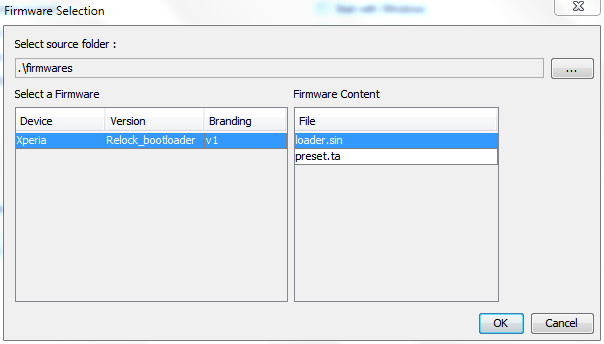
- You’ll see a screen like the image given below — click “Ok”!

- Now it should ask you to connect your phone to the PC. So first plug the USB cable to PC, then pick up your phone and hold the “Back” key (key at the bottom left on your Arc), and then connect the USB cable to your phone. Remember you’ve to hold the “Back” key while connecting the USB cable to phone.
- Once the phone gets connected — Flashtool will automatically start the flashing process.
- Keep an eye on the Flashtool’s screen.
- And once the process gets finished, disconnect your phone from PC and switch it ON.
Enjoy!
All thanks to XDA member Blagus for making it possible to re-lock the boot loader. Head over to this thread on XDA to thank him for his awesome work.
[info] If you wish to unlock the boot loader again, then the process is similar to what you did the first time. If you help — below is a link to step by step boot loader unlocking guide:https://nerdschalk.com/how-to-unlock-bootloader-xperia-arc-play-neo-pro/ [/info]




That’s a super tips ! does it works also on the play?
That’s a super tips ! does it works also on the play?
That’s a super tips ! does it works also on the play?
i also want to ask there is any relocker for Xperia play
i also want to ask there is any relocker for Xperia play
i also want to ask there is any relocker for Xperia play
It worked! I had unlocked the bootloader than i downloaded the updatet and my SE Arc died. Then i did this, it worked! Awsome, thanks alot! 😀
It worked! I had unlocked the bootloader than i downloaded the updatet and my SE Arc died. Then i did this, it worked! Awsome, thanks alot! 😀
It worked! I had unlocked the bootloader than i downloaded the updatet and my SE Arc died. Then i did this, it worked! Awsome, thanks alot! 😀
why can’t ……help
why can’t ……help
why can’t ……help
Where is the folder ”TEST” ?
The flash tool won’t open!!what do i have t do?
The flash tool won’t open!!what do i have t do?
The flash tool won’t open!!what do i have t do?
my phone wont connect when its in flash mode
!!! help
Make sure you’ve S1 fastboot drivers installed.
Make sure you’ve S1 fastboot drivers installed.
How does one find S1 fastboot drivers? I’ve googled to very confusing results. PLEASE ASSIST!
Look for the drivers in the Flashtool folder. Open the Flashtool folder, go into drivers, and install the drivers there. When installing, when you get the option to select which components to install, tick the Fasboot drivers option as well as the Flashmode drivers option.
If you don’t find the drivers folder on the Flashtool folder, download the latest version of Flashtool which will have the drivers: http://ul.to/czwoidh5 OR https://hotfile.com/dl/154666641/e4afe0b/flashtool-0.7.1.0-windows.exe.html OR http://fiberupload.com/yskjfslxaiyi/flashtool-0.7.1.0-windows.exe
my phone wont connect when its in flash mode
!!! help
Make sure you’ve S1 fastboot drivers installed.
How does one find S1 fastboot drivers? I’ve googled to very confusing results. PLEASE ASSIST!
Look for the drivers in the Flashtool folder. Open the Flashtool folder, go into drivers, and install the drivers there. When installing, when you get the option to select which components to install, tick the Fasboot drivers option as well as the Flashmode drivers option.
If you don’t find the drivers folder on the Flashtool folder, download the latest version of Flashtool which will have the drivers: http://ul.to/czwoidh5 OR https://hotfile.com/dl/154666641/e4afe0b/flashtool-0.7.1.0-windows.exe.html OR http://fiberupload.com/yskjfslxaiyi/flashtool-0.7.1.0-windows.exe
my phone wont connect when its in flash mode
!!! help
Make sure you’ve S1 fastboot drivers installed.
How does one find S1 fastboot drivers? I’ve googled to very confusing results. PLEASE ASSIST!
Look for the drivers in the Flashtool folder. Open the Flashtool folder, go into drivers, and install the drivers there. When installing, when you get the option to select which components to install, tick the Fasboot drivers option as well as the Flashmode drivers option.
If you don’t find the drivers folder on the Flashtool folder, download the latest version of Flashtool which will have the drivers: http://ul.to/czwoidh5 OR https://hotfile.com/dl/154666641/e4afe0b/flashtool-0.7.1.0-windows.exe.html OR http://fiberupload.com/yskjfslxaiyi/flashtool-0.7.1.0-windows.exe
whee is te folder “test” please repl am at te final step but i cant find th “test” folder
whee is te folder “test” please repl am at te final step but i cant find th “test” folder
whee is te folder “test” please repl am at te final step but i cant find th “test” folder
HELO my xperia arc won’t start, i tried to charge but wont conect to the flash tool, what can i do?
my problem is that i unlock the bootloader, and then i updated over the air, and got brick’ed,wen i want’it to flash whit flashtool,wont conect
i troed even whit test point but wont worck.
HELP PLEASE!
HELO my xperia arc won’t start, i tried to charge but wont conect to the flash tool, what can i do?
HELO my xperia arc won’t start, i tried to charge but wont conect to the flash tool, what can i do?
my problem is that i unlock the bootloader, and then i updated over the air, and got brick’ed,wen i want’it to flash whit flashtool,wont conect
i troed even whit test point but wont worck.
HELP PLEASE!
my problem is that i unlock the bootloader, and then i updated over the air, and got brick’ed,wen i want’it to flash whit flashtool,wont conect
i troed even whit test point but wont worck.
HELP PLEASE!
I WANT TO KISS WHOEVER MADE THIS THREAD, AND YES, ALL CAPS!
I WANT TO KISS WHOEVER MADE THIS THREAD, AND YES, ALL CAPS!
I WANT TO KISS WHOEVER MADE THIS THREAD, AND YES, ALL CAPS!
Thanks a bunch to everyone responsible for this, saved my Xperia Neo.
Thanks a bunch to everyone responsible for this, saved my Xperia Neo.
Thanks a bunch to everyone responsible for this, saved my Xperia Neo.
does still tampers with the software/hardware? 🙂
relocking*
does still tampers with the software/hardware? 🙂
relocking*
does still tampers with the software/hardware? 🙂
relocking*
hi;
after this process can I update my pda via se pc companion?
Yeah you can 🙂
Yeah you can 🙂
thanks m8 : )
hi again…
m8, I have installed flash tool and downloaded the firmware which is highligted on above (Xperia_Relock_bootloader) and put it in to firmwares folder. however when I start the flashtool and hit to flash button in the program, I can not see the loader.sin at the firmware content. do u have any clue about it. if u can help I would be appriciated.
hi;
after this process can I update my pda via se pc companion?
Yeah you can 🙂
thanks m8 : )
hi again…
m8, I have installed flash tool and downloaded the firmware which is highligted on above (Xperia_Relock_bootloader) and put it in to firmwares folder. however when I start the flashtool and hit to flash button in the program, I can not see the loader.sin at the firmware content. do u have any clue about it. if u can help I would be appriciated.
hi;
after this process can I update my pda via se pc companion?
Yeah you can 🙂
thanks m8 : )
hi again…
m8, I have installed flash tool and downloaded the firmware which is highligted on above (Xperia_Relock_bootloader) and put it in to firmwares folder. however when I start the flashtool and hit to flash button in the program, I can not see the loader.sin at the firmware content. do u have any clue about it. if u can help I would be appriciated.
could you please tell me where the folder “test” is? please i reached the final step and im stuck here
could you please tell me where the folder “test” is? please i reached the final step and im stuck here
could you please tell me where the folder “test” is? please i reached the final step and im stuck here
Please update. After step #10. The Flashtool tells you to enable USB Debugging and also “unknown sources”. It DOESNT tell you after this step to PLUG IT BACK IN straight away and therefore does not complete properly. Cost me about 3 hours… :-
Anyway, all good now, updated back from CM7.2 to STOCK SE 4.0.2.A.0.42 (living in Australia)
Thank you very much for the guide!! Loving the stock again 😉
Please update. After step #10. The Flashtool tells you to enable USB Debugging and also “unknown sources”. It DOESNT tell you after this step to PLUG IT BACK IN straight away and therefore does not complete properly. Cost me about 3 hours… :-
Anyway, all good now, updated back from CM7.2 to STOCK SE 4.0.2.A.0.42 (living in Australia)
Thank you very much for the guide!! Loving the stock again 😉
Please update. After step #10. The Flashtool tells you to enable USB Debugging and also “unknown sources”. It DOESNT tell you after this step to PLUG IT BACK IN straight away and therefore does not complete properly. Cost me about 3 hours… :-
Anyway, all good now, updated back from CM7.2 to STOCK SE 4.0.2.A.0.42 (living in Australia)
Thank you very much for the guide!! Loving the stock again 😉
Where is the folder ”TEST” ?
Where is the folder ”TEST” ?
Where is the folder ”TEST” ?
not working… tried 10s, but nothing,can’t update via update service or pcc
not working… tried 10s, but nothing,can’t update via update service or pcc
not working… tried 10s, but nothing,can’t update via update service or pcc
Can i relock my xperia ray by this procedure?
Can i relock my xperia ray by this procedure?
Can i relock my xperia ray by this procedure?
link don’t work
link don’t work
link don’t work
how would i know if my arc’s boot loader was successfully re-locked?
Just go to phone, then dial *#*#7378423#*#*. after dialing go to service info –> configuration… THEN VUELA! THERE YOU gO!
how would i know if my arc’s boot loader was successfully re-locked?
Just go to phone, then dial *#*#7378423#*#*. after dialing go to service info –> configuration… THEN VUELA! THERE YOU gO!
how would i know if my arc’s boot loader was successfully re-locked?
Just go to phone, then dial *#*#7378423#*#*. after dialing go to service info –> configuration… THEN VUELA! THERE YOU gO!
i m using 2.6.32.9-perf builduser@buildhost#1 kernel and a AOSP ICS beta Rom. will this method work for me? or will i have to first install a stock rom and kernel?
i m using 2.6.32.9-perf builduser@buildhost#1 kernel and a AOSP ICS beta Rom. will this method work for me? or will i have to first install a stock rom and kernel?
i m using 2.6.32.9-perf builduser@buildhost#1 kernel and a AOSP ICS beta Rom. will this method work for me? or will i have to first install a stock rom and kernel?
where’s TEST folder? plzz provide link
where’s TEST folder? plzz provide link
where’s TEST folder? plzz provide link
yoooooooooooou are aweeeesome man
i love you
it works on my Xperia Arc S
now i’m able to update it to the Android 4.0
yoooooooooooou are aweeeesome man
i love you
it works on my Xperia Arc S
now i’m able to update it to the Android 4.0
yoooooooooooou are aweeeesome man
i love you
it works on my Xperia Arc S
now i’m able to update it to the Android 4.0
Gracias! ThankU perfect in my xperia RAY
Gracias! ThankU perfect in my xperia RAY
Gracias! ThankU perfect in my xperia RAY
i am using the official ICS 4.0.4 for xperia arc and its rooted, if i relock my bootloader, will it remove my root access?
i am using the official ICS 4.0.4 for xperia arc and its rooted, if i relock my bootloader, will it remove my root access?
i am using the official ICS 4.0.4 for xperia arc and its rooted, if i relock my bootloader, will it remove my root access?
need information regarding live with walkman relock http://relockbootlockerwt19i.blogspot.com/
need information regarding live with walkman relock http://relockbootlockerwt19i.blogspot.com/
need information regarding live with walkman relock http://relockbootlockerwt19i.blogspot.com/
Oh my God THANKSSSSSSSSSS YOU VERY MUCH, I test on Xperia Active ST17i and it works excellent, thank you thank u
Oh my God THANKSSSSSSSSSS YOU VERY MUCH, I test on Xperia Active ST17i and it works excellent, thank you thank u
Oh my God THANKSSSSSSSSSS YOU VERY MUCH, I test on Xperia Active ST17i and it works excellent, thank you thank u
it not just only works, but also simple, thanks so much
it not just only works, but also simple, thanks so much
it not just only works, but also simple, thanks so much
i can’t download
FlashTool_0.2.9.1.exe
i can’t download
FlashTool_0.2.9.1.exe
i can’t download
FlashTool_0.2.9.1.exe
hi.. If i’m using custom rom can i relock it back without changing the rom?? i’m now using real ics 5 custom rom. cause i’m afraid if i relock it with custom rom which it needed custom kernel to avoid soft brick will be hardbrick. So my point is can i just relock it back with custom rom??
hi.. If i’m using custom rom can i relock it back without changing the rom?? i’m now using real ics 5 custom rom. cause i’m afraid if i relock it with custom rom which it needed custom kernel to avoid soft brick will be hardbrick. So my point is can i just relock it back with custom rom??
hi.. If i’m using custom rom can i relock it back without changing the rom?? i’m now using real ics 5 custom rom. cause i’m afraid if i relock it with custom rom which it needed custom kernel to avoid soft brick will be hardbrick. So my point is can i just relock it back with custom rom??
hi.. If i’m using custom rom can i relock it back without changing the rom?? i’m now using real ics 5 custom rom. cause i’m afraid if i relock it with custom rom which it needed custom kernel to avoid soft brick will be hardbrick. So my point is can i just relock it back with custom rom??
swthrt love u
swthrt love u
swthrt love u
Successful for Xperia Ray St18i happily running 4.0.4 with this process after using 2 Unofficial Rom’s :p 😉
buy the way can i again unlock the Bootloader ??? 😉 plz reply
Yep. No probs in unlocking the bootloader again.
Yep. No probs in unlocking the bootloader again.
Successful for Xperia Ray St18i happily running 4.0.4 with this process after using 2 Unofficial Rom’s :p 😉
buy the way can i again unlock the Bootloader ??? 😉 plz reply
Yep. No probs in unlocking the bootloader again.
Successful for Xperia Ray St18i happily running 4.0.4 with this process after using 2 Unofficial Rom’s :p 😉
buy the way can i again unlock the Bootloader ??? 😉 plz reply
Yep. No probs in unlocking the bootloader again.
Successful for Xperia mini ST15a. Thank you very mush!
Successful for Xperia mini ST15a. Thank you very mush!
Successful for Xperia mini ST15a. Thank you very mush!
😀 How smooth it was.. I just wonder..!!!!!!!!!!.Some p
eople are really genius !!! ( Xperia ray st18i)
😀 How smooth it was.. I just wonder..!!!!!!!!!!.Some p
eople are really genius !!! ( Xperia ray st18i)
😀 How smooth it was.. I just wonder..!!!!!!!!!!.Some p
eople are really genius !!! ( Xperia ray st18i)
How to unlock again??? And after relocking will bravia engine work correctly???
How to unlock again??? And after relocking will bravia engine work correctly???
How to unlock again??? And after relocking will bravia engine work correctly???