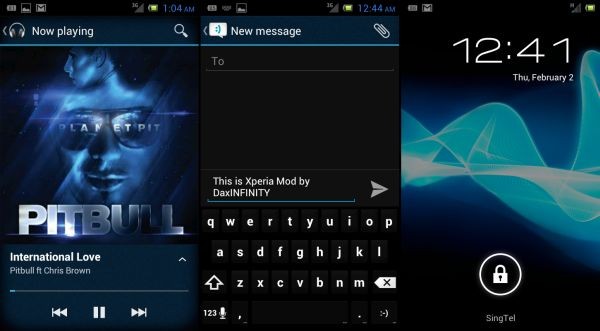
If you have made the jump to Cyanogenmod 9 or CM9, and are getting a taste of Ice Cream Sandwich on your phone, this may just be the topping that you need, to make that ICS even more delicious, and awesome looking. Presenting the BeMiNIX Theme by XDA member DaxIΠFIΠITY.
The BeMiNIX theme sports a Sony Ericsson Xperia like elegant look, with those cool hues of blue and turquoise. While the theme was designed to work on all devices with ICS 4.0.3, it currently works only on devices which are running Cyanogenmod 9 or CM9 ICS. This is an Alpha build of the theme, and will receive further improvements and enhancements.
Flashing it is a pretty straightforward and simple process. All you need is to be rooted (which you obviously would be if you are running CM9) and have Clockworkmod Recovery installed (again, stating the obvious).
Warning
The methods and procedures discussed here are considered risky and you should not attempt anything if you don’t know exactly what you are doing. If any damage occurs to you or your device, we won’t be held liable .You only will be responsible; you’ve been forewarned!!!
Compatibility
This Custom theme is compatible only with devices running Cyanogenmod 9 or CM9 . It’s not compatible with any other ROMs and may cause issues. Check your device ROM in: Settings » About phone » Build number
Download Links
BeMiNIX v0.5 CM9 Build 15 Filename: Xperia v0.5-B15-CM9-RC0-signed-signed.zip | Size: 10.3 MB
How To Install BeMiNIX Theme on your CM9 device
- Download the BeMiNIX Theme zip file (link provided above) to your PC
- Transfer the downloaded zip file to the phone sdcard via USB cable
- Switch off the phone and reboot to Clockworkmod recovery.
- In CWM, scroll down to Install zip from sdcard, and select it
- Now select Choose zip from sd card, and navigate to the ‘Xperia v0.5-B15-CM9-RC0-signed-signed.zip’ file you transferred in Step 2, and Select it
- This will start installation of the theme.
- Once the installation is complete, select Go back, and then Reboot System.
- That’s it!! Once you reboot, you should be running this awesome looking theme, powered by CM9 underneath.
If you want to provide feedback, thank the developer for his work, or check for updated versions of this theme, you can visit the original development thread. And of course, if you want to share your experience with us, you can drop us a line in comments below.