
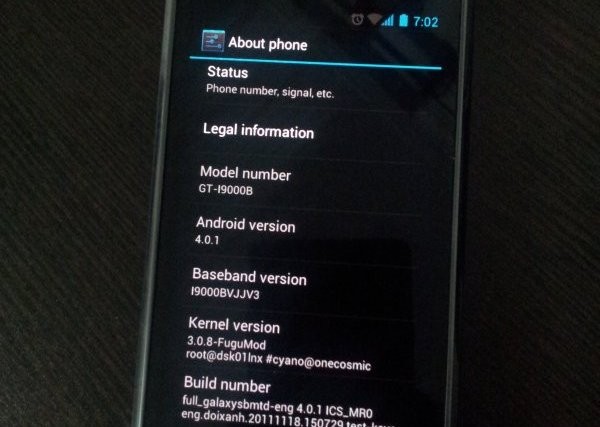
While Samsung would take ages — if they intend to bring the update in first place, which itself is debatable — to release the latest Android 4.0 update to Galaxy S officially via Kies, our beloved developers have already started burning their midnight oil to get you Ice Cream Sandwich love on your very dear very venerable phone in android blogosphere, the Galaxy S.
And their hard work is showing up now in the form of a custom ROM — we’re talking about the first ICS (Android 4.0) port for Galaxy S, made by pretty famous now on Galaxy S development scene, Galnet.
Developers: Galnet was first one to boot ICS on Galaxy S but since then, he and his team has been quite on this. The development came to life only after Onecosmic started working on it and he is the one who took further, making it a bit usable and fixing the touchscreen and doing all the crazy part. After Onecosmic got busy with other stuff, work was resumed by PaulForde, who is responsible for current stage of rom, among with other devs who are working continuously on it right now.
Developers and Donation Link
Here is list to all devs who are currently active on this rom. And we hope you donate them to show your gratitude to them for work they have, while also encouraging them for working more on this development.
Android 4.0 Ice Cream Sandwich (ICS) ROM Status
Update (As of February 12, 2012): RC 4.2 is out — it’s simply one incredible rom, by certain awesome teams of devs.
Big Update: RC1 is out. Features working from this release: Video recording and playback, Hardware Acceleration, Calendar Sync, etc. You may want to celebrate this!! People avoiding the ICS — somehow, I mean — should try this version. Kudos to PaulForde (we’re really thankful to him for this) and Onecosmic.
Almost everything is working — though, of course, there are bugs!
COMPATIBILITY
[error]This guide is applicable only for Samsung’s Galaxy S international version — GT-i9000 and GT-i9000B. Check your phone’s version in Settings – About Phone. It has to be “GT-i9000” or “GT-i9000B” for this Android 4.0 port ROM to be compatible with your phone. Otherwise, simply don’t try this ROM on your android handset — don’t even think about it if you care about your android device.[/error]WANRING!
Warning: Warranty may be void of your device if you follow the procedures given on this page. You only are responsible for your device. We won�t be liable if any damage occurs to your device and/or its components.Installing the Android 4.0 ICS custom ROM isn’t that hard if you’ve already done flashing stuff a couple of times. But even if you’re new to flashing and custom ROMs, don’t worry one bit, we’ve got you covered. Just watch the video below, read the instructions and you are good to do it yourself.
Pre-Installation thoughts:
- Installing/Flashing this ROM will erase your apps and data. So, it’s a very important you back them up, before proceeding further. To backup your apps and important data — bookmarks, contacts, SMS, APNs (internet settings), etc. Restore APN settings if Internet isn’t working for you. This Android backup guide would help you. And if you’ve rooted your Galaxy S, you can save application’s data too, using Titanium backup (free app on android market) to backup apps with data. And use this this app only again to restore those apps with data.
- Drivers! — it’s important you’ve the proper drivers installed. Download links below:
- If you have Samsung’s PC software Kies installed, be sure to exit it before using flashing this ROM, or anything with odin software.
Android 4.0 Ice Cream Sandwich for Galaxy S
Update: The installation process is much different now that what was for the initial release. But you can still watch the video — especially if you’re new to this — to get the idea of flashing and stuff. And the guide below has been duly updated to take care of installation needs of the latest release. So, go ahead!
So, the video below is not to be followed, but if you want to learn about rebooting into recovery, using CWM recovery, and other things, watching the video for once is recommended.
Here’s the video showing the installation of Android 4.0 custom ROM (AOSP port, version alpha4):
[youtube video_id=”EdkgVz0_Jmo” width=”620″ height=”400″ /]Note: There is a brief overview (from 6:58) of Android 4.0 running on Galaxy S in the above video.
How to Install Ice Cream Sandwich on Galaxy S [step-by-step guide]:
- Flash XXJVU Android 2.3.6 based firmware first.
- Install CWM and Root on the XXJVU.
- Download the latest version of “Android 4.0 ROM” from here — let’s call it rom file — and then continue the steps below to flash it without any worries. be careful while downloading since that page has downloads for all version of Galaxy S for which this rom is available. Download one meant for your phone, i9000.
- Transfer the rom file to your phone’s sdcard (don’t use external sdcard, btw). Remember the location where you transfer this files.
- Power Off your Galaxy S. Wait for 5-6 seconds until you feel the vibration to confirm complete switch off.
- Boot into Recovery mode. Then, press and hold these 3 buttons together: VolumeUP+Home+Power till the Galaxy S logo shows up on screen. You’ll boot into CWM recovery soon enough. (In recovery, use Volume keys to scroll up and down and power key to select an option. Use back key to go back.)
- Do Wipe Data/Factory Reset
- Do Wipe Cache Partition
- Go to advanced and do Wipe Dalvik Cache
- Now, flash the rom file. Select install zip from sdcard » choose zip from sdcard » browse through sdcard and select the rom file you downloaded in step 3 and transferred in step 4 above. Select “Yes – Install ______” on the next screen.
- After flashing necessary stuff, phone will boot up into recovery again. You will notice it’s a different recovery, colored blue now, and this is what was flashed in step 10 above to make the phone ready for installation.
- Now, flash the rom file again. Select install zip from sdcard » choose zip from sdcard » browse through sdcard and select the rom file you downloaded in step 3 and transferred in step 4 above. Select “Yes – Install ______” on the next screen.
- Go back and select ‘reboot system now’ to restart the phone. Be patient while phone boots up, it may take between 5 to 15 mins for first boot.
- IF IT FAILS TO BOOT in 15 mins, then, well we got problem here. Do this:
- When the phone is restarting (still booting up) open the back cover and REMOVE the battery. Yes you read it right. Reinsert it after 3-4 seconds and then boot into recovery again.
- In recovery, do a Wipe Data/ Factory Reset. And then, select reboot system now to restart the phone. it should boot up properly now. If it doesn’t, then perhaps you did not follow something correctly.
- Also, if you are not happy with the performance of this rom — maybe because it lacks some apps/features you cared too much for, or reboots itself — I would suggest you to install the Android 4.0 AOKP Rom for Galaxy S, it’s simply damn good.
- [Optional] Support the development and appreciate the hard work put in by the team by donating them. Find donation link given above.
- Also, it’s already rooted. You don’t need to root it.
- Just for your info, Android 4.0 custom ROM is available Galaxy S2 too — find our Installation Guide for Android 4.0 on Galaxy S2 i9100 here.
GOING BACK TO ANDROID 2.3 (Gingerbread) [IMPORTANT!!!]
Btw, if you want to revert back to Android 2.3 Gingerbread firmware from this Android 4.0 custom rom, get (install) the XXJVU firmware, linked in at step 1 above. And if wanted by you, root it as given in step 2.



Android 4.0 Update for Galaxy S i9000 [Custom ROM] .. COMPLETLY DOESNT WORK
oh ? It doesnt work ? Can someone please confirm it works ??
IT REALLY DOESNT, IM SAD. IVE BEEN TRYING THAT SINCE YESTERDAY NIGHT
When the developers update this to new and more-usable version, we’ll update the link and all that. So, check back later. Ot would work fine, eventually — just have some patience.
🙂
Android 4.0 Update for Galaxy S i9000 [Custom ROM] .. COMPLETLY DOESNT WORK
Android 4.0 Update for Galaxy S i9000 [Custom ROM] .. COMPLETLY DOESNT WORK
oh ? It doesnt work ? Can someone please confirm it works ??
IT REALLY DOESNT, IM SAD. IVE BEEN TRYING THAT SINCE YESTERDAY NIGHT
When the developers update this to new and more-usable version, we’ll update the link and all that. So, check back later. Ot would work fine, eventually — just have some patience.
🙂
oh ? It doesnt work ? Can someone please confirm it works ??
IT REALLY DOESNT, IM SAD. IVE BEEN TRYING THAT SINCE YESTERDAY NIGHT
When the developers update this to new and more-usable version, we’ll update the link and all that. So, check back later. Ot would work fine, eventually — just have some patience.
🙂
I can’t really see the point in featuring this until you can at least get past the lock screen… a complete waste of time IMHO!
On Nexus S, it took just 4-5 days for a not-at-all working port to become a usable ROM. I can’t give you that deadline here, but I am hopeful we will have a working ROM pretty soon. Even if it takes a week or two, these developers will have a lot if respect from me.
One should appreciate the fact that these devs have come with a port this soon.
Anyway, don’t bother much and check again later, you’ll know the fun once some basic stuff starts to work.
P.S. I am pretty much attached to Galaxy S dev. It’s still my fav phone although I use S2 now. You know, both CM7 and MIUI had this sort of beginning only. Those feeling bad abt it should atleast appreciate dev’s work, if they can’t donate at all.
David is right, u cant do anything because of the lockscreen, u cant pass it !!! :/ will u do something 4 us to fix that?
DO NOT TRY IT !!!!
I can’t really see the point in featuring this until you can at least get past the lock screen… a complete waste of time IMHO!
On Nexus S, it took just 4-5 days for a not-at-all working port to become a usable ROM. I can’t give you that deadline here, but I am hopeful we will have a working ROM pretty soon. Even if it takes a week or two, these developers will have a lot if respect from me.
One should appreciate the fact that these devs have come with a port this soon.
Anyway, don’t bother much and check again later, you’ll know the fun once some basic stuff starts to work.
P.S. I am pretty much attached to Galaxy S dev. It’s still my fav phone although I use S2 now. You know, both CM7 and MIUI had this sort of beginning only. Those feeling bad abt it should atleast appreciate dev’s work, if they can’t donate at all.
I can’t really see the point in featuring this until you can at least get past the lock screen… a complete waste of time IMHO!
On Nexus S, it took just 4-5 days for a not-at-all working port to become a usable ROM. I can’t give you that deadline here, but I am hopeful we will have a working ROM pretty soon. Even if it takes a week or two, these developers will have a lot if respect from me.
One should appreciate the fact that these devs have come with a port this soon.
Anyway, don’t bother much and check again later, you’ll know the fun once some basic stuff starts to work.
P.S. I am pretty much attached to Galaxy S dev. It’s still my fav phone although I use S2 now. You know, both CM7 and MIUI had this sort of beginning only. Those feeling bad abt it should atleast appreciate dev’s work, if they can’t donate at all.
LttlDvl here, You can navigate the rom by using two fingers to select and drag. you can also bypass the lockscreen by pressing back and then menu quickly.
It’s been our plesure to port this and release it for other developers to work on as well.
I’d just like to reiterate again: This port is NOT for daily use. It is literally at the point we had it right after we had it booting.
Hey there! Welcome to our blog, LttlDvl.
I’m from the TheAndroidSoul team. We’re thankful to you, and Galnet, for the work you guys are doing.
I hope you are able to get it this port working pretty soon, either before or after Galaxy Nexus hits and AOSP build of Android 4.0 is out.
You’re Awesome!
P.S. Would donate 20 bucks when I get home. Keep rocking, dear!
Thank you! Everyone is more than welcome for this, Galnet and I had alot of fun getting this to work.
The main idea behind it was to get it booting to give the community a chance to learn how the system works. We both understand that nobody is going to learn how the system definitively works from an SDK port, however all developers will gain some much needed experience from this, which should show when the first true data dumps and source compiled builds become available. But things will hopefully move quite quickly from that point.
It’s also allowing us to see how elements of ICS can benefit our MIUI development, so it’s all a case of watch this space!
Hopefully though, the developement community can wring some sense out of this and have a more stable version some time soon to allow everyone to have an idea of what ICS can deliver.
THANKS, BUT THE TOUCH IS REALLY DONT WORK WELL
David is right, u cant do anything because of the lockscreen, u cant pass it !!! :/ will u do something 4 us to fix that?
David is right, u cant do anything because of the lockscreen, u cant pass it !!! :/ will u do something 4 us to fix that?
DO NOT TRY IT !!!!
DO NOT TRY IT !!!!
LttlDvl here, You can navigate the rom by using two fingers to select and drag. you can also bypass the lockscreen by pressing back and then menu quickly.
It’s been our plesure to port this and release it for other developers to work on as well.
I’d just like to reiterate again: This port is NOT for daily use. It is literally at the point we had it right after we had it booting.
Hey there! Welcome to our blog, LttlDvl.
I’m from the TheAndroidSoul team. We’re thankful to you, and Galnet, for the work you guys are doing.
I hope you are able to get it this port working pretty soon, either before or after Galaxy Nexus hits and AOSP build of Android 4.0 is out.
You’re Awesome!
P.S. Would donate 20 bucks when I get home. Keep rocking, dear!
Thank you! Everyone is more than welcome for this, Galnet and I had alot of fun getting this to work.
The main idea behind it was to get it booting to give the community a chance to learn how the system works. We both understand that nobody is going to learn how the system definitively works from an SDK port, however all developers will gain some much needed experience from this, which should show when the first true data dumps and source compiled builds become available. But things will hopefully move quite quickly from that point.
It’s also allowing us to see how elements of ICS can benefit our MIUI development, so it’s all a case of watch this space!
Hopefully though, the developement community can wring some sense out of this and have a more stable version some time soon to allow everyone to have an idea of what ICS can deliver.
THANKS, BUT THE TOUCH IS REALLY DONT WORK WELL
LttlDvl here, You can navigate the rom by using two fingers to select and drag. you can also bypass the lockscreen by pressing back and then menu quickly.
It’s been our plesure to port this and release it for other developers to work on as well.
I’d just like to reiterate again: This port is NOT for daily use. It is literally at the point we had it right after we had it booting.
Hey there! Welcome to our blog, LttlDvl.
I’m from the TheAndroidSoul team. We’re thankful to you, and Galnet, for the work you guys are doing.
I hope you are able to get it this port working pretty soon, either before or after Galaxy Nexus hits and AOSP build of Android 4.0 is out.
You’re Awesome!
P.S. Would donate 20 bucks when I get home. Keep rocking, dear!
Thank you! Everyone is more than welcome for this, Galnet and I had alot of fun getting this to work.
The main idea behind it was to get it booting to give the community a chance to learn how the system works. We both understand that nobody is going to learn how the system definitively works from an SDK port, however all developers will gain some much needed experience from this, which should show when the first true data dumps and source compiled builds become available. But things will hopefully move quite quickly from that point.
It’s also allowing us to see how elements of ICS can benefit our MIUI development, so it’s all a case of watch this space!
Hopefully though, the developement community can wring some sense out of this and have a more stable version some time soon to allow everyone to have an idea of what ICS can deliver.
THANKS, BUT THE TOUCH IS REALLY DONT WORK WELL
Awesome job Devs. To take a SDK and turn it into a proof-of-concept ROM is always impressive.
Regarding the i897 (Captivate) 4.0 ROM, would it use a i9000 modified ROM, or would it likely be built from scratch? I ask since the captivate doesn’t seem to be too popular with the dev community, despite being the one of the prettiest Galaxy S (single-core) phones.
Personally, I like Captivate’s design far more appealing than Galaxy S (and other variants). But as you said it, dev work is pretty limited there. In fact, no other device matches Galaxy S’ sort of development, not even the Galaxy S2.
And I think Captivate will need sth built from scratch, which I think both Galaxy S i9000 and Captivate will get only after Google releases the Android 4.0 source code to public — possibly, after Galaxy Nexus is launched.
Awesome job Devs. To take a SDK and turn it into a proof-of-concept ROM is always impressive.
Regarding the i897 (Captivate) 4.0 ROM, would it use a i9000 modified ROM, or would it likely be built from scratch? I ask since the captivate doesn’t seem to be too popular with the dev community, despite being the one of the prettiest Galaxy S (single-core) phones.
Personally, I like Captivate’s design far more appealing than Galaxy S (and other variants). But as you said it, dev work is pretty limited there. In fact, no other device matches Galaxy S’ sort of development, not even the Galaxy S2.
And I think Captivate will need sth built from scratch, which I think both Galaxy S i9000 and Captivate will get only after Google releases the Android 4.0 source code to public — possibly, after Galaxy Nexus is launched.
Awesome job Devs. To take a SDK and turn it into a proof-of-concept ROM is always impressive.
Regarding the i897 (Captivate) 4.0 ROM, would it use a i9000 modified ROM, or would it likely be built from scratch? I ask since the captivate doesn’t seem to be too popular with the dev community, despite being the one of the prettiest Galaxy S (single-core) phones.
Personally, I like Captivate’s design far more appealing than Galaxy S (and other variants). But as you said it, dev work is pretty limited there. In fact, no other device matches Galaxy S’ sort of development, not even the Galaxy S2.
And I think Captivate will need sth built from scratch, which I think both Galaxy S i9000 and Captivate will get only after Google releases the Android 4.0 source code to public — possibly, after Galaxy Nexus is launched.
what version does it show in about phone?? can ne 1 tell me??
what version does it show in about phone?? can ne 1 tell me??
what version does it show in about phone?? can ne 1 tell me??
Post updated. New version — Alpha4 — is available for download as also the new kernel. The phone’s got calls and sms working now, and also the WiFi. You have no reason to not try it once more — it’s so awesome, and fast, thanks to ‘HW acceleration’ that is now working on this port.
Guys, go for it. you’re gonna love it.
Dev team is doing amazing work. Cheers!
I won’t try it until It’s stable, or at least, 3G and external SD are supported. Also, I had problems of bootloops with the Fugumod kernel T_T
K… But it’s amazing, I’ll tell you that.
Post updated. New version — Alpha4 — is available for download as also the new kernel. The phone’s got calls and sms working now, and also the WiFi. You have no reason to not try it once more — it’s so awesome, and fast, thanks to ‘HW acceleration’ that is now working on this port.
Guys, go for it. you’re gonna love it.
Dev team is doing amazing work. Cheers!
I won’t try it until It’s stable, or at least, 3G and external SD are supported. Also, I had problems of bootloops with the Fugumod kernel T_T
K… But it’s amazing, I’ll tell you that.
Post updated. New version — Alpha4 — is available for download as also the new kernel. The phone’s got calls and sms working now, and also the WiFi. You have no reason to not try it once more — it’s so awesome, and fast, thanks to ‘HW acceleration’ that is now working on this port.
Guys, go for it. you’re gonna love it.
Dev team is doing amazing work. Cheers!
Post updated. New version — Alpha4 — is available for download as also the new kernel. The phone’s got calls and sms working now, and also the WiFi. You have no reason to not try it once more — it’s so awesome, and fast, thanks to ‘HW acceleration’ that is now working on this port.
Guys, go for it. you’re gonna love it.
Dev team is doing amazing work. Cheers!
I won’t try it until It’s stable, or at least, 3G and external SD are supported. Also, I had problems of bootloops with the Fugumod kernel T_T
K… But it’s amazing, I’ll tell you that.
So i can do this for my galaxy s2 and have the wifi to work now? i hope so
No!
WOW great tutorial thx
can it work on all basebands of gt -i9000
You need to have Android 2.3 based firmware/rom. I think one shouldn’t try it on Froyo, it must be requiring Gingerbread boot loaders. Basebands not a problem.
So i can do this for my galaxy s2 and have the wifi to work now? i hope so
No!
So i can do this for my galaxy s2 and have the wifi to work now? i hope so
No!
WOW great tutorial thx
WOW great tutorial thx
can it work on all basebands of gt -i9000
You need to have Android 2.3 based firmware/rom. I think one shouldn’t try it on Froyo, it must be requiring Gingerbread boot loaders. Basebands not a problem.
can it work on all basebands of gt -i9000
You need to have Android 2.3 based firmware/rom. I think one shouldn’t try it on Froyo, it must be requiring Gingerbread boot loaders. Basebands not a problem.
hi can it work with xfjva – i9000 or xxjvt- i9000 pl reply & thank for this
All you need is a clockworkmod recovery installed on any gingerbread rom onn galaxy S i9000. JVT is cool to go with, it would work.
I tried as per instructions given above every thing goes fine . but my phone is stuck at FUGUMOD and not going further, please help.
Retry one more time.
same here
Tried it twice, same thing happens, stops at first screen. everything seemed to go on ok, what have I missed?
Try again.
If it still happens, flash the ICS again and this time, reboot the phone before installing the Fugumod kernel. Touchscreen won’t work, but don’t bother. Simply go back to recovery and flash the fugumod kernel and then reboot — should work.
Flash the ICS again and this time, reboot the phone before installing the Fugumod kernel. Touchscreen won’t work, but don’t bother. Simply go back to recovery and flash the fugumod kernel and then reboot — should work.
yes its booting now with flashing kernel
*without flashing kernel
Go back to recovery and then flash the kernel, it would boot and run smoothly. Make sure you’ve downloaded the right kernel — one meant for your device since 2 or 3 variants are available.
Yes, its booting! Great work thanks!
😀
hi can it work with xfjva – i9000 or xxjvt- i9000 pl reply & thank for this
All you need is a clockworkmod recovery installed on any gingerbread rom onn galaxy S i9000. JVT is cool to go with, it would work.
hi can it work with xfjva – i9000 or xxjvt- i9000 pl reply & thank for this
All you need is a clockworkmod recovery installed on any gingerbread rom onn galaxy S i9000. JVT is cool to go with, it would work.
I tried as per instructions given above every thing goes fine . but my phone is stuck at FUGUMOD and not going further, please help.
Retry one more time.
same here
Tried it twice, same thing happens, stops at first screen. everything seemed to go on ok, what have I missed?
Flash the ICS again and this time, reboot the phone before installing the Fugumod kernel. Touchscreen won’t work, but don’t bother. Simply go back to recovery and flash the fugumod kernel and then reboot — should work.
yes its booting now with flashing kernel
*without flashing kernel
Go back to recovery and then flash the kernel, it would boot and run smoothly. Make sure you’ve downloaded the right kernel — one meant for your device since 2 or 3 variants are available.
Yes, its booting! Great work thanks!
😀
Try again.
If it still happens, flash the ICS again and this time, reboot the phone before installing the Fugumod kernel. Touchscreen won’t work, but don’t bother. Simply go back to recovery and flash the fugumod kernel and then reboot — should work.
I tried as per instructions given above every thing goes fine . but my phone is stuck at FUGUMOD and not going further, please help.
Retry one more time.
same here
Tried it twice, same thing happens, stops at first screen. everything seemed to go on ok, what have I missed?
Flash the ICS again and this time, reboot the phone before installing the Fugumod kernel. Touchscreen won’t work, but don’t bother. Simply go back to recovery and flash the fugumod kernel and then reboot — should work.
yes its booting now with flashing kernel
*without flashing kernel
Go back to recovery and then flash the kernel, it would boot and run smoothly. Make sure you’ve downloaded the right kernel — one meant for your device since 2 or 3 variants are available.
Yes, its booting! Great work thanks!
😀
Try again.
If it still happens, flash the ICS again and this time, reboot the phone before installing the Fugumod kernel. Touchscreen won’t work, but don’t bother. Simply go back to recovery and flash the fugumod kernel and then reboot — should work.
is this stable enough for daily use now……curious…..thinkin of flashing it..
I9000 xxjvq 2.3.4 gingerbread
rooted w/cwm/superuser/tweak….
will this work on my unit….
thanks and keep up the excellent work devs………….
Depends on you whether you wanna use ICS in daily life with some gr8 bugs. Read what works and what not in the post, and decide it yourself. You’re good to go, btw!
I would suggest you to wait for Alpha7 which should be released anytime this week. It includes complete hardware acceleration along with working video and camera.
is this stable enough for daily use now……curious…..thinkin of flashing it..
I9000 xxjvq 2.3.4 gingerbread
rooted w/cwm/superuser/tweak….
will this work on my unit….
thanks and keep up the excellent work devs………….
Depends on you whether you wanna use ICS in daily life with some gr8 bugs. Read what works and what not in the post, and decide it yourself. You’re good to go, btw!
I would suggest you to wait for Alpha7 which should be released anytime this week. It includes complete hardware acceleration along with working video and camera.
is this stable enough for daily use now……curious…..thinkin of flashing it..
I9000 xxjvq 2.3.4 gingerbread
rooted w/cwm/superuser/tweak….
will this work on my unit….
thanks and keep up the excellent work devs………….
Depends on you whether you wanna use ICS in daily life with some gr8 bugs. Read what works and what not in the post, and decide it yourself. You’re good to go, btw!
I would suggest you to wait for Alpha7 which should be released anytime this week. It includes complete hardware acceleration along with working video and camera.
Great its working like a charm, except for my mobile network.
What is mneat by: “after a ugly patch ?”
which patch will make my mobile work ?
It just means you have to go through a lot of steps and change a lot of settings to enable 3G 🙂
I’ll update the post with a guide on how to apply 3g patch shortly. Btw, as suggested here, alpha 7 should be pretty good. Maybe, it will get RC1 tag, lol!
hi kapil im just getting ready to flash everything can you update 3g patch part of the post please…much appreciated, ps does the the mobile ap tethering and the internet phone browser work
thanks buddy
Umm, I’m gonna update it tomorrow morning but for now, you can use this well written guide over here – http://forum.xda-developers.com/showthread.php?p=19563068#post19563068
🙂
Great its working like a charm, except for my mobile network.
What is mneat by: “after a ugly patch ?”
which patch will make my mobile work ?
It just means you have to go through a lot of steps and change a lot of settings to enable 3G 🙂
I’ll update the post with a guide on how to apply 3g patch shortly. Btw, as suggested here, alpha 7 should be pretty good. Maybe, it will get RC1 tag, lol!
hi kapil im just getting ready to flash everything can you update 3g patch part of the post please…much appreciated, ps does the the mobile ap tethering and the internet phone browser work
thanks buddy
Umm, I’m gonna update it tomorrow morning but for now, you can use this well written guide over here – http://forum.xda-developers.com/showthread.php?p=19563068#post19563068
🙂
Great its working like a charm, except for my mobile network.
What is mneat by: “after a ugly patch ?”
which patch will make my mobile work ?
It just means you have to go through a lot of steps and change a lot of settings to enable 3G 🙂
I’ll update the post with a guide on how to apply 3g patch shortly. Btw, as suggested here, alpha 7 should be pretty good. Maybe, it will get RC1 tag, lol!
hi kapil im just getting ready to flash everything can you update 3g patch part of the post please…much appreciated, ps does the the mobile ap tethering and the internet phone browser work
thanks buddy
Umm, I’m gonna update it tomorrow morning but for now, you can use this well written guide over here – http://forum.xda-developers.com/showthread.php?p=19563068#post19563068
🙂
VERY GOOD, IM FROM ARGENTINA, I WANT TO TEST WHEN EVERYTHING ITS GOING ON, SORRY ABOUT MY ENGLISH… JEJ..
looks wonderful! does this include all the loacle languages? Hebrew specifically?
Hi there! Its working but i don’t have signal on the phone. Why?
Which version you installed? Alpha7 or 6?
Alpha 7. And one more question: The PC don’t want to recognize my phone, so i pluged in with a data cable and nothing.
Ohh, and my phone network does not work too. I haven’t tried with Wi-Fi still, but i usually use my phones network.
Don’t know how to fix it.
Man, there will be some bugs here and there until it gets out of alpha, for sure. So, be prepared to deal with it. And maybe, try it again after it gets Release Candidate status, or a full release. If you can’t bear it right now, simply go back to Android 2.3. That’s sad but you gotta wait, man!
Okay then. Well, thanks for your work, at least its great. 🙂
Not working… It freezes at fugomod , i’ve done exactly what was written , step by step.. and nothing..
Alpha 7 installed , reboot , install the kernel and it stops , freezes at boot …
Retry. It happens!
Now , it’s working but i dont have signal … wtf? 😐
hi kapil i am getting ready to flash everthing, but without the 3g patch post i wont be able to do because i use my ap tethering as my home network,such if you could this asap…you will be a ledge,,,thanks in advance
VERY GOOD, IM FROM ARGENTINA, I WANT TO TEST WHEN EVERYTHING ITS GOING ON, SORRY ABOUT MY ENGLISH… JEJ..
VERY GOOD, IM FROM ARGENTINA, I WANT TO TEST WHEN EVERYTHING ITS GOING ON, SORRY ABOUT MY ENGLISH… JEJ..
looks wonderful! does this include all the loacle languages? Hebrew specifically?
looks wonderful! does this include all the loacle languages? Hebrew specifically?
Hi there! Its working but i don’t have signal on the phone. Why?
Which version you installed? Alpha7 or 6?
Alpha 7. And one more question: The PC don’t want to recognize my phone, so i pluged in with a data cable and nothing.
Ohh, and my phone network does not work too. I haven’t tried with Wi-Fi still, but i usually use my phones network.
Don’t know how to fix it.
Man, there will be some bugs here and there until it gets out of alpha, for sure. So, be prepared to deal with it. And maybe, try it again after it gets Release Candidate status, or a full release. If you can’t bear it right now, simply go back to Android 2.3. That’s sad but you gotta wait, man!
Okay then. Well, thanks for your work, at least its great. 🙂
Hi there! Its working but i don’t have signal on the phone. Why?
Which version you installed? Alpha7 or 6?
Alpha 7. And one more question: The PC don’t want to recognize my phone, so i pluged in with a data cable and nothing.
Ohh, and my phone network does not work too. I haven’t tried with Wi-Fi still, but i usually use my phones network.
Don’t know how to fix it.
Man, there will be some bugs here and there until it gets out of alpha, for sure. So, be prepared to deal with it. And maybe, try it again after it gets Release Candidate status, or a full release. If you can’t bear it right now, simply go back to Android 2.3. That’s sad but you gotta wait, man!
Okay then. Well, thanks for your work, at least its great. 🙂
Not working… It freezes at fugomod , i’ve done exactly what was written , step by step.. and nothing..
Alpha 7 installed , reboot , install the kernel and it stops , freezes at boot …
Now , it’s working but i dont have signal … wtf? 😐
Retry. It happens!
Not working… It freezes at fugomod , i’ve done exactly what was written , step by step.. and nothing..
Alpha 7 installed , reboot , install the kernel and it stops , freezes at boot …
Now , it’s working but i dont have signal … wtf? 😐
Retry. It happens!
hi kapil i am getting ready to flash everthing, but without the 3g patch post i wont be able to do because i use my ap tethering as my home network,such if you could this asap…you will be a ledge,,,thanks in advance
hi kapil i am getting ready to flash everthing, but without the 3g patch post i wont be able to do because i use my ap tethering as my home network,such if you could this asap…you will be a ledge,,,thanks in advance
ok kapil,
I tried the rom out….just wanted to bring to your attention some of the features you said that worked that didn’t, internal sd card, face unlock and a few minor other things couldn’t port the usb to pc and no swype, not slagging the rom off, just trying to give you constructive feedback, keep up the hardwork buddy,
cheers paul
I have flashed ICS on my SGS as per the procedure. Phone not latching to network. 3G fix did not help. Please help.
Ohh.. nothing we could do, maybe gotta go back to gingerbread then. But it did work with my Docomo Sim.
Yeah 🙁 i’m back to gingernread. I have airtel sim.
Thanks for the response.
You’re welcome!
Can we go back on gingernread from ICS? if yes than what is process?
Install XXJVS. Link given above in the post in step 3.1. It’s damn easy.
flash player…… video player…………. can we watch movies with this ICS….
JUS WONDERING….. AND ALSO WOULD SOME OF THE APPS THAT REQUIRE FLASH PLAYER BE A PROBLEM…. IM USING AN APP TO WATCH SOME TV EPISODES AND WOULD IT BE ABLE TO PLAY……..
I guess not. It didn’t run movies on my SGS. :-
thanks kapil…. interested in this ics….jus gonna wait until its stable….for daily use…since i use this everyday…
ok kapil,
I tried the rom out….just wanted to bring to your attention some of the features you said that worked that didn’t, internal sd card, face unlock and a few minor other things couldn’t port the usb to pc and no swype, not slagging the rom off, just trying to give you constructive feedback, keep up the hardwork buddy,
cheers paul
ok kapil,
I tried the rom out….just wanted to bring to your attention some of the features you said that worked that didn’t, internal sd card, face unlock and a few minor other things couldn’t port the usb to pc and no swype, not slagging the rom off, just trying to give you constructive feedback, keep up the hardwork buddy,
cheers paul
could it Work on Galaxy S 5830 ACE ?????????
No. And your device isn’t Galaxy S or its variant. Galaxy Ace is a nice phone, but it’s another galaxy phone, man.
Btw, CM7.2 is available for your phone, have you tried it?
I can`t get service.. If i want to untick the option ”lock simcard” than it ask for pin code. It does not accept my pin code so i cant get service.. plzz help!
hey…i have the same problem…i tried to unlock sim with my pin…but i can t…always says key is wrog bla bla…can somebody help us?…on my phone bluetooh works but sim car doesn t…and everything else is so fine…working without bugs and similar stuff….pls help me with sim problem as soon as you can…:S
Hi
thanks very much for your hard work. I have followed the instructions (coming from latest MIUI) and am stuck at the GALAXY S screen with the FuguMod logo after the second installation having wiped cache and reset/data wiped. How long should it take to boot the phone after this and before going back to CWM to install kernel…?Thanks
Hamish
Don’t worry. Reboot to recovery, do factory reset, do wipe cache partition, and then flash the kernel again. Then, reboot.
Hey,
fast reply, I know lots of people have asked the same questions, so thanks for taking the time. I did it all again but did one thing different: wipe dalvik cache in Advanced, that made the difference and I am now into the big colourful X boot animation…. we will see what happens next…
Hamish
Cool 🙂
UPDATE:
Well, I got it going and for a while it was good. I know that it is an Alpha and so on that basis, it is great. I even had bluetooth working and sent a file to another phone. However, about 15 hours in everything started force closing, this included all the core google apps such as Market.
Not sure why that was, I was trying to install Paradise Island at the time.
Despite this it was a lovely insight into what it will be like when a decently stable beta build comes, or even, lets hope, a Stable build or, hope against hope, Samsung release an update for SGS i9000…. yeah, I know, never gonna happen.
Thanks for your work.
Hamish
it works! thanks a lot Kapil
Which version did you try? Alpha___?
Got it.
me to, im stuck to takes ages to load
Greetings! I am interested in why we do not detect the phone sim card?
i have the same issue, i unlocked the phone, made sure the lock code was off… updated and then it does recognize my sim or any for that matter. when i go into settings it says sim lock is on, so maybe this update activates it ? i dnt no the code to turn it off. rang samsung and they said they dnt supply the codes to unlock it :/
guna guess this update locks some phones
same problem.
I have flashed ICS on my SGS as per the procedure. Phone not latching to network. 3G fix did not help. Please help.
Ohh.. nothing we could do, maybe gotta go back to gingerbread then. But it did work with my Docomo Sim.
Yeah 🙁 i’m back to gingernread. I have airtel sim.
Thanks for the response.
You’re welcome!
Can we go back on gingernread from ICS? if yes than what is process?
Install XXJVS. Link given above in the post in step 3.1. It’s damn easy.
I have flashed ICS on my SGS as per the procedure. Phone not latching to network. 3G fix did not help. Please help.
Ohh.. nothing we could do, maybe gotta go back to gingerbread then. But it did work with my Docomo Sim.
Yeah 🙁 i’m back to gingernread. I have airtel sim.
Thanks for the response.
You’re welcome!
Can we go back on gingernread from ICS? if yes than what is process?
Install XXJVS. Link given above in the post in step 3.1. It’s damn easy.
flash player…… video player…………. can we watch movies with this ICS….
JUS WONDERING….. AND ALSO WOULD SOME OF THE APPS THAT REQUIRE FLASH PLAYER BE A PROBLEM…. IM USING AN APP TO WATCH SOME TV EPISODES AND WOULD IT BE ABLE TO PLAY……..
I guess not. It didn’t run movies on my SGS. :-
thanks kapil…. interested in this ics….jus gonna wait until its stable….for daily use…since i use this everyday…
flash player…… video player…………. can we watch movies with this ICS….
JUS WONDERING….. AND ALSO WOULD SOME OF THE APPS THAT REQUIRE FLASH PLAYER BE A PROBLEM…. IM USING AN APP TO WATCH SOME TV EPISODES AND WOULD IT BE ABLE TO PLAY……..
I guess not. It didn’t run movies on my SGS. :-
thanks kapil…. interested in this ics….jus gonna wait until its stable….for daily use…since i use this everyday…
I have the same problem no network coverage and no 3g coverage, how ca i fix it? on alpha 7
“I fixed it by myself going into recovery > advanced and selecting “Fix Permisions”. ” i quoted topfreitas from XDA.
Thanks for helping others out, man.
Cool 🙂
I need help to, 2 post up 🙂
install quick and simply: disable lagfix, wipe data/factory reset, wipe cache partition, wipe delvik cache, flash latest ice cream alpha 7 and reboot, flash latest kernal and update zip then your phone will be running on ice cream rom simple….to get superuser and and 3g coverage simply go to recovery and flash them both go to the market and download script manager open and follow instructions in this thread http://forum.xda-developers.co…
could it Work on Galaxy S 5830 ACE ?????????
No. And your device isn’t Galaxy S or its variant. Galaxy Ace is a nice phone, but it’s another galaxy phone, man.
Btw, CM7.2 is available for your phone, have you tried it?
could it Work on Galaxy S 5830 ACE ?????????
No. And your device isn’t Galaxy S or its variant. Galaxy Ace is a nice phone, but it’s another galaxy phone, man.
Btw, CM7.2 is available for your phone, have you tried it?
Touch screen not working. I installed Alpha 7, and now the touchscreen won’t work. it just opens a pop-up “Complete action using” and I have 2 options: com.android.provision.DefalutActivity and the second Setup Wizard. I re-flashed the kernel a few times, tried restart phone and other things .Also when i open the screen it won’t show up unless i rotate the screen (portrait to landscape or vice-versa). Anyone can help me please?
when the complete action screen comes on just tick the box default and click the first one…if the other setup does not work just goes through all the steps i put below again it does not take long to do,but for this to be a day to day rom, i would wait for a beta if i was you buddy
Thanks for sharing your thoughts… 🙂
I’ll be home tomorrow, so will see it myself and answer our dear users’ problems, then. See you guys!
Sorry paul, did all you wrote down there, but my touchscreen still won’t recognize my finger. As i need to use my phone i will revert back to 2.3.4 for this weekend, hoping our dear developers can help me and anyone else with this problem.
alex did the complete action screen flicker and wouldn’t let you press anything??
Nope, not even the touch-sensitive won’t light up.
I can`t get service.. If i want to untick the option ”lock simcard” than it ask for pin code. It does not accept my pin code so i cant get service.. plzz help!
hey…i have the same problem…i tried to unlock sim with my pin…but i can t…always says key is wrog bla bla…can somebody help us?…on my phone bluetooh works but sim car doesn t…and everything else is so fine…working without bugs and similar stuff….pls help me with sim problem as soon as you can…:S
I can`t get service.. If i want to untick the option ”lock simcard” than it ask for pin code. It does not accept my pin code so i cant get service.. plzz help!
hey…i have the same problem…i tried to unlock sim with my pin…but i can t…always says key is wrog bla bla…can somebody help us?…on my phone bluetooh works but sim car doesn t…and everything else is so fine…working without bugs and similar stuff….pls help me with sim problem as soon as you can…:S
Hi
thanks very much for your hard work. I have followed the instructions (coming from latest MIUI) and am stuck at the GALAXY S screen with the FuguMod logo after the second installation having wiped cache and reset/data wiped. How long should it take to boot the phone after this and before going back to CWM to install kernel…?Thanks
Hamish
Don’t worry. Reboot to recovery, do factory reset, do wipe cache partition, and then flash the kernel again. Then, reboot.
Hey,
fast reply, I know lots of people have asked the same questions, so thanks for taking the time. I did it all again but did one thing different: wipe dalvik cache in Advanced, that made the difference and I am now into the big colourful X boot animation…. we will see what happens next…
Hamish
Cool 🙂
UPDATE:
Well, I got it going and for a while it was good. I know that it is an Alpha and so on that basis, it is great. I even had bluetooth working and sent a file to another phone. However, about 15 hours in everything started force closing, this included all the core google apps such as Market.
Not sure why that was, I was trying to install Paradise Island at the time.
Despite this it was a lovely insight into what it will be like when a decently stable beta build comes, or even, lets hope, a Stable build or, hope against hope, Samsung release an update for SGS i9000…. yeah, I know, never gonna happen.
Thanks for your work.
Hamish
it works! thanks a lot Kapil
Which version did you try? Alpha___?
Got it.
Hi
thanks very much for your hard work. I have followed the instructions (coming from latest MIUI) and am stuck at the GALAXY S screen with the FuguMod logo after the second installation having wiped cache and reset/data wiped. How long should it take to boot the phone after this and before going back to CWM to install kernel…?Thanks
Hamish
Don’t worry. Reboot to recovery, do factory reset, do wipe cache partition, and then flash the kernel again. Then, reboot.
Hey,
fast reply, I know lots of people have asked the same questions, so thanks for taking the time. I did it all again but did one thing different: wipe dalvik cache in Advanced, that made the difference and I am now into the big colourful X boot animation…. we will see what happens next…
Hamish
Cool 🙂
UPDATE:
Well, I got it going and for a while it was good. I know that it is an Alpha and so on that basis, it is great. I even had bluetooth working and sent a file to another phone. However, about 15 hours in everything started force closing, this included all the core google apps such as Market.
Not sure why that was, I was trying to install Paradise Island at the time.
Despite this it was a lovely insight into what it will be like when a decently stable beta build comes, or even, lets hope, a Stable build or, hope against hope, Samsung release an update for SGS i9000…. yeah, I know, never gonna happen.
Thanks for your work.
Hamish
it works! thanks a lot Kapil
Which version did you try? Alpha___?
Got it.
me to, im stuck to takes ages to load
me to, im stuck to takes ages to load
Greetings! I am interested in why we do not detect the phone sim card?
i have the same issue, i unlocked the phone, made sure the lock code was off… updated and then it does recognize my sim or any for that matter. when i go into settings it says sim lock is on, so maybe this update activates it ? i dnt no the code to turn it off. rang samsung and they said they dnt supply the codes to unlock it :/
guna guess this update locks some phones
same problem.
Greetings! I am interested in why we do not detect the phone sim card?
i have the same issue, i unlocked the phone, made sure the lock code was off… updated and then it does recognize my sim or any for that matter. when i go into settings it says sim lock is on, so maybe this update activates it ? i dnt no the code to turn it off. rang samsung and they said they dnt supply the codes to unlock it :/
guna guess this update locks some phones
same problem.
I have the same problem no network coverage and no 3g coverage, how ca i fix it? on alpha 7
“I fixed it by myself going into recovery > advanced and selecting “Fix Permisions”. ” i quoted topfreitas from XDA.
Thanks for helping others out, man.
Cool 🙂
I need help to, 2 post up 🙂
I have the same problem no network coverage and no 3g coverage, how ca i fix it? on alpha 7
“I fixed it by myself going into recovery > advanced and selecting “Fix Permisions”. ” i quoted topfreitas from XDA.
Thanks for helping others out, man.
Cool 🙂
I need help to, 2 post up 🙂
install quick and simply: disable lagfix, wipe data/factory reset, wipe cache partition, wipe delvik cache, flash latest ice cream alpha 7 and reboot, flash latest kernal and update zip then your phone will be running on ice cream rom simple….to get superuser and and 3g coverage simply go to recovery and flash them both go to the market and download script manager open and follow instructions in this thread http://forum.xda-developers.co…
install quick and simply: disable lagfix, wipe data/factory reset, wipe cache partition, wipe delvik cache, flash latest ice cream alpha 7 and reboot, flash latest kernal and update zip then your phone will be running on ice cream rom simple….to get superuser and and 3g coverage simply go to recovery and flash them both go to the market and download script manager open and follow instructions in this thread http://forum.xda-developers.co…
Touch screen not working. I installed Alpha 7, and now the touchscreen won’t work. it just opens a pop-up “Complete action using” and I have 2 options: com.android.provision.DefalutActivity and the second Setup Wizard. I re-flashed the kernel a few times, tried restart phone and other things .Also when i open the screen it won’t show up unless i rotate the screen (portrait to landscape or vice-versa). Anyone can help me please?
when the complete action screen comes on just tick the box default and click the first one…if the other setup does not work just goes through all the steps i put below again it does not take long to do,but for this to be a day to day rom, i would wait for a beta if i was you buddy
Thanks for sharing your thoughts… 🙂
I’ll be home tomorrow, so will see it myself and answer our dear users’ problems, then. See you guys!
Sorry paul, did all you wrote down there, but my touchscreen still won’t recognize my finger. As i need to use my phone i will revert back to 2.3.4 for this weekend, hoping our dear developers can help me and anyone else with this problem.
alex did the complete action screen flicker and wouldn’t let you press anything??
Nope, not even the touch-sensitive won’t light up.
Touch screen not working. I installed Alpha 7, and now the touchscreen won’t work. it just opens a pop-up “Complete action using” and I have 2 options: com.android.provision.DefalutActivity and the second Setup Wizard. I re-flashed the kernel a few times, tried restart phone and other things .Also when i open the screen it won’t show up unless i rotate the screen (portrait to landscape or vice-versa). Anyone can help me please?
when the complete action screen comes on just tick the box default and click the first one…if the other setup does not work just goes through all the steps i put below again it does not take long to do,but for this to be a day to day rom, i would wait for a beta if i was you buddy
Thanks for sharing your thoughts… 🙂
I’ll be home tomorrow, so will see it myself and answer our dear users’ problems, then. See you guys!
Sorry paul, did all you wrote down there, but my touchscreen still won’t recognize my finger. As i need to use my phone i will revert back to 2.3.4 for this weekend, hoping our dear developers can help me and anyone else with this problem.
alex did the complete action screen flicker and wouldn’t let you press anything??
Nope, not even the touch-sensitive won’t light up.
not able to go forward after galaxy s fugumod logo………………
I just pulled out the battery, powered on the phone, waited a little on the same screen than nearly 4 mins on a beautiful nexus animation. If you succced, please let me know if your touchscreen is working 🙂
installed alpha 8.
im stuck at colorful screen ( after Galaxy S fugumod screen)
it took 10 minutes.
still continue
OK. i try alpha 7 and it done
Have the same problem.
Did you resolve this?
Flashing Alpha8 now… I shall update the progress 🙂
Trying alpha7 now
not able to go forward after galaxy s fugumod logo………………
I just pulled out the battery, powered on the phone, waited a little on the same screen than nearly 4 mins on a beautiful nexus animation. If you succced, please let me know if your touchscreen is working 🙂
not able to go forward after galaxy s fugumod logo………………
I just pulled out the battery, powered on the phone, waited a little on the same screen than nearly 4 mins on a beautiful nexus animation. If you succced, please let me know if your touchscreen is working 🙂
I’m stuck for 10 minutes now at the animation with the four-coloured X. Removing battery didn’t help. Wat do?
Same here…
Damn…and I already went through all the trouble of resetting to standard 2.3.4, rerooting and reinstalling ICS because I thought I’d bricked the phone. Back to playing Skyrim until alpha 9 is released I guess…
how did you manage to enter recovery mode? am currently stuck not being able to enter recovery mode using the VolUp/Home/Power combo
Icecream seems to be very far…
謝謝 我成功了
ICS sucks. It doesn’t even include a file manager that lets you access the external SD card. The face recognition is only for fun. The rest is just as Gingerbread. I’m almost sure they changed GB just because it looks a lot like Apple OS.
installed alpha 8.
im stuck at colorful screen ( after Galaxy S fugumod screen)
it took 10 minutes.
still continue
OK. i try alpha 7 and it done
Have the same problem.
Did you resolve this?
installed alpha 8.
im stuck at colorful screen ( after Galaxy S fugumod screen)
it took 10 minutes.
still continue
OK. i try alpha 7 and it done
Have the same problem.
Did you resolve this?
finally on ICS.
1. Flashed JVS
2. Rooted JVS
3. Flashed MIUI 1.11.25 from CWM
4. Flashed ICS version of CM7 from CWM.
5. Installed google apps pack.
Working like a charm. Phone works, 3G works.
Please speak open.
JVS? MIUI 1.11.25?
CM7?
Installed google apps pack?
I followed below procedure,
1. Installed I9000XXJVS on my i9000 from the links in this post.
2. Rooted JVS with CF-Root-XX_OXA_JVS-v4.1-CWM3RFS
3. Boot to CWM Recovery and perform Wipe data & Wipe cache
4. Install zip file from SD card and select miuiandroid_I9000-1.11.25.zip (http://miuiandroid.com/roms/miui-development-roms/) and reboot the system.
5. Boot to CWM Recovery again and Install zip file from SD card and select teamhacksung_galaxysmtd-ota-eng.BUILD1.zip (supposed to be CM9) .Link for procedure and downloading files (http://forum.xda-developers.com/showthread.php?s=71e99d084cae4c9ef00291d370eb8a62&t=1363593) and reboot the system
6. Boot to CWM recovery again and flash gapps.zip by selecting Install zip file from SD card.
Thats it. I’m able to boot to ICS. Phone, 3G, Exchange & Gmail works. Widgets, clock and other applications work though… As this is not final ROM, there might be lot of bugs and check the CM7 website/forum for more details.
I’m not sure if Point4 is necessary, but this is how it worked for me. I flashed my phone around 10 times with Alpha7 & Alpha8 versions and finally it worked after following above procedure.
I have posted this post with the links for the files to be downloaded. I’m waiting for moderator to approve the post. You can search forum.xdadevelopers for these files and check.
I followed below procedure,
1. Installed I9000XXJVS on my i9000 from the links in this post.
2. Rooted JVS with CF-Root-XX_OXA_JVS-v4.1-CWM3RFS
3. Boot to CWM Recovery and perform Wipe data & Wipe cache
4. Install zip file from SD card and select miuiandroid_I9000-1.11.25.zip and reboot the system.
5. Boot to CWM Recovery again and Install zip file from SD card and select teamhacksung_galaxysmtd-ota-eng.BUILD1.zip (supposed to be CM9) .Link for procedure and downloading files and reboot the system
6. Boot to CWM recovery again and flash gapps.zip by selecting Install zip file from SD card.
Thats it. I’m able to boot to ICS. Phone, 3G, Exchange & Gmail works. Widgets, clock and other applications work though… As this is not final ROM, there might be lot of bugs and check the CM7 website/forum for more details.
I’m not sure if Point4 is necessary, but this is how it worked for me. I flashed my phone around 10 times with Alpha7 & Alpha8 versions and finally it worked after following above procedure.
I simply cant get calls and sms to work everything else is almost perfect. please help
Disable sim-card pin
I’m stuck, now at the animation with the four-coloured X. Removing battery didn’t help. How to boot in Recovery mode to install another version?
Same for me, hope there’s someone with a solution…
Flashing Alpha8 now… I shall update the progress 🙂
Trying alpha7 now
Flashing Alpha8 now… I shall update the progress 🙂
Trying alpha7 now
I’m stuck for 10 minutes now at the animation with the four-coloured X. Removing battery didn’t help. Wat do?
Same here…
Damn…and I already went through all the trouble of resetting to standard 2.3.4, rerooting and reinstalling ICS because I thought I’d bricked the phone. Back to playing Skyrim until alpha 9 is released I guess…
how did you manage to enter recovery mode? am currently stuck not being able to enter recovery mode using the VolUp/Home/Power combo
I’m stuck for 10 minutes now at the animation with the four-coloured X. Removing battery didn’t help. Wat do?
Same here…
Damn…and I already went through all the trouble of resetting to standard 2.3.4, rerooting and reinstalling ICS because I thought I’d bricked the phone. Back to playing Skyrim until alpha 9 is released I guess…
how did you manage to enter recovery mode? am currently stuck not being able to enter recovery mode using the VolUp/Home/Power combo
Icecream seems to be very far…
Icecream seems to be very far…
謝謝 我成功了
ICS sucks. It doesn’t even include a file manager that lets you access the external SD card. The face recognition is only for fun. The rest is just as Gingerbread. I’m almost sure they changed GB just because it looks a lot like Apple OS.
謝謝 我成功了
ICS sucks. It doesn’t even include a file manager that lets you access the external SD card. The face recognition is only for fun. The rest is just as Gingerbread. I’m almost sure they changed GB just because it looks a lot like Apple OS.
I installed alpha 8 .. and stuck with four coloured x.. help?
install beta 1
finally on ICS.
1. Flashed JVS
2. Rooted JVS
3. Flashed MIUI 1.11.25 from CWM
4. Flashed ICS version of CM7 from CWM.
5. Installed google apps pack.
Working like a charm. Phone works, 3G works.
Please speak open.
JVS? MIUI 1.11.25?
CM7?
Installed google apps pack?
I followed below procedure,
1. Installed I9000XXJVS on my i9000 from the links in this post.
2. Rooted JVS with CF-Root-XX_OXA_JVS-v4.1-CWM3RFS
3. Boot to CWM Recovery and perform Wipe data & Wipe cache
4. Install zip file from SD card and select miuiandroid_I9000-1.11.25.zip (http://miuiandroid.com/roms/miui-development-roms/) and reboot the system.
5. Boot to CWM Recovery again and Install zip file from SD card and select teamhacksung_galaxysmtd-ota-eng.BUILD1.zip (supposed to be CM9) .Link for procedure and downloading files (http://forum.xda-developers.com/showthread.php?s=71e99d084cae4c9ef00291d370eb8a62&t=1363593) and reboot the system
6. Boot to CWM recovery again and flash gapps.zip by selecting Install zip file from SD card.
Thats it. I’m able to boot to ICS. Phone, 3G, Exchange & Gmail works. Widgets, clock and other applications work though… As this is not final ROM, there might be lot of bugs and check the CM7 website/forum for more details.
I’m not sure if Point4 is necessary, but this is how it worked for me. I flashed my phone around 10 times with Alpha7 & Alpha8 versions and finally it worked after following above procedure.
I have posted this post with the links for the files to be downloaded. I’m waiting for moderator to approve the post. You can search forum.xdadevelopers for these files and check.
I followed below procedure,
1. Installed I9000XXJVS on my i9000 from the links in this post.
2. Rooted JVS with CF-Root-XX_OXA_JVS-v4.1-CWM3RFS
3. Boot to CWM Recovery and perform Wipe data & Wipe cache
4. Install zip file from SD card and select miuiandroid_I9000-1.11.25.zip and reboot the system.
5. Boot to CWM Recovery again and Install zip file from SD card and select teamhacksung_galaxysmtd-ota-eng.BUILD1.zip (supposed to be CM9) .Link for procedure and downloading files and reboot the system
6. Boot to CWM recovery again and flash gapps.zip by selecting Install zip file from SD card.
Thats it. I’m able to boot to ICS. Phone, 3G, Exchange & Gmail works. Widgets, clock and other applications work though… As this is not final ROM, there might be lot of bugs and check the CM7 website/forum for more details.
I’m not sure if Point4 is necessary, but this is how it worked for me. I flashed my phone around 10 times with Alpha7 & Alpha8 versions and finally it worked after following above procedure.
finally on ICS.
1. Flashed JVS
2. Rooted JVS
3. Flashed MIUI 1.11.25 from CWM
4. Flashed ICS version of CM7 from CWM.
5. Installed google apps pack.
Working like a charm. Phone works, 3G works.
Please speak open.
JVS? MIUI 1.11.25?
CM7?
Installed google apps pack?
I followed below procedure,
1. Installed I9000XXJVS on my i9000 from the links in this post.
2. Rooted JVS with CF-Root-XX_OXA_JVS-v4.1-CWM3RFS
3. Boot to CWM Recovery and perform Wipe data & Wipe cache
4. Install zip file from SD card and select miuiandroid_I9000-1.11.25.zip (http://miuiandroid.com/roms/miui-development-roms/) and reboot the system.
5. Boot to CWM Recovery again and Install zip file from SD card and select teamhacksung_galaxysmtd-ota-eng.BUILD1.zip (supposed to be CM9) .Link for procedure and downloading files (http://forum.xda-developers.com/showthread.php?s=71e99d084cae4c9ef00291d370eb8a62&t=1363593) and reboot the system
6. Boot to CWM recovery again and flash gapps.zip by selecting Install zip file from SD card.
Thats it. I’m able to boot to ICS. Phone, 3G, Exchange & Gmail works. Widgets, clock and other applications work though… As this is not final ROM, there might be lot of bugs and check the CM7 website/forum for more details.
I’m not sure if Point4 is necessary, but this is how it worked for me. I flashed my phone around 10 times with Alpha7 & Alpha8 versions and finally it worked after following above procedure.
I have posted this post with the links for the files to be downloaded. I’m waiting for moderator to approve the post. You can search forum.xdadevelopers for these files and check.
I followed below procedure,
1. Installed I9000XXJVS on my i9000 from the links in this post.
2. Rooted JVS with CF-Root-XX_OXA_JVS-v4.1-CWM3RFS
3. Boot to CWM Recovery and perform Wipe data & Wipe cache
4. Install zip file from SD card and select miuiandroid_I9000-1.11.25.zip and reboot the system.
5. Boot to CWM Recovery again and Install zip file from SD card and select teamhacksung_galaxysmtd-ota-eng.BUILD1.zip (supposed to be CM9) .Link for procedure and downloading files and reboot the system
6. Boot to CWM recovery again and flash gapps.zip by selecting Install zip file from SD card.
Thats it. I’m able to boot to ICS. Phone, 3G, Exchange & Gmail works. Widgets, clock and other applications work though… As this is not final ROM, there might be lot of bugs and check the CM7 website/forum for more details.
I’m not sure if Point4 is necessary, but this is how it worked for me. I flashed my phone around 10 times with Alpha7 & Alpha8 versions and finally it worked after following above procedure.
I simply cant get calls and sms to work everything else is almost perfect. please help
Disable sim-card pin
I simply cant get calls and sms to work everything else is almost perfect. please help
Disable sim-card pin
I’m stuck, now at the animation with the four-coloured X. Removing battery didn’t help. How to boot in Recovery mode to install another version?
Same for me, hope there’s someone with a solution…
I’m stuck, now at the animation with the four-coloured X. Removing battery didn’t help. How to boot in Recovery mode to install another version?
Same for me, hope there’s someone with a solution…
Im on ICS now.
I followed below procedure,1. Installed I9000XXJVS on my i9000 from the links in this post.2. Rooted JVS with CF-Root-XX_OXA_JVS-v4.1-CWM3RFS3. Boot to CWM Recovery and perform Wipe data & Wipe cache4. Install zip file from SD card and select miuiandroid_I9000-1.11.25.zip and reboot the system.5. Boot to CWM Recovery again and Install zip file from SD card and select teamhacksung_galaxysmtd-ota-eng.BUILD1.zip (supposed to be CM9) .Link for procedure and downloading files and reboot the system6. Boot to CWM recovery again and flash gapps.zip by selecting Install zip file from SD card. Thats it. I’m able to boot to ICS. Phone, 3G, Exchange & Gmail works. Widgets, clock and other applications work though… As this is not final ROM, there might be lot of bugs and check the CM7 website/forum for more details. I’m not sure if Point4 is necessary, but this is how it worked for me. I flashed my phone around 10 times with Alpha7 & Alpha8 versions and finally it worked after following above procedure.
I installed alpha 8 .. and stuck with four coloured x.. help?
install beta 1
I installed alpha 8 .. and stuck with four coloured x.. help?
install beta 1
Alpha 8 Update is out!! 🙂
Im on ICS now.
I followed below procedure,1. Installed I9000XXJVS on my i9000 from the links in this post.2. Rooted JVS with CF-Root-XX_OXA_JVS-v4.1-CWM3RFS3. Boot to CWM Recovery and perform Wipe data & Wipe cache4. Install zip file from SD card and select miuiandroid_I9000-1.11.25.zip and reboot the system.5. Boot to CWM Recovery again and Install zip file from SD card and select teamhacksung_galaxysmtd-ota-eng.BUILD1.zip (supposed to be CM9) .Link for procedure and downloading files and reboot the system6. Boot to CWM recovery again and flash gapps.zip by selecting Install zip file from SD card. Thats it. I’m able to boot to ICS. Phone, 3G, Exchange & Gmail works. Widgets, clock and other applications work though… As this is not final ROM, there might be lot of bugs and check the CM7 website/forum for more details. I’m not sure if Point4 is necessary, but this is how it worked for me. I flashed my phone around 10 times with Alpha7 & Alpha8 versions and finally it worked after following above procedure.
Im on ICS now.
I followed below procedure,1. Installed I9000XXJVS on my i9000 from the links in this post.2. Rooted JVS with CF-Root-XX_OXA_JVS-v4.1-CWM3RFS3. Boot to CWM Recovery and perform Wipe data & Wipe cache4. Install zip file from SD card and select miuiandroid_I9000-1.11.25.zip and reboot the system.5. Boot to CWM Recovery again and Install zip file from SD card and select teamhacksung_galaxysmtd-ota-eng.BUILD1.zip (supposed to be CM9) .Link for procedure and downloading files and reboot the system6. Boot to CWM recovery again and flash gapps.zip by selecting Install zip file from SD card. Thats it. I’m able to boot to ICS. Phone, 3G, Exchange & Gmail works. Widgets, clock and other applications work though… As this is not final ROM, there might be lot of bugs and check the CM7 website/forum for more details. I’m not sure if Point4 is necessary, but this is how it worked for me. I flashed my phone around 10 times with Alpha7 & Alpha8 versions and finally it worked after following above procedure.
happen to flash Alpha 8… can’t seem to detect external storage card… 🙂
yeah, neither do mine, but i got 3g, phone and sms working, if u find solution please hit me up. thanks
Update with Beta 1
update for beta1 plz
Alpha 8 Update is out!! 🙂
Alpha 8 Update is out!! 🙂
after update to Alpha 8 i can’t see any of my contacts store in my SIM card , and i can’t find any option to import them . Can anybody please help me
the differente btw ics beta1 and ics beta1i900? both have same size – 158 mb
happen to flash Alpha 8… can’t seem to detect external storage card… 🙂
yeah, neither do mine, but i got 3g, phone and sms working, if u find solution please hit me up. thanks
Update with Beta 1
happen to flash Alpha 8… can’t seem to detect external storage card… 🙂
yeah, neither do mine, but i got 3g, phone and sms working, if u find solution please hit me up. thanks
Update with Beta 1
update for beta1 plz
update for beta1 plz
Thanks to all of all the guys of the dev team, its working like a charm.
Running Beta 1 now.
after update to Alpha 8 i can’t see any of my contacts store in my SIM card , and i can’t find any option to import them . Can anybody please help me
after update to Alpha 8 i can’t see any of my contacts store in my SIM card , and i can’t find any option to import them . Can anybody please help me
the differente btw ics beta1 and ics beta1i900? both have same size – 158 mb
the differente btw ics beta1 and ics beta1i900? both have same size – 158 mb
Thanks to all of all the guys of the dev team, its working like a charm.
Running Beta 1 now.
Thanks to all of all the guys of the dev team, its working like a charm.
Running Beta 1 now.
Does this touch the modem firmware, or does it leave my pre-existing one intact?
I’m on a i9000M which typically uses the international firmwares with the exception of the modem.
I think it would change the modem. Before trying this, make sure you have a firmware for your i9000M so that you can go back to stock easily.
And, you can try flashing the modem separately via Odin (only modem file, nothing else) on ICS rom and see if that works.
Does this touch the modem firmware, or does it leave my pre-existing one intact?
I’m on a i9000M which typically uses the international firmwares with the exception of the modem.
I think it would change the modem. Before trying this, make sure you have a firmware for your i9000M so that you can go back to stock easily.
And, you can try flashing the modem separately via Odin (only modem file, nothing else) on ICS rom and see if that works.
Does this touch the modem firmware, or does it leave my pre-existing one intact?
I’m on a i9000M which typically uses the international firmwares with the exception of the modem.
I think it would change the modem. Before trying this, make sure you have a firmware for your i9000M so that you can go back to stock easily.
And, you can try flashing the modem separately via Odin (only modem file, nothing else) on ICS rom and see if that works.
all is perfect, beta1 super!!!my galaxy s is so great now! Thank you guys.
but video recorder doesnt work
hey guys when trying to flash beta 1 ice cream zip,after the process starts after only a few seconds it aborts the procedure..i’ve tried a previous suggestion of a different cwm no joy…any help in this matter would be greatly appreciated
for some reason beta1 wont install, starts to install then comes up error in zip
I’ll update the post within 3 hrs or so. Check back later.
ok great
all is perfect, beta1 super!!!my galaxy s is so great now! Thank you guys.
but video recorder doesnt work
all is perfect, beta1 super!!!my galaxy s is so great now! Thank you guys.
but video recorder doesnt work
Hello everybody involved, thanks for creating ROM ics for galaxy s. Really appreciate that.
After some troubles I managed to flash beta1 several hours ago. All things work just fine except phone (modem) service itself. Phone is absolutely without GSM or data connectivity. Like there is not SIM card inside. If I go to settings – security – set up SIM card lock – lock SIM card -> enter correct PIN (vedrified using another phone) getting error message.
If I go to mobile network settings – Network operators – Search networks -> getting error message too.
If I try to call some number directly -> getting error message that airplane mode is turn on (but in fact it is turned off).
Any suggestion or idea what could be wrong?
Thanks in advance
After I followed published install procedure for beta 1, phone seems to work OK running ics right now.
Enabling 3G was not necessary it has been working fine just from moment I flashed beta1
hey guys when trying to flash beta 1 ice cream zip,after the process starts after only a few seconds it aborts the procedure..i’ve tried a previous suggestion of a different cwm no joy…any help in this matter would be greatly appreciated
hey guys when trying to flash beta 1 ice cream zip,after the process starts after only a few seconds it aborts the procedure..i’ve tried a previous suggestion of a different cwm no joy…any help in this matter would be greatly appreciated
And if phone is turned off and you connect a charger, phone is automatically turned on. Simply phone cannot be charged when is turned off
for some reason beta1 wont install, starts to install then comes up error in zip
I’ll update the post within 3 hrs or so. Check back later.
ok great
for some reason beta1 wont install, starts to install then comes up error in zip
I’ll update the post within 3 hrs or so. Check back later.
ok great
hey guys if you’re having problems like i was, i’ve found a simple way to resolve this firstly flash alpha 7 ice cream zip procedure and then put it into reboot mode and then flash beta ice cream zip and kernal and update zip and you will then be running on beta 1
Thanks for airing your thoughts (and method). Btw, I’ve updated the guide, and using CM7, it does seems to work.
Anyway, I’ll try your method too 😀
See ya!
Installed, turned on phone. Galaxy logo showed up for a while and everything gone black. Still trying to wait 10 mins.
Remove battery, go to recovery mode and flash the ics beta 1 rom again. Don’t flash kernel, though, this time. And reboot.
I found that installing rom (full wipe), install kernel (full wipe), remove sim card and plug into charger (not PC) seemed to work. Not sure why or how
That’s on cool — and weird — way to install ICS you unearthed, man!
I am trying to update my galaxy s i9000 to ICS but while im flashing the Beta rom im getting an error: “error in sdcard update.zip: status 7” can somehelp help me with this?
You’re using clockworkmod recovery, right?
at first u must install kernel from zip card and then when are founts blue color, u can install ics file
Installed beta1 but it seems to be stuck at the andriod logo. any thoughts?
just reflashed the kernel to get mine up and running, its working great, didnt even have to do the 3g mod, worked straight away o2-uk. great work guys
Gr8!
Hello everybody involved, thanks for creating ROM ics for galaxy s. Really appreciate that.
After some troubles I managed to flash beta1 several hours ago. All things work just fine except phone (modem) service itself. Phone is absolutely without GSM or data connectivity. Like there is not SIM card inside. If I go to settings – security – set up SIM card lock – lock SIM card -> enter correct PIN (vedrified using another phone) getting error message.
If I go to mobile network settings – Network operators – Search networks -> getting error message too.
If I try to call some number directly -> getting error message that airplane mode is turn on (but in fact it is turned off).
Any suggestion or idea what could be wrong?
Thanks in advance
After I followed published install procedure for beta 1, phone seems to work OK running ics right now.
Enabling 3G was not necessary it has been working fine just from moment I flashed beta1
Hello everybody involved, thanks for creating ROM ics for galaxy s. Really appreciate that.
After some troubles I managed to flash beta1 several hours ago. All things work just fine except phone (modem) service itself. Phone is absolutely without GSM or data connectivity. Like there is not SIM card inside. If I go to settings – security – set up SIM card lock – lock SIM card -> enter correct PIN (vedrified using another phone) getting error message.
If I go to mobile network settings – Network operators – Search networks -> getting error message too.
If I try to call some number directly -> getting error message that airplane mode is turn on (but in fact it is turned off).
Any suggestion or idea what could be wrong?
Thanks in advance
After I followed published install procedure for beta 1, phone seems to work OK running ics right now.
Enabling 3G was not necessary it has been working fine just from moment I flashed beta1
And if phone is turned off and you connect a charger, phone is automatically turned on. Simply phone cannot be charged when is turned off
And if phone is turned off and you connect a charger, phone is automatically turned on. Simply phone cannot be charged when is turned off
Tried installing ICS Beta1. I install the kernal, removed battery and then installed ICS but when I reboot it just goes directly back into the recovery.
I have the exact same problem! i found it weird that i had to flash the kernel twice, is that correct? I flashed the rom many times now, but it keeps booting back into recovery mode. any thoughts?
Ok. Try this.
After you’ve flashed CM7, reboot phone. Then, reboot to recovery and flash kernel. Now, remove battery, put it back and reboot to recovery. Flash ics rom and reboot phone. Hope iy reboots fine.
And, check in about phone, whether the fugu kernel is listed there or not.
Just tried your suggestion, still loops into recovery. Stupid question this is an Australia Galaxy S I believe classed as the i9000t would this be the reason why it isn’t working?
I’m not sure either 🙁
hey guys if you’re having problems like i was, i’ve found a simple way to resolve this firstly flash alpha 7 ice cream zip procedure and then put it into reboot mode and then flash beta ice cream zip and kernal and update zip and you will then be running on beta 1
Thanks for airing your thoughts (and method). Btw, I’ve updated the guide, and using CM7, it does seems to work.
Anyway, I’ll try your method too 😀
See ya!
hey guys if you’re having problems like i was, i’ve found a simple way to resolve this firstly flash alpha 7 ice cream zip procedure and then put it into reboot mode and then flash beta ice cream zip and kernal and update zip and you will then be running on beta 1
Thanks for airing your thoughts (and method). Btw, I’ve updated the guide, and using CM7, it does seems to work.
Anyway, I’ll try your method too 😀
See ya!
I am trying to update my galaxy s i9000 to ICS but while im flashing the Beta rom im getting an error: “error in sdcard update.zip: status 7” can somehelp help me with this?
You’re using clockworkmod recovery, right?
at first u must install kernel from zip card and then when are founts blue color, u can install ics file
Installed, turned on phone. Galaxy logo showed up for a while and everything gone black. Still trying to wait 10 mins.
Remove battery, go to recovery mode and flash the ics beta 1 rom again. Don’t flash kernel, though, this time. And reboot.
I found that installing rom (full wipe), install kernel (full wipe), remove sim card and plug into charger (not PC) seemed to work. Not sure why or how
That’s on cool — and weird — way to install ICS you unearthed, man!
I am trying to update my galaxy s i9000 to ICS but while im flashing the Beta rom im getting an error: “error in sdcard update.zip: status 7” can somehelp help me with this?
You’re using clockworkmod recovery, right?
at first u must install kernel from zip card and then when are founts blue color, u can install ics file
Installed, turned on phone. Galaxy logo showed up for a while and everything gone black. Still trying to wait 10 mins.
Remove battery, go to recovery mode and flash the ics beta 1 rom again. Don’t flash kernel, though, this time. And reboot.
I found that installing rom (full wipe), install kernel (full wipe), remove sim card and plug into charger (not PC) seemed to work. Not sure why or how
That’s on cool — and weird — way to install ICS you unearthed, man!
Installed beta1 but it seems to be stuck at the andriod logo. any thoughts?
just reflashed the kernel to get mine up and running, its working great, didnt even have to do the 3g mod, worked straight away o2-uk. great work guys
Gr8!
Installed beta1 but it seems to be stuck at the andriod logo. any thoughts?
just reflashed the kernel to get mine up and running, its working great, didnt even have to do the 3g mod, worked straight away o2-uk. great work guys
Gr8!
Tried installing ICS Beta1. I install the kernal, removed battery and then installed ICS but when I reboot it just goes directly back into the recovery.
I have the exact same problem! i found it weird that i had to flash the kernel twice, is that correct? I flashed the rom many times now, but it keeps booting back into recovery mode. any thoughts?
Ok. Try this.
After you’ve flashed CM7, reboot phone. Then, reboot to recovery and flash kernel. Now, remove battery, put it back and reboot to recovery. Flash ics rom and reboot phone. Hope iy reboots fine.
And, check in about phone, whether the fugu kernel is listed there or not.
Just tried your suggestion, still loops into recovery. Stupid question this is an Australia Galaxy S I believe classed as the i9000t would this be the reason why it isn’t working?
I’m not sure either 🙁
Tried installing ICS Beta1. I install the kernal, removed battery and then installed ICS but when I reboot it just goes directly back into the recovery.
I have the exact same problem! i found it weird that i had to flash the kernel twice, is that correct? I flashed the rom many times now, but it keeps booting back into recovery mode. any thoughts?
Ok. Try this.
After you’ve flashed CM7, reboot phone. Then, reboot to recovery and flash kernel. Now, remove battery, put it back and reboot to recovery. Flash ics rom and reboot phone. Hope iy reboots fine.
And, check in about phone, whether the fugu kernel is listed there or not.
Just tried your suggestion, still loops into recovery. Stupid question this is an Australia Galaxy S I believe classed as the i9000t would this be the reason why it isn’t working?
I’m not sure either 🙁
hmm i didn’t flash CM7, i know it was recommended but i had darky custom rom installed. Can i just flash CM7 from recovery, or should i use Odin?
Please follow instructions above. Begin from step 1.
I think I have done the same as you, I had Darkyrom and also didnt flash CM7 originally. I would be interested to see if you can now get it working. Can I ask which country are you in?
I tried the steps many times now, but no good.. i am now wondering how to get the CM7.zip on my device. I doens’t seem to work when i connect it to the pc when i am in ‘download mode’. I think download mode is only used with ODIN right? any idea if it’s possible to flash CM7 from exernal SD?
i am from The Netherlands.. i have the GTi9000, i am trying to get the CM7.zip on my phone, but don’t know how to.
There is a separate guide on installing CM7, and I’ve linked that too in tthe guide above. Use that guide to get CM7 working, and then continue to next step.
Ok, I am getting closer. I now get the red, blue, yellow and green logo when booting into ICS, but it just stays there (have waited 10mins) I have tried removing battery, re-installing ICS and kernel.
Good. If it still doesn’t boot, go back to recovery and just flash the ice again. And then reboot – DO NOT flash kernel again and do not do factory reset or wipe cache or anything.
Good luck!
Thanks, any suggestions if re-flashing ICS doesn’t work? I have tried about 4 times now! am going to leave phone on that screen overnight and see what has happened by morning haha
Aww.. that’s too bad. Lets wait for beta 2.
the exact same thing is happening to me at this very moment, im not sure what to do because i didnt install the cm7 thingo. what should i do?
mine now says encrytion unsuccessful, what should i do?
Guys read my last post i’m on darky jvt too…follow the steps I wrote and it works everytime 😀
Kapil I know it takes alot of time and effort to develop but would you know roughly when beta 2 will become available…living the work and dedication it takes btw
look at download section, beta2 file is up till one or so 🙂
paul, these betas are coming out like wildfire tbh. Like seriously, beta1 was released yesterday, alpha8 was released the day before, and like alpha7 was released the day or two before that.
Has anyone noticed with beta2 that the density has changed. Things appear smaller or are my eyes going tits up?
recognized that too, things are really smaller, i like it, its compact and looks more gentle 🙂
What is the problem with not having encryption? my email is [email protected]
i managed to fix my phone and flash the beta succesfully! it’s awesome 🙂 feels snappy and stable for a beta release. I flashed the darky 10.2 resurrection edition via ODIN and after that i flashed CM7 stable. From the CM7 ROM i installed the CWM and then succesfully flashed the kernel and beta ROM. Jippie!
Kwel!
hmm i didn’t flash CM7, i know it was recommended but i had darky custom rom installed. Can i just flash CM7 from recovery, or should i use Odin?
Please follow instructions above. Begin from step 1.
I tried the steps many times now, but no good.. i am now wondering how to get the CM7.zip on my device. I doens’t seem to work when i connect it to the pc when i am in ‘download mode’. I think download mode is only used with ODIN right? any idea if it’s possible to flash CM7 from exernal SD?
There is a separate guide on installing CM7, and I’ve linked that too in tthe guide above. Use that guide to get CM7 working, and then continue to next step.
Ok, I am getting closer. I now get the red, blue, yellow and green logo when booting into ICS, but it just stays there (have waited 10mins) I have tried removing battery, re-installing ICS and kernel.
Good. If it still doesn’t boot, go back to recovery and just flash the ice again. And then reboot – DO NOT flash kernel again and do not do factory reset or wipe cache or anything.
Good luck!
Thanks, any suggestions if re-flashing ICS doesn’t work? I have tried about 4 times now! am going to leave phone on that screen overnight and see what has happened by morning haha
Aww.. that’s too bad. Lets wait for beta 2.
mine now says encrytion unsuccessful, what should i do?
the exact same thing is happening to me at this very moment, im not sure what to do because i didnt install the cm7 thingo. what should i do?
I think I have done the same as you, I had Darkyrom and also didnt flash CM7 originally. I would be interested to see if you can now get it working. Can I ask which country are you in?
i am from The Netherlands.. i have the GTi9000, i am trying to get the CM7.zip on my phone, but don’t know how to.
hmm i didn’t flash CM7, i know it was recommended but i had darky custom rom installed. Can i just flash CM7 from recovery, or should i use Odin?
Please follow instructions above. Begin from step 1.
I tried the steps many times now, but no good.. i am now wondering how to get the CM7.zip on my device. I doens’t seem to work when i connect it to the pc when i am in ‘download mode’. I think download mode is only used with ODIN right? any idea if it’s possible to flash CM7 from exernal SD?
There is a separate guide on installing CM7, and I’ve linked that too in tthe guide above. Use that guide to get CM7 working, and then continue to next step.
Ok, I am getting closer. I now get the red, blue, yellow and green logo when booting into ICS, but it just stays there (have waited 10mins) I have tried removing battery, re-installing ICS and kernel.
Good. If it still doesn’t boot, go back to recovery and just flash the ice again. And then reboot – DO NOT flash kernel again and do not do factory reset or wipe cache or anything.
Good luck!
Thanks, any suggestions if re-flashing ICS doesn’t work? I have tried about 4 times now! am going to leave phone on that screen overnight and see what has happened by morning haha
Aww.. that’s too bad. Lets wait for beta 2.
mine now says encrytion unsuccessful, what should i do?
the exact same thing is happening to me at this very moment, im not sure what to do because i didnt install the cm7 thingo. what should i do?
I think I have done the same as you, I had Darkyrom and also didnt flash CM7 originally. I would be interested to see if you can now get it working. Can I ask which country are you in?
i am from The Netherlands.. i have the GTi9000, i am trying to get the CM7.zip on my phone, but don’t know how to.
Beta battery drain and overheating…. So, last night I installed the beta, looked good, all worked fine.
This morning after charging all night it was at 100% charge. I unplugged it and within an hour was down to 80% batter. After another hour it was 60% and getting very hot. I panicked and began to download the latest MIUI, which made it get even hotter. I then ditched ICS again and reinstalled MIUI 1.11.25 phew.
Nice as it was to see ICS working better with the beta it was too risky. Is the Kernel overclocked? Anyone else having this problem?
Thanks
Hamish
I had brutal battery life with the CWM9 ICS port, but when I switched to this one the battery life has been significantly better. Checkign right now, I’m at 25% remaining charge, at 22 hrs on battery. I barely got 4 hours on the other one.
Theres a problem …when i want to download something at the android markrt…it sais that my phone is not compatible….so i cant download something like the facebook app…but i can download fes file manager for abdroid 1.6…anny solutions¿?????
Btw looks awesome=D
is it normal that when I start it ip I see like an X during te start up with microsoft colors?
I also had this funky X-animation but skipped some important steps, got a funny “Encryption unsuccessful” message and a dead touchscreen. Tried and failed to get into recovery or download mode and am now the lucky owner of a bricked phone. Have now ordered some USB-dongle that should allow me to access download mode and flash again to something useful…
Thank god I don’t really need this device and hope you will be more lucky…
Yes, Microsoft colors they are. Google used it in Nexus logo (the X you’re seeing) and btw, if you noticed, same colors are in use Chrome browser icon. Pretty weird, but it look good, no doubt.
same as me!!
Even i got same error. After 3 to 4 Reset i got home screen but No Network:(
beta1 is spot on for me, not had any issues yet. no freezes no application crashes.
everything seems to work, bar video.
if you guys stuck with ‘X’ logo, reboot your phone into recovery mode and ‘wipe data/factory reset’ only.
i did it and it works
Aiman, this worked for me as well. Thank you!!
here it doesnt’t work 🙁
can anyone help ? :((((
Wipe data helped me as well, Thanks Aiman
The external Sd card doesnt show any progamms/filles?? It is full with music but my phone just cant get there…
Guys read my last post i’m on darky jvt too…follow the steps I wrote and it works everytime 😀
Guys read my last post i’m on darky jvt too…follow the steps I wrote and it works everytime 😀
Kapil I know it takes alot of time and effort to develop but would you know roughly when beta 2 will become available…living the work and dedication it takes btw
look at download section, beta2 file is up till one or so 🙂
paul, these betas are coming out like wildfire tbh. Like seriously, beta1 was released yesterday, alpha8 was released the day before, and like alpha7 was released the day or two before that.
Has anyone noticed with beta2 that the density has changed. Things appear smaller or are my eyes going tits up?
recognized that too, things are really smaller, i like it, its compact and looks more gentle 🙂
Kapil I know it takes alot of time and effort to develop but would you know roughly when beta 2 will become available…living the work and dedication it takes btw
look at download section, beta2 file is up till one or so 🙂
paul, these betas are coming out like wildfire tbh. Like seriously, beta1 was released yesterday, alpha8 was released the day before, and like alpha7 was released the day or two before that.
Has anyone noticed with beta2 that the density has changed. Things appear smaller or are my eyes going tits up?
recognized that too, things are really smaller, i like it, its compact and looks more gentle 🙂
What is the problem with not having encryption? my email is [email protected]
What is the problem with not having encryption? my email is [email protected]
i managed to fix my phone and flash the beta succesfully! it’s awesome 🙂 feels snappy and stable for a beta release. I flashed the darky 10.2 resurrection edition via ODIN and after that i flashed CM7 stable. From the CM7 ROM i installed the CWM and then succesfully flashed the kernel and beta ROM. Jippie!
Kwel!
i managed to fix my phone and flash the beta succesfully! it’s awesome 🙂 feels snappy and stable for a beta release. I flashed the darky 10.2 resurrection edition via ODIN and after that i flashed CM7 stable. From the CM7 ROM i installed the CWM and then succesfully flashed the kernel and beta ROM. Jippie!
Kwel!
Great great great!!! But how do i screen capture??
Use shootme free android app.
volume down + power
Beta battery drain and overheating…. So, last night I installed the beta, looked good, all worked fine.
This morning after charging all night it was at 100% charge. I unplugged it and within an hour was down to 80% batter. After another hour it was 60% and getting very hot. I panicked and began to download the latest MIUI, which made it get even hotter. I then ditched ICS again and reinstalled MIUI 1.11.25 phew.
Nice as it was to see ICS working better with the beta it was too risky. Is the Kernel overclocked? Anyone else having this problem?
Thanks
Hamish
I had brutal battery life with the CWM9 ICS port, but when I switched to this one the battery life has been significantly better. Checkign right now, I’m at 25% remaining charge, at 22 hrs on battery. I barely got 4 hours on the other one.
Beta battery drain and overheating…. So, last night I installed the beta, looked good, all worked fine.
This morning after charging all night it was at 100% charge. I unplugged it and within an hour was down to 80% batter. After another hour it was 60% and getting very hot. I panicked and began to download the latest MIUI, which made it get even hotter. I then ditched ICS again and reinstalled MIUI 1.11.25 phew.
Nice as it was to see ICS working better with the beta it was too risky. Is the Kernel overclocked? Anyone else having this problem?
Thanks
Hamish
I had brutal battery life with the CWM9 ICS port, but when I switched to this one the battery life has been significantly better. Checkign right now, I’m at 25% remaining charge, at 22 hrs on battery. I barely got 4 hours on the other one.
Theres a problem …when i want to download something at the android markrt…it sais that my phone is not compatible….so i cant download something like the facebook app…but i can download fes file manager for abdroid 1.6…anny solutions¿?????
Btw looks awesome=D
Theres a problem …when i want to download something at the android markrt…it sais that my phone is not compatible….so i cant download something like the facebook app…but i can download fes file manager for abdroid 1.6…anny solutions¿?????
Btw looks awesome=D
is it normal that when I start it ip I see like an X during te start up with microsoft colors?
I also had this funky X-animation but skipped some important steps, got a funny “Encryption unsuccessful” message and a dead touchscreen. Tried and failed to get into recovery or download mode and am now the lucky owner of a bricked phone. Have now ordered some USB-dongle that should allow me to access download mode and flash again to something useful…
Thank god I don’t really need this device and hope you will be more lucky…
same as me!!
Even i got same error. After 3 to 4 Reset i got home screen but No Network:(
Yes, Microsoft colors they are. Google used it in Nexus logo (the X you’re seeing) and btw, if you noticed, same colors are in use Chrome browser icon. Pretty weird, but it look good, no doubt.
is it normal that when I start it ip I see like an X during te start up with microsoft colors?
I also had this funky X-animation but skipped some important steps, got a funny “Encryption unsuccessful” message and a dead touchscreen. Tried and failed to get into recovery or download mode and am now the lucky owner of a bricked phone. Have now ordered some USB-dongle that should allow me to access download mode and flash again to something useful…
Thank god I don’t really need this device and hope you will be more lucky…
same as me!!
Even i got same error. After 3 to 4 Reset i got home screen but No Network:(
Yes, Microsoft colors they are. Google used it in Nexus logo (the X you’re seeing) and btw, if you noticed, same colors are in use Chrome browser icon. Pretty weird, but it look good, no doubt.
beta1 is spot on for me, not had any issues yet. no freezes no application crashes.
everything seems to work, bar video.
beta1 is spot on for me, not had any issues yet. no freezes no application crashes.
everything seems to work, bar video.
if you guys stuck with ‘X’ logo, reboot your phone into recovery mode and ‘wipe data/factory reset’ only.
i did it and it works
Aiman, this worked for me as well. Thank you!!
here it doesnt’t work 🙁
can anyone help ? :((((
if you guys stuck with ‘X’ logo, reboot your phone into recovery mode and ‘wipe data/factory reset’ only.
i did it and it works
Aiman, this worked for me as well. Thank you!!
here it doesnt’t work 🙁
can anyone help ? :((((
Wipe data helped me as well, Thanks Aiman
Wipe data helped me as well, Thanks Aiman
The external Sd card doesnt show any progamms/filles?? It is full with music but my phone just cant get there…
The external Sd card doesnt show any progamms/filles?? It is full with music but my phone just cant get there…
Hi, when a try to install in my I9000B i receive hits message e: signature verification failed. Why ? did i missed something ?
you should install the kernel file first
But I have I9000B Brazil version. Could i install same I9000 Kernel ? Which one ?
There is a i9000B kernel file too.
Great great great!!! But how do i screen capture??
Use shootme free android app.
volume down + power
Great great great!!! But how do i screen capture??
Use shootme free android app.
volume down + power
Hi, when a try to install in my I9000B i receive hits message e: signature verification failed. Why ? did i missed something ?
you should install the kernel file first
But I have I9000B Brazil version. Could i install same I9000 Kernel ? Which one ?
There is a i9000B kernel file too.
Hi, when a try to install in my I9000B i receive hits message e: signature verification failed. Why ? did i missed something ?
you should install the kernel file first
But I have I9000B Brazil version. Could i install same I9000 Kernel ? Which one ?
There is a i9000B kernel file too.
Is there a changelog posted somewhere?
hi guys
you did great great work
one thing i want to know
is there way to add languages ? for example arabic ?
i successfully installed the android 4.0 beta 1. But i have the problem in getting the phone signal to make calls. when i restart my phone it is automatically going to airplane mode. and i am unable to make the calls. Can someone help me in fixing this please.
getting same ProBlem..!! 🙁
woou…
like this
many more on the http://androidcome.blogspot.com/
and http://www.technogob.com/
Done it! Installed Beta 2 successfully :). I’m so happy. Christmas-> try to convince my parents to lend me some money to donate :).
are you getting the phone signal for making the calls?
Yes, I do( I can sen text messages and make/answer calls), thought I can’t test the 3G because I have no mobile data on my carrier contract.
i was able to get the 4.0 update done, but after when the phone rebooted i wasnt getting any network, though i remember pretty well that the sim wasnt locked. But now when i check the security settings its got a check on sim lock. Also im not getting the IMEI # when dialled *#06#… does that mean the phone is bricked…..? Can anybody help ?
Your phone isn’t bricked. Install jvd or any firmware will restore things to normal.
XXJVS I mean.
Hi Kapil, Can u pls guide me with the steps ….wud a gr8 help bro. B
so basically i gota downgrade :(…..so can i try upgrading again ?
i have tried that twice but i have the same problem again
Installing xxjvd is already linked in the guide above. Go to that link and you’ll get a good guide.
Is there a changelog posted somewhere?
Is there a changelog posted somewhere?
hi guys
you did great great work
one thing i want to know
is there way to add languages ? for example arabic ?
hi guys
you did great great work
one thing i want to know
is there way to add languages ? for example arabic ?
i successfully installed the android 4.0 beta 1. But i have the problem in getting the phone signal to make calls. when i restart my phone it is automatically going to airplane mode. and i am unable to make the calls. Can someone help me in fixing this please.
getting same ProBlem..!! 🙁
woou…
like this
many more on the http://androidcome.blogspot.com/
and http://www.technogob.com/
i successfully installed the android 4.0 beta 1. But i have the problem in getting the phone signal to make calls. when i restart my phone it is automatically going to airplane mode. and i am unable to make the calls. Can someone help me in fixing this please.
getting same ProBlem..!! 🙁
woou…
like this
many more on the http://androidcome.blogspot.com/
and http://www.technogob.com/
Done it! Installed Beta 2 successfully :). I’m so happy. Christmas-> try to convince my parents to lend me some money to donate :).
are you getting the phone signal for making the calls?
Yes, I do( I can sen text messages and make/answer calls), thought I can’t test the 3G because I have no mobile data on my carrier contract.
Done it! Installed Beta 2 successfully :). I’m so happy. Christmas-> try to convince my parents to lend me some money to donate :).
are you getting the phone signal for making the calls?
Yes, I do( I can sen text messages and make/answer calls), thought I can’t test the 3G because I have no mobile data on my carrier contract.
i was able to get the 4.0 update done, but after when the phone rebooted i wasnt getting any network, though i remember pretty well that the sim wasnt locked. But now when i check the security settings its got a check on sim lock. Also im not getting the IMEI # when dialled *#06#… does that mean the phone is bricked…..? Can anybody help ?
Your phone isn’t bricked. Install jvd or any firmware will restore things to normal.
Hi Kapil, Can u pls guide me with the steps ….wud a gr8 help bro. B
Installing xxjvd is already linked in the guide above. Go to that link and you’ll get a good guide.
XXJVS I mean.
so basically i gota downgrade :(…..so can i try upgrading again ?
i have tried that twice but i have the same problem again
i was able to get the 4.0 update done, but after when the phone rebooted i wasnt getting any network, though i remember pretty well that the sim wasnt locked. But now when i check the security settings its got a check on sim lock. Also im not getting the IMEI # when dialled *#06#… does that mean the phone is bricked…..? Can anybody help ?
Your phone isn’t bricked. Install jvd or any firmware will restore things to normal.
Hi Kapil, Can u pls guide me with the steps ….wud a gr8 help bro. B
Installing xxjvd is already linked in the guide above. Go to that link and you’ll get a good guide.
XXJVS I mean.
so basically i gota downgrade :(…..so can i try upgrading again ?
i have tried that twice but i have the same problem again
How do i get back my contactlist ?
You can only get it back if u Backed them Up on SD card, if you have them on SIM card or if you synced them with G-account. To sync them to your device, just connect to the internet(3G/WiFi) and add a the google account where all your contacts are synced. If you had the contacts only on your phone internal memory, you lost them forever(sorry).
Same problem here. After updating to 4.0 Beta 2 No Network. but the first boot was taking so long time so i restarted forcefully, then i got a message saying “Phone Encryption error you may loss your data” then ter was only option to Reset. after 3 to four time reset i got home screen but No Netowrk. 🙁 Help Please.
even i am facing same problem…….. it directly goes to airplane mode……i degraded to 2.3.5 and upgraded to 4.0 b2, i do get the signal in 2.3.5 but i dont get the signal in 4.0 beta 2.
some one help please…
Try finding your proper modem and flashing it.
I have flashed the CM7 compatible KG3 modem and it works with this mod. I have no trouble with the radio in Beta2
http://forum.xda-developers.com/archive/index.php/t-1173645.html
This works i had the same problem, i first flashed CM7 then ICS then it worked 100%
wow awesome now it os working perfect after installing by your way…..:)
How do i get back my contactlist ?
You can only get it back if u Backed them Up on SD card, if you have them on SIM card or if you synced them with G-account. To sync them to your device, just connect to the internet(3G/WiFi) and add a the google account where all your contacts are synced. If you had the contacts only on your phone internal memory, you lost them forever(sorry).
How do i get back my contactlist ?
You can only get it back if u Backed them Up on SD card, if you have them on SIM card or if you synced them with G-account. To sync them to your device, just connect to the internet(3G/WiFi) and add a the google account where all your contacts are synced. If you had the contacts only on your phone internal memory, you lost them forever(sorry).
Same problem here. After updating to 4.0 Beta 2 No Network. but the first boot was taking so long time so i restarted forcefully, then i got a message saying “Phone Encryption error you may loss your data” then ter was only option to Reset. after 3 to four time reset i got home screen but No Netowrk. 🙁 Help Please.
even i am facing same problem…….. it directly goes to airplane mode……i degraded to 2.3.5 and upgraded to 4.0 b2, i do get the signal in 2.3.5 but i dont get the signal in 4.0 beta 2.
some one help please…
Try finding your proper modem and flashing it.
I have flashed the CM7 compatible KG3 modem and it works with this mod. I have no trouble with the radio in Beta2
http://forum.xda-developers.com/archive/index.php/t-1173645.html
Same problem here. After updating to 4.0 Beta 2 No Network. but the first boot was taking so long time so i restarted forcefully, then i got a message saying “Phone Encryption error you may loss your data” then ter was only option to Reset. after 3 to four time reset i got home screen but No Netowrk. 🙁 Help Please.
even i am facing same problem…….. it directly goes to airplane mode……i degraded to 2.3.5 and upgraded to 4.0 b2, i do get the signal in 2.3.5 but i dont get the signal in 4.0 beta 2.
some one help please…
Try finding your proper modem and flashing it.
I have flashed the CM7 compatible KG3 modem and it works with this mod. I have no trouble with the radio in Beta2
http://forum.xda-developers.com/archive/index.php/t-1173645.html
This works i had the same problem, i first flashed CM7 then ICS then it worked 100%
wow awesome now it os working perfect after installing by your way…..:)
Installed Beta2, and the display resolution seems to be different than it was in Beta1 (?)
The icons are a little bit smaller for starters. It is even more noticeable in a game like Parallel Kingdom.
The last strange bit is that when you pull down the status bar, under the carrier name at the bottom is that little blue circle. Mine is no longer centered, but is off to the right a little bit.
Doesn’t affect much, but is a bit odd.
Yea ive the same problem with beta2… if it becomes to annying just flash back to Beta1…
Installed Beta2, and the display resolution seems to be different than it was in Beta1 (?)
The icons are a little bit smaller for starters. It is even more noticeable in a game like Parallel Kingdom.
The last strange bit is that when you pull down the status bar, under the carrier name at the bottom is that little blue circle. Mine is no longer centered, but is off to the right a little bit.
Doesn’t affect much, but is a bit odd.
Yea ive the same problem with beta2… if it becomes to annying just flash back to Beta1…
Installed Beta2, and the display resolution seems to be different than it was in Beta1 (?)
The icons are a little bit smaller for starters. It is even more noticeable in a game like Parallel Kingdom.
The last strange bit is that when you pull down the status bar, under the carrier name at the bottom is that little blue circle. Mine is no longer centered, but is off to the right a little bit.
Doesn’t affect much, but is a bit odd.
Yea ive the same problem with beta2… if it becomes to annying just flash back to Beta1…
i don’t have a problem at all.but i can’t install a facebook.it’s says “your device are not compatible”..anyone can help me.
yeah i got the same for a few apps when i moved up from beta 1
just create a bookmark in the browser and save it to the home screen for now. unless you can find the .apk for the latest version of the facebook app
i don’t have a problem at all.but i can’t install a facebook.it’s says “your device are not compatible”..anyone can help me.
yeah i got the same for a few apps when i moved up from beta 1
just create a bookmark in the browser and save it to the home screen for now. unless you can find the .apk for the latest version of the facebook app
i don’t have a problem at all.but i can’t install a facebook.it’s says “your device are not compatible”..anyone can help me.
yeah i got the same for a few apps when i moved up from beta 1
just create a bookmark in the browser and save it to the home screen for now. unless you can find the .apk for the latest version of the facebook app
This works i had the same problem, i first flashed CM7 then ICS then it worked 100%
wow awesome now it os working perfect after installing by your way…..:)
viber application is not running on my mobile after installing ICS 4.0
viber application is not running on my mobile after installing ICS 4.0
can abyone help me with this?
Is it also working on a galaxy sl?
I9003?
probably not…
Awesome rom, thx to the devs behind that! Running Beta1. Everything works good except the front camera is stretched. Anyone knows what’s fixed in beta 2?
This works i had the same problem, i first flashed CM7 then ICS then it worked 100%
wow awesome now it os working perfect after installing by your way…..:)
I’m having some of the same issues as below and also can’t add facebook or twitter sync accounts in settings. Anyone else been able to do this?
Otherwise great rom!
viber application is not running on my mobile after installing ICS 4.0
viber application is not running on my mobile after installing ICS 4.0
viber application is not running on my mobile after installing ICS 4.0
can abyone help me with this?
viber application is not running on my mobile after installing ICS 4.0
can abyone help me with this?
Is it also working on a galaxy sl?
I9003?
probably not…
Is it also working on a galaxy sl?
I9003?
probably not…
Awesome rom, thx to the devs behind that! Running Beta1. Everything works good except the front camera is stretched. Anyone knows what’s fixed in beta 2?
Awesome rom, thx to the devs behind that! Running Beta1. Everything works good except the front camera is stretched. Anyone knows what’s fixed in beta 2?
I’m having some of the same issues as below and also can’t add facebook or twitter sync accounts in settings. Anyone else been able to do this?
Otherwise great rom!
I’m having some of the same issues as below and also can’t add facebook or twitter sync accounts in settings. Anyone else been able to do this?
Otherwise great rom!
Whatsapp working?
Yea it works perfect =)
Whatsapp working?
Yea it works perfect =)
Whatsapp working?
Yea it works perfect =)
“Encryption unsuccessful” !!!
My computer cant find my phone, someone any suggestions?
I need to root my phone to use titanium back up pro, or else i lost everything.
Someone help.
Check step no. 20 above.
Yea i downloaden it, but how can i put the file on my phone if my phone dont connect with the computer..
I did connected my phone with wifi, and i downloaded whatsapp and it says “Whatsapp can’t find the right identificationcode for your device, please shut down your phone and remove the battery, and put it back and try again” but i keep getting the same problem..
Sorry for my english, hope you understand
If you can’t get your phone to connect while in ICS, boot into the recovery rom. There is an option there under “mount” to mount as a USB device. You can then transfer files to and from the computer while in that menu.
Thanks it worked!!
How do we access external SD Card on beta2?? explorer isn’t detecting external storage anymore…
seems that I always have problems detecting the external storage card… 16GB too large a storage for current build?? 🙂
furthermore, when i tried to access the “Storage” function, it crashed…
“Encryption unsuccessful” !!!
“Encryption unsuccessful” !!!
My computer cant find my phone, someone any suggestions?
I need to root my phone to use titanium back up pro, or else i lost everything.
Someone help.
Check step no. 20 above.
Yea i downloaden it, but how can i put the file on my phone if my phone dont connect with the computer..
If you can’t get your phone to connect while in ICS, boot into the recovery rom. There is an option there under “mount” to mount as a USB device. You can then transfer files to and from the computer while in that menu.
Thanks it worked!!
I did connected my phone with wifi, and i downloaded whatsapp and it says “Whatsapp can’t find the right identificationcode for your device, please shut down your phone and remove the battery, and put it back and try again” but i keep getting the same problem..
Sorry for my english, hope you understand
My computer cant find my phone, someone any suggestions?
I need to root my phone to use titanium back up pro, or else i lost everything.
Someone help.
Check step no. 20 above.
Yea i downloaden it, but how can i put the file on my phone if my phone dont connect with the computer..
If you can’t get your phone to connect while in ICS, boot into the recovery rom. There is an option there under “mount” to mount as a USB device. You can then transfer files to and from the computer while in that menu.
Thanks it worked!!
I did connected my phone with wifi, and i downloaded whatsapp and it says “Whatsapp can’t find the right identificationcode for your device, please shut down your phone and remove the battery, and put it back and try again” but i keep getting the same problem..
Sorry for my english, hope you understand
How do we access external SD Card on beta2?? explorer isn’t detecting external storage anymore…
seems that I always have problems detecting the external storage card… 16GB too large a storage for current build?? 🙂
furthermore, when i tried to access the “Storage” function, it crashed…
How do we access external SD Card on beta2?? explorer isn’t detecting external storage anymore…
seems that I always have problems detecting the external storage card… 16GB too large a storage for current build?? 🙂
furthermore, when i tried to access the “Storage” function, it crashed…
I’m facing network issues after installing the ROM. Its like zero signal inside any building Can you pl help with this issue.
just install CM7 and flash back the android 4.0. I guess it works. Even i had the same problem but later after proceeding with procedure it worked.
I’m facing network issues after installing the ROM. Its like zero signal inside any building Can you pl help with this issue.
just install CM7 and flash back the android 4.0. I guess it works. Even i had the same problem but later after proceeding with procedure it worked.
I’m facing network issues after installing the ROM. Its like zero signal inside any building Can you pl help with this issue.
just install CM7 and flash back the android 4.0. I guess it works. Even i had the same problem but later after proceeding with procedure it worked.
My phone won’t connect to my computer. Help
i’m currently on xxjvt, do i need to go back to xxjvs?
You can install from jvt using custom recovery.
ics is now running after flashing from xxjvt, however, i got no signal from any network. it just says error while searching for netwroks.
just install CM7 and flash back the android 4.0. I guess it works. Even i
had the same problem but later after proceeding with procedure it
worked.
viber application is not working on android 4.0. Can anyone help with this?
My phone won’t connect to my computer. Help
My phone won’t connect to my computer. Help
can’t connect to pc since update. help ?
Put your phone in recovery mode, and go to “Mount” option and below the menu you see “Mount to USB”
I did everything to get my internet back, i used the script manager I followed every step, but my internet is not comming back… and if i want to connect with WIFI it keeps saying “autentication problems” so now i’m like WTH!!
i’m currently on xxjvt, do i need to go back to xxjvs?
You can install from jvt using custom recovery.
i’m currently on xxjvt, do i need to go back to xxjvs?
You can install from jvt using custom recovery.
Omg my baseband is unknow that’s why!! can some1 help…
Baseband: UnknownKernel: 3.0.8 FugumodBuildnumber: GWK74
install cm7 then flash again ics, i had the same problem 6 hours ago.
Oke, thanks
2 days ago made a mistake, i had cm7 on my phone, but i flashed it to 2.3.5 XXJVS stupid me…
ics is now running after flashing from xxjvt, however, i got no signal from any network. it just says error while searching for netwroks.
just install CM7 and flash back the android 4.0. I guess it works. Even i
had the same problem but later after proceeding with procedure it
worked.
ics is now running after flashing from xxjvt, however, i got no signal from any network. it just says error while searching for netwroks.
just install CM7 and flash back the android 4.0. I guess it works. Even i
had the same problem but later after proceeding with procedure it
worked.
viber application is not working on android 4.0. Can anyone help with this?
viber application is not working on android 4.0. Can anyone help with this?
can’t connect to pc since update. help ?
Put your phone in recovery mode, and go to “Mount” option and below the menu you see “Mount to USB”
can’t connect to pc since update. help ?
Put your phone in recovery mode, and go to “Mount” option and below the menu you see “Mount to USB”
I did everything to get my internet back, i used the script manager I followed every step, but my internet is not comming back… and if i want to connect with WIFI it keeps saying “autentication problems” so now i’m like WTH!!
I did everything to get my internet back, i used the script manager I followed every step, but my internet is not comming back… and if i want to connect with WIFI it keeps saying “autentication problems” so now i’m like WTH!!
Omg my baseband is unknow that’s why!! can some1 help…
Baseband: UnknownKernel: 3.0.8 FugumodBuildnumber: GWK74
install cm7 then flash again ics, i had the same problem 6 hours ago.
Oke, thanks
2 days ago made a mistake, i had cm7 on my phone, but i flashed it to 2.3.5 XXJVS stupid me…
Omg my baseband is unknow that’s why!! can some1 help…
Baseband: UnknownKernel: 3.0.8 FugumodBuildnumber: GWK74
install cm7 then flash again ics, i had the same problem 6 hours ago.
Oke, thanks
2 days ago made a mistake, i had cm7 on my phone, but i flashed it to 2.3.5 XXJVS stupid me…
to play 720p videos use mx video player
I am having a few problems:
1) Can’t transfer files from bluetooth to the phone.
2) Everytime I try to open “storage” from settings, it crashes.
3) phone not being connected through usb cable. get a crash error
4) can’t seem to download attachment or open them from gmail.
does anyone has any solution to these problems?
to play 720p videos use mx video player
to play 720p videos use mx video player
I am having a few problems:
1) Can’t transfer files from bluetooth to the phone.
2) Everytime I try to open “storage” from settings, it crashes.
3) phone not being connected through usb cable. get a crash error
4) can’t seem to download attachment or open them from gmail.
does anyone has any solution to these problems?
I am having a few problems:
1) Can’t transfer files from bluetooth to the phone.
2) Everytime I try to open “storage” from settings, it crashes.
3) phone not being connected through usb cable. get a crash error
4) can’t seem to download attachment or open them from gmail.
does anyone has any solution to these problems?
i am so happy with this, thanks guys,im in love with my phone again, but i have 2 problems
1 my car radio has bluetooth and i use my phone for calls and music, only the music no longer plays through stereo (phone is ok) but music refuses even though it says its connected to both in the phone settings ?
2 while txting, after about 10 words it gets jittery and dificult to txt waiting for letters to work.
but im not criticizing this is phenomenal work in a short space of time, you guys rock, but i need my rock music man
i am so happy with this, thanks guys,im in love with my phone again, but i have 2 problems
1 my car radio has bluetooth and i use my phone for calls and music, only the music no longer plays through stereo (phone is ok) but music refuses even though it says its connected to both in the phone settings ?
2 while txting, after about 10 words it gets jittery and dificult to txt waiting for letters to work.
but im not criticizing this is phenomenal work in a short space of time, you guys rock, but i need my rock music man
i am so happy with this, thanks guys,im in love with my phone again, but i have 2 problems
1 my car radio has bluetooth and i use my phone for calls and music, only the music no longer plays through stereo (phone is ok) but music refuses even though it says its connected to both in the phone settings ?
2 while txting, after about 10 words it gets jittery and dificult to txt waiting for letters to work.
but im not criticizing this is phenomenal work in a short space of time, you guys rock, but i need my rock music man
This is amazing everything is so smooth and it is brilliant. Everything works except fo the Storage in Settings and my mobile signal is quite bad even after I did that 3G flash. Please help. Everything else is wonderful and it is an amazing job that you guys have done.
The first time i did the update i didnt have CM7 so i tried it with CM7 and i get amazingly good signal!!
Dude where did the radio app go ? is it coming back ?
Just installed the last update…runs smoothly, the pc connection fixed.
good job
This is amazing everything is so smooth and it is brilliant. Everything works except fo the Storage in Settings and my mobile signal is quite bad even after I did that 3G flash. Please help. Everything else is wonderful and it is an amazing job that you guys have done.
The first time i did the update i didnt have CM7 so i tried it with CM7 and i get amazingly good signal!!
This is amazing everything is so smooth and it is brilliant. Everything works except fo the Storage in Settings and my mobile signal is quite bad even after I did that 3G flash. Please help. Everything else is wonderful and it is an amazing job that you guys have done.
The first time i did the update i didnt have CM7 so i tried it with CM7 and i get amazingly good signal!!
Dude where did the radio app go ? is it coming back ?
Just installed the last update…runs smoothly, the pc connection fixed.
good job
Dude where did the radio app go ? is it coming back ?
Just installed the last update…runs smoothly, the pc connection fixed.
good job
just flashed with CM7 followed by ICS 4.0, as per procedure given above. While the phone is much faster and smoother, following are few of the issues:
– Messaging doesnt work, it collapses while opening any message or while compiling
– Can access Storage from settings
– Face unlock missing
– USB connection doesnt work
– FM app missing, even restoring from Titanium wont work
– few more, which I havent been able to test yet
But among all Messaging (SMS) is the most critical one and cant live without. Anybody has any resolution for that?
It’s beta, bugs are obvious 🙂
just flashed with CM7 followed by ICS 4.0, as per procedure given above. While the phone is much faster and smoother, following are few of the issues:
– Messaging doesnt work, it collapses while opening any message or while compiling
– Can access Storage from settings
– Face unlock missing
– USB connection doesnt work
– FM app missing, even restoring from Titanium wont work
– few more, which I havent been able to test yet
But among all Messaging (SMS) is the most critical one and cant live without. Anybody has any resolution for that?
It’s beta, bugs are obvious 🙂
just flashed with CM7 followed by ICS 4.0, as per procedure given above. While the phone is much faster and smoother, following are few of the issues:
– Messaging doesnt work, it collapses while opening any message or while compiling
– Can access Storage from settings
– Face unlock missing
– USB connection doesnt work
– FM app missing, even restoring from Titanium wont work
– few more, which I havent been able to test yet
But among all Messaging (SMS) is the most critical one and cant live without. Anybody has any resolution for that?
It’s beta, bugs are obvious 🙂
Just installed but at start up a screen appears saying ‘encryption unsuccessful.’ It suggests to reset phone but when i do i get ssame problem. Any help appreciated.
Try this: go to recovery and do wipe cache partition and factory reset. See if it works…
Thank you, i had already done this with no luck but tried again and now running fine. Just about to check if 3g working. Love the layout. Congats to all working on this and helping with issues.
Just installed but at start up a screen appears saying ‘encryption unsuccessful.’ It suggests to reset phone but when i do i get ssame problem. Any help appreciated.
Try this: go to recovery and do wipe cache partition and factory reset. See if it works…
Thank you, i had already done this with no luck but tried again and now running fine. Just about to check if 3g working. Love the layout. Congats to all working on this and helping with issues.
Just installed but at start up a screen appears saying ‘encryption unsuccessful.’ It suggests to reset phone but when i do i get ssame problem. Any help appreciated.
Try this: go to recovery and do wipe cache partition and factory reset. See if it works…
Thank you, i had already done this with no luck but tried again and now running fine. Just about to check if 3g working. Love the layout. Congats to all working on this and helping with issues.
Wow, nice project guys! I can’t wait until all the bugs are fixed. Once it reaches that point I surely do the upgrade on my I9000.
BBC iplayer not working with beta 2 update. Says phone is not compatible, GO keyboard also kinda buggy for text box input using built in internet. Still hugely impressed overall and definitely sticking with it.
Wow, nice project guys! I can’t wait until all the bugs are fixed. Once it reaches that point I surely do the upgrade on my I9000.
Wow, nice project guys! I can’t wait until all the bugs are fixed. Once it reaches that point I surely do the upgrade on my I9000.
BBC iplayer not working with beta 2 update. Says phone is not compatible, GO keyboard also kinda buggy for text box input using built in internet. Still hugely impressed overall and definitely sticking with it.
BBC iplayer not working with beta 2 update. Says phone is not compatible, GO keyboard also kinda buggy for text box input using built in internet. Still hugely impressed overall and definitely sticking with it.
Awesome work and tutorial. Rom runs so smooth and fast, I’m pretty happy with it. I’m just having problems with 3G, I’m from Mexico and I guess I need a different Modem, do you think I can donwload some and flash them via recovery and make it work? Or any suggestions? Thanks!
Yes, installing your regional mexican modem — either via Odin it cwm, whichever file you get — should do fine. Good luck searching that, btw. 🙂
Awesome work and tutorial. Rom runs so smooth and fast, I’m pretty happy with it. I’m just having problems with 3G, I’m from Mexico and I guess I need a different Modem, do you think I can donwload some and flash them via recovery and make it work? Or any suggestions? Thanks!
Yes, installing your regional mexican modem — either via Odin it cwm, whichever file you get — should do fine. Good luck searching that, btw. 🙂
Awesome work and tutorial. Rom runs so smooth and fast, I’m pretty happy with it. I’m just having problems with 3G, I’m from Mexico and I guess I need a different Modem, do you think I can donwload some and flash them via recovery and make it work? Or any suggestions? Thanks!
Yes, installing your regional mexican modem — either via Odin it cwm, whichever file you get — should do fine. Good luck searching that, btw. 🙂
Is there any update in the next few days.I cannot wait
Is there any update in the next few days.I cannot wait
Is there any update in the next few days.I cannot wait
just installed ics on my sgs i9000 , all works ok besides sd card. I cannot see my sd card and if i connect my sgs to the pc it says installing new driver….. and in the end it will cancel. help pls
I have the same problem. Any suggestion?
Just checked and saw that beta 2.5.1 is available , but i can’t see any kernel file. How should I proceed re-installing ?
Let me have a look. Flash after zip update the post in some 2-3 hrs.
Post updated 🙂
Just checked and saw that beta 2.5.1 is available , but i can’t see any kernel file. How should I proceed in updating?
Let me have a look. Flash after zip update the post in some 2-3 hrs.
Post updated 🙂
just installed ics on my sgs i9000 , all works ok besides sd card. I cannot see my sd card and if i connect my sgs to the pc it says installing new driver….. and in the end it will cancel. help pls
I have the same problem. Any suggestion?
just installed ics on my sgs i9000 , all works ok besides sd card. I cannot see my sd card and if i connect my sgs to the pc it says installing new driver….. and in the end it will cancel. help pls
I have the same problem. Any suggestion?
Found an easteregg: go to settings- about phone and tap “Android Version” many times. there will appear something you might like. then try to zoom it (pinch to zoom) , it will get bigger and bigger, just pinch it bigger till you reach the screen corners with your fingers, dont do it that fast. good luck
haha… thats pretty cool. thank you for posting this =)
Just checked and saw that beta 2.5.1 is available , but i can’t see any kernel file. How should I proceed in updating?
Let me have a look. Flash after zip update the post in some 2-3 hrs.
Post updated 🙂
Just checked and saw that beta 2.5.1 is available , but i can’t see any kernel file. How should I proceed re-installing ?
Let me have a look. Flash after zip update the post in some 2-3 hrs.
Post updated 🙂
Can’t find the kernel file in the download window
Kapil said he would update the post soon, I’ve complained about the same problem.
Didnt see your post in time… sorry
Post updated.
Found an easteregg: go to settings- about phone and tap “Android Version” many times. there will appear something you might like. then try to zoom it (pinch to zoom) , it will get bigger and bigger, just pinch it bigger till you reach the screen corners with your fingers, dont do it that fast. good luck
haha… thats pretty cool. thank you for posting this =)
Found an easteregg: go to settings- about phone and tap “Android Version” many times. there will appear something you might like. then try to zoom it (pinch to zoom) , it will get bigger and bigger, just pinch it bigger till you reach the screen corners with your fingers, dont do it that fast. good luck
haha… thats pretty cool. thank you for posting this =)
Where is the kernel? The link in step 4 is the same link as in step 3 (like it says) but there is no kernel if this could please be fixed or uploaded somewhere else if possible. Thank You!!!
I think kernel flashing is no longer required. It’s just one simple flash of ICS rom now, no messing up with kernel and all that. Just wait for 15 mins, I’m trying the rom again, and will update the post shortly.
Hope the video-camera works finally 🙂
POST UPDATED.. rom has been updated with significant changes that affect the installation guide — you know, the kernel is now included in the rom file itself now. So, see the updated guide, and fyi, it’s very easy now to install ICS. No CM7 required, and just one file (of rom, of course) download required.
Thanks, flashing finally.BTW: Nyan cat is cute.
Thanks, flashing finally.
will FM radio be coming in future updates?
Just applied latest update, very nice and so easy to install, fantastic work. Still having flash issues (BBC I Player mainly,) and a few app issues but nothing major. Disappointed at the ‘uninstall app’ option being removed when long pressing an app icon, really liked that in last version. Video recorder still not working but i’m sure you know this.
Can’t find the kernel file in the download window
Kapil said he would update the post soon, I’ve complained about the same problem.
Didnt see your post in time… sorry
Post updated.
Can’t find the kernel file in the download window
Kapil said he would update the post soon, I’ve complained about the same problem.
Didnt see your post in time… sorry
Post updated.
Where is the kernel? The link in step 4 is the same link as in step 3 (like it says) but there is no kernel if this could please be fixed or uploaded somewhere else if possible. Thank You!!!
I think kernel flashing is no longer required. It’s just one simple flash of ICS rom now, no messing up with kernel and all that. Just wait for 15 mins, I’m trying the rom again, and will update the post shortly.
Hope the video-camera works finally 🙂
Where is the kernel? The link in step 4 is the same link as in step 3 (like it says) but there is no kernel if this could please be fixed or uploaded somewhere else if possible. Thank You!!!
I think kernel flashing is no longer required. It’s just one simple flash of ICS rom now, no messing up with kernel and all that. Just wait for 15 mins, I’m trying the rom again, and will update the post shortly.
Hope the video-camera works finally 🙂
POST UPDATED.. rom has been updated with significant changes that affect the installation guide — you know, the kernel is now included in the rom file itself now. So, see the updated guide, and fyi, it’s very easy now to install ICS. No CM7 required, and just one file (of rom, of course) download required.
Thanks, flashing finally.
POST UPDATED.. rom has been updated with significant changes that affect the installation guide — you know, the kernel is now included in the rom file itself now. So, see the updated guide, and fyi, it’s very easy now to install ICS. No CM7 required, and just one file (of rom, of course) download required.
Thanks, flashing finally.BTW: Nyan cat is cute.
will FM radio be coming in future updates?
will FM radio be coming in future updates?
Just applied latest update, very nice and so easy to install, fantastic work. Still having flash issues (BBC I Player mainly,) and a few app issues but nothing major. Disappointed at the ‘uninstall app’ option being removed when long pressing an app icon, really liked that in last version. Video recorder still not working but i’m sure you know this.
Just applied latest update, very nice and so easy to install, fantastic work. Still having flash issues (BBC I Player mainly,) and a few app issues but nothing major. Disappointed at the ‘uninstall app’ option being removed when long pressing an app icon, really liked that in last version. Video recorder still not working but i’m sure you know this.
I see that a kernel has been added now for the i9000. Now I am confused. The updated guide says the Kernel is included in the ROM so must I only download the ICS_4.0.1_r1-Beta2-i9000.zip file and flash it or must I download this file and the Beta 2 Kernel aswell. Help appreciated, thank you!
Seems like it got updated again. Will update the guide in a day. Check back later, please.
I flashed it straight from rom with no problems.
Awsum thanxs I dont mind waiting…take ur time!
Can’t find the update 2.5.1 beta anywhere. Last update dates from December 3!
The update has now been marked as deprecated. I assume this means some major bugs or issues have been found? I’ve not experienced anything bad so far.
Me neither, btw.
http://code.google.com/p/ice-cream-sandwich-sgs/downloads/list?can=1&q=2.5.1&colspec=Filename+Summary+Uploaded+ReleaseDate+Size+DownloadCount
+1, 2.5.1 seems ok
i have done it but i have got the problem. i am not getting the music. and when i open storage in settings i get an error message as unfortunately,settings has stopped.
Is the insallation for 2.5.1 BETA same like this?
I see that a kernel has been added now for the i9000. Now I am confused. The updated guide says the Kernel is included in the ROM so must I only download the ICS_4.0.1_r1-Beta2-i9000.zip file and flash it or must I download this file and the Beta 2 Kernel aswell. Help appreciated, thank you!
Seems like it got updated again. Will update the guide in a day. Check back later, please.
Awsum thanxs I dont mind waiting…take ur time!
I flashed it straight from rom with no problems.
I see that a kernel has been added now for the i9000. Now I am confused. The updated guide says the Kernel is included in the ROM so must I only download the ICS_4.0.1_r1-Beta2-i9000.zip file and flash it or must I download this file and the Beta 2 Kernel aswell. Help appreciated, thank you!
Seems like it got updated again. Will update the guide in a day. Check back later, please.
Awsum thanxs I dont mind waiting…take ur time!
I flashed it straight from rom with no problems.
Does Android Beam work with this version?
Can’t find the update 2.5.1 beta anywhere. Last update dates from December 3!
The update has now been marked as deprecated. I assume this means some major bugs or issues have been found? I’ve not experienced anything bad so far.
Me neither, btw.
+1, 2.5.1 seems ok
i have done it but i have got the problem. i am not getting the music. and when i open storage in settings i get an error message as unfortunately,settings has stopped.
http://code.google.com/p/ice-cream-sandwich-sgs/downloads/list?can=1&q=2.5.1&colspec=Filename+Summary+Uploaded+ReleaseDate+Size+DownloadCount
Can’t find the update 2.5.1 beta anywhere. Last update dates from December 3!
The update has now been marked as deprecated. I assume this means some major bugs or issues have been found? I’ve not experienced anything bad so far.
Me neither, btw.
+1, 2.5.1 seems ok
i have done it but i have got the problem. i am not getting the music. and when i open storage in settings i get an error message as unfortunately,settings has stopped.
http://code.google.com/p/ice-cream-sandwich-sgs/downloads/list?can=1&q=2.5.1&colspec=Filename+Summary+Uploaded+ReleaseDate+Size+DownloadCount
Is the insallation for 2.5.1 BETA same like this?
Is the insallation for 2.5.1 BETA same like this?
work fine and nice work. only some small bugs.
Does Android Beam work with this version?
Does Android Beam work with this version?
Im on network locked tmobile uk branded
but now running xxjvs (rooted.)
Will this work for me? Or do i need to unlock the phone?
Also, what is different in this 2.5.1 version from the last? Because it isnt mentioned…
Fixes since original beta 2:
Microbes works now
Black Hole Live wallpaper added
File explorer added
Barcode Scanner added
Cache partition has been symlinked to a folder on /data so we no longer have issues with installing big apps
efs partition is no longer mounted during the install process,it is backed up a different way to cause less issues.
The camera has been updated to the one from koush’s nexus s build,it seems to perform better than what we were using.
NYANCAT BOOT ANIMATION!!!
Thanks for adding extra detail. 🙂
What about me having a network locked phone?? Does that matter?
Im on rooted jvs already (i can use odin just about)
But how do I transfer zip ( ics rom) file to my i9000 precisely?
Im unsure…
I want to get this right first time!
Nathan.
can not find..
fuguicsdrmfixi9000update zip
help
work fine and nice work. only some small bugs.
work fine and nice work. only some small bugs.
I just updated to 2.5.1. Is anyone else having problems when connecting the phone to the PC? And also when trying to open Storage Menu?
yea same problem… seems like there are more glitches in 2.5 than in 2.0. I flashed back to 2.0.
Im on network locked tmobile uk branded
but now running xxjvs (rooted.)
Will this work for me? Or do i need to unlock the phone?
Also, what is different in this 2.5.1 version from the last? Because it isnt mentioned…
Fixes since original beta 2:
Microbes works now
Black Hole Live wallpaper added
File explorer added
Barcode Scanner added
Cache partition has been symlinked to a folder on /data so we no longer have issues with installing big apps
efs partition is no longer mounted during the install process,it is backed up a different way to cause less issues.
The camera has been updated to the one from koush’s nexus s build,it seems to perform better than what we were using.
NYANCAT BOOT ANIMATION!!!
Thanks for adding extra detail. 🙂
What about me having a network locked phone?? Does that matter?
Im on rooted jvs already (i can use odin just about)
But how do I transfer zip ( ics rom) file to my i9000 precisely?
Im unsure…
I want to get this right first time!
Nathan.
can not find..
fuguicsdrmfixi9000update zip
help
Im on network locked tmobile uk branded
but now running xxjvs (rooted.)
Will this work for me? Or do i need to unlock the phone?
Also, what is different in this 2.5.1 version from the last? Because it isnt mentioned…
Fixes since original beta 2:
Microbes works now
Black Hole Live wallpaper added
File explorer added
Barcode Scanner added
Cache partition has been symlinked to a folder on /data so we no longer have issues with installing big apps
efs partition is no longer mounted during the install process,it is backed up a different way to cause less issues.
The camera has been updated to the one from koush’s nexus s build,it seems to perform better than what we were using.
NYANCAT BOOT ANIMATION!!!
Thanks for adding extra detail. 🙂
What about me having a network locked phone?? Does that matter?
Im on rooted jvs already (i can use odin just about)
But how do I transfer zip ( ics rom) file to my i9000 precisely?
Im unsure…
I want to get this right first time!
Nathan.
can not find..
fuguicsdrmfixi9000update zip
help
I just updated to 2.5.1. Is anyone else having problems when connecting the phone to the PC? And also when trying to open Storage Menu?
yea same problem… seems like there are more glitches in 2.5 than in 2.0. I flashed back to 2.0.
I just updated to 2.5.1. Is anyone else having problems when connecting the phone to the PC? And also when trying to open Storage Menu?
yea same problem… seems like there are more glitches in 2.5 than in 2.0. I flashed back to 2.0.
netwoRK is Not available ..!! 🙁
What’s your network band..? I might be able to help.
i’m facing the same problem, i’ve upgraded from baseband v. I9000XXJVQ to I9000UGKG3 and cant seem to connect to carrier, tried every forum/thread .. if you can help it would be great!
netwoRK is Not available ..!! 🙁
What’s your network band..? I might be able to help.
i’m facing the same problem, i’ve upgraded from baseband v. I9000XXJVQ to I9000UGKG3 and cant seem to connect to carrier, tried every forum/thread .. if you can help it would be great!
netwoRK is Not available ..!! 🙁
What’s your network band..? I might be able to help.
i’m facing the same problem, i’ve upgraded from baseband v. I9000XXJVQ to I9000UGKG3 and cant seem to connect to carrier, tried every forum/thread .. if you can help it would be great!
hi i already installed ICS_4.0.1_r1-Beta2-i9000.zip and really awesome everything looks different. its running smoothly to my phone, i try also the updated 2.5.1 it’s almost the same only some additional application like barcode scanner and there was a file manager but in r1-beta2 version there’s no file manager. both had same issue regarding in storage when you click it setting was force closed is someone encounter this thing? second all my mp3 and other photo cannot read in my external mmc even i install different mp3 player sometimes it force closed. also the video format regarding for all my download movies in my phone cannot play even i already download the media player in blackmart still video cannot play. is all the person encounter this? i stay in ICS_4.0.1_r1-Beta2-i9000.zip in my phone cause i dont like the boot animation on 2.5.1 version it was cat running on it. but im happy and waiting for latest update to fixed some bugs. thanks for dev team keep it up
after i install beta 2.5.1 my phone run out of battery in about 14 hours.Is that normal
?
hi i already installed ICS_4.0.1_r1-Beta2-i9000.zip and really awesome everything looks different. its running smoothly to my phone, i try also the updated 2.5.1 it’s almost the same only some additional application like barcode scanner and there was a file manager but in r1-beta2 version there’s no file manager. both had same issue regarding in storage when you click it setting was force closed is someone encounter this thing? second all my mp3 and other photo cannot read in my external mmc even i install different mp3 player sometimes it force closed. also the video format regarding for all my download movies in my phone cannot play even i already download the media player in blackmart still video cannot play. is all the person encounter this? i stay in ICS_4.0.1_r1-Beta2-i9000.zip in my phone cause i dont like the boot animation on 2.5.1 version it was cat running on it. but im happy and waiting for latest update to fixed some bugs. thanks for dev team keep it up
hi i already installed ICS_4.0.1_r1-Beta2-i9000.zip and really awesome everything looks different. its running smoothly to my phone, i try also the updated 2.5.1 it’s almost the same only some additional application like barcode scanner and there was a file manager but in r1-beta2 version there’s no file manager. both had same issue regarding in storage when you click it setting was force closed is someone encounter this thing? second all my mp3 and other photo cannot read in my external mmc even i install different mp3 player sometimes it force closed. also the video format regarding for all my download movies in my phone cannot play even i already download the media player in blackmart still video cannot play. is all the person encounter this? i stay in ICS_4.0.1_r1-Beta2-i9000.zip in my phone cause i dont like the boot animation on 2.5.1 version it was cat running on it. but im happy and waiting for latest update to fixed some bugs. thanks for dev team keep it up
after i install beta 2.5.1 my phone run out of battery in about 14 hours.Is that normal
?
after i install beta 2.5.1 my phone run out of battery in about 14 hours.Is that normal
?
Hi Kapil, Currently I am on XXJVP 2.3.4 ON Galaxy S GT-I9000. Next Updates 2.3.5 and 2.5.6 are available from long but i have been waiting for Ice Cream Sandwich version to become stable. What is the best option for me now as ICS is not yet complete. Should i move to 2.3.5 or 2.3.6 till then? What is the best option ?
Android 4.0 ICS roms are not good for daily use right now.. so stick with Android 2.3.x rom. Btw, we’ll be posting a guide to update Galaxy S to Android 2.3.6 shortly, within a couple of hrs. Stay tuned.
Can’t agree with you less. Rom is not ideal, I admit but the most important work without tok much bugs (I’m speaking of beta 2.0)
Hi Kapil, Currently I am on XXJVP 2.3.4 ON Galaxy S GT-I9000. Next Updates 2.3.5 and 2.5.6 are available from long but i have been waiting for Ice Cream Sandwich version to become stable. What is the best option for me now as ICS is not yet complete. Should i move to 2.3.5 or 2.3.6 till then? What is the best option ?
Android 4.0 ICS roms are not good for daily use right now.. so stick with Android 2.3.x rom. Btw, we’ll be posting a guide to update Galaxy S to Android 2.3.6 shortly, within a couple of hrs. Stay tuned.
Can’t agree with you less. Rom is not ideal, I admit but the most important work without tok much bugs (I’m speaking of beta 2.0)
Hi Kapil, Currently I am on XXJVP 2.3.4 ON Galaxy S GT-I9000. Next Updates 2.3.5 and 2.5.6 are available from long but i have been waiting for Ice Cream Sandwich version to become stable. What is the best option for me now as ICS is not yet complete. Should i move to 2.3.5 or 2.3.6 till then? What is the best option ?
Android 4.0 ICS roms are not good for daily use right now.. so stick with Android 2.3.x rom. Btw, we’ll be posting a guide to update Galaxy S to Android 2.3.6 shortly, within a couple of hrs. Stay tuned.
Can’t agree with you less. Rom is not ideal, I admit but the most important work without tok much bugs (I’m speaking of beta 2.0)
My carrier network uses 850Mhz WCDMA band, if I install ICS on my Samsung Galaxy S I9000 will I be able to use the 850 band..? please I need ur help..!
My carrier network uses 850Mhz WCDMA band, if I install ICS on my Samsung Galaxy S I9000 will I be able to use the 850 band..? please I need ur help..!
My carrier network uses 850Mhz WCDMA band, if I install ICS on my Samsung Galaxy S I9000 will I be able to use the 850 band..? please I need ur help..!
Needed some help.
I installed just the ICS_4.0.1 zip file on my GT-I9000. Everything seems to be working fine including 3G.
The kernel version shows as: 3.0.8-FuguMod….
There is one hitch though, I am unable to sync contacts from my simcard or from my exchange account or even from my Touchdown account. I was able to sync from the gmail account.
Is there a patch I need to apply to get it working. I have zero contacts and its really needed to keep me going.
I don’t think there is a fix for that…… Onky gmail sync works for now… 🙁
Oh No !
I loved the interface but cannot operate without contacts.
Will have to switch back to my previous ROM till a fix is obtained. 🙁
Anyways, Thank You for the super quick response.
EDIT:
Managed to copy the contacts from Touchdown to the Phone and now all contacts are available 🙂
Thanks for the fantastic ROM.
Hopefully, the few remaining issues will be sorted out over the next few weeks.
Oh No !
I loved the interface but cannot operate without contacts.
Will have to switch back to my previous ROM till a fix is obtained. 🙁
Anyways, Thank You for the super quick response.
flashed the ICS_4.0.1 zip 😀 I didnt have to do the 3g fix. Its working fine! 😀 Love the rom! Thanks for the guide man.
my drivers are not detecting my mobile .how to solve this problem HELP !!
mine is currently running XXJVR i am trying to update to XXJVS but it doesn’t shows up on Odin while i try …how should i update my drivers ??
Drivers have been linked under pre-installation thoughts heading.. Download and install from there.
Odin should recognize then. If it doesn’t install Samsung Kies software which installs drivers too, but be sure to exit Kies when using Odin.
adobe flash please…
Wifi…..not work…..in my SGS i9000
Everything works on mine … but a bit glitchy. Cannot wait for a stable version! I amazed with interface!! much better than the iOS
which file you installed, the link shows ICS_4.0.1_r1-Beta2-i9000.zip uploaded on 29th Nov, is this the latest 5.1 version ,
ICS_4.0.1_r1-Beta2-i9000.zip this one I installed.
Needed some help.
I installed just the ICS_4.0.1 zip file on my GT-I9000. Everything seems to be working fine including 3G.
The kernel version shows as: 3.0.8-FuguMod….
There is one hitch though, I am unable to sync contacts from my simcard or from my exchange account or even from my Touchdown account. I was able to sync from the gmail account.
Is there a patch I need to apply to get it working. I have zero contacts and its really needed to keep me going.
I don’t think there is a fix for that…… Onky gmail sync works for now… 🙁
Needed some help.
I installed just the ICS_4.0.1 zip file on my GT-I9000. Everything seems to be working fine including 3G.
The kernel version shows as: 3.0.8-FuguMod….
There is one hitch though, I am unable to sync contacts from my simcard or from my exchange account or even from my Touchdown account. I was able to sync from the gmail account.
Is there a patch I need to apply to get it working. I have zero contacts and its really needed to keep me going.
I don’t think there is a fix for that…… Onky gmail sync works for now… 🙁
Oh No !
I loved the interface but cannot operate without contacts.
Will have to switch back to my previous ROM till a fix is obtained. 🙁
Anyways, Thank You for the super quick response.
Oh No !
I loved the interface but cannot operate without contacts.
Will have to switch back to my previous ROM till a fix is obtained. 🙁
Anyways, Thank You for the super quick response.
EDIT:
Managed to copy the contacts from Touchdown to the Phone and now all contacts are available 🙂
Thanks for the fantastic ROM.
Hopefully, the few remaining issues will be sorted out over the next few weeks.
flashed the ICS_4.0.1 zip 😀 I didnt have to do the 3g fix. Its working fine! 😀 Love the rom! Thanks for the guide man.
flashed the ICS_4.0.1 zip 😀 I didnt have to do the 3g fix. Its working fine! 😀 Love the rom! Thanks for the guide man.
my drivers are not detecting my mobile .how to solve this problem HELP !!
my drivers are not detecting my mobile .how to solve this problem HELP !!
my drivers are not detecting my mobile .how to solve this problem HELP !!
my drivers are not detecting my mobile .how to solve this problem HELP !!
mine is currently running XXJVR i am trying to update to XXJVS but it doesn’t shows up on Odin while i try …how should i update my drivers ??
Drivers have been linked under pre-installation thoughts heading.. Download and install from there.
Odin should recognize then. If it doesn’t install Samsung Kies software which installs drivers too, but be sure to exit Kies when using Odin.
mine is currently running XXJVR i am trying to update to XXJVS but it doesn’t shows up on Odin while i try …how should i update my drivers ??
Drivers have been linked under pre-installation thoughts heading.. Download and install from there.
Odin should recognize then. If it doesn’t install Samsung Kies software which installs drivers too, but be sure to exit Kies when using Odin.
successfully installed, love the new, fast interface, following stuff doesn’t work though
video shooting as mentioned in the article
google TTS engine
most of the apps cant be installed from market, may be they are
not yet ready for ICS, like Facebook, skype, GO keyboard
thanks for all the hard work team, really appreciated.
any expected date for new version resolving video recording issue ?
adobe flash please…
adobe flash please…
Wifi…..not work…..in my SGS i9000
Wifi…..not work…..in my SGS i9000
Everything works on mine … but a bit glitchy. Cannot wait for a stable version! I amazed with interface!! much better than the iOS
which file you installed, the link shows ICS_4.0.1_r1-Beta2-i9000.zip uploaded on 29th Nov, is this the latest 5.1 version ,
ICS_4.0.1_r1-Beta2-i9000.zip this one I installed.
Everything works on mine … but a bit glitchy. Cannot wait for a stable version! I amazed with interface!! much better than the iOS
which file you installed, the link shows ICS_4.0.1_r1-Beta2-i9000.zip uploaded on 29th Nov, is this the latest 5.1 version ,
ICS_4.0.1_r1-Beta2-i9000.zip this one I installed.
successfully installed, love the new, fast interface, following stuff doesn’t work though
video shooting as mentioned in the article
google TTS engine
most of the apps cant be installed from market, may be they are
not yet ready for ICS, like Facebook, skype, GO keyboard
thanks for all the hard work team, really appreciated.
any expected date for new version resolving video recording issue ?
successfully installed, love the new, fast interface, following stuff doesn’t work though
video shooting as mentioned in the article
google TTS engine
most of the apps cant be installed from market, may be they are
not yet ready for ICS, like Facebook, skype, GO keyboard
thanks for all the hard work team, really appreciated.
any expected date for new version resolving video recording issue ?
successfully installed, love the new, fast interface, following stuff doesn’t work though
video shooting as mentioned in the article
google TTS engine
most of the apps cant be installed from market, may be they are
not yet ready for ICS, like Facebook, skype, GO keyboard
thanks for all the hard work team, really appreciated.
any expected date for new version resolving video recording issue ?
successfully installed, love the new, fast interface, following stuff doesn’t work though
video shooting as mentioned in the article
google TTS engine
most of the apps cant be installed from market, may be they are
not yet ready for ICS, like Facebook, skype, GO keyboard
thanks for all the hard work team, really appreciated.
any expected date for new version resolving video recording issue ?
My phone does not recognise the external SD card and the default ‘My Files’ app is missing 🙁 or has it been named something else? pls help!! Rest all works beautifully…thanks so much for the rom
oh btw…swype is missing too 🙂 and apps like facebook and google TTS force close
My phone does not recognise the external SD card and the default ‘My Files’ app is missing 🙁 or has it been named something else? pls help!! Rest all works beautifully…thanks so much for the rom
oh btw…swype is missing too 🙂 and apps like facebook and google TTS force close
My phone does not recognise the external SD card and the default ‘My Files’ app is missing 🙁 or has it been named something else? pls help!! Rest all works beautifully…thanks so much for the rom
oh btw…swype is missing too 🙂 and apps like facebook and google TTS force close
Can I connect my i9000 to TV on this ROM?
I guess you can’t.
HOW DO I SAVE THE ZIP FILE EXACTLY?
Do I have to use my laptop or download direct on phone?
SOMEONE PLEASE TELL ME WHAT I NEED TO PRECISELY!
Ive already installed and rooted xxJVS
Sorry for being an idiot…
Thanks in advance!
Save on PC and then transfer it to phone.
+ will it work if im on a network locked device??
Do you know when next beta version is coming?
Which country and carrier?
Uk tmobile.
Im on xxjvs rooted, titanium backed up
and ready to try cm9 or this build.
Which is better?
What’s your mobile’s model number? It has to be gt-i9000 for it to work. And both cm9 and this are okay.
Yeah its gti9000 so i’ll be ok…
Are both cm9 and this at the same stage of development then?
Do you know when an updated version is coming?
Lots of gt-i9000 users want an early christmas present.
I CAN NOT DOWNLOAD APPS LIKE FACEBOOK AND MORE
Can I connect my i9000 to TV on this ROM?
I guess you can’t.
Can I connect my i9000 to TV on this ROM?
I guess you can’t.
HOW DO I SAVE THE ZIP FILE EXACTLY?
Do I have to use my laptop or download direct on phone?
SOMEONE PLEASE TELL ME WHAT I NEED TO PRECISELY!
Ive already installed and rooted xxJVS
Sorry for being an idiot…
Thanks in advance!
Save on PC and then transfer it to phone.
HOW DO I SAVE THE ZIP FILE EXACTLY?
Do I have to use my laptop or download direct on phone?
SOMEONE PLEASE TELL ME WHAT I NEED TO PRECISELY!
Ive already installed and rooted xxJVS
Sorry for being an idiot…
Thanks in advance!
Save on PC and then transfer it to phone.
+ will it work if im on a network locked device??
Do you know when next beta version is coming?
Which country and carrier?
+ will it work if im on a network locked device??
Do you know when next beta version is coming?
Which country and carrier?
@a6b38f99925e1339d38fad21625187bf:disqus You cant install apps from Market. However, you can download the APKs from other sources and install manually. All the apps work fine. I tried facebook today. It works. Only prob is you cant install through Android Market.
On a different topic, AppDrawer icons are really tiny. :S Anyway to make them larger?
from where.. i need skype and facebook apks please 🙂
Uk tmobile.
Im on xxjvs rooted, titanium backed up
and ready to try cm9 or this build.
Which is better?
What’s your mobile’s model number? It has to be gt-i9000 for it to work. And both cm9 and this are okay.
Uk tmobile.
Im on xxjvs rooted, titanium backed up
and ready to try cm9 or this build.
Which is better?
What’s your mobile’s model number? It has to be gt-i9000 for it to work. And both cm9 and this are okay.
I get no network coverage.
Yeah its gti9000 so i’ll be ok…
Are both cm9 and this at the same stage of development then?
Do you know when an updated version is coming?
Lots of gt-i9000 users want an early christmas present.
Yeah its gti9000 so i’ll be ok…
Are both cm9 and this at the same stage of development then?
Do you know when an updated version is coming?
Lots of gt-i9000 users want an early christmas present.
Wow!
M in luv vid my updated Samsung Galaxy S.
The new interface rocks and is surely the best among android by now!
All mentioned things are working properly and I am able to use 3g without any extra steps!
The phone is also rooted by default!
Just can’t wait for the Stable release!
Thank you for the upload!
(:
I CAN NOT DOWNLOAD APPS LIKE FACEBOOK AND MORE
I CAN NOT DOWNLOAD APPS LIKE FACEBOOK AND MORE
@a6b38f99925e1339d38fad21625187bf:disqus You cant install apps from Market. However, you can download the APKs from other sources and install manually. All the apps work fine. I tried facebook today. It works. Only prob is you cant install through Android Market.
On a different topic, AppDrawer icons are really tiny. :S Anyway to make them larger?
from where.. i need skype and facebook apks please 🙂
@a6b38f99925e1339d38fad21625187bf:disqus You cant install apps from Market. However, you can download the APKs from other sources and install manually. All the apps work fine. I tried facebook today. It works. Only prob is you cant install through Android Market.
On a different topic, AppDrawer icons are really tiny. :S Anyway to make them larger?
from where.. i need skype and facebook apks please 🙂
I get no network coverage.
I get no network coverage.
Wow!
M in luv vid my updated Samsung Galaxy S.
The new interface rocks and is surely the best among android by now!
All mentioned things are working properly and I am able to use 3g without any extra steps!
The phone is also rooted by default!
Just can’t wait for the Stable release!
Thank you for the upload!
(:
Wow!
M in luv vid my updated Samsung Galaxy S.
The new interface rocks and is surely the best among android by now!
All mentioned things are working properly and I am able to use 3g without any extra steps!
The phone is also rooted by default!
Just can’t wait for the Stable release!
Thank you for the upload!
(:
i tried this the 2nd time & it worked….however few glitches in my upgrade ;
1 – zoom doesnt work on the cam
2 – when connected to usb it doesnt install the drives
3 – when try to check the storage option under system settings it forcefully stops
4 – managing contacts from sim – no option for that
juz fiddlin around ….hope 2 come up wit few bugs….but thnx a zillion folks… appreciate all ur efforts ….keep rockin m/ ……!
Bala.S
When you release the final version
i tried this the 2nd time & it worked….however few glitches in my upgrade ;
1 – zoom doesnt work on the cam
2 – when connected to usb it doesnt install the drives
3 – when try to check the storage option under system settings it forcefully stops
4 – managing contacts from sim – no option for that
juz fiddlin around ….hope 2 come up wit few bugs….but thnx a zillion folks… appreciate all ur efforts ….keep rockin m/ ……!
Bala.S
i tried this the 2nd time & it worked….however few glitches in my upgrade ;
1 – zoom doesnt work on the cam
2 – when connected to usb it doesnt install the drives
3 – when try to check the storage option under system settings it forcefully stops
4 – managing contacts from sim – no option for that
juz fiddlin around ….hope 2 come up wit few bugs….but thnx a zillion folks… appreciate all ur efforts ….keep rockin m/ ……!
Bala.S
My mobile got stuck during booting. It stops at the colorful lines. It doesnt move after that. I used ICS 4.0.1 r1-beta2-i9000.zipPlease help
Retry, it happens. remove battery, do a wipe cache partition and factory reset and restart.
Flash Player is not supported, hope they fix it! Makes the phone faster 🙂
WITH ICE CREAM THE PHONE IS FASTER???
I think it is a little faster 🙂
You think right.
When you release the final version
When you release the final version
My mobile got stuck during booting. It stops at the colorful lines. It doesnt move after that. I used ICS 4.0.1 r1-beta2-i9000.zipPlease help
Retry, it happens. remove battery, do a wipe cache partition and factory reset and restart.
My mobile got stuck during booting. It stops at the colorful lines. It doesnt move after that. I used ICS 4.0.1 r1-beta2-i9000.zipPlease help
Retry, it happens. remove battery, do a wipe cache partition and factory reset and restart.
Flash Player is not supported, hope they fix it! Makes the phone faster 🙂
WITH ICE CREAM THE PHONE IS FASTER???
I think it is a little faster 🙂
You think right.
Flash Player is not supported, hope they fix it! Makes the phone faster 🙂
WITH ICE CREAM THE PHONE IS FASTER???
I think it is a little faster 🙂
You think right.
how do i get my network operator to work i am in australia on the telstra network it keeps saying network busy try again later
I’m trying to make 3G work but I cannot get Script Manager because (like most other apps) “my device is not compatible with this item”… any ideas?
how do i get my network operator to work i am in australia on the telstra network it keeps saying network busy try again later
how do i get my network operator to work i am in australia on the telstra network it keeps saying network busy try again later
I’m trying to make 3G work but I cannot get Script Manager because (like most other apps) “my device is not compatible with this item”… any ideas?
I’m trying to make 3G work but I cannot get Script Manager because (like most other apps) “my device is not compatible with this item”… any ideas?
Found a .apk of a working version of Script Manager… but i’ve followed the instructions many times and still no 3G 🙁
3G working! persistence is key!
Don’t assume the APN settings are OK because they were before you got the new firmware… mine were reset. Easy enough to find on google though. Good luck peoples with problems!
Thumb up great job. I just flahed my galaxy s I9000, i love the interface and it is very fast. But i have problem with installing apps and retriving or synchronizing contacts from SIM.
-after flashing, I am trying to install my apps again from Market, But i am getting a compatibel error. For all apps that had been installed, getting the same error. And the apps are marked as installed in Market. But i cann’t see them in my galaxy. Any idea? I used ‘Backup II’ to back up my contacts and agenda’s. How can i restor my apps?
Thanks in advance.
So now the only real issue I am experiencing is some apps not being able to install, i can’t find a workaround short of finding .apks on the web 🙂
Lemme know if there’s something I can do 😀
Found a .apk of a working version of Script Manager… but i’ve followed the instructions many times and still no 3G 🙁
Found a .apk of a working version of Script Manager… but i’ve followed the instructions many times and still no 3G 🙁
3G working! persistence is key!
Don’t assume the APN settings are OK because they were before you got the new firmware… mine were reset. Easy enough to find on google though. Good luck peoples with problems!
3G working! persistence is key!
Don’t assume the APN settings are OK because they were before you got the new firmware… mine were reset. Easy enough to find on google though. Good luck peoples with problems!
Thumb up great job. I just flahed my galaxy s I9000, i love the interface and it is very fast. But i have problem with installing apps and retriving or synchronizing contacts from SIM.
-after flashing, I am trying to install my apps again from Market, But i am getting a compatibel error. For all apps that had been installed, getting the same error. And the apps are marked as installed in Market. But i cann’t see them in my galaxy. Any idea? I used ‘Backup II’ to back up my contacts and agenda’s. How can i restor my apps?
Thanks in advance.
Thumb up great job. I just flahed my galaxy s I9000, i love the interface and it is very fast. But i have problem with installing apps and retriving or synchronizing contacts from SIM.
-after flashing, I am trying to install my apps again from Market, But i am getting a compatibel error. For all apps that had been installed, getting the same error. And the apps are marked as installed in Market. But i cann’t see them in my galaxy. Any idea? I used ‘Backup II’ to back up my contacts and agenda’s. How can i restor my apps?
Thanks in advance.
So now the only real issue I am experiencing is some apps not being able to install, i can’t find a workaround short of finding .apks on the web 🙂
Lemme know if there’s something I can do 😀
So now the only real issue I am experiencing is some apps not being able to install, i can’t find a workaround short of finding .apks on the web 🙂
Lemme know if there’s something I can do 😀
cant connect to network/carrier (network is not available), i’ve upgraded from baseband v. I9000XXJVQ to I9000UGKG3 and cant seem to connect to carrier anymore, tried every forum/thread .. if you can help it would be gr8?!
Hi Kapil,
I am facing the following issues:
– Unable to connect my mobile to the laptop even with the latest drivers.The mobile give the error “process Android.process.media has stopped”
– Google TTS force closes. Only PICO TTS works.
– SVOX Classic & the english voice “Victoria” do not work and hence the app “Jeannie” also does not have a voice.
Incompatibility reported with the following apps:
– Evernote : I have restored the backup from Titanium and that works well but am unable to update it as it lists it as incompatible in the Market.
– The game “Where is my Water” installs but does not play due to incompatibility.
Overall, still a fantastic experience and highly recommended.
THANK YOU and THE DEVELOPMENT TEAM
i think that is the problem with the 2.5.1. because i had the same problem in 2.5.1
It took a few tries for it to work with my phone, but here’s what I did:
1) Started out on the latest CM7 for the I9000
2) Booted into recovery
3) Backed up
4) Flashed ICS ROM mentioned in the article
5) Phone did NOT reboot back into recovery after installation so:
6) Wiped data / cache / dalvik
7) Reboot
This thing is even faster than CyanogenMod was on my phone (and that was lightning fast compared to the stock ROM I was using before that.
Can’t wait for a final release!
cant connect to network/carrier (network is not available), i’ve upgraded from baseband v. I9000XXJVQ to I9000UGKG3 and cant seem to connect to carrier anymore, tried every forum/thread .. if you can help it would be gr8?!
cant connect to network/carrier (network is not available), i’ve upgraded from baseband v. I9000XXJVQ to I9000UGKG3 and cant seem to connect to carrier anymore, tried every forum/thread .. if you can help it would be gr8?!
Hi Kapil,
I am facing the following issues:
– Unable to connect my mobile to the laptop even with the latest drivers.The mobile give the error “process Android.process.media has stopped”
– Google TTS force closes. Only PICO TTS works.
– SVOX Classic & the english voice “Victoria” do not work and hence the app “Jeannie” also does not have a voice.
Incompatibility reported with the following apps:
– Evernote : I have restored the backup from Titanium and that works well but am unable to update it as it lists it as incompatible in the Market.
– The game “Where is my Water” installs but does not play due to incompatibility.
Overall, still a fantastic experience and highly recommended.
THANK YOU and THE DEVELOPMENT TEAM
i think that is the problem with the 2.5.1. because i had the same problem in 2.5.1
Hi Kapil,
I am facing the following issues:
– Unable to connect my mobile to the laptop even with the latest drivers.The mobile give the error “process Android.process.media has stopped”
– Google TTS force closes. Only PICO TTS works.
– SVOX Classic & the english voice “Victoria” do not work and hence the app “Jeannie” also does not have a voice.
Incompatibility reported with the following apps:
– Evernote : I have restored the backup from Titanium and that works well but am unable to update it as it lists it as incompatible in the Market.
– The game “Where is my Water” installs but does not play due to incompatibility.
Overall, still a fantastic experience and highly recommended.
THANK YOU and THE DEVELOPMENT TEAM
i think that is the problem with the 2.5.1. because i had the same problem in 2.5.1
It took a few tries for it to work with my phone, but here’s what I did:
1) Started out on the latest CM7 for the I9000
2) Booted into recovery
3) Backed up
4) Flashed ICS ROM mentioned in the article
5) Phone did NOT reboot back into recovery after installation so:
6) Wiped data / cache / dalvik
7) Reboot
This thing is even faster than CyanogenMod was on my phone (and that was lightning fast compared to the stock ROM I was using before that.
Can’t wait for a final release!
It took a few tries for it to work with my phone, but here’s what I did:
1) Started out on the latest CM7 for the I9000
2) Booted into recovery
3) Backed up
4) Flashed ICS ROM mentioned in the article
5) Phone did NOT reboot back into recovery after installation so:
6) Wiped data / cache / dalvik
7) Reboot
This thing is even faster than CyanogenMod was on my phone (and that was lightning fast compared to the stock ROM I was using before that.
Can’t wait for a final release!
Anybody who knows when beta 3 will arrive? A guess?
Thx in advance!
will it work on the i9001?
I don’t think it would work.
Anybody who knows when beta 3 will arrive? A guess?
Thx in advance!
Anybody who knows when beta 3 will arrive? A guess?
Thx in advance!
will it work on the i9001?
I don’t think it would work.
will it work on the i9001?
I don’t think it would work.
Kapil,
My Galaxy S shows ‘Mobile network not available’ when tried to call, any Idea?
Just flashed from 2.3.5 XXJVS to ICS_4.0.1_r1-Beta2.
All worked fine.
There was no need to wipe cache and data again like explained in the step by step guide.
First boot took abouth 5 minutes.
Could not connect to network (3 Austria) till i found:
System Settings – Security – Set up SIM card lock – Lock SIM card
There i typed in my pin code and box was unchecked.
Now Network and 3G/HSDPA works.
Don`t know why dataconnection works, i did not configure something.
It still works 😉
THX for this ROM, now i will start testing all functions.
Android4 is like a completly new OS when you used 2.x.x bevore.
And its very fast too!!
So far so good.. However cannot Install some apps from Market and get the following message: “Your device isn’t compatible with this item”… Need skype badly.. n facebook too :p 🙁
Kapil,
My Galaxy S shows ‘Mobile network not available’ when tried to call, any Idea?
Kapil,
My Galaxy S shows ‘Mobile network not available’ when tried to call, any Idea?
Just flashed from 2.3.5 XXJVS to ICS_4.0.1_r1-Beta2.
All worked fine.
There was no need to wipe cache and data again like explained in the step by step guide.
First boot took abouth 5 minutes.
Could not connect to network (3 Austria) till i found:
System Settings – Security – Set up SIM card lock – Lock SIM card
There i typed in my pin code and box was unchecked.
Now Network and 3G/HSDPA works.
Don`t know why dataconnection works, i did not configure something.
It still works 😉
THX for this ROM, now i will start testing all functions.
Android4 is like a completly new OS when you used 2.x.x bevore.
And its very fast too!!
Just flashed from 2.3.5 XXJVS to ICS_4.0.1_r1-Beta2.
All worked fine.
There was no need to wipe cache and data again like explained in the step by step guide.
First boot took abouth 5 minutes.
Could not connect to network (3 Austria) till i found:
System Settings – Security – Set up SIM card lock – Lock SIM card
There i typed in my pin code and box was unchecked.
Now Network and 3G/HSDPA works.
Don`t know why dataconnection works, i did not configure something.
It still works 😉
THX for this ROM, now i will start testing all functions.
Android4 is like a completly new OS when you used 2.x.x bevore.
And its very fast too!!
So far so good.. However cannot Install some apps from Market and get the following message: “Your device isn’t compatible with this item”… Need skype badly.. n facebook too :p 🙁
So far so good.. However cannot Install some apps from Market and get the following message: “Your device isn’t compatible with this item”… Need skype badly.. n facebook too :p 🙁
Can not install many of the apps from android market. inc. facebook, skype.. Is this any solution for this.!!
ICS 4.0.3 OneCosmic for Galaxy S i9000 RC1 is out. Everything works! Video, Hardware acc, Appmarket issues. Looks like its really stable! Read this thread for more info. Brilliant piece of work by Onecosmic!
http://forum.xda-developers.com/showthread.php?t=1398223&page=29
@itskapil:disqus : You should update your post now! 🙂 Thanks man!
Sure thing. Thnx for updating us 🙂
[Guide to be updated in 1-2 hrs.]
I updated over the beta2 which I got from this post, and its working brilliantly. Everything is working as its supposed to.
Test it and tell us if it works everything. Try to install skype, facebook, viber and many applications?
Market has been updated to latest version 3.4.4 in latest version RC1. I have installing the apps you said an d it works flawlessly. So, go ahead and install it without any worries. Post has been updated 🙂
Installed Skype, Facebook, G+, MX Video Player, and many more apps already. Works without any issues.
Basically, all the features work. There can be bugs, theres always bugs. However, didnt face any crashes yet.
You should try it 🙂 I never loved my SGS i9000 this much before. Its just brilliant! I recommand it for daily use. 😀
Hello all,
RC1 is out — you should try this. Guide and link has been updated. Hope you like the latest version. Thank PaulForde (the developer of RC1) for this 🙂
Yesterday i have upgraded my phone with Beta 2..
Now to upgrade RC1, should i downgrade to GB2.3.5 or i can upgrade from Beta 2 ? What are the steps i should do.Thnx
Just flash the latest version from recovery using ‘install zip from sdcard’ option. No need to go back to android 2.3.
Thanks man! I appreciate your help! You really save my time.
Can not install many of the apps from android market. inc. facebook, skype.. Is this any solution for this.!!
Can not install many of the apps from android market. inc. facebook, skype.. Is this any solution for this.!!
If I updated the ICS Custom Rom then If I want to change it back to a firmware rom, Can I do this?
Cannot switch on WiFi any longer after upgrading to RC1 (from beta 2.5.1).
Any ideas?
Theres an updated kernel with the wi-fi fix. It was released alongside with the ICS 4.0.3 RC 1. You can just apply it using the CWM 🙂
Heres the fix. 🙂
bit.ly/s1vRYI
I posted a link here with the Kernel fix, It said “Need Moderator Approval” or something, lol. So till its approved, if you are in a hurry, you can check the xda dev forum link I posted earlier and follow the thread. The link for the fix is there. 🙂
Thanks for sharing the link and helping out others. Really appreciate it 😀
That solved the WiFi activation problem. Thanks!
I’m already running CM7, so i just flash from there right?
How far away do you think CM9 is??
Do you think it is worth waiting for the finished CM9 or try this?
Guide could do with tidying up?
Well done to the devs and you for all your help kapil.
Right. I’ll remove unwanted stuff next time I update it.
Cheers to developers!!!
ICS 4.0.3 OneCosmic for Galaxy S i9000 RC1 is out. Everything works! Video, Hardware acc, Appmarket issues. Looks like its really stable! Read this thread for more info. Brilliant piece of work by Onecosmic!
http://forum.xda-developers.com/showthread.php?t=1398223&page=29
@itskapil:disqus : You should update your post now! 🙂 Thanks man!
Sure thing. Thnx for updating us 🙂
[Guide to be updated in 1-2 hrs.]
I updated over the beta2 which I got from this post, and its working brilliantly. Everything is working as its supposed to.
Test it and tell us if it works everything. Try to install skype, facebook, viber and many applications?
Market has been updated to latest version 3.4.4 in latest version RC1. I have installing the apps you said an d it works flawlessly. So, go ahead and install it without any worries. Post has been updated 🙂
Installed Skype, Facebook, G+, MX Video Player, and many more apps already. Works without any issues.
Basically, all the features work. There can be bugs, theres always bugs. However, didnt face any crashes yet.
You should try it 🙂 I never loved my SGS i9000 this much before. Its just brilliant! I recommand it for daily use. 😀
ICS 4.0.3 OneCosmic for Galaxy S i9000 RC1 is out. Everything works! Video, Hardware acc, Appmarket issues. Looks like its really stable! Read this thread for more info. Brilliant piece of work by Onecosmic!
http://forum.xda-developers.com/showthread.php?t=1398223&page=29
@itskapil:disqus : You should update your post now! 🙂 Thanks man!
Sure thing. Thnx for updating us 🙂
[Guide to be updated in 1-2 hrs.]
I updated over the beta2 which I got from this post, and its working brilliantly. Everything is working as its supposed to.
Test it and tell us if it works everything. Try to install skype, facebook, viber and many applications?
Market has been updated to latest version 3.4.4 in latest version RC1. I have installing the apps you said an d it works flawlessly. So, go ahead and install it without any worries. Post has been updated 🙂
Installed Skype, Facebook, G+, MX Video Player, and many more apps already. Works without any issues.
Basically, all the features work. There can be bugs, theres always bugs. However, didnt face any crashes yet.
You should try it 🙂 I never loved my SGS i9000 this much before. Its just brilliant! I recommand it for daily use. 😀
Does this need 2.3.5 or 2.3.4 is good enough?
2.3.4 with cwm is good enough.
Also, is cm7 mandatory?
Not mandatory but very much recommended.
Network is not detecting, no call, sms, internet etc. It is not showing even the IME number of phone. Do I missed something ? And how can I go back, forgot to backup old version.
Install xxjvs to to back to Android 2.3.
Hello all,
RC1 is out — you should try this. Guide and link has been updated. Hope you like the latest version. Thank PaulForde (the developer of RC1) for this 🙂
Yesterday i have upgraded my phone with Beta 2..
Now to upgrade RC1, should i downgrade to GB2.3.5 or i can upgrade from Beta 2 ? What are the steps i should do.Thnx
Just flash the latest version from recovery using ‘install zip from sdcard’ option. No need to go back to android 2.3.
Thanks man! I appreciate your help! You really save my time.
Hello all,
RC1 is out — you should try this. Guide and link has been updated. Hope you like the latest version. Thank PaulForde (the developer of RC1) for this 🙂
Yesterday i have upgraded my phone with Beta 2..
Now to upgrade RC1, should i downgrade to GB2.3.5 or i can upgrade from Beta 2 ? What are the steps i should do.Thnx
Just flash the latest version from recovery using ‘install zip from sdcard’ option. No need to go back to android 2.3.
Thanks man! I appreciate your help! You really save my time.
If I updated the ICS Custom Rom then If I want to change it back to a firmware rom, Can I do this?
If I updated the ICS Custom Rom then If I want to change it back to a firmware rom, Can I do this?
Cannot switch on WiFi any longer after upgrading to RC1 (from beta 2.5.1).
Any ideas?
Theres an updated kernel with the wi-fi fix. It was released alongside with the ICS 4.0.3 RC 1. You can just apply it using the CWM 🙂
I posted a link here with the Kernel fix, It said “Need Moderator Approval” or something, lol. So till its approved, if you are in a hurry, you can check the xda dev forum link I posted earlier and follow the thread. The link for the fix is there. 🙂
That solved the WiFi activation problem. Thanks!
Heres the fix. 🙂
bit.ly/s1vRYI
Cannot switch on WiFi any longer after upgrading to RC1 (from beta 2.5.1).
Any ideas?
Theres an updated kernel with the wi-fi fix. It was released alongside with the ICS 4.0.3 RC 1. You can just apply it using the CWM 🙂
I posted a link here with the Kernel fix, It said “Need Moderator Approval” or something, lol. So till its approved, if you are in a hurry, you can check the xda dev forum link I posted earlier and follow the thread. The link for the fix is there. 🙂
That solved the WiFi activation problem. Thanks!
Heres the fix. 🙂
bit.ly/s1vRYI
Thanks for sharing the link and helping out others. Really appreciate it 😀
I’m already running CM7, so i just flash from there right?
How far away do you think CM9 is??
Do you think it is worth waiting for the finished CM9 or try this?
Guide could do with tidying up?
Well done to the devs and you for all your help kapil.
Right. I’ll remove unwanted stuff next time I update it.
Cheers to developers!!!
I’m already running CM7, so i just flash from there right?
How far away do you think CM9 is??
Do you think it is worth waiting for the finished CM9 or try this?
Guide could do with tidying up?
Well done to the devs and you for all your help kapil.
Right. I’ll remove unwanted stuff next time I update it.
Cheers to developers!!!
Does this need 2.3.5 or 2.3.4 is good enough?
2.3.4 with cwm is good enough.
Also, is cm7 mandatory?
Not mandatory but very much recommended.
Does this need 2.3.5 or 2.3.4 is good enough?
2.3.4 with cwm is good enough.
Also, is cm7 mandatory?
Not mandatory but very much recommended.
Thanks for sharing the link and helping out others. Really appreciate it 😀
Network is not detecting, no call, sms, internet etc. It is not showing even the IME number of phone. Do I missed something ? And how can I go back, forgot to backup old version.
Install xxjvs to to back to Android 2.3.
Network is not detecting, no call, sms, internet etc. It is not showing even the IME number of phone. Do I missed something ? And how can I go back, forgot to backup old version.
Install xxjvs to to back to Android 2.3.
please help
my wifi is not working
Flash the kernel from recovery mode using ‘install zip from sdcard’ option to fix wifi.
when i enter in install zip:
choose zip from sdcardapply/sdcard/update zip
toggle singnature
toggle script asserts
choose zip from internal sd card
See updated step 14 above. I hope you’ve downloaded the kernel and transferred to to your sdcard as said in step 3 and 4. Flashing the kernel is easy, just like you flashed the rom in step 13. There should be no problem.
before gingerbread 2.3.6 xwjvz
thanks for all your help kapil evryting works fine,
For those who fail to at the step 11 (like me, where my flash was a failure and it keep rebooting), here is what u got to do:
1) Remove the battery, put it back, boot into recovery mode, do the above steps no 9 and 10, and then flash the kernel file (not the rom file) using “install zip from sdcard” option from recovery and wait till it finish updating/installing.
2) After flashing the kernel succeed, go back, DON’T REBOOT but select “install zip from sdcard” . This time, select the ROM file like the step 11.
3) Wait till the unpacking and installation complete and ONLY THEN YOU REBOOT your phone.
4) Sit back and enjoy the new firmware. 🙂
Thanks for sharing the link and helping out others. Really appreciate it 😀
my wifi is not working
Flash the kernel from recovery mode using ‘install zip from sdcard’ option to fix wifi.
please help
my wifi is not working
Flash the kernel from recovery mode using ‘install zip from sdcard’ option to fix wifi.
please help
when i enter in install zip:
choose zip from sdcardapply/sdcard/update zip
toggle singnature
toggle script asserts
choose zip from internal sd card
See updated step 14 above. I hope you’ve downloaded the kernel and transferred to to your sdcard as said in step 3 and 4. Flashing the kernel is easy, just like you flashed the rom in step 13. There should be no problem.
when i enter in install zip:
choose zip from sdcardapply/sdcard/update zip
toggle singnature
toggle script asserts
choose zip from internal sd card
See updated step 14 above. I hope you’ve downloaded the kernel and transferred to to your sdcard as said in step 3 and 4. Flashing the kernel is easy, just like you flashed the rom in step 13. There should be no problem.
before gingerbread 2.3.6 xwjvz
before gingerbread 2.3.6 xwjvz
thanks for all your help kapil evryting works fine,
thanks for all your help kapil evryting works fine,
For those who fail to at the step 11 (like me, where my flash was a failure and it keep rebooting), here is what u got to do:
1) Remove the battery, put it back, boot into recovery mode, do the above steps no 9 and 10, and then flash the kernel file (not the rom file) using “install zip from sdcard” option from recovery and wait till it finish updating/installing.
2) After flashing the kernel succeed, go back, DON’T REBOOT but select “install zip from sdcard” . This time, select the ROM file like the step 11.
3) Wait till the unpacking and installation complete and ONLY THEN YOU REBOOT your phone.
4) Sit back and enjoy the new firmware. 🙂
For those who fail to at the step 11 (like me, where my flash was a failure and it keep rebooting), here is what u got to do:
1) Remove the battery, put it back, boot into recovery mode, do the above steps no 9 and 10, and then flash the kernel file (not the rom file) using “install zip from sdcard” option from recovery and wait till it finish updating/installing.
2) After flashing the kernel succeed, go back, DON’T REBOOT but select “install zip from sdcard” . This time, select the ROM file like the step 11.
3) Wait till the unpacking and installation complete and ONLY THEN YOU REBOOT your phone.
4) Sit back and enjoy the new firmware. 🙂
It seems that to flash this RC1 rom I need to flash from 2.3.4 into 2.3.5 and then root it, and the flash the RC1 thru CWM. Is there a way to flash 4.0 thru Odin without rooting? I have never done rooting.
Don’t worry. Follow the guide and you’ll be fine. As for what you asked, there is no other way.
Finally, after 2 days of sleepless night, I managed to make it ! First I have made some mistakes which turned my phone unstable.
Below is the succeeded restoration steps .
*** Backed up all my contacts/data with ‘myBackup’ app (I had an unstable ‘Ice cream’ running at that time) to external SD Card and removed it to keep safe.
1) Flashed XWJVZ_2.3.6 using Odin
2) Rooted with CF-Root-XX_OXA_JVZ-v4.3-CWM3RFS
– here I have got a fresh rooted 2.3.6 Android running
3) Flashed CyanogenMode-7 from boot log menu (all the following steps are done through boot log menu only). Somewhere read ‘CyanogenMode’ is good to do before going to ‘icecream’. (I think, it is a custom theme version of 2.3.7 Android)
– now ready to go for ICS.
4) Flashed ICS_4.0.3_r1-RC1-i9000-reupload.zip
– here I got ICS fully functional with 3g (no need to run 3g_fix), but there is no WIFI.
5) To fix WIFI, flashed FuguModICS_GT-I9000_update.zip kernal
– Now everything works. Next I want root the ICS. I need it mainly because ‘myBackup’ app runs only on rooted phone.
6) To root the phone, flashed Superuser-3.0.7-efghi-signed.zip
*** Installed ‘myBackup’ from Google Market, ran restore.
My phone is now fully functional with ICS with all my contacts and other history !
If you have a stable 2.3.6 or similar you can start from step 3.
Thanks Kapil and all other Techies to bring this great piece to light.
Cheers!!!
Oh yeaaah great rom 😉
Now, everything working right. I will make more tests.
Ps. If anyone have the wifi problem just flash with this kernel http://www.multiupload.com/EF8CIAHDI5
Just worked for me
Okay okay… I will update the link in guide myself now. Even though I’ve said there quite clearly that one need to flash the kernel to fix WiFi.
Thanks for highlighting this further up 😉
Update has been done. Everything works.. But the problem is that it is not as fast as the other versions. If you compare with 2.3.5 this works very slow. Why it is like this. It should work faster. Have i missed something during the upgarde???
You haven’t done anything wrong. It’s what it is.
I currently have last beta version of ICS installed and can’t seem to connect my phone to my computer in order to transfer the new ROM. What am I doing wrong?
Don’t worry, I’m clearly an idiot. Mounted using CWM and transferred. Thanks for the excellent tutorial. ICS is awesome.
Its a bug in the beta. You can download the files from your phone directly, and it will be saved at the download folder. Then install from there.
Thats what I did and it works fine
It seems that to flash this RC1 rom I need to flash from 2.3.4 into 2.3.5 and then root it, and the flash the RC1 thru CWM. Is there a way to flash 4.0 thru Odin without rooting? I have never done rooting.
Don’t worry. Follow the guide and you’ll be fine. As for what you asked, there is no other way.
It seems that to flash this RC1 rom I need to flash from 2.3.4 into 2.3.5 and then root it, and the flash the RC1 thru CWM. Is there a way to flash 4.0 thru Odin without rooting? I have never done rooting.
Don’t worry. Follow the guide and you’ll be fine. As for what you asked, there is no other way.
I’m currently using MIUI 1.12.9 on my SGS.
Can I flash this ROM over MIUI?
And, is this ROM stable enough & fast enough for daily use?
Yes you can 🙂
Finally, after 2 days of sleepless night, I managed to make it ! First I have made some mistakes which turned my phone unstable.
Below is the succeeded restoration steps .
*** Backed up all my contacts/data with ‘myBackup’ app (I had an unstable ‘Ice cream’ running at that time) to external SD Card and removed it to keep safe.
1) Flashed XWJVZ_2.3.6 using Odin
2) Rooted with CF-Root-XX_OXA_JVZ-v4.3-CWM3RFS
– here I have got a fresh rooted 2.3.6 Android running
3) Flashed CyanogenMode-7 from boot log menu (all the following steps are done through boot log menu only). Somewhere read ‘CyanogenMode’ is good to do before going to ‘icecream’. (I think, it is a custom theme version of 2.3.7 Android)
– now ready to go for ICS.
4) Flashed ICS_4.0.3_r1-RC1-i9000-reupload.zip
– here I got ICS fully functional with 3g (no need to run 3g_fix), but there is no WIFI.
5) To fix WIFI, flashed FuguModICS_GT-I9000_update.zip kernal
– Now everything works. Next I want root the ICS. I need it mainly because ‘myBackup’ app runs only on rooted phone.
6) To root the phone, flashed Superuser-3.0.7-efghi-signed.zip
*** Installed ‘myBackup’ from Google Market, ran restore.
My phone is now fully functional with ICS with all my contacts and other history !
If you have a stable 2.3.6 or similar you can start from step 3.
Thanks Kapil and all other Techies to bring this great piece to light.
Cheers!!!
Finally, after 2 days of sleepless night, I managed to make it ! First I have made some mistakes which turned my phone unstable.
Below is the succeeded restoration steps .
*** Backed up all my contacts/data with ‘myBackup’ app (I had an unstable ‘Ice cream’ running at that time) to external SD Card and removed it to keep safe.
1) Flashed XWJVZ_2.3.6 using Odin
2) Rooted with CF-Root-XX_OXA_JVZ-v4.3-CWM3RFS
– here I have got a fresh rooted 2.3.6 Android running
3) Flashed CyanogenMode-7 from boot log menu (all the following steps are done through boot log menu only). Somewhere read ‘CyanogenMode’ is good to do before going to ‘icecream’. (I think, it is a custom theme version of 2.3.7 Android)
– now ready to go for ICS.
4) Flashed ICS_4.0.3_r1-RC1-i9000-reupload.zip
– here I got ICS fully functional with 3g (no need to run 3g_fix), but there is no WIFI.
5) To fix WIFI, flashed FuguModICS_GT-I9000_update.zip kernal
– Now everything works. Next I want root the ICS. I need it mainly because ‘myBackup’ app runs only on rooted phone.
6) To root the phone, flashed Superuser-3.0.7-efghi-signed.zip
*** Installed ‘myBackup’ from Google Market, ran restore.
My phone is now fully functional with ICS with all my contacts and other history !
If you have a stable 2.3.6 or similar you can start from step 3.
Thanks Kapil and all other Techies to bring this great piece to light.
Cheers!!!
Oh yeaaah great rom 😉
Now, everything working right. I will make more tests.
Ps. If anyone have the wifi problem just flash with this kernel http://www.multiupload.com/EF8CIAHDI5
Just worked for me
Okay okay… I will update the link in guide myself now. Even though I’ve said there quite clearly that one need to flash the kernel to fix WiFi.
Thanks for highlighting this further up 😉
Oh yeaaah great rom 😉
Now, everything working right. I will make more tests.
Ps. If anyone have the wifi problem just flash with this kernel http://www.multiupload.com/EF8CIAHDI5
Just worked for me
Okay okay… I will update the link in guide myself now. Even though I’ve said there quite clearly that one need to flash the kernel to fix WiFi.
Thanks for highlighting this further up 😉
Hi everybody! thx for the update. i downloaded the zip file but after trying to install it in recovery mode i get the message “installation aborted”. can somebody help?
thx in advance!!!
Problem solved, much better than previous beta 2! Works like a charm, but still some minor bugs! Keep up the good work!
Is this version support Hebrew ?
yes! fully supports hebrew!
תבחר בשפה בעברית, שים לב שהמקלדת שלך תהיה רק בשפה אחת כברירת מחדל.. צריך להוסיף ידנית את המקלדת האנגלית:
הגדרות-שפה וקלט- לחיצה על כפתור ההגדרה של מקלדת אנדרויד- שפות קלט- להוריד את סימון הוי מ”השתמש בשפת המערכת” ולבחור במקלדת בעברית ובמקלדת באנגלית..
זהו, תמיכה מלאה (:
Update has been done. Everything works.. But the problem is that it is not as fast as the other versions. If you compare with 2.3.5 this works very slow. Why it is like this. It should work faster. Have i missed something during the upgarde???
You haven’t done anything wrong. It’s what it is.
Update has been done. Everything works.. But the problem is that it is not as fast as the other versions. If you compare with 2.3.5 this works very slow. Why it is like this. It should work faster. Have i missed something during the upgarde???
You haven’t done anything wrong. It’s what it is.
I currently have last beta version of ICS installed and can’t seem to connect my phone to my computer in order to transfer the new ROM. What am I doing wrong?
Don’t worry, I’m clearly an idiot. Mounted using CWM and transferred. Thanks for the excellent tutorial. ICS is awesome.
Its a bug in the beta. You can download the files from your phone directly, and it will be saved at the download folder. Then install from there.
Thats what I did and it works fine
I currently have last beta version of ICS installed and can’t seem to connect my phone to my computer in order to transfer the new ROM. What am I doing wrong?
Don’t worry, I’m clearly an idiot. Mounted using CWM and transferred. Thanks for the excellent tutorial. ICS is awesome.
Its a bug in the beta. You can download the files from your phone directly, and it will be saved at the download folder. Then install from there.
Thats what I did and it works fine
I’m currently using MIUI 1.12.9 on my SGS.
Can I flash this ROM over MIUI?
And, is this ROM stable enough & fast enough for daily use?
Yes you can 🙂
I’m currently using MIUI 1.12.9 on my SGS.
Can I flash this ROM over MIUI?
And, is this ROM stable enough & fast enough for daily use?
Yes you can 🙂
Hi everybody! thx for the update. i downloaded the zip file but after trying to install it in recovery mode i get the message “installation aborted”. can somebody help?
thx in advance!!!
Problem solved, much better than previous beta 2! Works like a charm, but still some minor bugs! Keep up the good work!
Hi everybody! thx for the update. i downloaded the zip file but after trying to install it in recovery mode i get the message “installation aborted”. can somebody help?
thx in advance!!!
Problem solved, much better than previous beta 2! Works like a charm, but still some minor bugs! Keep up the good work!
does it also works with the galaxy s plus?
and does it support german language?
Ja, sind sehr viele Sprachen enthalten wie auch bei 2.3 und 2.2
Is this version support Hebrew ?
yes! fully supports hebrew!
תבחר בשפה בעברית, שים לב שהמקלדת שלך תהיה רק בשפה אחת כברירת מחדל.. צריך להוסיף ידנית את המקלדת האנגלית:
הגדרות-שפה וקלט- לחיצה על כפתור ההגדרה של מקלדת אנדרויד- שפות קלט- להוריד את סימון הוי מ”השתמש בשפת המערכת” ולבחור במקלדת בעברית ובמקלדת באנגלית..
זהו, תמיכה מלאה (:
Is this version support Hebrew ?
yes! fully supports hebrew!
תבחר בשפה בעברית, שים לב שהמקלדת שלך תהיה רק בשפה אחת כברירת מחדל.. צריך להוסיף ידנית את המקלדת האנגלית:
הגדרות-שפה וקלט- לחיצה על כפתור ההגדרה של מקלדת אנדרויד- שפות קלט- להוריד את סימון הוי מ”השתמש בשפת המערכת” ולבחור במקלדת בעברית ובמקלדת באנגלית..
זהו, תמיכה מלאה (:
I have on question, when i download apps from the market in i open them after they are installed (googlr docs, google reader, dropbox) the ics layout isnt applied to apps that are optimized for ics instead i get the normal gingerbread look:(
does it also works with the galaxy s plus?
does it also works with the galaxy s plus?
and does it support german language?
Ja, sind sehr viele Sprachen enthalten wie auch bei 2.3 und 2.2
and does it support german language?
Ja, sind sehr viele Sprachen enthalten wie auch bei 2.3 und 2.2
I have on question, when i download apps from the market in i open them after they are installed (googlr docs, google reader, dropbox) the ics layout isnt applied to apps that are optimized for ics instead i get the normal gingerbread look:(
I have on question, when i download apps from the market in i open them after they are installed (googlr docs, google reader, dropbox) the ics layout isnt applied to apps that are optimized for ics instead i get the normal gingerbread look:(
Lag fIX?
HOW CAN I LAGFIX THIS VERSION?
THE QUADRANT IS SO LOW 🙁
No lagfix.
Is there any way to make thst rom works faster?
Asphalt 6 is so sllow. Is it rfs or ext4?
Help guys
Dear Kapil,
First of all, thanks for the guide.
However, i got 2 issue here that i need your assistance:
1) it seems that i can’t access to my external sd. Tried installing astro file manager and android file manager. Both failed to connect to the external. USB connection to the pc is the only way that i can do that.
2) for the typing, how can i get the ‘copy/paste’ option?
thanx.
1. Isn’t it the external_sd folder in your normal sdcard folder? Look for that.
2. I didn’t get your ques. Btw, every file manager has a copy paste option. Just long press on file. Either it’s directly visible or is under the edit option. I hope that’s what you’re asking for.
hy Kapil…can you tell me how i make to see my sd card..nothing work..:(( please help..
Lag fIX?
HOW CAN I LAGFIX THIS VERSION?
THE QUADRANT IS SO LOW 🙁
No lagfix.
Lag fIX?
HOW CAN I LAGFIX THIS VERSION?
THE QUADRANT IS SO LOW 🙁
No lagfix.
nice rom!
thx!
however there are two things i cant really get to work properly..
syncronising is auto switching off after about 5 minutes (like for google, whatsapp)
and the idea behind the new contact layout.. google contacts and phone contacts in seperate apps?
i dont find a “show only contacts with number” option..
any ideas?
merry xmas and thx!
Is there any way to make thst rom works faster?
Asphalt 6 is so sllow. Is it rfs or ext4?
Help guys
Is there any way to make thst rom works faster?
Asphalt 6 is so sllow. Is it rfs or ext4?
Help guys
Dear Kapil,
First of all, thanks for the guide.
However, i got 2 issue here that i need your assistance:
1) it seems that i can’t access to my external sd. Tried installing astro file manager and android file manager. Both failed to connect to the external. USB connection to the pc is the only way that i can do that.
2) for the typing, how can i get the ‘copy/paste’ option?
thanx.
1. Isn’t it the external_sd folder in your normal sdcard folder? Look for that.
2. I didn’t get your ques. Btw, every file manager has a copy paste option. Just long press on file. Either it’s directly visible or is under the edit option. I hope that’s what you’re asking for.
hy Kapil…can you tell me how i make to see my sd card..nothing work..:(( please help..
Dear Kapil,
First of all, thanks for the guide.
However, i got 2 issue here that i need your assistance:
1) it seems that i can’t access to my external sd. Tried installing astro file manager and android file manager. Both failed to connect to the external. USB connection to the pc is the only way that i can do that.
2) for the typing, how can i get the ‘copy/paste’ option?
thanx.
1. Isn’t it the external_sd folder in your normal sdcard folder? Look for that.
2. I didn’t get your ques. Btw, every file manager has a copy paste option. Just long press on file. Either it’s directly visible or is under the edit option. I hope that’s what you’re asking for.
hy Kapil…can you tell me how i make to see my sd card..nothing work..:(( please help..
I was just wondering if its possible to get the power control in the notification bar.
nice rom!
thx!
however there are two things i cant really get to work properly..
syncronising is auto switching off after about 5 minutes (like for google, whatsapp)
and the idea behind the new contact layout.. google contacts and phone contacts in seperate apps?
i dont find a “show only contacts with number” option..
any ideas?
merry xmas and thx!
nice rom!
thx!
however there are two things i cant really get to work properly..
syncronising is auto switching off after about 5 minutes (like for google, whatsapp)
and the idea behind the new contact layout.. google contacts and phone contacts in seperate apps?
i dont find a “show only contacts with number” option..
any ideas?
merry xmas and thx!
I was just wondering if its possible to get the power control in the notification bar.
I was just wondering if its possible to get the power control in the notification bar.
Any plans to work on compatibility for I9000M (Vibrant) in a near future??
hi
I can’t seem to find the link for the kernel file. in step 3 it doesent give a link for the kernel file it just says ‘(see step and of you want root, download the file for that too, form that page’ What page?
The page from where you downloaded rom, it has links to kernel and root files too.
hi nI can’t seem to find the link for the kernel file. in step 3 it doesent give a link for the kernel file it just says ‘(see step and of you want root, download the file for that too, form that page’ What page?
The page from where you downloaded rom, it has links to kernel and root files too.
Any plans to work on compatibility for I9000M (Vibrant) in a near future??
Any plans to work on compatibility for I9000M (Vibrant) in a near future??
hi nI can’t seem to find the link for the kernel file. in step 3 it doesent give a link for the kernel file it just says ‘(see step and of you want root, download the file for that too, form that page’ What page?
The page from where you downloaded rom, it has links to kernel and root files too.
hi
I can’t seem to find the link for the kernel file. in step 3 it doesent give a link for the kernel file it just says ‘(see step and of you want root, download the file for that too, form that page’ What page?
The page from where you downloaded rom, it has links to kernel and root files too.
still having problems with my wifi after installing fix
Everything is working really good …however 2G does not seem to work on my phone … so I am getting poor reception by only having 3G enable. It will not switch not even in auto mode or even if I tick it … it will not remember the selection.
OK fixed my 2G bug …. installed XXJVT modem file and sorted it out
still having problems with my wifi after installing fix
still having problems with my wifi after installing fix
ICS installed successfully, thanks to AndroidSoul! 🙂
Hey Kapil,
If I updated a custom ROM, then I didn’t like.
Can I downgrade to a firmware stock ROM?Please Reply and Thanks in advance
Install xxjvs.
Hey Kapil,nIf I updated a custom ROM, then I didnu2019t like.nCan I downgrade to a firmware stock ROM?Please Reply and Thanks in advance
Install xxjvs.
Everything is working really good …however 2G does not seem to work on my phone … so I am getting poor reception by only having 3G enable. It will not switch not even in auto mode or even if I tick it … it will not remember the selection.
OK fixed my 2G bug …. installed XXJVT modem file and sorted it out
Everything is working really good …however 2G does not seem to work on my phone … so I am getting poor reception by only having 3G enable. It will not switch not even in auto mode or even if I tick it … it will not remember the selection.
OK fixed my 2G bug …. installed XXJVT modem file and sorted it out
Kapil,
i cant seem to get latitide to work.. failed to login?
i allready tried gapps 5.1 but that doesnt help. I had to flash the complete rom again. Can you help me to activate latitude?
Marcel
Nope. It’s the bug.
Kapil,nni cant seem to get latitide to work.. failed to login?ni allready tried gapps 5.1 but that doesnt help. I had to flash the complete rom again. Can you help me to activate latitude?nnMarcel
Nope. It’s the bug.
ICS installed successfully, thanks to AndroidSoul! 🙂
ICS installed successfully, thanks to AndroidSoul! 🙂
Hey Kapil,nIf I updated a custom ROM, then I didnu2019t like.nCan I downgrade to a firmware stock ROM?Please Reply and Thanks in advance
Install xxjvs.
Hey Kapil,
If I updated a custom ROM, then I didn’t like.
Can I downgrade to a firmware stock ROM?Please Reply and Thanks in advance
Install xxjvs.
Kapil,nni cant seem to get latitide to work.. failed to login?ni allready tried gapps 5.1 but that doesnt help. I had to flash the complete rom again. Can you help me to activate latitude?nnMarcel
Nope. It’s the bug.
Kapil,
i cant seem to get latitide to work.. failed to login?
i allready tried gapps 5.1 but that doesnt help. I had to flash the complete rom again. Can you help me to activate latitude?
Marcel
Nope. It’s the bug.
hey man, i’m getting problem on everySingle step.
problem now is that ima having problems with wifi so i went to recovery mode again… the problem is that i cant get to recovery (it yust wont work) and i cant turn my phone on i’m looking at that cat right now
pls help thx
Do factory reset and wipe cache partition from recovery. And then select reboot system now. If it doesn’t boot, do the above again, and then flash ics rom, and then reboot.
maybe it’s not my time to talk, but try the 3 button combo?
Volume up + home button + power on at the same time till the phone boots up?!
you guys dont get it i cant even get it… after few hours i puted my phone backto 2.3.5 and i’m trying to do something now
Ohh man…. this rom is buggy and many people had installing it. Anyway, wait till stable Android 4.0 build comes out. Hope it would be dead easy to flash/install. I will personally let you know when it arrives. See ya!
thank you for your time i did it somehow….
merry xmas u rly helped me it works now i did it all over again
Cool.
Merry Christmas !!!!
kapil,
even my gps works now!!!
on the following link look for know issues:
http://forum.xda-developers.com/showthread.php?t=1363593
the is a gps does not work(fix)
click on the fix, flash with cwm en the gps works!!
Thnx for sharing it 😀
hey man, i’m getting problem on everySingle step.nproblem now is that ima having problems with wifi so i went to recovery mode again… the problem is that i cant get to recovery (it yust wont work) and i cant turn my phone on i’m looking at that cat right nownpls help thx
Do factory reset and wipe cache partition from recovery. And then select reboot system now. If it doesn’t boot, do the above again, and then flash ics rom, and then reboot.
maybe it’s not my time to talk, but try the 3 button combo?nVolume up + home button + power on at the same time till the phone boots up?!
you guys dont get it i cant even get it… after few hours i puted my phone backto 2.3.5 and i’m trying to do something nown
Ohh man…. this rom is buggy and many people had installing it. Anyway, wait till stable Android 4.0 build comes out. Hope it would be dead easy to flash/install. I will personally let you know when it arrives. See ya!
thank you for your time i did it somehow….nmerry xmas u rly helped me it works now i did it all over again
Cool.nnMerry Christmas !!!!
kapil,nneven my gps works now!!!nnon the following link look for know issues:nhttp://forum.xda-developers.com/showthread.php?t=1363593nnthe is a gps does not work(fix)nclick on the fix, flash with cwm en the gps works!!
Thnx for sharing it 😀
help,kapil,no radio,no google +,wifi still not working after several flashes with kernel ROM.help
perfect
hey man, i’m getting problem on everySingle step.nproblem now is that ima having problems with wifi so i went to recovery mode again… the problem is that i cant get to recovery (it yust wont work) and i cant turn my phone on i’m looking at that cat right nownpls help thx
Do factory reset and wipe cache partition from recovery. And then select reboot system now. If it doesn’t boot, do the above again, and then flash ics rom, and then reboot.
you guys dont get it i cant even get it… after few hours i puted my phone backto 2.3.5 and i’m trying to do something nown
Ohh man…. this rom is buggy and many people had installing it. Anyway, wait till stable Android 4.0 build comes out. Hope it would be dead easy to flash/install. I will personally let you know when it arrives. See ya!
thank you for your time i did it somehow….nmerry xmas u rly helped me it works now i did it all over again
Cool.nnMerry Christmas !!!!
kapil,nneven my gps works now!!!nnon the following link look for know issues:nhttp://forum.xda-developers.com/showthread.php?t=1363593nnthe is a gps does not work(fix)nclick on the fix, flash with cwm en the gps works!!
Thnx for sharing it 😀
maybe it’s not my time to talk, but try the 3 button combo?nVolume up + home button + power on at the same time till the phone boots up?!
hey man, i’m getting problem on everySingle step.
problem now is that ima having problems with wifi so i went to recovery mode again… the problem is that i cant get to recovery (it yust wont work) and i cant turn my phone on i’m looking at that cat right now
pls help thx
Do factory reset and wipe cache partition from recovery. And then select reboot system now. If it doesn’t boot, do the above again, and then flash ics rom, and then reboot.
you guys dont get it i cant even get it… after few hours i puted my phone backto 2.3.5 and i’m trying to do something now
Ohh man…. this rom is buggy and many people had installing it. Anyway, wait till stable Android 4.0 build comes out. Hope it would be dead easy to flash/install. I will personally let you know when it arrives. See ya!
thank you for your time i did it somehow….
merry xmas u rly helped me it works now i did it all over again
Cool.
Merry Christmas !!!!
kapil,
even my gps works now!!!
on the following link look for know issues:
http://forum.xda-developers.com/showthread.php?t=1363593
the is a gps does not work(fix)
click on the fix, flash with cwm en the gps works!!
Thnx for sharing it 😀
maybe it’s not my time to talk, but try the 3 button combo?
Volume up + home button + power on at the same time till the phone boots up?!
help,kapil,no radio,no google +,wifi still not working after several flashes with kernel ROM.help
help,kapil,no radio,no google +,wifi still not working after several flashes with kernel ROM.help
Hello everyone,
I decide to follow Sam guide (using XXJVT or any stable android 2.3.6) instead of XXJVS and it works fine for me. XXJVS caused a lot of ‘force close’ and i can’t connect to my HM100 blue tooth headset. With XXJVT (or equivalent), it become a lot stable and hardly my program crash up. 3G or HSDPA signal is receiving is so much better with ICS.
If your previous installation failed, flash your phone with a fresh XXJVT and before you flash CM7 ROM, please format your internal sd card (usb storage) to wipe out any left over folder from the failed installation. Please be remind that even you flash the fresh 2.3.6 ROM using Odin which automatically set re-partition when u select a pit file, it will not remove the previous installation folder which might caused conflict to the system.
And to kapil, refer to my previous queries which u answer as follows:
“1. Isn’t it the external_sd folder in your normal sdcard folder? Look for that.2. I didn’t get your ques. Btw, every file manager has a copy paste option. Just long press on file. Either it’s directly visible or is under the edit option. I hope that’s what you’re asking for. ”
Well, here is my findings:
1) External sd card = I tried to explore CM7 before installing ICS. The system from CM7 had changed the external sd card string from ‘ext_sd’ inside the sd_card main folder to ’emmc’ in the ‘root’ folder. Try and browse with astro or any file manager and u will find it. But still, I can’t change the default memory location from internal (usb) to the external sd.
2) I was referring to the typing cursor. Previously, when u type, u can select an option to ‘copy/cut/paste’ whenever u click the typing cursor. It seems that the option didn’t working/appear in the CM7 and ICS ROM version.
On top of that, I find that I can’t make a video call through my phone network? Is it still not functioning? Or do i need to install the Face Detection attachment? Front camera works fine during photo taking and so video call should be ok. I even tried engage a video call from my wife handphone, the results I can answer the call but can’t see my wife face. 🙁
Anyway, thank you for taking your time to read my comment and my shared experience. 🙂
Glad to know that my steps helped you.
The UI of ICS is great and 100%, but the usability is not :(. So I am going to rollback. I found some problems specific to me, probably.
1) I missed the good old alarm clock
2) The WIFI tethering is not working
3) Some quick shortcuts are not there (viz., disable data connection from power menu)
4) Built-in file browser
5) Built-in swype keyboard is missing (I eagerly need this)
6) Radio is missing
7) Visualizations for the music player is missing (wallpaper visualization is still there, but with bugs)
8) The screen auto brightness has only 2 steps
Sure, I will come back to ICS once a good stable release is available.
You can download and install Swype beta for your rooted ics.
Search ‘Swype beta’
Just as you have to if you want it on cm7.
It takes 2 mins.
Hello everyone,nnnI decide to follow Sam guide (using XXJVT or any stable android 2.3.6) instead of XXJVS and it works fine for me. XXJVS caused a lot of ‘force close’ and i can’t connect to my HM100 blue tooth headset. With XXJVT (or equivalent), it become a lot stable and hardly my program crash up. 3G or HSDPA signal is receiving is so much better with ICS.nnIf your previous installation failed, flash your phone with a fresh XXJVT and before you flash CM7 ROM, please format your internal sd card (usb storage) to wipe out any left over folder from the failed installation. Please be remind that even you flash the fresh 2.3.6 ROM using Odin which automatically set re-partition when u select a pit file, it will not remove the previous installation folder which might caused conflict to the system.nnAnd to kapil, refer to my previous queries which u answer as follows:nn”1. Isn’t it the external_sd folder in your normal sdcard folder? Look for that.2. I didn’t get your ques. Btw, every file manager has a copy paste option. Just long press on file. Either it’s directly visible or is under the edit option. I hope that’s what you’re asking for.u00a0″nnWell, here is my findings:n1) External sd card = I tried to explore CM7 before installing ICS. The system from CM7 had changed the external sd card string from ‘ext_sd’ inside the sd_card main folder to ’emmc’ in the ‘root’ folder. Try and browse with astro or any file manager and u will find it. But still, I can’t change the default memory location from internal (usb) to the external sd.nn2) I wasu00a0referringu00a0to the typing cursor. Previously, when u type, u can select an option to ‘copy/cut/paste’ whenever u click the typing cursor. It seems that the option didn’t working/appear in the CM7 and ICS ROM version.nnOn top of that, I find that I can’t make a video call through my phone network? Is it still not functioning? Or do i need to install the Face Detection attachment? Front camera works fine during photo taking and so video call should be ok. I even tried engage a video call from my wife handphone, the results I can answer the call but can’t see my wife face. :(nnAnyway, thank you for taking your time to read my comment and my shared experience. 🙂
Glad to know that my steps helped you. nThe UI of ICS is great and 100%, but the usability is not :(. So I am going to rollback. I found some problems specific to me, probably. nn1) I missed the good old alarm clockn2) The WIFI tethering is not workingn3) Some quick shortcuts are not there (viz., disable data connection from power menu)n4) Built-in file browsern5) Built-in swype keyboard is missing (I eagerly need this)n6) Radio is missingn7) Visualizations for the music player is missing (wallpaper visualization is still there, but with bugs)n8) The screen auto brightness has only 2 stepsnnSure, I will come back to ICS once a good stable release is available.
You can download and install Swype beta for your rooted ics.nSearch ‘Swype beta’nnJust as you have to if you want it on cm7.nIt takes 2 mins.
perfect
perfect
Hi Kapil,Teams or Everyone,
I’m new to Android and I’m using Samsung Galaxy S GT-I9000 which is still on 2.3.3. I read the latest news that Samsung has announced that Galaxy S and Galaxy Tab will not be upgraded to Android 4. It says that Samsung’s TouchWiz interface on Galaxy S and Tab takes up too much space. So, will this ICS update be running smoothly together with TouchWiz? Sorry if this question is too basic for all of you 🙂 but I definitely will take my risk to update it to ICS. Thanks for you all and have a great holiday season. Moh
Same with me, I have Galaxy S GT-I9000, wanna upgrade to ICS!
But if it doesn’t work out can I roll back to my current OS? And how?
If you want to roll back to Android 2.3.x, simply install xxjvs.
Hi Kapil,Teams or Everyone, nnI’m new to Android and I’m using Samsung Galaxy S GT-I9000 which is still on 2.3.3. I read the latest news that Samsung has announced that Galaxy S and Galaxy Tab will not be upgraded to Android 4. It says that Samsung’s TouchWiz interface on Galaxy S and Tab takes up too much space. So, will this ICS update be running smoothly together with TouchWiz? Sorry if this question is too basic for all of you 🙂 but I definitely will take my risk to update it to ICS. Thanks for you all and have a great holiday season. Moh
Same with me, I have Galaxy S GT-I9000, wanna upgrade to ICS!nBut if it doesn’t work out can I roll back to my current OS? And how?
If you want to roll back to Android 2.3.x, simply install xxjvs.
Hello everyone,nnnI decide to follow Sam guide (using XXJVT or any stable android 2.3.6) instead of XXJVS and it works fine for me. XXJVS caused a lot of ‘force close’ and i can’t connect to my HM100 blue tooth headset. With XXJVT (or equivalent), it become a lot stable and hardly my program crash up. 3G or HSDPA signal is receiving is so much better with ICS.nnIf your previous installation failed, flash your phone with a fresh XXJVT and before you flash CM7 ROM, please format your internal sd card (usb storage) to wipe out any left over folder from the failed installation. Please be remind that even you flash the fresh 2.3.6 ROM using Odin which automatically set re-partition when u select a pit file, it will not remove the previous installation folder which might caused conflict to the system.nnAnd to kapil, refer to my previous queries which u answer as follows:nn”1. Isn’t it the external_sd folder in your normal sdcard folder? Look for that.2. I didn’t get your ques. Btw, every file manager has a copy paste option. Just long press on file. Either it’s directly visible or is under the edit option. I hope that’s what you’re asking for.u00a0″nnWell, here is my findings:n1) External sd card = I tried to explore CM7 before installing ICS. The system from CM7 had changed the external sd card string from ‘ext_sd’ inside the sd_card main folder to ’emmc’ in the ‘root’ folder. Try and browse with astro or any file manager and u will find it. But still, I can’t change the default memory location from internal (usb) to the external sd.nn2) I wasu00a0referringu00a0to the typing cursor. Previously, when u type, u can select an option to ‘copy/cut/paste’ whenever u click the typing cursor. It seems that the option didn’t working/appear in the CM7 and ICS ROM version.nnOn top of that, I find that I can’t make a video call through my phone network? Is it still not functioning? Or do i need to install the Face Detection attachment? Front camera works fine during photo taking and so video call should be ok. I even tried engage a video call from my wife handphone, the results I can answer the call but can’t see my wife face. :(nnAnyway, thank you for taking your time to read my comment and my shared experience. 🙂
Glad to know that my steps helped you. nThe UI of ICS is great and 100%, but the usability is not :(. So I am going to rollback. I found some problems specific to me, probably. nn1) I missed the good old alarm clockn2) The WIFI tethering is not workingn3) Some quick shortcuts are not there (viz., disable data connection from power menu)n4) Built-in file browsern5) Built-in swype keyboard is missing (I eagerly need this)n6) Radio is missingn7) Visualizations for the music player is missing (wallpaper visualization is still there, but with bugs)n8) The screen auto brightness has only 2 stepsnnSure, I will come back to ICS once a good stable release is available.
You can download and install Swype beta for your rooted ics.nSearch ‘Swype beta’nnJust as you have to if you want it on cm7.nIt takes 2 mins.
Hello everyone,
I decide to follow Sam guide (using XXJVT or any stable android 2.3.6) instead of XXJVS and it works fine for me. XXJVS caused a lot of ‘force close’ and i can’t connect to my HM100 blue tooth headset. With XXJVT (or equivalent), it become a lot stable and hardly my program crash up. 3G or HSDPA signal is receiving is so much better with ICS.
If your previous installation failed, flash your phone with a fresh XXJVT and before you flash CM7 ROM, please format your internal sd card (usb storage) to wipe out any left over folder from the failed installation. Please be remind that even you flash the fresh 2.3.6 ROM using Odin which automatically set re-partition when u select a pit file, it will not remove the previous installation folder which might caused conflict to the system.
And to kapil, refer to my previous queries which u answer as follows:
“1. Isn’t it the external_sd folder in your normal sdcard folder? Look for that.2. I didn’t get your ques. Btw, every file manager has a copy paste option. Just long press on file. Either it’s directly visible or is under the edit option. I hope that’s what you’re asking for. ”
Well, here is my findings:
1) External sd card = I tried to explore CM7 before installing ICS. The system from CM7 had changed the external sd card string from ‘ext_sd’ inside the sd_card main folder to ’emmc’ in the ‘root’ folder. Try and browse with astro or any file manager and u will find it. But still, I can’t change the default memory location from internal (usb) to the external sd.
2) I was referring to the typing cursor. Previously, when u type, u can select an option to ‘copy/cut/paste’ whenever u click the typing cursor. It seems that the option didn’t working/appear in the CM7 and ICS ROM version.
On top of that, I find that I can’t make a video call through my phone network? Is it still not functioning? Or do i need to install the Face Detection attachment? Front camera works fine during photo taking and so video call should be ok. I even tried engage a video call from my wife handphone, the results I can answer the call but can’t see my wife face. 🙁
Anyway, thank you for taking your time to read my comment and my shared experience. 🙂
Glad to know that my steps helped you.
The UI of ICS is great and 100%, but the usability is not :(. So I am going to rollback. I found some problems specific to me, probably.
1) I missed the good old alarm clock
2) The WIFI tethering is not working
3) Some quick shortcuts are not there (viz., disable data connection from power menu)
4) Built-in file browser
5) Built-in swype keyboard is missing (I eagerly need this)
6) Radio is missing
7) Visualizations for the music player is missing (wallpaper visualization is still there, but with bugs)
8) The screen auto brightness has only 2 steps
Sure, I will come back to ICS once a good stable release is available.
You can download and install Swype beta for your rooted ics.
Search ‘Swype beta’
Just as you have to if you want it on cm7.
It takes 2 mins.
Hi Kapil,Teams or Everyone, nnI’m new to Android and I’m using Samsung Galaxy S GT-I9000 which is still on 2.3.3. I read the latest news that Samsung has announced that Galaxy S and Galaxy Tab will not be upgraded to Android 4. It says that Samsung’s TouchWiz interface on Galaxy S and Tab takes up too much space. So, will this ICS update be running smoothly together with TouchWiz? Sorry if this question is too basic for all of you 🙂 but I definitely will take my risk to update it to ICS. Thanks for you all and have a great holiday season. Moh
Same with me, I have Galaxy S GT-I9000, wanna upgrade to ICS!nBut if it doesn’t work out can I roll back to my current OS? And how?
If you want to roll back to Android 2.3.x, simply install xxjvs.
Hi Kapil,Teams or Everyone,
I’m new to Android and I’m using Samsung Galaxy S GT-I9000 which is still on 2.3.3. I read the latest news that Samsung has announced that Galaxy S and Galaxy Tab will not be upgraded to Android 4. It says that Samsung’s TouchWiz interface on Galaxy S and Tab takes up too much space. So, will this ICS update be running smoothly together with TouchWiz? Sorry if this question is too basic for all of you 🙂 but I definitely will take my risk to update it to ICS. Thanks for you all and have a great holiday season. Moh
Same with me, I have Galaxy S GT-I9000, wanna upgrade to ICS!
But if it doesn’t work out can I roll back to my current OS? And how?
If you want to roll back to Android 2.3.x, simply install xxjvs.
Same with me, I have Galaxy S GT-I9000, wanna upgrade to ICS!
But if it doesn’t work out can I roll back to my current OS? And how?
Same with me, I have Galaxy S GT-I9000, wanna upgrade to ICS!nnBut if it doesn’t work out can I roll back to my current OS? And how?
i just put ics on my gt i9000 and it works perfectly thanks all who this this guide and the developers this cfw is crazy
Same with me, I have Galaxy S GT-I9000, wanna upgrade to ICS!nnBut if it doesn’t work out can I roll back to my current OS? And how?
Same with me, I have Galaxy S GT-I9000, wanna upgrade to ICS!
But if it doesn’t work out can I roll back to my current OS? And how?
i just put ics on my gt i9000 and it works perfectly thanks all who this this guide and the developers this cfw is crazy
i just put ics on my gt i9000 and it works perfectly thanks all who this this guide and the developers this cfw is crazy
I’m constantly getting a ‘Low On Storage’ notification.
Is this a bug in the ROM? And, is there a fix floating around?
I’m constantly getting a ‘Low On Storage’ notification.nnIs this a bug in the ROM? And, is there a fix floating around?
I’m constantly getting a ‘Low On Storage’ notification.nnIs this a bug in the ROM? And, is there a fix floating around?
I’m constantly getting a ‘Low On Storage’ notification.
Is this a bug in the ROM? And, is there a fix floating around?
Samsung kies doesn’t detect phone running on ICS and external sd card doesn’t shows folders and stuff but it plays songs stored in it. so is there any more update coming for these fixes?
thank you
samsung kies will not detect your phone but you can use the driver for 32bit or 64bit what said in the instruction you can download it there cause it works for me. regarding for your stuff that save in your external sd card go to your file manager then moun emmc that is the name of the folder not like in gingerbread rom name is external sd. try it and you will see your stuff that save to your external sd card. remember emmc is the name of the folder. thanks sorry for my english.
hy…can someone help me….in my file manager(and i have tried 3 ) the name of my external_sd is the same..and i cand see my files..what can i do…i dont have any emmc….i have to rename it or something??? please help…thanks
Samsung kies doesn’t detect phone running on ICS and external sd card doesn’t shows folders and stuff but it plays songs stored in it. so is there any more update coming for these fixes? nthank you
samsung kies will not detect your phone but you can use the driver for 32bit or 64bit what said in the instruction you can download it there cause it works for me. regarding for your stuff that save in your external sd card go to your file manager then moun emmc that is the name of the folder not like in gingerbread rom name is external sd. try it and you will see your stuff that save to your external sd card. remember emmc is the name of the folder. thanks sorry for my english.
hy…can someone help me….in my file manager(and i have tried 3 ) the u00a0name of my external_sd is the same..and i cand see my files..what can i do…i dont have any emmc….i have to rename it or something??? u00a0 please help…thanks
I am always getting “unfortunately,android.com.process stopped’,,,any help???wanna stop this.help kapil!
Samsung kies doesn’t detect phone running on ICS and external sd card doesn’t shows folders and stuff but it plays songs stored in it. so is there any more update coming for these fixes? nthank you
samsung kies will not detect your phone but you can use the driver for 32bit or 64bit what said in the instruction you can download it there cause it works for me. regarding for your stuff that save in your external sd card go to your file manager then moun emmc that is the name of the folder not like in gingerbread rom name is external sd. try it and you will see your stuff that save to your external sd card. remember emmc is the name of the folder. thanks sorry for my english.
hy…can someone help me….in my file manager(and i have tried 3 ) the u00a0name of my external_sd is the same..and i cand see my files..what can i do…i dont have any emmc….i have to rename it or something??? u00a0 please help…thanks
Samsung kies doesn’t detect phone running on ICS and external sd card doesn’t shows folders and stuff but it plays songs stored in it. so is there any more update coming for these fixes?
thank you
samsung kies will not detect your phone but you can use the driver for 32bit or 64bit what said in the instruction you can download it there cause it works for me. regarding for your stuff that save in your external sd card go to your file manager then moun emmc that is the name of the folder not like in gingerbread rom name is external sd. try it and you will see your stuff that save to your external sd card. remember emmc is the name of the folder. thanks sorry for my english.
hy…can someone help me….in my file manager(and i have tried 3 ) the name of my external_sd is the same..and i cand see my files..what can i do…i dont have any emmc….i have to rename it or something??? please help…thanks
I tried it n m happy with it
i m on latest rc1 ics rom
wi-fi working fine
facebook sync not working
missing a good gingerbread keyboard
no radio
bugs in brightness control
n no suggestions in dialer
no inbuilt file explorer
some apps like kies air n couple more are not working
still waiting for a more stable rom
btw rom is working fine n m using it for daily use
I tried it n m happy with itu00a0ni m on latest rc1 ics romnwi-fi working finenfacebook sync not workingu00a0nmissing a good gingerbread keyboardnno radiou00a0nbugs in brightness controlnn no suggestions in dialernno inbuilt file explorernsome apps like kies air n couple more are not workingnnstill waiting for a more stable romnnbtw rom is working fine n m using it for daily use
I am always getting “unfortunately,android.com.process stopped’,,,any help???wanna stop this.help kapil!
I am always getting “unfortunately,android.com.process stopped’,,,any help???wanna stop this.help kapil!
Installed this yesterday.. Started charging for the second complete cycle of charging and draining. So can’t comment on the battery life.. The only problem I found as of now is that I can’t add my facebook account. Apart from that, everything is working perfectly fine.
There are some minor issues though. like there is no T9 in the Dialer and also no contacts show up when we are dialing the number. In the people app, there is no option to only display contacts with phone numbers. But I guess these things were a part of Touchwiz and if so, I don’t mind. 🙂
I can… I’ve been using it for 4 days now… Have to admit the first day I was playing a lot with it, but that changed the two days following (first and second Christmas day ;P) But the drainage was still quite fast. Normally my screen uses the most power, then WiFi then maybe Bluetooth then Android it self.
Now Android seems to dominate the drainage, are there any useless cycles on the background? Perhaps monitoring tools or something?
The phone also tends to get warm/hot sometimes. I couldn’t determine which application was responsible for that.
Except for the lockscreen, everything seems to work great! (There is a lag before the touch capability works.)
It looks like it has a connection between “Data over mobile networks” option. Disable it, and your phone wont loose more than 1%-2% for a duration of 1 hour, and importantly, “Android OS” wont use more than 5-10% of the battery. Just for testing purposes, i kept it disabled and ran almost 4 days with ordinary mobile usage (calls/text/video/music/camera) without data transfer (Facebook/Gmail/Gtalk etc).
It should get fixed in future releases. Android OS shouldn’t consume that much battery.
Installed this yesterday.. Started charging for the second complete cycle of charging and draining. So can’t comment on the battery life.. The only problem I found as of now is that I can’t add my facebook account. Apart from that, everything is working perfectly fine.nnThere are some minor issues though. like there is no T9 in the Dialer and also no contacts show up when we are dialing the number. In the people app, there is no option to only display contacts with phone numbers. But I guess these things were a part of Touchwiz and if so, I don’t mind. 🙂
I can… I’ve been using it for 4 days now… Have to admit the first day I was playing a lot with it, but that changed the two days following (first and secondu00a0Christmasu00a0day ;P) But the drainage was still quite fast. Normally my screen uses the most power, thenu00a0WiFiu00a0then maybeu00a0Bluetoothu00a0then Android it self.nnNow Android seems to dominate the drainage, are there any useless cycles on the background? Perhaps monitoring tools or something?nnThe phone also tends to get warm/hot sometimes. I couldn’t determine which application was responsible for that.nnExcept for the lockscreen, everything seems to work great! (There is a lag before the touch capability works.)
It looks like it has a connection between “Data over mobile networks” option. Disable it, and your phone wont loose more than 1%-2% for a duration of 1 hour, and importantly, “Android OS” wont use more than 5-10% of the battery. Just for testing purposes, i kept it disabled and ran almost 4 days with ordinary mobile usage (calls/text/video/music/camera) without data transfer (Facebook/Gmail/Gtalk etc).
It should get fixed in future releases. Android OSu00a0shouldn’tu00a0consume that much battery.
I tried it n m happy with itu00a0ni m on latest rc1 ics romnwi-fi working finenfacebook sync not workingu00a0nmissing a good gingerbread keyboardnno radiou00a0nbugs in brightness controlnn no suggestions in dialernno inbuilt file explorernsome apps like kies air n couple more are not workingnnstill waiting for a more stable romnnbtw rom is working fine n m using it for daily use
I tried it n m happy with it
i m on latest rc1 ics rom
wi-fi working fine
facebook sync not working
missing a good gingerbread keyboard
no radio
bugs in brightness control
n no suggestions in dialer
no inbuilt file explorer
some apps like kies air n couple more are not working
still waiting for a more stable rom
btw rom is working fine n m using it for daily use
You can download and install Swype beta for your rooted ics. Search ‘Swype beta’
Just as you have to if you want it on cm7. It takes 2 mins.
This will solve all your stock keyboard issues…
You can download and install Swype beta for your rooted ics. Search ‘Swype beta’nnJust as you have to if you want it on cm7. It takes 2 mins. nnThis will solve all your stock keyboard issues…
is there any option to get keyboard which is in 2.3.5 gingerbread??????
the stock one…………..
is there any option to get keyboard which is in 2.3.5 gingerbread??????nnthe stock one…………..
Installed this yesterday.. Started charging for the second complete cycle of charging and draining. So can’t comment on the battery life.. The only problem I found as of now is that I can’t add my facebook account. Apart from that, everything is working perfectly fine.nnThere are some minor issues though. like there is no T9 in the Dialer and also no contacts show up when we are dialing the number. In the people app, there is no option to only display contacts with phone numbers. But I guess these things were a part of Touchwiz and if so, I don’t mind. 🙂
I can… I’ve been using it for 4 days now… Have to admit the first day I was playing a lot with it, but that changed the two days following (first and secondu00a0Christmasu00a0day ;P) But the drainage was still quite fast. Normally my screen uses the most power, thenu00a0WiFiu00a0then maybeu00a0Bluetoothu00a0then Android it self.nnNow Android seems to dominate the drainage, are there any useless cycles on the background? Perhaps monitoring tools or something?nnThe phone also tends to get warm/hot sometimes. I couldn’t determine which application was responsible for that.nnExcept for the lockscreen, everything seems to work great! (There is a lag before the touch capability works.)
It looks like it has a connection between “Data over mobile networks” option. Disable it, and your phone wont loose more than 1%-2% for a duration of 1 hour, and importantly, “Android OS” wont use more than 5-10% of the battery. Just for testing purposes, i kept it disabled and ran almost 4 days with ordinary mobile usage (calls/text/video/music/camera) without data transfer (Facebook/Gmail/Gtalk etc).
It should get fixed in future releases. Android OSu00a0shouldn’tu00a0consume that much battery.
Installed this yesterday.. Started charging for the second complete cycle of charging and draining. So can’t comment on the battery life.. The only problem I found as of now is that I can’t add my facebook account. Apart from that, everything is working perfectly fine.
There are some minor issues though. like there is no T9 in the Dialer and also no contacts show up when we are dialing the number. In the people app, there is no option to only display contacts with phone numbers. But I guess these things were a part of Touchwiz and if so, I don’t mind. 🙂
I can… I’ve been using it for 4 days now… Have to admit the first day I was playing a lot with it, but that changed the two days following (first and second Christmas day ;P) But the drainage was still quite fast. Normally my screen uses the most power, then WiFi then maybe Bluetooth then Android it self.
Now Android seems to dominate the drainage, are there any useless cycles on the background? Perhaps monitoring tools or something?
The phone also tends to get warm/hot sometimes. I couldn’t determine which application was responsible for that.
Except for the lockscreen, everything seems to work great! (There is a lag before the touch capability works.)
It looks like it has a connection between “Data over mobile networks” option. Disable it, and your phone wont loose more than 1%-2% for a duration of 1 hour, and importantly, “Android OS” wont use more than 5-10% of the battery. Just for testing purposes, i kept it disabled and ran almost 4 days with ordinary mobile usage (calls/text/video/music/camera) without data transfer (Facebook/Gmail/Gtalk etc).
It should get fixed in future releases. Android OS shouldn’t consume that much battery.
Works great!
Only problem so far is I can’t connect to my blue tooth headset. The phone doesn’t recognize it.
Works great!nOnly problem so far is I can’t connect to my blue tooth headset. The phone doesn’t recognize it.
You can download and install Swype beta for your rooted ics. Search ‘Swype beta’nnJust as you have to if you want it on cm7. It takes 2 mins. nnThis will solve all your stock keyboard issues…
You can download and install Swype beta for your rooted ics. Search ‘Swype beta’
Just as you have to if you want it on cm7. It takes 2 mins.
This will solve all your stock keyboard issues…
is there any option to get keyboard which is in 2.3.5 gingerbread??????nnthe stock one…………..
is there any option to get keyboard which is in 2.3.5 gingerbread??????
the stock one…………..
Works great!nOnly problem so far is I can’t connect to my blue tooth headset. The phone doesn’t recognize it.
Works great!
Only problem so far is I can’t connect to my blue tooth headset. The phone doesn’t recognize it.
Any plans to work on compatibility for I9000M (Vibrant) in a near future??
Will you guys be making a ICS rom for the Epic 4g (original)
Any plans to work on compatibility for I9000M (Vibrant) in a near future??
Any plans to work on compatibility for I9000M (Vibrant) in a near future??
Will you guys be making a ICS rom for the Epic 4g (original)
Will you guys be making a ICS rom for the Epic 4g (original)
i am unable to play some mp4 files,divx and mkv files also. i dont knowwhat’s wrong with it. in 2.3.5 once i played video with .mkv format.
any suggestions please
i am unable to play some mp4 files,divx and mkv files also. i dont knowwhat’s wrong with it. in 2.3.5 once i played video with .mkv format.nany suggestions please
Gr8888888888888888888888888 WORK ….. super like 🙂
Gr8888888888888888888888888 WORK ….. super like :)n
i am unable to play some mp4 files,divx and mkv files also. i dont knowwhat’s wrong with it. in 2.3.5 once i played video with .mkv format.nany suggestions please
i am unable to play some mp4 files,divx and mkv files also. i dont knowwhat’s wrong with it. in 2.3.5 once i played video with .mkv format.
any suggestions please
is slovak or czech language included?
czech is included… but im not sure if slovak is
Gr8888888888888888888888888 WORK ….. super like :)n
Gr8888888888888888888888888 WORK ….. super like 🙂
is slovak or czech language included?
czech is included… but im not sure if slovak is
is slovak or czech language included?
czech is included… but im not sure if slovak is
okay i installed ics on my phone now i want to remove ics and i want gingerbread my old version ? hoe to remove ics from my phone ?
Follow these instructions:http://nerdschalk.com/xxjvr-latest-galaxy-s-firmware/
Follow these instructions:https://nerdschalk.com/xxjvr-latest-galaxy-s-firmware/
HOW*
just follow the procedure that you used to install 2.3.5 for your mobile using odin. i did the same.
u00a0just follow the procedure that you used to install 2.3.5 for your mobile using odin. i did the same.
okay i installed ics on my phone now i want to remove ics and i want gingerbread my old version ? hoe to remove ics from my phone ?
Follow these instructions:https://nerdschalk.com/xxjvr-latest-galaxy-s-firmware/
okay i installed ics on my phone now i want to remove ics and i want gingerbread my old version ? hoe to remove ics from my phone ?
Follow these instructions:http://nerdschalk.com/xxjvr-latest-galaxy-s-firmware/
HOW*
u00a0just follow the procedure that you used to install 2.3.5 for your mobile using odin. i did the same.
HOW*
just follow the procedure that you used to install 2.3.5 for your mobile using odin. i did the same.
finally i am able to play all the video files in my mobile after flashing back to 2.3.5 gingerbread. may be the problem is that it still doesn’t have access to samsung kies…… sorry if i am wrong…..i am not blaming anyone…..just a small suggestion……
thank you
what..i can play videos on my phone with ICS on it. try installing mx video player.
finally i am able to play all the video files in my mobile after flashing back to 2.3.5 gingerbread. may be the problem is that it still doesn’t have access to samsung kies…… sorry if i am wrong…..i am not blaming anyone…..just a small suggestion……nthank you
what..i can playu00a0videos on my phone with ICS on it. try installing mx video player.
finally i am able to play all the video files in my mobile after flashing back to 2.3.5 gingerbread. may be the problem is that it still doesn’t have access to samsung kies…… sorry if i am wrong…..i am not blaming anyone…..just a small suggestion……nthank you
what..i can playu00a0videos on my phone with ICS on it. try installing mx video player.
finally i am able to play all the video files in my mobile after flashing back to 2.3.5 gingerbread. may be the problem is that it still doesn’t have access to samsung kies…… sorry if i am wrong…..i am not blaming anyone…..just a small suggestion……
thank you
what..i can play videos on my phone with ICS on it. try installing mx video player.
RC2 is out. FYI
guys listen..it is perfectly working, just some bugs you wouldnt even notice it. who needs FM radio anyways, c’mon! they are doin’ their best we should encourage them more by sayin’ “nice work” or “nice job” instead of whining and expressing dissatisfaction.
guys listen..it is perfectly working, just some bugs you wouldnt even notice it. whou00a0needs FM radiou00a0anyways, c’mon! they are doin’ their best we should encourage themu00a0more by sayin’ “nice work”u00a0or “nice job” instead of whining and expressingu00a0 dissatisfaction.
You can download the software on the
Galaxy S SL I9003
You can download the software on the nGalaxy S SL I9003
RC2 is out. FYI
RC2 is out. FYI
guys listen..it is perfectly working, just some bugs you wouldnt even notice it. whou00a0needs FM radiou00a0anyways, c’mon! they are doin’ their best we should encourage themu00a0more by sayin’ “nice work”u00a0or “nice job” instead of whining and expressingu00a0 dissatisfaction.
guys listen..it is perfectly working, just some bugs you wouldnt even notice it. who needs FM radio anyways, c’mon! they are doin’ their best we should encourage them more by sayin’ “nice work” or “nice job” instead of whining and expressing dissatisfaction.
Everything is working great, but can not get my mms messages to receive or send
Everything is working great, but can not get my mms messages tou00a0receiveu00a0or send
You can download the software on the nGalaxy S SL I9003
You can download the software on the
Galaxy S SL I9003
Works on Motorola DeFY?
Everything is working great, but can not get my mms messages tou00a0receiveu00a0or send
Everything is working great, but can not get my mms messages to receive or send
Dear Team of Awesome Developers!!! i love this update and freaked alllllllllllllllllllllll my near and dear ones with this Upgrade To Android 4.0, but sadly though i had to get my fone back to Gingerbread 2.3.5… The BUG/PROBLEMS i faced were:-
1. The Start Screen is not the same as shown in the video, i mean i get an android wrapped in icecream Flying in Rainbow colors on the screen, instead of the ANDROID written on the startup screen.
2. And the main issue is when someone gives me calls, they just cannot hear my voice properly… i thought i made a mistake in the install procedure, i repeated the procedure and still i had issues…….
Please suggest me something, i really LOVE this upgrade! and i want to use it.
Awaiting a Reply, Thanks in advance!
Arpit Handa
[email protected]
Hi Arpit I have the same problem point 2 can you please let me know if you have found a solution to this issue.Can you please mail me on [email protected]
Dear Team of Awesome Developers!!! i love this update and freaked alllllllllllllllllllllll my near and dear ones with this Upgrade To Android 4.0, but sadly though i had to get my fone back to Gingerbread 2.3.5… The BUG/PROBLEMS i faced were:-n1. The Start Screen is not the same as shown in the video, i mean i get an android wrapped in icecream Flying in Rainbow colors on the screen, instead of the ANDROID written on the startup screen.n2. And the main issue is when someone gives me calls, they just cannot hear my voice properly… i thought i made a mistake in the install procedure, i repeated the procedure and still i had issues…….nnPlease suggest me something, i really LOVE this upgrade! and i want to use it.nnAwaiting a Reply, Thanks in advance!nArpit [email protected]
Hi Arpit I have the same problem point 2 can you please let me know if you have found a solution to this issue.Can you please mail me on [email protected]
USB is not working, I cant connect to to PC
same problem here each time i connect usb cable, the process for media crash. also kies air cannot be installed, instalation crash. cannot import contacts from my laptop. damn 🙁
u can take from ur gmail…
fist send to ur contacts to gmail
then downlaod it
it will automatically installed on ur phone contacts !!!
u can take from ur gmail…nfist send to ur contacts to gmailnnthen downlaod itnit will automatically installed on ur phone contacts !!!
Dear Team of Awesome Developers!!! i love this update and freaked alllllllllllllllllllllll my near and dear ones with this Upgrade To Android 4.0, but sadly though i had to get my fone back to Gingerbread 2.3.5… The BUG/PROBLEMS i faced were:-n1. The Start Screen is not the same as shown in the video, i mean i get an android wrapped in icecream Flying in Rainbow colors on the screen, instead of the ANDROID written on the startup screen.n2. And the main issue is when someone gives me calls, they just cannot hear my voice properly… i thought i made a mistake in the install procedure, i repeated the procedure and still i had issues…….nnPlease suggest me something, i really LOVE this upgrade! and i want to use it.nnAwaiting a Reply, Thanks in advance!nArpit [email protected]
Hi Arpit I have the same problem point 2 can you please let me know if you have found a solution to this issue.Can you please mail me on [email protected]
Dear Team of Awesome Developers!!! i love this update and freaked alllllllllllllllllllllll my near and dear ones with this Upgrade To Android 4.0, but sadly though i had to get my fone back to Gingerbread 2.3.5… The BUG/PROBLEMS i faced were:-
1. The Start Screen is not the same as shown in the video, i mean i get an android wrapped in icecream Flying in Rainbow colors on the screen, instead of the ANDROID written on the startup screen.
2. And the main issue is when someone gives me calls, they just cannot hear my voice properly… i thought i made a mistake in the install procedure, i repeated the procedure and still i had issues…….
Please suggest me something, i really LOVE this upgrade! and i want to use it.
Awaiting a Reply, Thanks in advance!
Arpit Handa
[email protected]
Hi Arpit I have the same problem point 2 can you please let me know if you have found a solution to this issue.Can you please mail me on [email protected]
USB is not working, I cant connect to to PC
same problem here each time i connect usb cable, the process for media crash. also kies air cannot be installed, instalation crash. cannot import contacts from my laptop. damn 🙁
u can take from ur gmail…nfist send to ur contacts to gmailnnthen downlaod itnit will automatically installed on ur phone contacts !!!
USB is not working, I cant connect to to PC
same problem here each time i connect usb cable, the process for media crash. also kies air cannot be installed, instalation crash. cannot import contacts from my laptop. damn 🙁
u can take from ur gmail…
fist send to ur contacts to gmail
then downlaod it
it will automatically installed on ur phone contacts !!!
Hi, works great but having problem with reading my external SD-Card… Any suggestions??
your external sd has been moved to emmc on the root folder of the internal sd. You can get there with ES fileexplorer (free). Dont know for sure if you need root or not.
It worked and you dont need to root, just havent seen the emmc folder before, my bad, thanks
is there any way that we revert it back to the way it was before? Like the “My File” app? i tried restoring the app using Titanium backup to no avail. Without file managers like Astro and ES, the external SD card is invisible. How to i make it appear on Ol File Manager.
is there any way that we revert it back to the way it was before? Like the “My File” app? i tried restoring the app using Titanium backup to no avail. Without file managers like Astro and ES, the external SD card is invisible. How to i make it appear on Ol File Manager.n
Hi, works great but having problem with reading my external SD-Card… Any suggestions??
your external sd has been moved to emmc on the root folder of the internal sd. You can get there with ES fileexplorer (free). Dont know for sure if you need root or not.
It worked and you dont need to root, just havent seen the emmc folder before, my bad, thanks
is there any way that we revert it back to the way it was before? Like the “My File” app? i tried restoring the app using Titanium backup to no avail. Without file managers like Astro and ES, the external SD card is invisible. How to i make it appear on Ol File Manager.n
Hi, works great but having problem with reading my external SD-Card… Any suggestions??
your external sd has been moved to emmc on the root folder of the internal sd. You can get there with ES fileexplorer (free). Dont know for sure if you need root or not.
It worked and you dont need to root, just havent seen the emmc folder before, my bad, thanks
is there any way that we revert it back to the way it was before? Like the “My File” app? i tried restoring the app using Titanium backup to no avail. Without file managers like Astro and ES, the external SD card is invisible. How to i make it appear on Ol File Manager.
Hey Kapil,
If I updated a custom ROM, then I didn’t like.Can I downgrade to a firmware stock ROM?
Please Reply and Thanks in advance
Go to download mode and then flash stock xxjvs/xxjvt via Odin (the 512bit/pda/modem/CSC files.
Yes you can, just search any tutorial for any android version you want ( latest 2.5.6) .
Here is a link for you: http://nerdschalk.com/new-android-2-3-6-firmware-leaked-for-galaxy-s-i9000-xwjw1/
PS: I’m not Kapil 😉
Hey Kapil,nIf I updated a custom ROM, then I didnu2019t like.Can I downgrade to a firmware stock ROM?nPlease Reply and Thanks in advance
Go to download mode and then flash stock xxjvs/xxjvt via Odin (the 512bit/pda/modem/CSC files.
Yes you can, just search any tutorial for any android version you want ( latest 2.5.6) .
Here is a link for you: https://nerdschalk.com/new-android-2-3-6-firmware-leaked-for-galaxy-s-i9000-xwjw1/
PS: I’m not Kapil 😉
help
cant make video call
??
help nncant make video callnn??
RC2.11 is already out!
Hey Kapil,nIf I updated a custom ROM, then I didnu2019t like.Can I downgrade to a firmware stock ROM?nPlease Reply and Thanks in advance
Go to download mode and then flash stock xxjvs/xxjvt via Odin (the 512bit/pda/modem/CSC files.
Yes you can, just search any tutorial for any android version you want ( latest 2.5.6) .
Here is a link for you: https://nerdschalk.com/new-android-2-3-6-firmware-leaked-for-galaxy-s-i9000-xwjw1/
PS: I’m not Kapil 😉
Hey Kapil,
If I updated a custom ROM, then I didn’t like.Can I downgrade to a firmware stock ROM?
Please Reply and Thanks in advance
Go to download mode and then flash stock xxjvs/xxjvt via Odin (the 512bit/pda/modem/CSC files.
Yes you can, just search any tutorial for any android version you want ( latest 2.5.6) .
Here is a link for you: http://nerdschalk.com/new-android-2-3-6-firmware-leaked-for-galaxy-s-i9000-xwjw1/
PS: I’m not Kapil 😉
Dont have any problems with it.
Only thing that sucks is that you have to download a file manager from the market to get acces to all your files.
But in the end I am very happy with this!! Works absolutely great!
Ps sorry for my bad english im dutch
Dont have any problems with it.u00a0nnOnly thing that sucks is that you have to download a file manager from the market to get acces to all your files.nnBut in the end I am very happy with this!! Works absolutely great!nnPs sorry for my bad english im dutch
Can i flash from Darky v10.2.2?
help nncant make video callnn??
help
cant make video call
??
RC2.11 is already out!
RC2.11 is already out!
Dont have any problems with it.u00a0nnOnly thing that sucks is that you have to download a file manager from the market to get acces to all your files.nnBut in the end I am very happy with this!! Works absolutely great!nnPs sorry for my bad english im dutch
Dont have any problems with it.
Only thing that sucks is that you have to download a file manager from the market to get acces to all your files.
But in the end I am very happy with this!! Works absolutely great!
Ps sorry for my bad english im dutch
Can i flash from Darky v10.2.2?
Can i flash from Darky v10.2.2?
Hi~
The Rom is great,
however, I have found a problem on my i9000.
After I have flash the RC2.1,
Every time if my phone is switched off and when I plug in my charger,
the phone will automatically switch on by itself.
Could anyone help me out about it?
I just want to power off my phone and recharge it.
Connect original Samsung charger, your problem will solve
Thanks for the suggestion,
but I have tried connected through original Samsung charger and Samsung USB cable to computer,
still it will auto-switch on itself……
Hi~nThe Rom is great,nhowever, I have found a problem on my i9000.nAfter I have flash the RC2.1,nEvery time if my phone is switched off and when I plug in my charger,nthe phone will automatically switch on by itself.nCould anyone help me out about it?nI just want to power off my phone and recharge it.
Connect original Samsung charger, your problem will solve
Thanks for the suggestion,nbut I have tried connected through original Samsung charger and Samsung USB cable to computer,nstill it will auto-switch on itself……
ics rc2.1.3 is out, whats your comments?
ics rc2.1.3 is out, whats your comments?n
Hi~nThe Rom is great,nhowever, I have found a problem on my i9000.nAfter I have flash the RC2.1,nEvery time if my phone is switched off and when I plug in my charger,nthe phone will automatically switch on by itself.nCould anyone help me out about it?nI just want to power off my phone and recharge it.
Connect original Samsung charger, your problem will solve
Thanks for the suggestion,nbut I have tried connected through original Samsung charger and Samsung USB cable to computer,nstill it will auto-switch on itself……
Hi~
The Rom is great,
however, I have found a problem on my i9000.
After I have flash the RC2.1,
Every time if my phone is switched off and when I plug in my charger,
the phone will automatically switch on by itself.
Could anyone help me out about it?
I just want to power off my phone and recharge it.
Connect original Samsung charger, your problem will solve
Thanks for the suggestion,
but I have tried connected through original Samsung charger and Samsung USB cable to computer,
still it will auto-switch on itself……
ics rc2.1.3 is out, whats your comments?n
ics rc2.1.3 is out, whats your comments?
Firmware version 2.2.1
Will it work?
Install xxjvs firmware first. Then, root xxjvs. Search this site for both.
Firmware version 2.2.1nWill it work?
Install xxjvs firmware first. Then, root xxjvs. Search this site for both.
Firmware version 2.2.1nWill it work?
Install xxjvs firmware first. Then, root xxjvs. Search this site for both.
Firmware version 2.2.1
Will it work?
Install xxjvs firmware first. Then, root xxjvs. Search this site for both.
calendar app does not synchronize with google calendar.
Serious bug. I had it with rc1 and now with 2.11
calendar app does not synchronize with google calendar.nSerious bug. I had it with rc1 and now with 2.11
I’m on Gingerbread and i got this rom to work and it works brilliantly, I’ve reverted to a backup i had of gingerbread though because all my phone numbers and texts etc are there, can anybody tell me a way to bring over everything from my current rom to this ics one??
if you save contacts to your google account rather than the actual phone itself, it backs them up everytime you enable sync
And what about my messages and pictures and apps and that?
I guess you will have to use a back up application for all those messages and apps. for the pictures i guess even if you delete all the user data in the recovery mode the pictures won’t get deleted.
I’m on Gingerbread and i got this rom to work and it works brilliantly, I’ve reverted to a backup i had of gingerbread though because all my phone numbers and texts etc are there, can anybody tell me a way to bring over everything from my current rom to this ics one??u00a0
if you save contacts to your google account rather than the actual phone itself, it backs them up everytime you enable syncnn
And what about my messages and pictures and apps and that?
I guess you will have to use a back up application for all those messages and apps. for the pictures i guess even if you delete all the user data in the recovery mode the pictures won’t get deleted.
calendar app does not synchronize with google calendar.nSerious bug. I had it with rc1 and now with 2.11
calendar app does not synchronize with google calendar.
Serious bug. I had it with rc1 and now with 2.11
I’ve installed ics rc1 it is brilliant but there is a serious bug, while taking an incoming call the other person can’t here my voice clearly. It happens only sometimes. I have two I9000 the same problem is going on both the two devices. so what should I do to get rid of this problem??
try updating to rc2.11
i’ve updated rc 2.11 but same problem is there… can any one help me??
I’ve installed ics rc1 it isu00a0brilliantu00a0but there is a serious bug, while taking an incoming call the other person can’t here my voice clearly. It happens only sometimes. I have twou00a0I9000 the same problem is going on both the two devices. so whatu00a0should I do to get rid of this problem??u00a0u00a0
try updating to rc2.11
i’ve updated rc 2.11 but same problem is there… can any one help me??
I’m on Gingerbread and i got this rom to work and it works brilliantly, I’ve reverted to a backup i had of gingerbread though because all my phone numbers and texts etc are there, can anybody tell me a way to bring over everything from my current rom to this ics one??u00a0
if you save contacts to your google account rather than the actual phone itself, it backs them up everytime you enable syncnn
And what about my messages and pictures and apps and that?
I guess you will have to use a back up application for all those messages and apps. for the pictures i guess even if you delete all the user data in the recovery mode the pictures won’t get deleted.
I’m on Gingerbread and i got this rom to work and it works brilliantly, I’ve reverted to a backup i had of gingerbread though because all my phone numbers and texts etc are there, can anybody tell me a way to bring over everything from my current rom to this ics one??
if you save contacts to your google account rather than the actual phone itself, it backs them up everytime you enable sync
And what about my messages and pictures and apps and that?
I guess you will have to use a back up application for all those messages and apps. for the pictures i guess even if you delete all the user data in the recovery mode the pictures won’t get deleted.
I’ve installed ics rc1 it isu00a0brilliantu00a0but there is a serious bug, while taking an incoming call the other person can’t here my voice clearly. It happens only sometimes. I have twou00a0I9000 the same problem is going on both the two devices. so whatu00a0should I do to get rid of this problem??u00a0u00a0
try updating to rc2.11
i’ve updated rc 2.11 but same problem is there… can any one help me??
I’ve installed ics rc1 it is brilliant but there is a serious bug, while taking an incoming call the other person can’t here my voice clearly. It happens only sometimes. I have two I9000 the same problem is going on both the two devices. so what should I do to get rid of this problem??
try updating to rc2.11
i’ve updated rc 2.11 but same problem is there… can any one help me??
i dont know if there is any problem with ics because i am unable to play videos on my phone with this os. and those same videos are playing in gingerbread 2.3.5. can any one help me????
the google video player doesnt have the codecs for many video types.
just download mx video player from the android market.
the google video player doesnt have the codecs for many video types.nnjust download mx video player from the android market.
Thank you this worked
u00a0Thank you this worked
i dont know if there is any problem with ics because i am unable to play videos on my phone with this os. and those same videos are playing in gingerbread 2.3.5. can any one help me????
the google video player doesnt have the codecs for many video types.nnjust download mx video player from the android market.
u00a0Thank you this worked
i dont know if there is any problem with ics because i am unable to play videos on my phone with this os. and those same videos are playing in gingerbread 2.3.5. can any one help me????
the google video player doesnt have the codecs for many video types.
just download mx video player from the android market.
Thank you this worked
i tried to update my Samsung galaxy s and it failed , when i took off my battery, n put the battery back, i cant no longer turn on my phone, and cant enter download mode , my 3 button not functioning. need your help
i think it is bricked. search youtube for a how to unbrick galaxy s.
hope this will help you.
i think it is bricked. search youtube for a how to unbrick galaxy s.u00a0nnhope this will help you.
Hello,
Do one thing i have got these type of problems many times. I just step back to android 2.3.5 using odin and flash back it again. Try this i guess it will work.
u00a0Hello,nu00a0 Do one thing i have got these type of problems many times. I just step back to android 2.3.5 using odin and flash back it again. Try this i guess it will work.
oh i am sorry i didn’t see that can’t enter download mode
u00a0oh i am sorry i didn’t see that can’t enter download mode
I think, Galaxy S is very hard to be bricked. Just make sure you are pressing the right key combinations. It is VolumeDown+Home+Power. NOT VolumeUp. I have had in this same situation, and realized after a 100 try.
I have just upgraded from RC1 to RC2.11 and i have two questions:
1. How do i fix the message i keep getting on my screen: Unfortunately the process android.process.media has stopped
2. How do i get back the SIM Tool Kit Menu I had on my phone when I was running on 2.3.5?
Thanks
1.You can not fix that, maybe one on of the later versions it will be fixed.
2. As far as i know, this works the same( wait for an update)
Sorry for disappointing you, maybe someone knows sth…
RC3 is out and fixed this problem.
I have just upgraded from RC1 to RC2.11 and i have two questions:n1. How do i fix the message i keep getting on my screen: Unfortunately the process android.process.media has stoppedn2. How do i get back the SIM Tool Kit Menu I had on my phone when I was running on 2.3.5?nThanks
1.You can not fix that,u00a0maybeu00a0one on of the later versions it will be fixed.u00a0n2. As far as i know, this works the same( wait for an update)nSorry foru00a0disappointingu00a0you, maybe someone knows sth…
RC3 is out and fixed this problem.
i tried to update my Samsung galaxy s and it failed , when i took off my battery, n put the battery back, i cant no longer turn on my phone, and cant enter download mode , my 3 button not functioning. need your help
i think it is bricked. search youtube for a how to unbrick galaxy s.u00a0nnhope this will help you.
u00a0Hello,nu00a0 Do one thing i have got these type of problems many times. I just step back to android 2.3.5 using odin and flash back it again. Try this i guess it will work.
u00a0oh i am sorry i didn’t see that can’t enter download mode
I think, Galaxy S is very hard to be bricked. Just make sure you are pressing the right key combinations. It is VolumeDown+Home+Power. NOT VolumeUp. I have had in this same situation, and realized after a 100 try.
i tried to update my Samsung galaxy s and it failed , when i took off my battery, n put the battery back, i cant no longer turn on my phone, and cant enter download mode , my 3 button not functioning. need your help
i think it is bricked. search youtube for a how to unbrick galaxy s.
hope this will help you.
Hello,
Do one thing i have got these type of problems many times. I just step back to android 2.3.5 using odin and flash back it again. Try this i guess it will work.
oh i am sorry i didn’t see that can’t enter download mode
I think, Galaxy S is very hard to be bricked. Just make sure you are pressing the right key combinations. It is VolumeDown+Home+Power. NOT VolumeUp. I have had in this same situation, and realized after a 100 try.
I have just upgraded from RC1 to RC2.11 and i have two questions:n1. How do i fix the message i keep getting on my screen: Unfortunately the process android.process.media has stoppedn2. How do i get back the SIM Tool Kit Menu I had on my phone when I was running on 2.3.5?nThanks
1.You can not fix that,u00a0maybeu00a0one on of the later versions it will be fixed.u00a0n2. As far as i know, this works the same( wait for an update)nSorry foru00a0disappointingu00a0you, maybe someone knows sth…
RC3 is out and fixed this problem.
I have just upgraded from RC1 to RC2.11 and i have two questions:
1. How do i fix the message i keep getting on my screen: Unfortunately the process android.process.media has stopped
2. How do i get back the SIM Tool Kit Menu I had on my phone when I was running on 2.3.5?
Thanks
1.You can not fix that, maybe one on of the later versions it will be fixed.
2. As far as i know, this works the same( wait for an update)
Sorry for disappointing you, maybe someone knows sth…
RC3 is out and fixed this problem.
HAI frnd.
i have problem in my Samsung Galaxy S2 ics 4.0.3
i cannot capture in video mode…
when i take video mode automatically closing app.
any idea about it ?
please help
i have found the update file for this in link http://code.google.com/p/ice-cream-sandwich-sgs/downloads/list. this worked for me. it is written as featured. now video is working for me
HAI frnd.ni have problem in my Samsung Galaxy S2 u00a0ics 4.0.3ni cannot capture in video mode…nwhen i take video mode u00a0automatically closing app.nany idea about it ?nplease help
i have found the update file for this in link http://code.google.com/p/ice-cream-sandwich-sgs/downloads/list. this worked for me. it is written as featured. now video is working for me
HAI frnd.ni have problem in my Samsung Galaxy S2 u00a0ics 4.0.3ni cannot capture in video mode…nwhen i take video mode u00a0automatically closing app.nany idea about it ?nplease help
i have found the update file for this in link http://code.google.com/p/ice-cream-sandwich-sgs/downloads/list. this worked for me. it is written as featured. now video is working for me
HAI frnd.
i have problem in my Samsung Galaxy S2 ics 4.0.3
i cannot capture in video mode…
when i take video mode automatically closing app.
any idea about it ?
please help
i have found the update file for this in link http://code.google.com/p/ice-cream-sandwich-sgs/downloads/list. this worked for me. it is written as featured. now video is working for me
Hi Kapil and All,
In step 6. Next, CM7 (or any MTD based ROM) is a must…Why is it a MUST? Thanks for the reply to all. 🙂
No it is not a must. Most of the people just say it worked better with doing that first.
But i dont realy know why.
Hi Kapil and All,nnIn step 6. Next, CM7 (or any MTD based ROM) is a must…Why is it a MUST? Thanks for the reply to all. 🙂
No it is not a must. Most of the people just say it worked better with doing that first.
But i dont realy know why.
Hi Kapil and All,nnIn step 6. Next, CM7 (or any MTD based ROM) is a must…Why is it a MUST? Thanks for the reply to all. 🙂
No it is not a must. Most of the people just say it worked better with doing that first.
But i dont realy know why.
Hi Kapil and All,
In step 6. Next, CM7 (or any MTD based ROM) is a must…Why is it a MUST? Thanks for the reply to all. 🙂
No it is not a must. Most of the people just say it worked better with doing that first.
But i dont realy know why.
can anyone tell if there will be an official update of ICS for galaxy s i9000? if so when is it expected?
thank you
can anyone tell if there will be an official update of ICS for galaxy s i9000? if so when is it expected?nthank you
hi, i cant download from direct link. can you send me again? thx
http://forum.xda-developers.com/showthread.php?t=1398223&highlight=phone+is+not+connected+to+pc
can anyone tell if there will be an official update of ICS for galaxy s i9000? if so when is it expected?nthank you
can anyone tell if there will be an official update of ICS for galaxy s i9000? if so when is it expected?
thank you
hi, i cant download from direct link. can you send me again? thx
http://forum.xda-developers.com/showthread.php?t=1398223&highlight=phone+is+not+connected+to+pc
hi, i cant download from direct link. can you send me again? thx
http://forum.xda-developers.com/showthread.php?t=1398223&highlight=phone+is+not+connected+to+pc
hELLO.I have return my SGS to 2.3.5 from ICS4.0.
My SGS can’t connect to packet data.
could anybody please advice.
CHECK ACCESS POINTS.
MAKE A CALL TO YOUR NETWORK PROVIDER, YOUR PROBLEM WILL SOVLE.
hELLO.I have return my SGS to 2.3.5 from ICS4.0.nMy SGS can’t connect to packet data.ncould anybody please advice.
CHECK ACCESS POINTS.
MAKE A CALL TO YOUR NETWORK PROVIDER, YOUR PROBLEM WILL SOVLE.
hELLO.I have return my SGS to 2.3.5 from ICS4.0.nMy SGS can’t connect to packet data.ncould anybody please advice.
CHECK ACCESS POINTS.
MAKE A CALL TO YOUR NETWORK PROVIDER, YOUR PROBLEM WILL SOVLE.
hELLO.I have return my SGS to 2.3.5 from ICS4.0.
My SGS can’t connect to packet data.
could anybody please advice.
CHECK ACCESS POINTS.
MAKE A CALL TO YOUR NETWORK PROVIDER, YOUR PROBLEM WILL SOVLE.
MY WIFI doesnt work here please help !!
Upgrade to RC3. If u did and still have the problem flash the Kernel again
MY WIFI doesnt work here please help !!n
Flash Kernel again.
IF I TRY EXACTLY LIKE HERE IT IS WRITTEN..IT WILL BE OKAY? (WIFI AND SO ON?
PLS QUICK RESPOND!
It Should. They fixed most of the problems. I just flashed it and everything works fine.
If not you will still have the option to flash back.
MY WIFI doesnt work here please help !!n
Flash Kernel again.
MY WIFI doesnt work here please help !!
Upgrade to RC3. If u did and still have the problem flash the Kernel again
What about unlocked fones. I have galaxy-s 19000 orage france unlocked with gingerbread.xxjvp installed. Will it remain unlocked after upgrad to this rom.
Thanks
Plus, I could not find any list of bugs ( just to see if they are worth worrying abt or not)
yes it will remain unlocked after upgrading.
Thanks. Nice to know that 🙂
Now I will try it.
So, I installed this rom and works perfect. Fone remained unlocked and it turned out that I had everything available (root, CWM etc) so just copied rom and flashed. It took 5 minutes tops J
Thanks everyone who made this beautiful ROM available to us.
As far OS itself
It has a great simplicity and decency. Widget preview is amazing. Web browser is way better. Recent apps preview is helpful. Folders are great but not as convenient as “Go Launcher” ones which are not also available on home screens but also in apps pages plus they have limited space (for a person like me who runs SGS like a PC, its really inconvenient) but still better than nothing. No “My Files” ??? Could not find many other features too i.e. home screens switching and setting default home screen. No office app too. External storage mount point changed making things complex. Apps page is forced sorted by name (or I could not find a way to customize it). Long press an icon in apps page gives you uninstall option (which I think is new or did not notice before). I liked old YouTube widget which let you record directly to YouTube. New one is just beauty.
Overall, It has its charm but I expected + all features of third party UIs like Go Launcher. It’s like a tradeoff for me now. Choose some options and give up some options 🙁
hi i have samsung galaxy s i896 can i upgrade android 2.3.3 gingerbread to ice cream?
IF I TRY EXACTLY LIKE HERE IT IS WRITTEN..IT WILL BE OKAY? (WIFI AND SO ON?
PLS QUICK RESPOND!
It Should. They fixed most of the problems. I just flashed it and everything works fine.
If not you will still have the option to flash back.
IF I TRY EXACTLY LIKE HERE IT IS WRITTEN..IT WILL BE OKAY? (WIFI AND SO ON?
PLS QUICK RESPOND!
It Should. They fixed most of the problems. I just flashed it and everything works fine.
If not you will still have the option to flash back.
What about unlocked fones. I have galaxy-s 19000 orage france unlocked with gingerbread.xxjvp installed. Will it remain unlocked after upgrad to this rom.
Thanks
Plus, I could not find any list of bugs ( just to see if they are worth worrying abt or not)
yes it will remain unlocked after upgrading.
Thanks. Nice to know that 🙂
Now I will try it.
So, I installed this rom and works perfect. Fone remained unlocked and it turned out that I had everything available (root, CWM etc) so just copied rom and flashed. It took 5 minutes tops J
Thanks everyone who made this beautiful ROM available to us.
As far OS itself
It has a great simplicity and decency. Widget preview is amazing. Web browser is way better. Recent apps preview is helpful. Folders are great but not as convenient as “Go Launcher” ones which are not also available on home screens but also in apps pages plus they have limited space (for a person like me who runs SGS like a PC, its really inconvenient) but still better than nothing. No “My Files” ??? Could not find many other features too i.e. home screens switching and setting default home screen. No office app too. External storage mount point changed making things complex. Apps page is forced sorted by name (or I could not find a way to customize it). Long press an icon in apps page gives you uninstall option (which I think is new or did not notice before). I liked old YouTube widget which let you record directly to YouTube. New one is just beauty.
Overall, It has its charm but I expected + all features of third party UIs like Go Launcher. It’s like a tradeoff for me now. Choose some options and give up some options 🙁
What about unlocked fones. I have galaxy-s 19000 orage france unlocked with gingerbread.xxjvp installed. Will it remain unlocked after upgrad to this rom.
Thanks
Plus, I could not find any list of bugs ( just to see if they are worth worrying abt or not)
yes it will remain unlocked after upgrading.
Thanks. Nice to know that 🙂
Now I will try it.
So, I installed this rom and works perfect. Fone remained unlocked and it turned out that I had everything available (root, CWM etc) so just copied rom and flashed. It took 5 minutes tops J
Thanks everyone who made this beautiful ROM available to us.
As far OS itself
It has a great simplicity and decency. Widget preview is amazing. Web browser is way better. Recent apps preview is helpful. Folders are great but not as convenient as “Go Launcher” ones which are not also available on home screens but also in apps pages plus they have limited space (for a person like me who runs SGS like a PC, its really inconvenient) but still better than nothing. No “My Files” ??? Could not find many other features too i.e. home screens switching and setting default home screen. No office app too. External storage mount point changed making things complex. Apps page is forced sorted by name (or I could not find a way to customize it). Long press an icon in apps page gives you uninstall option (which I think is new or did not notice before). I liked old YouTube widget which let you record directly to YouTube. New one is just beauty.
Overall, It has its charm but I expected + all features of third party UIs like Go Launcher. It’s like a tradeoff for me now. Choose some options and give up some options 🙁
hi i have samsung galaxy s i896 can i upgrade android 2.3.3 gingerbread to ice cream?
hi i have samsung galaxy s i896 can i upgrade android 2.3.3 gingerbread to ice cream?
Hi Kapil,
The latest version is out now! ICS 4.0.3 RC3. Hope this helps 🙂
Hi Kapil,
The latest version is out now! ICS 4.0.3 RC3. Hope this helps 🙂
Hi Kapil,
The latest version is out now! ICS 4.0.3 RC3. Hope this helps 🙂
No network service after installing ICS 4.0.3 RC3… plzz help!
Brilliant! Thanks to everyone who made the steps so easy to follow!
No network service after installing ICS 4.0.3 RC3… plzz help!
No network service after installing ICS 4.0.3 RC3… plzz help!
Brilliant! Thanks to everyone who made the steps so easy to follow!
Brilliant! Thanks to everyone who made the steps so easy to follow!
Where do I get the kernel file and root files from? I can’t find them. Can you please give me the links? This is the first time I’m trying to flash my phone so I don’t really know what to do…
If you’ve got the i9000 you dont need a kernal file, just the rom zip, and mine was rooted when it booted up?
ok thx
Does it works and on Samsung Galaxy S Plus GT-I9001?
And works with Samgung Galaxy S SCL White Edition GT-I9003
it was a question too… sorry … adds “????”
Where do I get the kernel file and root files from? I can’t find them. Can you please give me the links? This is the first time I’m trying to flash my phone so I don’t really know what to do…
If you’ve got the i9000 you dont need a kernal file, just the rom zip, and mine was rooted when it booted up?
ok thx
Where do I get the kernel file and root files from? I can’t find them. Can you please give me the links? This is the first time I’m trying to flash my phone so I don’t really know what to do…
If you’ve got the i9000 you dont need a kernal file, just the rom zip, and mine was rooted when it booted up?
ok thx
Does it works and on Samsung Galaxy S Plus GT-I9001?
And works with Samgung Galaxy S SCL White Edition GT-I9003
it was a question too… sorry … adds “????”
Does it works and on Samsung Galaxy S Plus GT-I9001?
And works with Samgung Galaxy S SCL White Edition GT-I9003
it was a question too… sorry … adds “????”
Hey, my gps isnt working on any programs? facebook, twitter etc. What can i do? I didnt use a seperate kernal file, just the rom zip.
Try this from the market
https://market.android.com/details?id=com.Double.FasterFix
How can we install adobe flash player to watch web videos in samsung galaxy s i9000? Can i het a proper link.
You can download Snappz market from the internet and there yout can find adobe flash player.
Good luck!!;))
Adobe Flash Player 11 should be availabe in the official Android Market.
Hey, my gps isnt working on any programs? facebook, twitter etc. What can i do? I didnt use a seperate kernal file, just the rom zip.
Try this from the market
https://market.android.com/details?id=com.Double.FasterFix
Hey, my gps isnt working on any programs? facebook, twitter etc. What can i do? I didnt use a seperate kernal file, just the rom zip.
Try this from the market
https://market.android.com/details?id=com.Double.FasterFix
How can we install adobe flash player to watch web videos in samsung galaxy s i9000? Can i het a proper link.
You can download Snappz market from the internet and there yout can find adobe flash player.
Good luck!!;))
Adobe Flash Player 11 should be availabe in the official Android Market.
How can we install adobe flash player to watch web videos in samsung galaxy s i9000? Can i het a proper link.
You can download Snappz market from the internet and there yout can find adobe flash player.
Good luck!!;))
Adobe Flash Player 11 should be availabe in the official Android Market.
HI.mine is samsung GTI9000DXJV9 2.3.3.
CAN I UPGRADE TO 4.0? TQ.
yes
hi again.should i use same as above step because mine 2.3.3.
coming from rc2.11, tried updating to rc3 but failed. it says “(bad) Installation aborted.”
what did i do wrong?
Anyone else having trouble with the back key acting as the home button, and the home button itself not working at all? Tried flashing/wiping data 3 times, but no luck. Any fix known?
http://forum.xda-developers.com/showthread.php?t=1398223&page;=29# – here is the latest version of the ics 4.0.3 RC3 just reboot to recovery – flash rc3 -wipe data – wipe cache – reboot – you’re done mate
So, I installed this rom and works perfect. Fone remained unlocked and it turned out that I had everything available (root, CWM etc) so just copied rom and flashed. It toon 5 minutes tops 🙂
As far OS itself
It has a great simplicity and decency. Widget preview is amazing. Web browser is way better. Recent apps preview is helpful. Folders are great but not as convenient as “Go Launcher” ones which are not also available on homescreens but also in apps pages plus they have limited space (for a person like me who runs SGS like a PC, its really inconvenient) but still better than nothing. No “My Files” ??? Could not find many other features too i.e. homescreens switching and setting default home screen. No office app too. External storage mount point changed making things complex. Apps page is forced sorted by name (or I could not find a way to customize it). Long press an icon in apps page gives you uninstall option (which I think is new or didnot notice before).
Overall, Its has its charm but I expected + all features of third party UIs like Go Launcher. Its like a trade off for me now. Choose some options and give up some options 🙁
RC3 is out!!! post it! its bloody amazing how fast it is!!
HI.mine is samsung GTI9000DXJV9 2.3.3.
CAN I UPGRADE TO 4.0? TQ.
yes
hi again.should i use same as above step because mine 2.3.3.
HI.mine is samsung GTI9000DXJV9 2.3.3.
CAN I UPGRADE TO 4.0? TQ.
yes
hi again.should i use same as above step because mine 2.3.3.
coming from rc2.11, tried updating to rc3 but failed. it says “(bad) Installation aborted.”
what did i do wrong?
coming from rc2.11, tried updating to rc3 but failed. it says “(bad) Installation aborted.”
what did i do wrong?
Anyone else having trouble with the back key acting as the home button, and the home button itself not working at all? Tried flashing/wiping data 3 times, but no luck. Any fix known?
http://forum.xda-developers.com/showthread.php?t=1398223&page;=29# – here is the latest version of the ics 4.0.3 RC3 just reboot to recovery – flash rc3 -wipe data – wipe cache – reboot – you’re done mate
Anyone else having trouble with the back key acting as the home button, and the home button itself not working at all? Tried flashing/wiping data 3 times, but no luck. Any fix known?
http://forum.xda-developers.com/showthread.php?t=1398223&page;=29# – here is the latest version of the ics 4.0.3 RC3 just reboot to recovery – flash rc3 -wipe data – wipe cache – reboot – you’re done mate
update seams to be working great, but the swype keyboard is missing from input settings. is there any way to retrieve it?
So, I installed this rom and works perfect. Fone remained unlocked and it turned out that I had everything available (root, CWM etc) so just copied rom and flashed. It toon 5 minutes tops 🙂
As far OS itself
It has a great simplicity and decency. Widget preview is amazing. Web browser is way better. Recent apps preview is helpful. Folders are great but not as convenient as “Go Launcher” ones which are not also available on homescreens but also in apps pages plus they have limited space (for a person like me who runs SGS like a PC, its really inconvenient) but still better than nothing. No “My Files” ??? Could not find many other features too i.e. homescreens switching and setting default home screen. No office app too. External storage mount point changed making things complex. Apps page is forced sorted by name (or I could not find a way to customize it). Long press an icon in apps page gives you uninstall option (which I think is new or didnot notice before).
Overall, Its has its charm but I expected + all features of third party UIs like Go Launcher. Its like a trade off for me now. Choose some options and give up some options 🙁
So, I installed this rom and works perfect. Fone remained unlocked and it turned out that I had everything available (root, CWM etc) so just copied rom and flashed. It toon 5 minutes tops 🙂
As far OS itself
It has a great simplicity and decency. Widget preview is amazing. Web browser is way better. Recent apps preview is helpful. Folders are great but not as convenient as “Go Launcher” ones which are not also available on homescreens but also in apps pages plus they have limited space (for a person like me who runs SGS like a PC, its really inconvenient) but still better than nothing. No “My Files” ??? Could not find many other features too i.e. homescreens switching and setting default home screen. No office app too. External storage mount point changed making things complex. Apps page is forced sorted by name (or I could not find a way to customize it). Long press an icon in apps page gives you uninstall option (which I think is new or didnot notice before).
Overall, Its has its charm but I expected + all features of third party UIs like Go Launcher. Its like a trade off for me now. Choose some options and give up some options 🙁
RC3 is out!!! post it! its bloody amazing how fast it is!!
RC3 is out!!! post it! its bloody amazing how fast it is!!
I’ve followed all the directions, and find myself arriving at the screen after rebooting with the “Welcome” and “Touch to Enter Password” in front of me – but my touchscreen doesn’t seem to work, I can’t select anything – but I get vibrations after pressing the back and home buttons…I’m not sure as to what I can do? Any advice?
hey you can find a sensor fix update under this link find it and update it. this might work http://code.google.com/p/ice-cream-sandwich-sgs/downloads/list
hope this helps you
update seams to be working great, but the swype keyboard is missing from input settings. is there any way to retrieve it?
update seams to be working great, but the swype keyboard is missing from input settings. is there any way to retrieve it?
I’ve followed all the directions, and find myself arriving at the screen after rebooting with the “Welcome” and “Touch to Enter Password” in front of me – but my touchscreen doesn’t seem to work, I can’t select anything – but I get vibrations after pressing the back and home buttons…I’m not sure as to what I can do? Any advice?
hey you can find a sensor fix update under this link find it and update it. this might work http://code.google.com/p/ice-cream-sandwich-sgs/downloads/list
hope this helps you
I’ve followed all the directions, and find myself arriving at the screen after rebooting with the “Welcome” and “Touch to Enter Password” in front of me – but my touchscreen doesn’t seem to work, I can’t select anything – but I get vibrations after pressing the back and home buttons…I’m not sure as to what I can do? Any advice?
hey you can find a sensor fix update under this link find it and update it. this might work http://code.google.com/p/ice-cream-sandwich-sgs/downloads/list
hope this helps you
wens da official version coming out?
theres new version available RC3.1
wens da official version coming out?
wens da official version coming out?
theres new version available RC3.1
theres new version available RC3.1
i have current firmware 2.3.6 . baseband version : I90000XXJVU . can i apply the custom rom ?
if i understand good i need to revert to 2.3.5 ?
Yes you can.
Where on earth is the Kernel file? I can’t see the download link 🙁
nevermind 🙂 the ROM is amazing! Thank You!!!
i have current firmware 2.3.6 . baseband version : I90000XXJVU . can i apply the custom rom ?
if i understand good i need to revert to 2.3.5 ?
Yes you can.
i have current firmware 2.3.6 . baseband version : I90000XXJVU . can i apply the custom rom ?
if i understand good i need to revert to 2.3.5 ?
Yes you can.
Where on earth is the Kernel file? I can’t see the download link 🙁
nevermind 🙂 the ROM is amazing! Thank You!!!
Where on earth is the Kernel file? I can’t see the download link 🙁
nevermind 🙂 the ROM is amazing! Thank You!!!
hello guys i am not getting wifi on ICS RC3.1. i tried installing datafix.zip . but it says some error.
please help.
hello guys i am not getting wifi on ICS RC3.1. i tried installing datafix.zip . but it says some error.
please help.
hello guys i am not getting wifi on ICS RC3.1. i tried installing datafix.zip . but it says some error.
please help.
The Rom is awesome! But im not able to get the WIfi! I’m not able to find the kernel file! Please help!
The Rom is awesome! But im not able to get the WIfi! I’m not able to find the kernel file! Please help!
The Rom is awesome! But im not able to get the WIfi! I’m not able to find the kernel file! Please help!
cool
I followed all the steps and the ICS works perfect!
Except for my mobile internet 3G, I have put in all the right settings but the phone does not search for connection.
Does anyone has an idea, how to fix ??
For when its helpful my provider is MOBILE VINKINGS Belgium
Did you find already a solution? I’m also MV but when that didn’t work for you. I’m not gonna use the ICS
slow as H*L!!!!! but it does work.. (barely)
further testing from now.. first thing: spotify for in my car..
cool
cool
Hi Guys… I downloaded this android 4.0 software on my Samsung Galaxy S GT-I9000 and everything was okay until I tried calling someone using the phone.. but whenever i try to, the phone makes one “beep” sound and on the screen says call ended and does not ring. CAN ANYONE HELP ME PLEASE?
I followed all the steps and the ICS works perfect!
Except for my mobile internet 3G, I have put in all the right settings but the phone does not search for connection.
Does anyone has an idea, how to fix ??
For when its helpful my provider is MOBILE VINKINGS Belgium
Did you find already a solution? I’m also MV but when that didn’t work for you. I’m not gonna use the ICS
I followed all the steps and the ICS works perfect!
Except for my mobile internet 3G, I have put in all the right settings but the phone does not search for connection.
Does anyone has an idea, how to fix ??
For when its helpful my provider is MOBILE VINKINGS Belgium
Did you find already a solution? I’m also MV but when that didn’t work for you. I’m not gonna use the ICS
This is great work! Thank you you have really saved my phone not only that I have the native Hebrew lang I also proud to use ver 4 on my i9000.
I do have A Q regarding the FM radio, it seems like the phone don’t know he got one. please tell me if you have a solution.
again thank you for your wonderful work
Yoav.
slow as H*L!!!!! but it does work.. (barely)
further testing from now.. first thing: spotify for in my car..
slow as H*L!!!!! but it does work.. (barely)
further testing from now.. first thing: spotify for in my car..
Hi Guys… I downloaded this android 4.0 software on my Samsung Galaxy S GT-I9000 and everything was okay until I tried calling someone using the phone.. but whenever i try to, the phone makes one “beep” sound and on the screen says call ended and does not ring. CAN ANYONE HELP ME PLEASE?
Hi Guys… I downloaded this android 4.0 software on my Samsung Galaxy S GT-I9000 and everything was okay until I tried calling someone using the phone.. but whenever i try to, the phone makes one “beep” sound and on the screen says call ended and does not ring. CAN ANYONE HELP ME PLEASE?
This is great work! Thank you you have really saved my phone not only that I have the native Hebrew lang I also proud to use ver 4 on my i9000.
I do have A Q regarding the FM radio, it seems like the phone don’t know he got one. please tell me if you have a solution.
again thank you for your wonderful work
Yoav.
This is great work! Thank you you have really saved my phone not only that I have the native Hebrew lang I also proud to use ver 4 on my i9000.
I do have A Q regarding the FM radio, it seems like the phone don’t know he got one. please tell me if you have a solution.
again thank you for your wonderful work
Yoav.
can anyone help me..i just change my gingebread to ics..it actually work..but sometime when i open some application it say ‘ unfortunately, the process android.process.media has stopped’ why its happens? can you help me..
Do a factory reset and wipe cache partition from recovery. Then reboot 100% work, good luck.
Its working!! when do it in several times..finally..no more
‘ unfortunately, the process android.process.media has stopped ‘. Wifi is working great..like have a new phone now =)..i planed to sell this g.s i9000 to buy g.note..but when i thinking back..mayb not..TQ Kapil..
Do a factory reset and wipe cache partition from recovery. Then reboot.
hey plz help me when i play i video it comes like slowly
when i open any video or a game it stops n countinue stop means that the video is not playing the video normal help me plz
can anyone help me..i just change my gingebread to ics..it actually work..but sometime when i open some application it say ‘ unfortunately, the process android.process.media has stopped’ why its happens? can you help me..
Do a factory reset and wipe cache partition from recovery. Then reboot 100% work, good luck.
can anyone help me..i just change my gingebread to ics..it actually work..but sometime when i open some application it say ‘ unfortunately, the process android.process.media has stopped’ why its happens? can you help me..
Do a factory reset and wipe cache partition from recovery. Then reboot 100% work, good luck.
thanks alot to the dev team that working hard on this superb rom…one thing that i noticed…there is no option to view files like (my files)on gingerbread…i have to install file manager to view them…and the usb port is not working when i connect it to my pc….i hope u can fix them….thx dude…
Its working!! when do it in several times..finally..no more
‘ unfortunately, the process android.process.media has stopped ‘. Wifi is working great..like have a new phone now =)..i planed to sell this g.s i9000 to buy g.note..but when i thinking back..mayb not..TQ Kapil..
Do a factory reset and wipe cache partition from recovery. Then reboot.
hey plz help me when i play i video it comes like slowly
Its working!! when do it in several times..finally..no more
‘ unfortunately, the process android.process.media has stopped ‘. Wifi is working great..like have a new phone now =)..i planed to sell this g.s i9000 to buy g.note..but when i thinking back..mayb not..TQ Kapil..
Do a factory reset and wipe cache partition from recovery. Then reboot.
hey plz help me when i play i video it comes like slowly
when i open any video or a game it stops n countinue stop means that the video is not playing the video normal help me plz
when i open any video or a game it stops n countinue stop means that the video is not playing the video normal help me plz
thanks alot to the dev team that working hard on this superb rom…one thing that i noticed…there is no option to view files like (my files)on gingerbread…i have to install file manager to view them…and the usb port is not working when i connect it to my pc….i hope u can fix them….thx dude…
thanks alot to the dev team that working hard on this superb rom…one thing that i noticed…there is no option to view files like (my files)on gingerbread…i have to install file manager to view them…and the usb port is not working when i connect it to my pc….i hope u can fix them….thx dude…
do you guys notice that screen flash when you put your phone on power saving mode? is there a fix for that?
do you guys notice that screen flash when you put your phone on power saving mode? is there a fix for that?
do you guys notice that screen flash when you put your phone on power saving mode? is there a fix for that?
Can i use this rom to my samsung Vibrant???
You Can Download the Vibrant Kernel on the XDA developer site.
cannot play flv format videos in ics ='( can anyone fix this..
The Google Video player doesnt support FLV.
Download the MX Video Player from the Android Market.
Can i use this rom to my samsung Vibrant???
You Can Download the Vibrant Kernel on the XDA developer site.
Can i use this rom to my samsung Vibrant???
You Can Download the Vibrant Kernel on the XDA developer site.
cannot play flv format videos in ics ='( can anyone fix this..
The Google Video player doesnt support FLV.
Download the MX Video Player from the Android Market.
cannot play flv format videos in ics ='( can anyone fix this..
The Google Video player doesnt support FLV.
Download the MX Video Player from the Android Market.
man there’s rc3 now , how to now ??
i can not find the kermel file and the superuser file shown in the video , help plssss
You dont need them anymore. You only need the ICS_4.0.3(RC3.1)_GalaxyS_Full.zip file.
The Videotutorial on this site is a little old you should follow the instructions on the xda developer site.
Hope this helps.
man there’s rc3 now , how to now ??
man there’s rc3 now , how to now ??
i can not find the kermel file and the superuser file shown in the video , help plssss
You dont need them anymore. You only need the ICS_4.0.3(RC3.1)_GalaxyS_Full.zip file.
The Videotutorial on this site is a little old you should follow the instructions on the xda developer site.
Hope this helps.
i can not find the kermel file and the superuser file shown in the video , help plssss
You dont need them anymore. You only need the ICS_4.0.3(RC3.1)_GalaxyS_Full.zip file.
The Videotutorial on this site is a little old you should follow the instructions on the xda developer site.
Hope this helps.
where do i get the wifi kernel file to download from for my wifi
so karim now i just have to flash the rc3 only ??and it will work ??
yes.
Hi guys,
Just flashed RC3.1 on my I9000, all ok except the Wifi. Does any body know how to fix this?
Thanks in advance
thanks for the post. All is ok except facebook contact not syncing!! When I try to add facebook acount it comes back to account page. Any suggestion?
where do i get the wifi kernel file to download from for my wifi
where do i get the wifi kernel file to download from for my wifi
so karim now i just have to flash the rc3 only ??and it will work ??
yes.
so karim now i just have to flash the rc3 only ??and it will work ??
yes.
Hi guys,
Just flashed RC3.1 on my I9000, all ok except the Wifi. Does any body know how to fix this?
Thanks in advance
Hi guys,
Just flashed RC3.1 on my I9000, all ok except the Wifi. Does any body know how to fix this?
Thanks in advance
thanks for the post. All is ok except facebook contact not syncing!! When I try to add facebook acount it comes back to account page. Any suggestion?
thanks for the post. All is ok except facebook contact not syncing!! When I try to add facebook acount it comes back to account page. Any suggestion?
HI, I did a copy from contacts with Kies but my samsung does not connect with kies after install 4.0.3 anymore. How can I get back the contacts?
I have the same problem. Kies can´t connect with the ICS on the Galaxy S.
I installed 2.3.5 again and then I exported all contacts to *.vcf file (to internal sd) and then I installed ICS again and imported vcf file. ICS recognizes only vcf file. I have more than 1000 contacts and It was easier uninstall and install the software. 🙂
HI, I did a copy from contacts with Kies but my samsung does not connect with kies after install 4.0.3 anymore. How can I get back the contacts?
I have the same problem. Kies can´t connect with the ICS on the Galaxy S.
I installed 2.3.5 again and then I exported all contacts to *.vcf file (to internal sd) and then I installed ICS again and imported vcf file. ICS recognizes only vcf file. I have more than 1000 contacts and It was easier uninstall and install the software. 🙂
HI, I did a copy from contacts with Kies but my samsung does not connect with kies after install 4.0.3 anymore. How can I get back the contacts?
I have the same problem. Kies can´t connect with the ICS on the Galaxy S.
I installed 2.3.5 again and then I exported all contacts to *.vcf file (to internal sd) and then I installed ICS again and imported vcf file. ICS recognizes only vcf file. I have more than 1000 contacts and It was easier uninstall and install the software. 🙂
10xxxxxxxxxxxxxxxxxx
10xxxxxxxxxxxxxxxxxx
10xxxxxxxxxxxxxxxxxx
A lot more needs to be done. I experienced these problems:
1. Occasional system reboot
2. Battery life dramatically reduced (by ~40%)
3. Majority of user apps for power control (wifi, gps, autorotate etc.) doesn’t work
4. Cant filter out contacts without phone number
5. … probably coming soon
nevertheless good job, lot of good solutions. I would like to continue using ICS but buttery life is just ridiculous.
I cannot say anything bad for battary but I have next problems: I cannot import contacts. Touch screen does not work so well like with 2.3.5. Phone book system is not so good.
A lot more needs to be done. I experienced these problems:
1. Occasional system reboot
2. Battery life dramatically reduced (by ~40%)
3. Majority of user apps for power control (wifi, gps, autorotate etc.) doesn’t work
4. Cant filter out contacts without phone number
5. … probably coming soon
nevertheless good job, lot of good solutions. I would like to continue using ICS but buttery life is just ridiculous.
A lot more needs to be done. I experienced these problems:
1. Occasional system reboot
2. Battery life dramatically reduced (by ~40%)
3. Majority of user apps for power control (wifi, gps, autorotate etc.) doesn’t work
4. Cant filter out contacts without phone number
5. … probably coming soon
nevertheless good job, lot of good solutions. I would like to continue using ICS but buttery life is just ridiculous.
I cannot say anything bad for battary but I have next problems: I cannot import contacts. Touch screen does not work so well like with 2.3.5. Phone book system is not so good.
I cannot say anything bad for battary but I have next problems: I cannot import contacts. Touch screen does not work so well like with 2.3.5. Phone book system is not so good.
I’ve did everything perfectly! No errors no bugs no nothing. But at the end I didn’t had red cat fish logo… something mixed between crocodile, duck, beaver and snake “Platypus” … so far so good! Okay.. but when I reach the starting screen my galaxy s is getting really slow… I need to spam hit something for like 10mins just to continue and I have error “Unfortuately, the process android.process.media has stoped” and I cant remove this message to get into the phone = … some help would be really appreciated! 😛
I’ve did everything perfectly! No errors no bugs no nothing. But at the end I didn’t had red cat fish logo… something mixed between crocodile, duck, beaver and snake “Platypus” … so far so good! Okay.. but when I reach the starting screen my galaxy s is getting really slow… I need to spam hit something for like 10mins just to continue and I have error “Unfortuately, the process android.process.media has stoped” and I cant remove this message to get into the phone = … some help would be really appreciated! 😛
I’ve did everything perfectly! No errors no bugs no nothing. But at the end I didn’t had red cat fish logo… something mixed between crocodile, duck, beaver and snake “Platypus” … so far so good! Okay.. but when I reach the starting screen my galaxy s is getting really slow… I need to spam hit something for like 10mins just to continue and I have error “Unfortuately, the process android.process.media has stoped” and I cant remove this message to get into the phone = … some help would be really appreciated! 😛
Hi,
I again flashed RC3.1 after flashing CM7 on my rooted XXJVS and for me every thing worked well but the WIFI. I was simply not able to enable wifi on my I9000 and the 3G speed was teribly slow. I did flash JVT modem but for no improvement.
Otherwise every other thing worked fine. No “android.process.media” errors and the navigation was smooth. I even like the all new look of the GUI and also made the FM radio app work by installing Spirit FM app from market.
However since I cant live without Wifi (obviously no one can), so I will have to revert back to XXJVS 2.3.5
Can anybody share how to fix the wifi issue on RC3.1
regards,
Do the wipe cache and wipe data again.
Hi,
I again flashed RC3.1 after flashing CM7 on my rooted XXJVS and for me every thing worked well but the WIFI. I was simply not able to enable wifi on my I9000 and the 3G speed was teribly slow. I did flash JVT modem but for no improvement.
Otherwise every other thing worked fine. No “android.process.media” errors and the navigation was smooth. I even like the all new look of the GUI and also made the FM radio app work by installing Spirit FM app from market.
However since I cant live without Wifi (obviously no one can), so I will have to revert back to XXJVS 2.3.5
Can anybody share how to fix the wifi issue on RC3.1
regards,
Do the wipe cache and wipe data again.
Hi,
I again flashed RC3.1 after flashing CM7 on my rooted XXJVS and for me every thing worked well but the WIFI. I was simply not able to enable wifi on my I9000 and the 3G speed was teribly slow. I did flash JVT modem but for no improvement.
Otherwise every other thing worked fine. No “android.process.media” errors and the navigation was smooth. I even like the all new look of the GUI and also made the FM radio app work by installing Spirit FM app from market.
However since I cant live without Wifi (obviously no one can), so I will have to revert back to XXJVS 2.3.5
Can anybody share how to fix the wifi issue on RC3.1
regards,
Do the wipe cache and wipe data again.
@1fc6db6f3b8fb0cd00c993cee7384ae0:disqus
Try with JVU modem.
@1fc6db6f3b8fb0cd00c993cee7384ae0:disqus
Try with JVU modem.
@1fc6db6f3b8fb0cd00c993cee7384ae0:disqus
Try with JVU modem.
Hi Jez,
Thanks it worked with JVU modem finally. Many thanks again now I can continue with ICS 🙂
Hi Jez,
Thanks it worked with JVU modem finally. Many thanks again now I can continue with ICS 🙂
Hi Jez,
Thanks it worked with JVU modem finally. Many thanks again now I can continue with ICS 🙂
thanks but i dont find a kernel file which i could get at step 3 i’m desoriantated
Ohh… kernel is no longer required.
thanks but i dont find a kernel file which i could get at step 3 i’m desoriantated
Ohh… kernel is no longer required.
thanks but i dont find a kernel file which i could get at step 3 i’m desoriantated
Ohh… kernel is no longer required.
everything ok but extrnal card is not in filemanager. although music files and videos r in media player. what to do?
Look for emmc folder in sdcard…
Thanks a lot to Kapil..i like very much this ics rom..its difference with others rom..
1. run smooth
2. new key lock
3. vibrate intensity is superb!!
4. new camera setting + edit picture
5. the way phone sleep is..awesome!!
but it had some lack..likes
1. cannot set a full song (mp3 format) to caller ringtone
2. cannot play avi video format (can play only mp4 format)
3. no shortcut (toggle slide) for wifi, bluetooth, gps, silent, and screen rotation setting.
please help me if there’s another way to fix this problem..TQ
i upgrade i9000xxjvu to ics..its actually work..but got problem with wifi. i do the wipe cache and wipe data but its same..i also install a kernel file via recovery mod but nothing change..
Try to flash other modem (ex. jvk)
It’s a problem that has occurred to multiple people at the moment, they’ve even pulled the rc4 downlaod because of it, but they will publish rc5 which should fix everything ^^
everything ok but extrnal card is not in filemanager. although music files and videos r in media player. what to do?
Look for emmc folder in sdcard…
everything ok but extrnal card is not in filemanager. although music files and videos r in media player. what to do?
Look for emmc folder in sdcard…
Thanks a lot to Kapil..i like very much this ics rom..its difference with others rom..
1. run smooth
2. new key lock
3. vibrate intensity is superb!!
4. new camera setting + edit picture
5. the way phone sleep is..awesome!!
but it had some lack..likes
1. cannot set a full song (mp3 format) to caller ringtone
2. cannot play avi video format (can play only mp4 format)
3. no shortcut (toggle slide) for wifi, bluetooth, gps, silent, and screen rotation setting.
please help me if there’s another way to fix this problem..TQ
Thanks a lot to Kapil..i like very much this ics rom..its difference with others rom..
1. run smooth
2. new key lock
3. vibrate intensity is superb!!
4. new camera setting + edit picture
5. the way phone sleep is..awesome!!
but it had some lack..likes
1. cannot set a full song (mp3 format) to caller ringtone
2. cannot play avi video format (can play only mp4 format)
3. no shortcut (toggle slide) for wifi, bluetooth, gps, silent, and screen rotation setting.
please help me if there’s another way to fix this problem..TQ
i upgrade i9000xxjvu to ics..its actually work..but got problem with wifi. i do the wipe cache and wipe data but its same..i also install a kernel file via recovery mod but nothing change..
Try to flash other modem (ex. jvk)
It’s a problem that has occurred to multiple people at the moment, they’ve even pulled the rc4 downlaod because of it, but they will publish rc5 which should fix everything ^^
i upgrade i9000xxjvu to ics..its actually work..but got problem with wifi. i do the wipe cache and wipe data but its same..i also install a kernel file via recovery mod but nothing change..
Try to flash other modem (ex. jvk)
It’s a problem that has occurred to multiple people at the moment, they’ve even pulled the rc4 downlaod because of it, but they will publish rc5 which should fix everything ^^
Does anyone has an idea where I have to store my mp3 songs so I can use them as my ringtone ?
Try this:
/sdcard/media/audio/ringtones
Does anyone has an idea where I have to store my mp3 songs so I can use them as my ringtone ?
Try this:
/sdcard/media/audio/ringtones
Does anyone has an idea where I have to store my mp3 songs so I can use them as my ringtone ?
Try this:
/sdcard/media/audio/ringtones
will this work on galaxy s i 9003?
No.
will this work on galaxy s i 9003?
No.
will this work on galaxy s i 9003?
No.
WORKS LIKE A CHARM ON MY GALAXY S I9000.
I USE THE RC3.1 VERSION OF ANDROID 4.
THANK YOU VERY MUCH !
WORKS LIKE A CHARM ON MY GALAXY S I9000.
I USE THE RC3.1 VERSION OF ANDROID 4.
THANK YOU VERY MUCH !
WORKS LIKE A CHARM ON MY GALAXY S I9000.
I USE THE RC3.1 VERSION OF ANDROID 4.
THANK YOU VERY MUCH !
THank you very much. i have installed on my galaxy s i9000. works like charm. Camera setting not available, cannot change the saving to external sd card. plz help
is this working on galaxy s plus(i 9001)?
i 9000 and i 9001 have the same specs only the cpu is diffrent
THank you very much. i have installed on my galaxy s i9000. works like charm. Camera setting not available, cannot change the saving to external sd card. plz help
THank you very much. i have installed on my galaxy s i9000. works like charm. Camera setting not available, cannot change the saving to external sd card. plz help
is this working on galaxy s plus(i 9001)?
i 9000 and i 9001 have the same specs only the cpu is diffrent
is this working on galaxy s plus(i 9001)?
i 9000 and i 9001 have the same specs only the cpu is diffrent
My bottom 3 buttons doesn’t work what should I do?
My bottom 3 buttons doesn’t work what should I do?
My bottom 3 buttons doesn’t work what should I do?
Hi everybody,
After reading all this, I feel ready for the big “Jump”, but …I dont succeed to download the Rom Android 4.0 at the given link, this link seems not to work, could anyone show me a new link ? please.
Thanks to all
RC4 has been pulled due to issues
best hang on until it gets sorted
OK then,
thanks a lot Martin, I’ll wait for it.
Regards
Hi everybody,
After reading all this, I feel ready for the big “Jump”, but …I dont succeed to download the Rom Android 4.0 at the given link, this link seems not to work, could anyone show me a new link ? please.
Thanks to all
RC4 has been pulled due to issues
best hang on until it gets sorted
OK then,
thanks a lot Martin, I’ll wait for it.
Regards
Hi everybody,
After reading all this, I feel ready for the big “Jump”, but …I dont succeed to download the Rom Android 4.0 at the given link, this link seems not to work, could anyone show me a new link ? please.
Thanks to all
RC4 has been pulled due to issues
best hang on until it gets sorted
OK then,
thanks a lot Martin, I’ll wait for it.
Regards
I am not able to download the kernel file 🙁
No need to download and flash/install kernel file now. Will update the post later 🙂
I am not able to download the kernel file 🙁
No need to download and flash/install kernel file now. Will update the post later 🙂
I am not able to download the kernel file 🙁
No need to download and flash/install kernel file now. Will update the post later 🙂
dude every thing is working… 🙂
but hav problm with WI-FI is not working and usb connection nt wrking… windows 7 is asking for drivers… 🙁 help me
Install drivers linked in point 3 of pre-installation thoughts above.
For usb connection, restart both phone and PC and try again.
yeah everything is working bro… cool…!!!!
but ma phone didn’t start with fugumode(samsung) it ws hanging…i took of battry… so i again installed ics 4 the phone hs tunrnd on but not in fugamode…. is ther any problem..???
dude every thing is working… 🙂
but hav problm with WI-FI is not working and usb connection nt wrking… windows 7 is asking for drivers… 🙁 help me
Install drivers linked in point 3 of pre-installation thoughts above.
For usb connection, restart both phone and PC and try again.
yeah everything is working bro… cool…!!!!
but ma phone didn’t start with fugumode(samsung) it ws hanging…i took of battry… so i again installed ics 4 the phone hs tunrnd on but not in fugamode…. is ther any problem..???
dude every thing is working… 🙂
but hav problm with WI-FI is not working and usb connection nt wrking… windows 7 is asking for drivers… 🙁 help me
Install drivers linked in point 3 of pre-installation thoughts above.
For usb connection, restart both phone and PC and try again.
yeah everything is working bro… cool…!!!!
but ma phone didn’t start with fugumode(samsung) it ws hanging…i took of battry… so i again installed ics 4 the phone hs tunrnd on but not in fugamode…. is ther any problem..???
Hey!!
Thanks for the well instructed guide!
Everything works except for the WI-FI.
I have read the comments below and your guide.
In the instructions you say for the WI-FI to work you need to
re-install the kernel file and in the comments has been said that
there is no kernel file!I have googled other solutions but nothing works… can this be fixed?thanks again anyway!!
Hey!!
Thanks for the well instructed guide!
Everything works except for the WI-FI.
I have read the comments below and your guide.
In the instructions you say for the WI-FI to work you need to
re-install the kernel file and in the comments has been said that
there is no kernel file!I have googled other solutions but nothing works… can this be fixed?thanks again anyway!!
Hey!!
Thanks for the well instructed guide!
Everything works except for the WI-FI.
I have read the comments below and your guide.
In the instructions you say for the WI-FI to work you need to
re-install the kernel file and in the comments has been said that
there is no kernel file!I have googled other solutions but nothing works… can this be fixed?thanks again anyway!!
hi guys n girls
I cannot see any kernel file or root file as in step 3 & 4 and I’ve google it but no luck..pls advice
thank you
Kernel file is no longer required. Let me look for the root file, I’ll get back to you.
After much searching and some luck i found a patch for the Wi-Fi bug,
http://androidadvices.com/fix-galaxy-wifi-disconnection-android-403-rc1-firmware/
worked first time.
Thanks to everyone for the help.
hi guys n girls
I cannot see any kernel file or root file as in step 3 & 4 and I’ve google it but no luck..pls advice
thank you
Kernel file is no longer required. Let me look for the root file, I’ll get back to you.
hi guys n girls
I cannot see any kernel file or root file as in step 3 & 4 and I’ve google it but no luck..pls advice
thank you
Kernel file is no longer required. Let me look for the root file, I’ll get back to you.
if wifi is not working –>
http://androidadvices.com/fix-galaxy-wifi-disconnection-android-403-rc1-firmware/
is there any good kernel? 🙁
After much searching and some luck i found a patch for the Wi-Fi bug,
http://androidadvices.com/fix-galaxy-wifi-disconnection-android-403-rc1-firmware/
worked first time.
Thanks to everyone for the help.
After much searching and some luck i found a patch for the Wi-Fi bug,
http://androidadvices.com/fix-galaxy-wifi-disconnection-android-403-rc1-firmware/
worked first time.
Thanks to everyone for the help.
if wifi is not working –>
http://androidadvices.com/fix-galaxy-wifi-disconnection-android-403-rc1-firmware/
if wifi is not working –>
http://androidadvices.com/fix-galaxy-wifi-disconnection-android-403-rc1-firmware/
is there any good kernel? 🙁
is there any good kernel? 🙁
Have problem with navigation google maps is not connected on google acount
Have problem with navigation google maps is not connected on google acount
Have problem with navigation google maps is not connected on google acount
i had flash to RC4.1, why it didnt detect my sim card contact
Does this work on Samsung galaxy S Plus ?? Or is it ever gonna work on it : )?
I don’t think it will work in Galaxy S Plus. No idea when it will 🙁
Do you know why it`s are unable to Galaxy S Plus? It’s the same phone but just that galaxy S plus has better processor or what? 😉
Hello, here in Brazil the Galaxy S GTi9000B came with digital tv and FM radio. This ROM keeps digital tv and FM radio working?
Thanks in advance.
This might work but I’m not sure FM radio and digital tv thing. But I think there is a separate version specific for i9000B out there, which may have these two things working, but nothing for sure.
i had flash to RC4.1, why it didnt detect my sim card contact
i had flash to RC4.1, why it didnt detect my sim card contact
Does this work on Samsung galaxy S Plus ?? Or is it ever gonna work on it : )?
I don’t think it will work in Galaxy S Plus. No idea when it will 🙁
Do you know why it`s are unable to Galaxy S Plus? It’s the same phone but just that galaxy S plus has better processor or what? 😉
Does this work on Samsung galaxy S Plus ?? Or is it ever gonna work on it : )?
I don’t think it will work in Galaxy S Plus. No idea when it will 🙁
Do you know why it`s are unable to Galaxy S Plus? It’s the same phone but just that galaxy S plus has better processor or what? 😉
Hello, here in Brazil the Galaxy S GTi9000B came with digital tv and FM radio. This ROM keeps digital tv and FM radio working?
Thanks in advance.
This might work but I’m not sure FM radio and digital tv thing. But I think there is a separate version specific for i9000B out there, which may have these two things working, but nothing for sure.
Hello, here in Brazil the Galaxy S GTi9000B came with digital tv and FM radio. This ROM keeps digital tv and FM radio working?
Thanks in advance.
This might work but I’m not sure FM radio and digital tv thing. But I think there is a separate version specific for i9000B out there, which may have these two things working, but nothing for sure.
is this upgrade compatible with the galaxy 5.0 mp3 player? anyone? wikipedia says that the mp3 player is technically the same.
I don’t think it will work on Galaxy S 5.0. Don’t try it.
I did everything like described above … but my Galaxy S stucks at first boot logo. Aftre that it’s not possible to start cwm. Only download mode is possible and I have to flash gingerbread again. I tried it 3 times now without success. Could anyone helkp me please?
Did you install CM7 first? Also, you need to flash the Android 4.0 Rom file two times. Did you do it?
Hi Oli, Do this – when stuck at first boot logo, pull out the battery and use 3 button combo to switch on go directly in Recovery, flash the ROM again. This should work. remember phone takes quite long to boot first time.
Thnx man for helping other out!!
I will include your tip in the post above.. cool!
Mine did this too. It just reboots in a loop before it is possible to do the second flash of the Rom. During first flash it reboots back into recovery but the phone reboots every 5 seconds and is unresponsive. I just flashed 2.3.6 again and rooted again and then tried again with 4.0.3 but it has done exactly the same this time too.
I should say the problem is occurring at 4:05 of that 9:38 youtube video above. I don’t get the modified Galaxy S screen, just endless perpetual loop of rebooting.
Sorted now. Works sweetly. Thanks very much for the help!
Same problem here, a real bummer. will try reflashing after i wipe data again. currently back on 2.3.6
is this upgrade compatible with the galaxy 5.0 mp3 player? anyone? wikipedia says that the mp3 player is technically the same.
I don’t think it will work on Galaxy S 5.0. Don’t try it.
is this upgrade compatible with the galaxy 5.0 mp3 player? anyone? wikipedia says that the mp3 player is technically the same.
I don’t think it will work on Galaxy S 5.0. Don’t try it.
for anyone wanting to use the t9 dial up searching like in gingerbread you have to flash this zip from CWM recovery
http://forum.xda-developers.com/attachment.php?attachmentid=853452&d=1326369946
I did everything like described above … but my Galaxy S stucks at first boot logo. Aftre that it’s not possible to start cwm. Only download mode is possible and I have to flash gingerbread again. I tried it 3 times now without success. Could anyone helkp me please?
Did you install CM7 first? Also, you need to flash the Android 4.0 Rom file two times. Did you do it?
Mine did this too. It just reboots in a loop before it is possible to do the second flash of the Rom. During first flash it reboots back into recovery but the phone reboots every 5 seconds and is unresponsive. I just flashed 2.3.6 again and rooted again and then tried again with 4.0.3 but it has done exactly the same this time too.
I should say the problem is occurring at 4:05 of that 9:38 youtube video above. I don’t get the modified Galaxy S screen, just endless perpetual loop of rebooting.
Same problem here, a real bummer. will try reflashing after i wipe data again. currently back on 2.3.6
Sorted now. Works sweetly. Thanks very much for the help!
Hi Oli, Do this – when stuck at first boot logo, pull out the battery and use 3 button combo to switch on go directly in Recovery, flash the ROM again. This should work. remember phone takes quite long to boot first time.
Thnx man for helping other out!!
I will include your tip in the post above.. cool!
I did everything like described above … but my Galaxy S stucks at first boot logo. Aftre that it’s not possible to start cwm. Only download mode is possible and I have to flash gingerbread again. I tried it 3 times now without success. Could anyone helkp me please?
Did you install CM7 first? Also, you need to flash the Android 4.0 Rom file two times. Did you do it?
Mine did this too. It just reboots in a loop before it is possible to do the second flash of the Rom. During first flash it reboots back into recovery but the phone reboots every 5 seconds and is unresponsive. I just flashed 2.3.6 again and rooted again and then tried again with 4.0.3 but it has done exactly the same this time too.
I should say the problem is occurring at 4:05 of that 9:38 youtube video above. I don’t get the modified Galaxy S screen, just endless perpetual loop of rebooting.
Same problem here, a real bummer. will try reflashing after i wipe data again. currently back on 2.3.6
Sorted now. Works sweetly. Thanks very much for the help!
Hi Oli, Do this – when stuck at first boot logo, pull out the battery and use 3 button combo to switch on go directly in Recovery, flash the ROM again. This should work. remember phone takes quite long to boot first time.
Thnx man for helping other out!!
I will include your tip in the post above.. cool!
for anyone wanting to use the t9 dial up searching like in gingerbread you have to flash this zip from CWM recovery
http://forum.xda-developers.com/attachment.php?attachmentid=853452&d=1326369946
for anyone wanting to use the t9 dial up searching like in gingerbread you have to flash this zip from CWM recovery
http://forum.xda-developers.com/attachment.php?attachmentid=853452&d=1326369946
rc 4.2 is ready
but i cant download rom and cf-root
rc 4.2 is ready
but i cant download rom and cf-root
rc 4.2 is ready
but i cant download rom and cf-root
keeps saying ‘unfortunately, the process android.process.media has stopped’ and then closes.
every thing works excellent but it would be better if it gets official version and possible to connect to internet from phone to computer.
Just upgraded to ICS using your guide, with next to no experience in flashing before, and it worked like a charm. Thank you very much for your efforts, much appreciated!
keeps saying ‘unfortunately, the process android.process.media has stopped’ and then closes.
keeps saying ‘unfortunately, the process android.process.media has stopped’ and then closes.
every thing works excellent but it would be better if it gets official version and possible to connect to internet from phone to computer.
every thing works excellent but it would be better if it gets official version and possible to connect to internet from phone to computer.
Just upgraded to ICS using your guide, with next to no experience in flashing before, and it worked like a charm. Thank you very much for your efforts, much appreciated!
Just upgraded to ICS using your guide, with next to no experience in flashing before, and it worked like a charm. Thank you very much for your efforts, much appreciated!
If I install it now, will I be able to the things I usually do? Like internet, youtube, mp3, sms, …
I remeber when I installed beta2, I couldn’t acces my files, will this work now?
Yes you would be able to do all that stuff. Even camera is working. Or, try the AOKP version — http://nerdschalk.com/galaxy-s-gets-android-4-0-based-aokp-rom/
Yes you would be able to do all that stuff. Even camera is working. Or, try the AOKP version — https://nerdschalk.com/galaxy-s-gets-android-4-0-based-aokp-rom/
I’ll try the ICS rom now
Where do I find the kernel and root?
Kernel file isn’t required any longer.. so forget about that. You’re good to go without kernel. The newer version of this rom take care of everything and separate flashing of kernel isn’t required.
Hi,
Good tutorial you have here. I followed it thru and managed to get 4.0 running on my Galaxy S.
NICE!
Thnx. Btw, there is another cool ICS based ROM our there for Galaxy S, do try this — http://nerdschalk.com/galaxy-s-gets-android-4-0-based-aokp-rom/
Hope it helps 😀
Thnx. Btw, there is another cool ICS based ROM our there for Galaxy S, do try this — https://nerdschalk.com/galaxy-s-gets-android-4-0-based-aokp-rom/
Hope it helps 😀
I’ll get it a try later. Let me finish my new ICS experience first LOL!
For two days I put the Android ICS on my samsug galaxy i9000 so far everything works perfectly with one problem can not store pictures / applications on my external Mirco SD card (no longer sees it as the previous version andoid the external sd) but sees him as emmc, what can I do in this case?
As emmc is available to read music / documents almost everything on it but I can not store enithing from the phone on it . I tri to move from the phone memory with cut and paste am the card and is not working
Do you have a solution for to this problem?
What happens when you connect phone to PC. Are both cards showing up on PC?
yes when i connet the phone to pc both cards are showing up and i can acces them copy/paste
Everything is up and running. Thanks a lot! Really nice work you’ve done here.
yes when i connet the phone to pc both cards are showing up and i can acces them copy/paste
I guess it’s okay then. Right?
You know, since this is not official firmware from Samsung, so there will be some bugs here and there.
yes it ok…..i would like to use the external sd but if is not possible i will use it for store from pc am it 🙁
Thank you soo much
If I install it now, will I be able to the things I usually do? Like internet, youtube, mp3, sms, …
I remeber when I installed beta2, I couldn’t acces my files, will this work now?
Yes you would be able to do all that stuff. Even camera is working. Or, try the AOKP version — https://nerdschalk.com/galaxy-s-gets-android-4-0-based-aokp-rom/
I’ll try the ICS rom now
Where do I find the kernel and root?
Kernel file isn’t required any longer.. so forget about that. You’re good to go without kernel. The newer version of this rom take care of everything and separate flashing of kernel isn’t required.
If I install it now, will I be able to the things I usually do? Like internet, youtube, mp3, sms, …
I remeber when I installed beta2, I couldn’t acces my files, will this work now?
Yes you would be able to do all that stuff. Even camera is working. Or, try the AOKP version — http://nerdschalk.com/galaxy-s-gets-android-4-0-based-aokp-rom/
I’ll try the ICS rom now
Where do I find the kernel and root?
Kernel file isn’t required any longer.. so forget about that. You’re good to go without kernel. The newer version of this rom take care of everything and separate flashing of kernel isn’t required.
Hi,
Good tutorial you have here. I followed it thru and managed to get 4.0 running on my Galaxy S.
NICE!
Thnx. Btw, there is another cool ICS based ROM our there for Galaxy S, do try this — https://nerdschalk.com/galaxy-s-gets-android-4-0-based-aokp-rom/
Hope it helps 😀
I’ll get it a try later. Let me finish my new ICS experience first LOL!
Hi,
Good tutorial you have here. I followed it thru and managed to get 4.0 running on my Galaxy S.
NICE!
Thnx. Btw, there is another cool ICS based ROM our there for Galaxy S, do try this — http://nerdschalk.com/galaxy-s-gets-android-4-0-based-aokp-rom/
Hope it helps 😀
I’ll get it a try later. Let me finish my new ICS experience first LOL!
For two days I put the Android ICS on my samsug galaxy i9000 so far everything works perfectly with one problem can not store pictures / applications on my external Mirco SD card (no longer sees it as the previous version andoid the external sd) but sees him as emmc, what can I do in this case?
As emmc is available to read music / documents almost everything on it but I can not store enithing from the phone on it . I tri to move from the phone memory with cut and paste am the card and is not working
Do you have a solution for to this problem?
What happens when you connect phone to PC. Are both cards showing up on PC?
yes when i connet the phone to pc both cards are showing up and i can acces them copy/paste
For two days I put the Android ICS on my samsug galaxy i9000 so far everything works perfectly with one problem can not store pictures / applications on my external Mirco SD card (no longer sees it as the previous version andoid the external sd) but sees him as emmc, what can I do in this case?
As emmc is available to read music / documents almost everything on it but I can not store enithing from the phone on it . I tri to move from the phone memory with cut and paste am the card and is not working
Do you have a solution for to this problem?
What happens when you connect phone to PC. Are both cards showing up on PC?
yes when i connet the phone to pc both cards are showing up and i can acces them copy/paste
Everything is up and running. Thanks a lot! Really nice work you’ve done here.
Everything is up and running. Thanks a lot! Really nice work you’ve done here.
yes when i connet the phone to pc both cards are showing up and i can acces them copy/paste
I guess it’s okay then. Right?
You know, since this is not official firmware from Samsung, so there will be some bugs here and there.
yes it ok…..i would like to use the external sd but if is not possible i will use it for store from pc am it 🙁
yes when i connet the phone to pc both cards are showing up and i can acces them copy/paste
I guess it’s okay then. Right?
You know, since this is not official firmware from Samsung, so there will be some bugs here and there.
yes it ok…..i would like to use the external sd but if is not possible i will use it for store from pc am it 🙁
Hi I installed 4.0 without any problem but now can not connect phone to PC. I updated all drivers. My phone is galaxy S and thank you
hi, i have finised, but i installed just the rom file… its ok?… i want to be sure its ok.. hellp me..
It’s okay. Rom will work. But to have google apps like market, you gotta flash gaaps too.
Thank you soo much
Thank you soo much
Hi, I am using XWJW1 2.3.6 (not rooted) on my Galaxy S i9000. Now, I want to install ICS 4.0.3 RC4.
Can I skip step 1 and 2 (flashing XXJVU) and directly install ICS on my XWJW1 firmware?
Thanks for help.
If you have clockworkmod recovery installed, you can skip first two steps. But if it doesn’t work, install again without skipping two steps.
Thanks heaps Kapil. Like your quick replies.
Just wondering if you could please tell me which is the best place to download and follow the instructions to install clockworkmod from? (or if u can paste a link here. thanks.)
You know, better use the links in first two steps above, which will get you xxjvu and cwm on xxjvu.
Hi I installed 4.0 without any problem but now can not connect phone to PC. I updated all drivers. My phone is galaxy S and thank you
Hi I installed 4.0 without any problem but now can not connect phone to PC. I updated all drivers. My phone is galaxy S and thank you
hi, i have finised, but i installed just the rom file… its ok?… i want to be sure its ok.. hellp me..
It’s okay. Rom will work. But to have google apps like market, you gotta flash gaaps too.
hi, i have finised, but i installed just the rom file… its ok?… i want to be sure its ok.. hellp me..
It’s okay. Rom will work. But to have google apps like market, you gotta flash gaaps too.
which ics rom is best for I9000 :
Cyanogenmod 9 / rc4.2 / rc3plus or galaxy droid ?
Try the AOKP Galaxy S Rom, it’s new and wonderful. We’ve covered it already, so just search for it here.
Hi I installed rc4.2 without any problem but now can not connect phone to PC,and do not read external cardsd. I updated all drivers. My phone is galaxy S and thank you
Hi, I am using XWJW1 2.3.6 (not rooted) on my Galaxy S i9000. Now, I want to install ICS 4.0.3 RC4.
Can I skip step 1 and 2 (flashing XXJVU) and directly install ICS on my XWJW1 firmware?
Thanks for help.
If you have clockworkmod recovery installed, you can skip first two steps. But if it doesn’t work, install again without skipping two steps.
Thanks heaps Kapil. Like your quick replies.
Just wondering if you could please tell me which is the best place to download and follow the instructions to install clockworkmod from? (or if u can paste a link here. thanks.)
You know, better use the links in first two steps above, which will get you xxjvu and cwm on xxjvu.
Hi, I am using XWJW1 2.3.6 (not rooted) on my Galaxy S i9000. Now, I want to install ICS 4.0.3 RC4.
Can I skip step 1 and 2 (flashing XXJVU) and directly install ICS on my XWJW1 firmware?
Thanks for help.
If you have clockworkmod recovery installed, you can skip first two steps. But if it doesn’t work, install again without skipping two steps.
Thanks heaps Kapil. Like your quick replies.
Just wondering if you could please tell me which is the best place to download and follow the instructions to install clockworkmod from? (or if u can paste a link here. thanks.)
You know, better use the links in first two steps above, which will get you xxjvu and cwm on xxjvu.
its giving me google.. and restarting continuously .. i didnt get the blue screen -.- .. help me asap please.
Try again. And btw, which step you’re stuck on?
hi..i have rooted my galaxy s i9000 to 4.0.3 using RC4.1
i want to install RC4.2 now…should i directly do it or is there some special procedure…pls let me know asap..and thank you…..
Do it directly, simply download the latest update and flash it over your current RC 4.1 rom.
can i change fonts in this firmware?
Use font installer app from market, it’s free, and pretty damn easy to use.
which ics rom is best for I9000 :
Cyanogenmod 9 / rc4.2 / rc3plus or galaxy droid ?
Try the AOKP Galaxy S Rom, it’s new and wonderful. We’ve covered it already, so just search for it here.
which ics rom is best for I9000 :
Cyanogenmod 9 / rc4.2 / rc3plus or galaxy droid ?
Try the AOKP Galaxy S Rom, it’s new and wonderful. We’ve covered it already, so just search for it here.
Hi I installed rc4.2 without any problem but now can not connect phone to PC,and do not read external cardsd. I updated all drivers. My phone is galaxy S and thank you
Hi I installed rc4.2 without any problem but now can not connect phone to PC,and do not read external cardsd. I updated all drivers. My phone is galaxy S and thank you
How to downgrade to the factory software ?!
Thanks for Sharing this Just installed it by your tutorial.
its giving me google.. and restarting continuously .. i didnt get the blue screen -.- .. help me asap please.
Try again. And btw, which step you’re stuck on?
its giving me google.. and restarting continuously .. i didnt get the blue screen -.- .. help me asap please.
Try again. And btw, which step you’re stuck on?
Can this be done on Galaxy S Plus(I9001) ???
Nope 🙁
hi..i have rooted my galaxy s i9000 to 4.0.3 using RC4.1
i want to install RC4.2 now…should i directly do it or is there some special procedure…pls let me know asap..and thank you…..
Do it directly, simply download the latest update and flash it over your current RC 4.1 rom.
can i change fonts in this firmware?
Use font installer app from market, it’s free, and pretty damn easy to use.
hi..i have rooted my galaxy s i9000 to 4.0.3 using RC4.1
i want to install RC4.2 now…should i directly do it or is there some special procedure…pls let me know asap..and thank you…..
Do it directly, simply download the latest update and flash it over your current RC 4.1 rom.
can i change fonts in this firmware?
Use font installer app from market, it’s free, and pretty damn easy to use.
How to downgrade to the factory software ?!
How to downgrade to the factory software ?!
Thanks for Sharing this Just installed it by your tutorial.
Thanks for Sharing this Just installed it by your tutorial.
Can this be done on Galaxy S Plus(I9001) ???
Nope 🙁
Can this be done on Galaxy S Plus(I9001) ???
Nope 🙁
Great work! I am now enjoing Galaxy S with Andriod 4.0! Thanks so much !!
Great work! I am now enjoing Galaxy S with Andriod 4.0! Thanks so much !!
Great work! I am now enjoing Galaxy S with Andriod 4.0! Thanks so much !!
no fm radio on this rom yet?
I have a Samsung Galaxy i9000 with follow software specs:
Modelnr: GT-I9000 Firmware: 2.3.3 Baseband-version:I9000XXJVO Buildnumber:Gingerbread.XXJVO
1. Is it possible for me to upgrade to this new Android 4.0 to follow this steps?2. Is Android 4.0 faster then all older versions? will i notice any progress in performance?
3. Will everything works fine with this Android 4.0?
Hopefully u can answere this qeustions. Thanks for sharing this development.
You need to clockworkmod (cwm) recovery installed in order to install the ICS rom above. So, first get cwm on your galaxy s running xxjvo from here — http://nerdschalk.com/root-xxjvo-android-gingerbread-rom-on-galaxy-s-i9000/
Then, boot into recovery and make a nandroid backup (under backup and restore of recovery) so that you can revert back easily to current rom if you don’t like the above rom.
After doing all this, proceed form step 3 above.
I have a Samsung Galaxy i9000 with follow software specs:
Modelnr: GT-I9000 Firmware: 2.3.3 Baseband-version:I9000XXJVO Buildnumber:Gingerbread.XXJVO
1. Is it possible for me to upgrade to this new Android 4.0 to follow this steps?2. Is Android 4.0 faster then all older versions? will i notice any progress in performance?
3. Will everything works fine with this Android 4.0?
Hopefully u can answere this qeustions. Thanks for this development.
You need to clockworkmod (cwm) recovery installed in order to install the ICS rom above. So, first get cwm on your galaxy s running xxjvo from here — https://nerdschalk.com/root-xxjvo-android-gingerbread-rom-on-galaxy-s-i9000/
Then, boot into recovery and make a nandroid backup (under backup and restore of recovery) so that you can revert back easily to current rom if you don’t like the above rom.
After doing all this, proceed form step 3 above.
how can i fix my wi-fi? it’s allways turning on and of automatically. i’m using Galaxy S I9000
Install version 1.2 of AOKP rom for Galaxy S — it fixes the WiFi issue.
nerdschalk.com/galaxy-s-gets-android-4-0-based-aokp-rom/
Which rom are you using? I don’t think you’re using the rom above. Aren’t you using AOKP Ice Cream Sandwich rom?
i don’t know beacause i’m a noob in this lol i just follow the steps and i sucessfly instaled android 4.0.3 but i’m with that ‘little’ problem
No probs 🙂 Simply install version 1.2 of AOKP rom as I said in my previous comment.
thanks for the help man, but the only problem is that i don’t have the cwm installed, i already installed the rom manager but due to the wi-fi problems i can’t install the cwm
i have to install the 2.3.5 version of android and do a backup of cwm and than install the 4.0.3 again?
If you installed the rom above, you already have cwm recovery, just flash the version 1.2 of AOKP rom on it.
i had the same problem mate restart the phone then go to activate google account and leave it (make sure you are not connected to the mobile internet) then it should come up with wifi, and the modems it has found.
Dear all..
for wi fi issues download this file wifi zip file from here “http://www.2shared.com/file/Ij1xMoDP/WifiFix.html”
copy this file to ur mass storage/SD card —then go to recovery mode — select install from sd card and select this wifi zip file and let the recovery install it for u…
enjoy WIFI problem fixed
Hi, i cant seem to get the camera working???
Have you updated to latest version of the rom above?
Anyway, another great ICS rom for Galaxy S is available, it’s AOKP rom. Give it a try, it’s what I’m using right now, too. Luink – nerdschalk.com/galaxy-s-gets-android-4-0-based-aokp-rom/
And I can confirm camera is working in AOKP rom.
no fm radio on this rom yet?
no fm radio on this rom yet?
I have a Samsung Galaxy i9000 with follow software specs:
Modelnr: GT-I9000 Firmware: 2.3.3 Baseband-version:I9000XXJVO Buildnumber:Gingerbread.XXJVO
1. Is it possible for me to upgrade to this new Android 4.0 to follow this steps?2. Is Android 4.0 faster then all older versions? will i notice any progress in performance?
3. Will everything works fine with this Android 4.0?
Hopefully u can answere this qeustions. Thanks for this development.
You need to clockworkmod (cwm) recovery installed in order to install the ICS rom above. So, first get cwm on your galaxy s running xxjvo from here — https://nerdschalk.com/root-xxjvo-android-gingerbread-rom-on-galaxy-s-i9000/
Then, boot into recovery and make a nandroid backup (under backup and restore of recovery) so that you can revert back easily to current rom if you don’t like the above rom.
After doing all this, proceed form step 3 above.
I have a Samsung Galaxy i9000 with follow software specs:
Modelnr: GT-I9000 Firmware: 2.3.3 Baseband-version:I9000XXJVO Buildnumber:Gingerbread.XXJVO
1. Is it possible for me to upgrade to this new Android 4.0 to follow this steps?2. Is Android 4.0 faster then all older versions? will i notice any progress in performance?
3. Will everything works fine with this Android 4.0?
Hopefully u can answere this qeustions. Thanks for sharing this development.
You need to clockworkmod (cwm) recovery installed in order to install the ICS rom above. So, first get cwm on your galaxy s running xxjvo from here — http://nerdschalk.com/root-xxjvo-android-gingerbread-rom-on-galaxy-s-i9000/
Then, boot into recovery and make a nandroid backup (under backup and restore of recovery) so that you can revert back easily to current rom if you don’t like the above rom.
After doing all this, proceed form step 3 above.
based on AOKP Rom
how can i fix my wi-fi? it’s allways turning on and of automatically. i’m using Galaxy S I9000
Install version 1.2 of AOKP rom for Galaxy S — it fixes the WiFi issue.
nerdschalk.com/galaxy-s-gets-android-4-0-based-aokp-rom/
i don’t know beacause i’m a noob in this lol i just follow the steps and i sucessfly instaled android 4.0.3 but i’m with that ‘little’ problem
No probs 🙂 Simply install version 1.2 of AOKP rom as I said in my previous comment.
thanks for the help man, but the only problem is that i don’t have the cwm installed, i already installed the rom manager but due to the wi-fi problems i can’t install the cwm
i have to install the 2.3.5 version of android and do a backup of cwm and than install the 4.0.3 again?
If you installed the rom above, you already have cwm recovery, just flash the version 1.2 of AOKP rom on it.
Which rom are you using? I don’t think you’re using the rom above. Aren’t you using AOKP Ice Cream Sandwich rom?
i had the same problem mate restart the phone then go to activate google account and leave it (make sure you are not connected to the mobile internet) then it should come up with wifi, and the modems it has found.
Dear all..
for wi fi issues download this file wifi zip file from here “http://www.2shared.com/file/Ij1xMoDP/WifiFix.html”
copy this file to ur mass storage/SD card —then go to recovery mode — select install from sd card and select this wifi zip file and let the recovery install it for u…
enjoy WIFI problem fixed
how can i fix my wi-fi? it’s allways turning on and of automatically. i’m using Galaxy S I9000
Install version 1.2 of AOKP rom for Galaxy S — it fixes the WiFi issue.
nerdschalk.com/galaxy-s-gets-android-4-0-based-aokp-rom/
i don’t know beacause i’m a noob in this lol i just follow the steps and i sucessfly instaled android 4.0.3 but i’m with that ‘little’ problem
No probs 🙂 Simply install version 1.2 of AOKP rom as I said in my previous comment.
thanks for the help man, but the only problem is that i don’t have the cwm installed, i already installed the rom manager but due to the wi-fi problems i can’t install the cwm
i have to install the 2.3.5 version of android and do a backup of cwm and than install the 4.0.3 again?
If you installed the rom above, you already have cwm recovery, just flash the version 1.2 of AOKP rom on it.
Which rom are you using? I don’t think you’re using the rom above. Aren’t you using AOKP Ice Cream Sandwich rom?
i had the same problem mate restart the phone then go to activate google account and leave it (make sure you are not connected to the mobile internet) then it should come up with wifi, and the modems it has found.
Dear all..
for wi fi issues download this file wifi zip file from here “http://www.2shared.com/file/Ij1xMoDP/WifiFix.html”
copy this file to ur mass storage/SD card —then go to recovery mode — select install from sd card and select this wifi zip file and let the recovery install it for u…
enjoy WIFI problem fixed
Hi, i cant seem to get the camera working???
Have you updated to latest version of the rom above?
Anyway, another great ICS rom for Galaxy S is available, it’s AOKP rom. Give it a try, it’s what I’m using right now, too. Luink – nerdschalk.com/galaxy-s-gets-android-4-0-based-aokp-rom/
And I can confirm camera is working in AOKP rom.
Hi, i cant seem to get the camera working???
Have you updated to latest version of the rom above?
Anyway, another great ICS rom for Galaxy S is available, it’s AOKP rom. Give it a try, it’s what I’m using right now, too. Luink – nerdschalk.com/galaxy-s-gets-android-4-0-based-aokp-rom/
And I can confirm camera is working in AOKP rom.
based on AOKP Rom
based on AOKP Rom
I have installed ICS 🙂 working sweet!!!
In android 2.3.x, there used to be a shortcut in the shortcut bar on the top which had wi-fi, gps, silent, rotation etc. I can see a shortcut bar on the desktop in ICS, but vibration mode icon is not there.
Any one knows how to add a shortcut to put phone to silent/vibration mode?
Try this version of ICS, AOKP Galaxy S Rom — https://nerdschalk.com/galaxy-s-gets-android-4-0-based-aokp-rom/
This will let you customize shortcuts at the top of notification bar.
Absolutely fantastic! AOKP rules! 🙂 Enjoying every option.
Thanks Kapil.
Yeah 😉
I have installed ICS 🙂 working sweet!!!
In android 2.3.x, there used to be a shortcut in the shortcut bar on the top which had wi-fi, gps, silent, rotation etc. I can see a shortcut bar on the desktop in ICS, but vibration mode icon is not there.
Any one knows how to add a shortcut to put phone to silent/vibration mode?
Try this version of ICS, AOKP Galaxy S Rom — https://nerdschalk.com/galaxy-s-gets-android-4-0-based-aokp-rom/
This will let you customize shortcuts at the top of notification bar.
Absolutely fantastic! AOKP rules! 🙂 Enjoying every option.
Thanks Kapil.
Yeah 😉
I have installed ICS 🙂 working sweet!!!
In android 2.3.x, there used to be a shortcut in the shortcut bar on the top which had wi-fi, gps, silent, rotation etc. I can see a shortcut bar on the desktop in ICS, but vibration mode icon is not there.
Any one knows how to add a shortcut to put phone to silent/vibration mode?
ics 4.0.3 wifi is not working.
The instructions here are great but alas the lag with ICS is so frustrating I reverted back to 2.3.6. My i9000 is back to normal and much faster without ICS.
any FM radio will be available soon? I have installed spirit FM radio, but not work on I9000 ICS 🙁
ics 4.0.3 wifi is not working.
The instructions here are great but alas the lag with ICS is so frustrating I reverted back to 2.3.6. My i9000 is back to normal and much faster without ICS.
ics 4.0.3 wifi is not working.
The instructions here are great but alas the lag with ICS is so frustrating I reverted back to 2.3.6. My i9000 is back to normal and much faster without ICS.
Hello,
Thanks for the Rom, it works great for me!
Do you know where i can find an FM radio?
The Android market only contains web radio….
download Spirit FM from the market for FM radio
Thank you, I tried this radio one day ago, but i had set a bad configuration …
But now it works fine.
I found on a forum the configuration:
– regional band: put your land
– audio – method: GalaxyS ALSA
Thanks ! I followed your settings above, it works fine on my I9000! Thanks so much!!!
This App is not safe for SGS – the developer claims it.
Any chance for a radio in the near future ?
any FM radio will be available soon? I have installed spirit FM radio, but not work on I9000 ICS 🙁
any FM radio will be available soon? I have installed spirit FM radio, but not work on I9000 ICS 🙁
Hello,
Thanks for the Rom, it works great for me!
Do you know where i can find an FM radio?
The Android market only contains web radio….
download Spirit FM from the market for FM radio
Thank you, I tried this radio one day ago, but i had set a bad configuration …
But now it works fine.
I found on a forum the configuration:
– regional band: put your land
– audio – method: GalaxyS ALSA
Thanks ! I followed your settings above, it works fine on my I9000! Thanks so much!!!
This App is not safe for SGS – the developer claims it.
Any chance for a radio in the near future ?
Hello,
Thanks for the Rom, it works great for me!
Do you know where i can find an FM radio?
The Android market only contains web radio….
download Spirit FM from the market for FM radio
Thank you, I tried this radio one day ago, but i had set a bad configuration …
But now it works fine.
I found on a forum the configuration:
– regional band: put your land
– audio – method: GalaxyS ALSA
Thanks ! I followed your settings above, it works fine on my I9000! Thanks so much!!!
This App is not safe for SGS – the developer claims it.
Any chance for a radio in the near future ?
Absolutely fantastic! AOKP rules! 🙂 Enjoying every option.
Thanks Kapil.
Yeah 😉
Absolutely fantastic! AOKP rules! 🙂 Enjoying every option.
Thanks Kapil.
Yeah 😉
hi
I’ve installed the rom using the guide above, only that after flashing the rom it didn’t boot up into recovery,it just loaded with the new rom.
is it ok or should I flash it twice anyway?
If it’s running good, then it’s okay 🙂
If it’s running good, then it’s okay 🙂
Is there any ICS rom avaiable for GT i9000t?
hi
I’ve installed the rom using the guide above, only that after flashing the rom it didn’t boot up into recovery,it just loaded with the new rom.
is it ok or should I flash it twice anyway?
If it’s running good, then it’s okay 🙂
hi
I’ve installed the rom using the guide above, only that after flashing the rom it didn’t boot up into recovery,it just loaded with the new rom.
is it ok or should I flash it twice anyway?
If it’s running good, then it’s okay 🙂
Is there any ICS rom avaiable for GT i9000t?
Is there any ICS rom avaiable for GT i9000t?
hi, where i can find 4.0.1 or another verion?, from download link from here i can get only 4.0.3, and on this verion programs like viber don’t working,
hi, where i can find 4.0.1 or another verion?, from download link from here i can get only 4.0.3, and on this verion programs like viber don’t working,
hi, where i can find 4.0.1 or another verion?, from download link from here i can get only 4.0.3, and on this verion programs like viber don’t working,
Hi, i instaled this rom just now and i dont know why, but my phone is now extremly slow, like slowpoke, takes ages to load image or message. Anyone know what might be the issue?
Thanks in advance for answer
Hi, I think I have a similar issue like Dartagnan…….Currently my SGS I9000 is running on ICS which I installed as per instructions given here.Well everything went fine, however now my free/available memory is around 50-100M/326M which was previously 120-190M/313M when I was on 2.2 Froyo. Can anyone tell me whether this is normal for ICS and if anything could be done to increase the free memory?.And also I could see that now the battery charge lasts only a day since I installed this ICS. Any suggestions regarding this?. Please help me to solve these issues. Thanks in advance for reading my message. Cheers.
i have a problem i backed up everything on my phone onto samsung kies before doing the update and now my phone want connect to samsung kies is there anyway i can do it with reverting bak to gingerbread version
Hi, i instaled this rom just now and i dont know why, but my phone is now extremly slow, like slowpoke, takes ages to load image or message. Anyone know what might be the issue?
Thanks in advance for answer
Hi, i instaled this rom just now and i dont know why, but my phone is now extremly slow, like slowpoke, takes ages to load image or message. Anyone know what might be the issue?
Thanks in advance for answer
Hi, I think I have a similar issue like Dartagnan…….Currently my SGS I9000 is running on ICS which I installed as per instructions given here.Well everything went fine, however now my free/available memory is around 50-100M/326M which was previously 120-190M/313M when I was on 2.2 Froyo. Can anyone tell me whether this is normal for ICS and if anything could be done to increase the free memory?.And also I could see that now the battery charge lasts only a day since I installed this ICS. Any suggestions regarding this?. Please help me to solve these issues. Thanks in advance for reading my message. Cheers.
Hi, I think I have a similar issue like Dartagnan…….Currently my SGS I9000 is running on ICS which I installed as per instructions given here.Well everything went fine, however now my free/available memory is around 50-100M/326M which was previously 120-190M/313M when I was on 2.2 Froyo. Can anyone tell me whether this is normal for ICS and if anything could be done to increase the free memory?.And also I could see that now the battery charge lasts only a day since I installed this ICS. Any suggestions regarding this?. Please help me to solve these issues. Thanks in advance for reading my message. Cheers.
Now, ICS works on my Galaxy S but everything is blue… How can I fix this problem ?
i have a problem i backed up everything on my phone onto samsung kies before doing the update and now my phone want connect to samsung kies is there anyway i can do it with reverting bak to gingerbread version
i have a problem i backed up everything on my phone onto samsung kies before doing the update and now my phone want connect to samsung kies is there anyway i can do it with reverting bak to gingerbread version
Now, ICS works on my Galaxy S but everything is blue… How can I fix this problem ?
Now, ICS works on my Galaxy S but everything is blue… How can I fix this problem ?
what about Gt-i9003 ??
what about Gt-i9003 ??
what about Gt-i9003 ??
Hi I installed 4.0 without any problem but now can not connect phone to
PC. I updated all drivers. My phone is galaxy S and thank you
i cant see the ICS_4.0.1_r1-alpha4.zip download link
Hi I installed 4.0 without any problem but now can not connect phone to
PC. I updated all drivers. My phone is galaxy S and thank you
Hi I installed 4.0 without any problem but now can not connect phone to
PC. I updated all drivers. My phone is galaxy S and thank you
i install ics. but phone speaker does not work and there have no range indication
same problem help plz when i call someone i cant hear anything only when i put it on speaker i can hear
Hi? I installed it successfully but Market is not loading with my Network Internet.
i cant see the ICS_4.0.1_r1-alpha4.zip download link
i cant see the ICS_4.0.1_r1-alpha4.zip download link
i install ics. but phone speaker does not work and there have no range indication
same problem help plz when i call someone i cant hear anything only when i put it on speaker i can hear
i install ics. but phone speaker does not work and there have no range indication
same problem help plz when i call someone i cant hear anything only when i put it on speaker i can hear
Hi? I installed it successfully but Market is not loading with my Network Internet.
Hi? I installed it successfully but Market is not loading with my Network Internet.
android.process.media error what is it?
android.process.media error what is it?
android.process.media error what is it?
Installed ICS as per these great instructions, but my i9000 lagged badly and screen responsiveness was reduced. I have reverted back to 2.3.6 and it is much faster. Has anyone else had this problem or knows how to fix the lag problem?
For all, who are experiencing lag issues after flashing RC4.1 or 4.2, try flashing semaphore 8.1 kernel on top of RC4.2 and you will experience lot of improvements and start loving your true ICS. Refer attached link for kernel and procedure.
http://forum.xda-developers.com/showthread.php?t=1468795
Installed ICS as per these great instructions, but my i9000 lagged badly and screen responsiveness was reduced. I have reverted back to 2.3.6 and it is much faster. Has anyone else had this problem or knows how to fix the lag problem?
For all, who are experiencing lag issues after flashing RC4.1 or 4.2, try flashing semaphore 8.1 kernel on top of RC4.2 and you will experience lot of improvements and start loving your true ICS. Refer attached link for kernel and procedure.
http://forum.xda-developers.com/showthread.php?t=1468795
Installed ICS as per these great instructions, but my i9000 lagged badly and screen responsiveness was reduced. I have reverted back to 2.3.6 and it is much faster. Has anyone else had this problem or knows how to fix the lag problem?
For all, who are experiencing lag issues after flashing RC4.1 or 4.2, try flashing semaphore 8.1 kernel on top of RC4.2 and you will experience lot of improvements and start loving your true ICS. Refer attached link for kernel and procedure.
http://forum.xda-developers.com/showthread.php?t=1468795
hi , I did this ,everything was ok, i dont hav Fm-radio, i cant copy contacts to phone memory,it goes to gmail and there s no facebook sync in account and sync 🙁
If anybody has problem with Market ( isn’t connecting with 3G Internet), then first try to connect with WIFI internet, all the apps, then you will be able to use 3G with apps. I figured it out by this.
Worked perfectly – thank you!
Can’t see how to change appearance though.
hi , I did this ,everything was ok, i dont hav Fm-radio, i cant copy contacts to phone memory,it goes to gmail and there s no facebook sync in account and sync 🙁
hi , I did this ,everything was ok, i dont hav Fm-radio, i cant copy contacts to phone memory,it goes to gmail and there s no facebook sync in account and sync 🙁
If anybody has problem with Market ( isn’t connecting with 3G Internet), then first try to connect with WIFI internet, all the apps, then you will be able to use 3G with apps. I figured it out by this.
If anybody has problem with Market ( isn’t connecting with 3G Internet), then first try to connect with WIFI internet, all the apps, then you will be able to use 3G with apps. I figured it out by this.
Worked perfectly – thank you!
Can’t see how to change appearance though.
Worked perfectly – thank you!
Can’t see how to change appearance though.
Everyone! To make the UI snappier and quicker, try enabling “Force GPU rendering” in the developer options. I think it’s working… or I’m just imagining things.
Hi All!
I installed on my Galaxy S the 4.0.Everything was fine.Unfortunately the 2-3g does not work, and get the required settings from service provider.. Unfortunately, I did not go down the APN2 settings. 🙁
Do you have any solution to get back to use a 2-3g-t?
Thank you in advance.
Everyone! To make the UI snappier and quicker, try enabling “Force GPU rendering” in the developer options. I think it’s working… or I’m just imagining things.
Everyone! To make the UI snappier and quicker, try enabling “Force GPU rendering” in the developer options. I think it’s working… or I’m just imagining things.
Hi All!
I installed on my Galaxy S the 4.0.Everything was fine.Unfortunately the 2-3g does not work, and get the required settings from service provider.. Unfortunately, I did not go down the APN2 settings. 🙁
Do you have any solution to get back to use a 2-3g-t?
Thank you in advance.
Hi All!
I installed on my Galaxy S the 4.0.Everything was fine.Unfortunately the 2-3g does not work, and get the required settings from service provider.. Unfortunately, I did not go down the APN2 settings. 🙁
Do you have any solution to get back to use a 2-3g-t?
Thank you in advance.
Here is another how to install ICS on Galaxy S: https://gurde.com/2012/01/how-to-android-ics-4-0-3-on-galaxy-s-i9000/
Here is another how to install ICS on Galaxy S: https://gurde.com/2012/01/how-to-android-ics-4-0-3-on-galaxy-s-i9000/
Please tell me that if I have 2.1 can I flash it & have 4.0?
Search for XXJVU here on this site and install that first, that will update your phone to Android 2.3 and then you go for the above, Android 4.0.
I would also suggest you to try AOKP rom for Galaxy S, it’s based on Android 4.0 too, but install XXJVU first.
It’ always stuks on level 12. it makes boot loop.
HELP PLEASE…
and after that i reinsert battery, wie data/factory reset and after that i am installing the ROM again and now my phone is on the boot logo for more than 10 minutes.
And I don’t have the ics boot logo, I have the regular boot logo of galaxy s.
its there a program monitor widget for ICS, to close the running aps ??
Oh, i am 3000th liker. Great!
hi my phone s i9000 ice 4.0 installation np problems but caller voice no recived no accpted loud speker is accpted pls tel me any one how to fix the problems
Please tell me that if I have 2.1 can I flash it & have 4.0?
Search for XXJVU here on this site and install that first, that will update your phone to Android 2.3 and then you go for the above, Android 4.0.
I would also suggest you to try AOKP rom for Galaxy S, it’s based on Android 4.0 too, but install XXJVU first.
Please tell me that if I have 2.1 can I flash it & have 4.0?
Search for XXJVU here on this site and install that first, that will update your phone to Android 2.3 and then you go for the above, Android 4.0.
I would also suggest you to try AOKP rom for Galaxy S, it’s based on Android 4.0 too, but install XXJVU first.
Hi everyone
i have GT i9000 gingerbread 2.3.3 I9000XXJVO with root can i upgrade direct to android 4.0 or first get 2.3.6 and then upgrade to android 4.0?
thanks
You can update to Android 4.0 directly, no issues 🙂
Thanks Kapil
It’ always stuks on level 12. it makes boot loop.
HELP PLEASE…
and after that i reinsert battery, wie data/factory reset and after that i am installing the ROM again and now my phone is on the boot logo for more than 10 minutes.
And I don’t have the ics boot logo, I have the regular boot logo of galaxy s.
It’ always stuks on level 12. it makes boot loop.
HELP PLEASE…
and after that i reinsert battery, wie data/factory reset and after that i am installing the ROM again and now my phone is on the boot logo for more than 10 minutes.
And I don’t have the ics boot logo, I have the regular boot logo of galaxy s.
its there a program monitor widget for ICS, to close the running aps ??
its there a program monitor widget for ICS, to close the running aps ??
Oh, i am 3000th liker. Great!
hi my phone s i9000 ice 4.0 installation np problems but caller voice no recived no accpted loud speker is accpted pls tel me any one how to fix the problems
Oh, i am 3000th liker. Great!
hi my phone s i9000 ice 4.0 installation np problems but caller voice no recived no accpted loud speker is accpted pls tel me any one how to fix the problems
Hi,
I have GT i9000 gingerbread 2.3.7. Cyanogenmod 7.1. Can i update directly to Android 4.0 ?
thanks
Yes you can.
Got it. Thank you.
– Where is the status bar ?
– how can i import contacts from the sim ?
– how can i define global touch vibrating settings ?
– does not come with market ?
–
Some interesting, mainly graphic related, new features. But very far behind cyanogenmod concerning customization.
Unninstalling….
Olá Rui pelas tuas “criticas” dei um passo atrás essa ginger está melhor?
Hi everyone
i have GT i9000 gingerbread 2.3.3 I9000XXJVO with root can i upgrade direct to android 4.0 or first get 2.3.6 and then upgrade to android 4.0?
thanks
You can update to Android 4.0 directly, no issues 🙂
Thanks Kapil
Hi everyone
i have GT i9000 gingerbread 2.3.3 I9000XXJVO with root can i upgrade direct to android 4.0 or first get 2.3.6 and then upgrade to android 4.0?
thanks
You can update to Android 4.0 directly, no issues 🙂
Thanks Kapil
Been using this rom for a few weeks and I love it, it runs bit laggy but i’m sure it will get better
Hi,
I have GT i9000 gingerbread 2.3.7. Cyanogenmod 7.1. Can i update directly to Android 4.0 ?
thanks
Yes you can.
Got it. Thank you.
– Where is the status bar ?
– how can i import contacts from the sim ?
– how can i define global touch vibrating settings ?
– does not come with market ?
–
Some interesting, mainly graphic related, new features. But very far behind cyanogenmod concerning customization.
Unninstalling….
Olá Rui pelas tuas “criticas” dei um passo atrás essa ginger está melhor?
Hi,
I have GT i9000 gingerbread 2.3.7. Cyanogenmod 7.1. Can i update directly to Android 4.0 ?
thanks
Yes you can.
Got it. Thank you.
– Where is the status bar ?
– how can i import contacts from the sim ?
– how can i define global touch vibrating settings ?
– does not come with market ?
–
Some interesting, mainly graphic related, new features. But very far behind cyanogenmod concerning customization.
Unninstalling….
Olá Rui pelas tuas “criticas” dei um passo atrás essa ginger está melhor?
Been using this rom for a few weeks and I love it, it runs bit laggy but i’m sure it will get better
Been using this rom for a few weeks and I love it, it runs bit laggy but i’m sure it will get better
Hi, I already done with all the steps, bun when it finish booting, it always said : android.media.process has stopped.
and also my gmail always force closed, is there any solution??
thx before..
Reboot to recovery mode, and then do Factory Reset and Wipe Cache Partition from there. Then, reboot your device.
thanks alot Kapil, it’s working now, even a lil bit lagging, but thats okay.. 😀
does it work on i9003sl???
Nope 🙁
Hi, I already done with all the steps, bun when it finish booting, it always said : android.media.process has stopped.
and also my gmail always force closed, is there any solution??
thx before..
Reboot to recovery mode, and then do Factory Reset and Wipe Cache Partition from there. Then, reboot your device.
thanks alot Kapil, it’s working now, even a lil bit lagging, but thats okay.. 😀
Hi, I already done with all the steps, bun when it finish booting, it always said : android.media.process has stopped.
and also my gmail always force closed, is there any solution??
thx before..
Reboot to recovery mode, and then do Factory Reset and Wipe Cache Partition from there. Then, reboot your device.
thanks alot Kapil, it’s working now, even a lil bit lagging, but thats okay.. 😀
plz tell me how i tranfer data from mobile to pc . galaxy s i9000
my e mail is iqrar086@yahoo:disqus .com
plz tell me from where i downoad software
does it work on i9003sl???
Nope 🙁
does it work on i9003sl???
Nope 🙁
will this work for the gt-i9000m
Nope, I guess. If gingerbread firmwares of Galaxy s i9000 worked for you, this might too.
But before trying, make sure you have gingerbread firmware for your phone to go back, in case it doesn’t work out.
plz tell me how i tranfer data from mobile to pc . galaxy s i9000
my e mail is iqrar086@yahoo:disqus .com
plz tell me from where i downoad software
plz tell me how i tranfer data from mobile to pc . galaxy s i9000
my e mail is iqrar086@yahoo:disqus .com
plz tell me from where i downoad software
Hi, all the download links are updated? I’ve read apx all the comments below and i see that some guys are having problems (bugs with wi-fi and so on) what version of ICS should i install? One month ago i’ve updated my firmware to 2.3.5 xxjvt, as i already read here in some comments it should be work right? sry for my bad english, thanks.
You can install the above safely.
will this work for the gt-i9000m
Nope, I guess. If gingerbread firmwares of Galaxy s i9000 worked for you, this might too.
But before trying, make sure you have gingerbread firmware for your phone to go back, in case it doesn’t work out.
will this work for the gt-i9000m
Nope, I guess. If gingerbread firmwares of Galaxy s i9000 worked for you, this might too.
But before trying, make sure you have gingerbread firmware for your phone to go back, in case it doesn’t work out.
Hi, all the download links are updated? I’ve read apx all the comments below and i see that some guys are having problems (bugs with wi-fi and so on) what version of ICS should i install? One month ago i’ve updated my firmware to 2.3.5 xxjvt, as i already read here in some comments it should be work right? sry for my bad english, thanks.
You can install the above safely.
Hi, all the download links are updated? I’ve read apx all the comments below and i see that some guys are having problems (bugs with wi-fi and so on) what version of ICS should i install? One month ago i’ve updated my firmware to 2.3.5 xxjvt, as i already read here in some comments it should be work right? sry for my bad english, thanks.
You can install the above safely.
can u plzz put tutorials for updating i9003 to ICS. there are many users waiting for it and i could hardly find any video tutorial for updating i9003
can u plzz put tutorials for updating i9003 to ICS. there are many users waiting for it and i could hardly find any video tutorial for updating i9003
can u plzz put tutorials for updating i9003 to ICS. there are many users waiting for it and i could hardly find any video tutorial for updating i9003
instaled it and it works, unable to sync it with Kies, how to connect it to PC what driver to use?
Has anyone sorted out the auto brightness issue yet??
Can’t connect to wifi anybody else?
dear theandroidsoul,
I’m an idiot and should have read more comments firsts!
Thank you for everything, it’s all working now!
The stock browser is not working “Unfortunately, Browser has stopped” nor does Dolphin HD work or any other internet browser
Did you restore everything from titanium backup? Don’t restore system apps on new firmware or rom.
I did restore all my apps from Titanium, but not the stock internet, everytime I try to launch it, it crashes 🙁
Do Factory Reset and then it would be okay again. Do NOT restore any system apps then.
Hi Kapil. I finally figured it out. I used ES Task Manager to erase all cache and force stopped ‘internet’. That seems to do the job. Thanks for your speedy reply’s. Any news on the Auto Brightness issue yet? Thanks
Hi Kapil. Good news, the auto brightness just started working all by it self. I did not do anything to make it work or any updates…
I’ve check my APN settings, everything is as it should be, but both my wireless and mobile data is competely dead
UPDATE: Firewall was preventing dolphin to connect, but something is seriously wrong with the stock browser “unfortunately, Browser has stopped” even before the program opens
wifi is not working any solution?
instaled it and it works, unable to sync it with Kies, how to connect it to PC what driver to use?
instaled it and it works, unable to sync it with Kies, how to connect it to PC what driver to use?
Has anyone sorted out the auto brightness issue yet??
Has anyone sorted out the auto brightness issue yet??
Can’t connect to wifi anybody else?
dear theandroidsoul,
I’m an idiot and should have read more comments firsts!
Thank you for everything, it’s all working now!
Can’t connect to wifi anybody else?
dear theandroidsoul,
I’m an idiot and should have read more comments firsts!
Thank you for everything, it’s all working now!
The stock browser is not working “Unfortunately, Browser has stopped” nor does Dolphin HD work or any other internet browser
Did you restore everything from titanium backup? Don’t restore system apps on new firmware or rom.
I did restore all my apps from Titanium, but not the stock internet, everytime I try to launch it, it crashes 🙁
Do Factory Reset and then it would be okay again. Do NOT restore any system apps then.
Hi Kapil. I finally figured it out. I used ES Task Manager to erase all cache and force stopped ‘internet’. That seems to do the job. Thanks for your speedy reply’s. Any news on the Auto Brightness issue yet? Thanks
Hi Kapil. Good news, the auto brightness just started working all by it self. I did not do anything to make it work or any updates…
The stock browser is not working “Unfortunately, Browser has stopped” nor does Dolphin HD work or any other internet browser
Did you restore everything from titanium backup? Don’t restore system apps on new firmware or rom.
I did restore all my apps from Titanium, but not the stock internet, everytime I try to launch it, it crashes 🙁
Do Factory Reset and then it would be okay again. Do NOT restore any system apps then.
Hi Kapil. I finally figured it out. I used ES Task Manager to erase all cache and force stopped ‘internet’. That seems to do the job. Thanks for your speedy reply’s. Any news on the Auto Brightness issue yet? Thanks
Hi Kapil. Good news, the auto brightness just started working all by it self. I did not do anything to make it work or any updates…
I’ve check my APN settings, everything is as it should be, but both my wireless and mobile data is competely dead
I’ve check my APN settings, everything is as it should be, but both my wireless and mobile data is competely dead
UPDATE: Firewall was preventing dolphin to connect, but something is seriously wrong with the stock browser “unfortunately, Browser has stopped” even before the program opens
UPDATE: Firewall was preventing dolphin to connect, but something is seriously wrong with the stock browser “unfortunately, Browser has stopped” even before the program opens
wifi is not working any solution?
wifi is not working any solution?
I HAVE I9000B 2.3.3 JV3, HOW I HAVE TO DO FOR INSTALL THAT ICS?? IM WAITING YOUR ANSWERS THANKSS
I HAVE I9000B 2.3.3 JV3, HOW I HAVE TO DO FOR INSTALL THAT ICS?? IM WAITING YOUR ANSWERS THANKSS
I HAVE I9000B 2.3.3 JV3, HOW I HAVE TO DO FOR INSTALL THAT ICS?? IM WAITING YOUR ANSWERS THANKSS
I can’t connect to 3G network. Is this a problem from ROM version or it should work without problems? Anyone can help me with this problem?
Problem solved! All is working fine the Wi-Fi, 3G Network, the Apps. Android 4.0 is rolling!!!
Do you need the DATAFix.zip as well or just the rom for the latest version?
Just the rom. But if you get problem with data, then flash data fixer file too.
Thanks for the reply. Where to find the fuguicsdrmfixi9000.zip?
Every file you need can be found on page linked in step 3. If the file you are looking for is not there, then you don’t need that file.
I can’t connect to 3G network. Is this a problem from ROM version or it should work without problems? Anyone can help me with this problem?
Problem solved! All is working fine the Wi-Fi, 3G Network, the Apps. Android 4.0 is rolling!!!
I can’t connect to 3G network. Is this a problem from ROM version or it should work without problems? Anyone can help me with this problem?
Problem solved! All is working fine the Wi-Fi, 3G Network, the Apps. Android 4.0 is rolling!!!
Do you need the DATAFix.zip as well or just the rom for the latest version?
Just the rom. But if you get problem with data, then flash data fixer file too.
Thanks for the reply. Where to find the fuguicsdrmfixi9000.zip?
Every file you need can be found on page linked in step 3. If the file you are looking for is not there, then you don’t need that file.
Do you need the DATAFix.zip as well or just the rom for the latest version?
Just the rom. But if you get problem with data, then flash data fixer file too.
Thanks for the reply. Where to find the fuguicsdrmfixi9000.zip?
Every file you need can be found on page linked in step 3. If the file you are looking for is not there, then you don’t need that file.
Help just upgraded and Wifi not working on my phone
hi i have jvz,i must first to flash jvu and after to flash ice cream android 4.0?
2.3.6 jvz!!
This will work on Galaxy S plus?
Help just upgraded and Wifi not working on my phone
Help just upgraded and Wifi not working on my phone
hi i have jvz,i must first to flash jvu and after to flash ice cream android 4.0?
2.3.6 jvz!!
hi i have jvz,i must first to flash jvu and after to flash ice cream android 4.0?
2.3.6 jvz!!
This will work on Galaxy S plus?
This will work on Galaxy S plus?
Hi, I installed the ics, but it draines my battery a lot not like the 2.3.3 gingerbread, it is overclock the processor or what?? Thx for the respond..
Try this, it should solve your problem… AOKP ICS Rom — nerdschalk.com/galaxy-s-gets-android-4-0-based-aokp-rom/.
Hi, I installed the ics, but it draines my battery a lot not like the 2.3.3 gingerbread, it is overclock the processor or what?? Thx for the respond..
Try this, it should solve your problem… AOKP ICS Rom — nerdschalk.com/galaxy-s-gets-android-4-0-based-aokp-rom/.
Hi, I installed the ics, but it draines my battery a lot not like the 2.3.3 gingerbread, it is overclock the processor or what?? Thx for the respond..
Try this, it should solve your problem… AOKP ICS Rom — nerdschalk.com/galaxy-s-gets-android-4-0-based-aokp-rom/.
Hello
I can’t make Access Point Work as WiFi Hotspot. I installed the Wifi patch but when I try to activate “Wi-Fi Access Point” it switches off immediatelly. 🙁
Any suggestions?
I have just check on mine and it seems to b working fine. maybe try and reinstall again maybe you did something wrong on the install.
Mine kept looping after step 10 but solved by removing bat and now seems to be installing atm :-S
ok it installed fine could someone direct me in the right direction to get the most out of my phone with this new os performance and maybe something to make it look the nuts 😀
Hi
Thanks for testing. Did you install the WIFI patch ?
About me, I installed ICS_4.0.3_MR1-RC4.2_I9000 then Semaphore because of very slow behaviour then Datafix and WIFI patches… All is working well unless AP so I won’t reinstall it immediatelly 🙂
i have only done wats been said above and have had nothing go wrong yet. have not done data fix or anything. Is semaphore a lagfix? quite new to this still learning all the dif addons lol
any luck?
You can install this rom if you want – nerdschalk.com/galaxy-s-gets-android-4-0-based-aokp-rom/ – it’s for galaxy S and based on ICS. Is better than the above.
so i just place it in my sd and then do the same as i did to install ICS? and can this be done over the top of ICS or do i need to uninstall ect ect. kinda new to this so excuse my lack of know how atm.
You can install it over ics. Btw, there is complete guide there, follow that.
i shell give it a whirl and see what happens 🙂 what about lagfix what would b the best to use to boost performance? like voodoo or something?
Forget lag fix, voodoo and all other such stuff…. no longer required.
Oh cool right, well just trying CM7 then will give it a go and see wat dif is. thanks for your help Kapil 😀
Any idea on overclocking this software? Many thanks 😀
Nah…. maybe Glitch kernel for Galaxy S can do that.. search for it.. but I won’t suggest you overclocking it.
ok 2 days in and im finding its crashing apps? any fix’s
ok 2 days in and im finding its crashing apps? any fix’s
Plz can someone direct me to the best mod for better performance on my galaxy s I9000 and with nutty looking shells, and how can i get Black Market Apps? all i need is links guys plz help a newbie and also keep me intrested in rooting. iv used google but leads me all over the place lol Thanks
Hello
I can’t make Access Point Work as WiFi Hotspot. I installed the Wifi patch but when I try to activate “Wi-Fi Access Point” it switches off immediatelly. 🙁
Any suggestions?
I have just check on mine and it seems to b working fine. maybe try and reinstall again maybe you did something wrong on the install.
Hello
I can’t make Access Point Work as WiFi Hotspot. I installed the Wifi patch but when I try to activate “Wi-Fi Access Point” it switches off immediatelly. 🙁
Any suggestions?
I have just check on mine and it seems to b working fine. maybe try and reinstall again maybe you did something wrong on the install.
Mine kept looping after step 10 but solved by removing bat and now seems to be installing atm :-S
Mine kept looping after step 10 but solved by removing bat and now seems to be installing atm :-S
ok it installed fine could someone direct me in the right direction to get the most out of my phone with this new os performance and maybe something to make it look the nuts 😀
ok it installed fine could someone direct me in the right direction to get the most out of my phone with this new os performance and maybe something to make it look the nuts 😀
Hi
Thanks for testing. Did you install the WIFI patch ?
About me, I installed ICS_4.0.3_MR1-RC4.2_I9000 then Semaphore because of very slow behaviour then Datafix and WIFI patches… All is working well unless AP so I won’t reinstall it immediatelly 🙂
i have only done wats been said above and have had nothing go wrong yet. have not done data fix or anything. Is semaphore a lagfix? quite new to this still learning all the dif addons lol
You can install this rom if you want – nerdschalk.com/galaxy-s-gets-android-4-0-based-aokp-rom/ – it’s for galaxy S and based on ICS. Is better than the above.
so i just place it in my sd and then do the same as i did to install ICS? and can this be done over the top of ICS or do i need to uninstall ect ect. kinda new to this so excuse my lack of know how atm.
You can install it over ics. Btw, there is complete guide there, follow that.
i shell give it a whirl and see what happens 🙂 what about lagfix what would b the best to use to boost performance? like voodoo or something?
Forget lag fix, voodoo and all other such stuff…. no longer required.
Oh cool right, well just trying CM7 then will give it a go and see wat dif is. thanks for your help Kapil 😀
Any idea on overclocking this software? Many thanks 😀
Nah…. maybe Glitch kernel for Galaxy S can do that.. search for it.. but I won’t suggest you overclocking it.
ok 2 days in and im finding its crashing apps? any fix’s
ok 2 days in and im finding its crashing apps? any fix’s
any luck?
Hi
Thanks for testing. Did you install the WIFI patch ?
About me, I installed ICS_4.0.3_MR1-RC4.2_I9000 then Semaphore because of very slow behaviour then Datafix and WIFI patches… All is working well unless AP so I won’t reinstall it immediatelly 🙂
i have only done wats been said above and have had nothing go wrong yet. have not done data fix or anything. Is semaphore a lagfix? quite new to this still learning all the dif addons lol
You can install this rom if you want – nerdschalk.com/galaxy-s-gets-android-4-0-based-aokp-rom/ – it’s for galaxy S and based on ICS. Is better than the above.
so i just place it in my sd and then do the same as i did to install ICS? and can this be done over the top of ICS or do i need to uninstall ect ect. kinda new to this so excuse my lack of know how atm.
You can install it over ics. Btw, there is complete guide there, follow that.
i shell give it a whirl and see what happens 🙂 what about lagfix what would b the best to use to boost performance? like voodoo or something?
Forget lag fix, voodoo and all other such stuff…. no longer required.
Oh cool right, well just trying CM7 then will give it a go and see wat dif is. thanks for your help Kapil 😀
Any idea on overclocking this software? Many thanks 😀
Nah…. maybe Glitch kernel for Galaxy S can do that.. search for it.. but I won’t suggest you overclocking it.
ok 2 days in and im finding its crashing apps? any fix’s
ok 2 days in and im finding its crashing apps? any fix’s
any luck?
im now stuck in a bootloop any ideas how to get out of it i put CM7 over ICS and now stuck HELP!!!!!
its ok im unlooped lol just had to install again 😀
Plz can someone direct me to the best mod for better performance on my galaxy s I9000 and with nutty looking shells, and how can i get Black Market Apps? all i need is links guys plz help a newbie and also keep me intrested in rooting. iv used google but leads me all over the place lol Thanks
Plz can someone direct me to the best mod for better performance on my galaxy s I9000 and with nutty looking shells, and how can i get Black Market Apps? all i need is links guys plz help a newbie and also keep me intrested in rooting. iv used google but leads me all over the place lol Thanks
im now stuck in a bootloop any ideas how to get out of it i put CM7 over ICS and now stuck HELP!!!!!
its ok im unlooped lol just had to install again 😀
im now stuck in a bootloop any ideas how to get out of it i put CM7 over ICS and now stuck HELP!!!!!
its ok im unlooped lol just had to install again 😀
Thanks! Love it! 🙂
WTF android 4 steal my money !!!
Thanks! Love it! 🙂
Thanks! Love it! 🙂
WTF android 4 steal my money !!!
WTF android 4 steal my money !!!
i m getting problem in ineternet it automaticaly gets off after a while……..what to do….?
is this a problem……?
please reply i m waiting
i should sat the dev team.. a BIG THANK YOU SO MUCH…… ice cream sandwich welcomes to my i9000. i can’t stop looking at it.. it immaculate…wwwwooooo… again, THANK YOU SO MUCH dev team and also theandroidsoul.com website.. keep it up guys.. cheers.. 😀
instaled it and it works, unable to sync it with Kies, how to connect it to PC
i m getting problem in ineternet it automaticaly gets off after a while……..what to do….?
is this a problem……?
please reply i m waiting
i m getting problem in ineternet it automaticaly gets off after a while……..what to do….?
is this a problem……?
please reply i m waiting
i should sat the dev team.. a BIG THANK YOU SO MUCH…… ice cream sandwich welcomes to my i9000. i can’t stop looking at it.. it immaculate…wwwwooooo… again, THANK YOU SO MUCH dev team and also theandroidsoul.com website.. keep it up guys.. cheers.. 😀
i should sat the dev team.. a BIG THANK YOU SO MUCH…… ice cream sandwich welcomes to my i9000. i can’t stop looking at it.. it immaculate…wwwwooooo… again, THANK YOU SO MUCH dev team and also theandroidsoul.com website.. keep it up guys.. cheers.. 😀
instaled it and it works, unable to sync it with Kies, how to connect it to PC
instaled it and it works, unable to sync it with Kies, how to connect it to PC
Hi Kapil, is this ROM still being updated or will RC4.2 be the last release? Many thanks
Hi Kapil, is this ROM still being updated or will RC4.2 be the last release? Many thanks
Hi Kapil, is this ROM still being updated or will RC4.2 be the last release? Many thanks
Hi,
Can this be implemented on Samsung Galaxy S Plus (i9001)?
If not so, is there any other way to get ICS on galaxy S Plus(i9001).
Thanks for your help.
Hi,
Can this be implemented on Samsung Galaxy S Plus (i9001)?
If not so, is there any other way to get ICS on galaxy S Plus(i9001).
Thanks for your help.
Hi,
Can this be implemented on Samsung Galaxy S Plus (i9001)?
If not so, is there any other way to get ICS on galaxy S Plus(i9001).
Thanks for your help.
tnx tnx tnx tnx tnx tnx bilion times!!!!!!!!!!!!!!! 😉
tnx tnx tnx tnx tnx tnx bilion times!!!!!!!!!!!!!!! 😉
tnx tnx tnx tnx tnx tnx bilion times!!!!!!!!!!!!!!! 😉
what are the bugs ? are they of importance or should i just download it and have fun ?
what are the bugs ? are they of importance or should i just download it and have fun ?
what are the bugs ? are they of importance or should i just download it and have fun ?
instaled it and it works, unable to sync it with Kies, how to connect it to PC ,Please help
instaled it and it works, unable to sync it with Kies, how to connect it to PC ,Please help
instaled it and it works, unable to sync it with Kies, how to connect it to PC ,Please help
@ipower7000:disqus If you install this ICS package, then say bye bye to the annoying Kies. It will not work anymore since the phone will not be recognized in it.
THANKS to ICS package must be installed for Kies does it work with the mobile.
@ipower7000:disqus If you install this ICS package, then say bye bye to the annoying Kies. It will not work anymore since the phone will not be recognized in it.
THANKS to ICS package must be installed for Kies does it work with the mobile.
@ipower7000:disqus If you install this ICS package, then say bye bye to the annoying Kies. It will not work anymore since the phone will not be recognized in it.
THANKS to ICS package must be installed for Kies does it work with the mobile.
THANK U SO MUCH!! ICS is much better than 2.3.6!!
it runs smooth, looks nice, faster.
btw: was very usefull guide, keep up the good work!!
Hey guys I’m at step 10 and I’ve done everything perfectly so far. (i9000 international XXJVU 2.3.6) Used the ICS4.2 zip file for i9000. Done every step correct but however at step 10 when you have to do the first flash it’s been taking over 45min now. How long does it take to flash the first time? It keeps going back to Galaxy S GT-i9000 logo screen and then to Google logo and then to some android installing code/lines. but then back to Galaxy GT-i9000 logo and this process has been going on for over 45min. Please help thanks 🙂
same happens to me ..however take the battery out (because you cant switch off your phone) .. put back again and do step 6 and 11 (skip step 7,8,9,10) ..its works for me 🙂 .. good luck
Same here, step 6 and 11 don’t work unfortunately
I forgot to reply back. But I managed it by just pressing the reboot key combo volume+power+homescreen to go back to the installer menu. and from there on everything was blue and I continued next step. phone is now working great on android 4.0.3 however I do have a thing to add: I use 2 batteries for my GT-i9000 because I use my phone alot 1 battery is sometimes not enough so whenever I run out of battery I like to switch to another one and get full battery again! thats why a removeable battery in ur phone is so awesome! however when u do this with android 4.0.3 ROM it still works but many applications just get a error like: android.process.something has stopped working…this is for gmail application, market, video, gallery, stuff like that.
THANK U SO MUCH!! ICS is much better than 2.3.6!!
it runs smooth, looks nice, faster.
btw: was very usefull guide, keep up the good work!!
THANK U SO MUCH!! ICS is much better than 2.3.6!!
it runs smooth, looks nice, faster.
btw: was very usefull guide, keep up the good work!!
Hey guys I’m at step 10 and I’ve done everything perfectly so far. (i9000 international XXJVU 2.3.6) Used the ICS4.2 zip file for i9000. Done every step correct but however at step 10 when you have to do the first flash it’s been taking over 45min now. How long does it take to flash the first time? It keeps going back to Galaxy S GT-i9000 logo screen and then to Google logo and then to some android installing code/lines. but then back to Galaxy GT-i9000 logo and this process has been going on for over 45min. Please help thanks 🙂
same happens to me ..however take the battery out (because you cant switch off your phone) .. put back again and do step 6 and 11 (skip step 7,8,9,10) ..its works for me 🙂 .. good luck
Same here, step 6 and 11 don’t work unfortunately
I forgot to reply back. But I managed it by just pressing the reboot key combo volume+power+homescreen to go back to the installer menu. and from there on everything was blue and I continued next step. phone is now working great on android 4.0.3 however I do have a thing to add: I use 2 batteries for my GT-i9000 because I use my phone alot 1 battery is sometimes not enough so whenever I run out of battery I like to switch to another one and get full battery again! thats why a removeable battery in ur phone is so awesome! however when u do this with android 4.0.3 ROM it still works but many applications just get a error like: android.process.something has stopped working…this is for gmail application, market, video, gallery, stuff like that.
Hey guys I’m at step 10 and I’ve done everything perfectly so far. (i9000 international XXJVU 2.3.6) Used the ICS4.2 zip file for i9000. Done every step correct but however at step 10 when you have to do the first flash it’s been taking over 45min now. How long does it take to flash the first time? It keeps going back to Galaxy S GT-i9000 logo screen and then to Google logo and then to some android installing code/lines. but then back to Galaxy GT-i9000 logo and this process has been going on for over 45min. Please help thanks 🙂
same happens to me ..however take the battery out (because you cant switch off your phone) .. put back again and do step 6 and 11 (skip step 7,8,9,10) ..its works for me 🙂 .. good luck
Same here, step 6 and 11 don’t work unfortunately
I forgot to reply back. But I managed it by just pressing the reboot key combo volume+power+homescreen to go back to the installer menu. and from there on everything was blue and I continued next step. phone is now working great on android 4.0.3 however I do have a thing to add: I use 2 batteries for my GT-i9000 because I use my phone alot 1 battery is sometimes not enough so whenever I run out of battery I like to switch to another one and get full battery again! thats why a removeable battery in ur phone is so awesome! however when u do this with android 4.0.3 ROM it still works but many applications just get a error like: android.process.something has stopped working…this is for gmail application, market, video, gallery, stuff like that.
Thanks I followed the steps described above and i was able to update my phone Samsung Galaxy S great job.As Android 4.0 does not have words to describe
you manually restart(reboot) and continue from point 12 to me it worked just fine
For GT-i9000 Help,Frank Zijlstra
Thanks I followed the steps described above and i was able to update my phone Samsung Galaxy S great job.As Android 4.0 does not have words to describe
Thanks I followed the steps described above and i was able to update my phone Samsung Galaxy S great job.As Android 4.0 does not have words to describe
you manually restart(reboot) and continue from point 12 to me it worked just fine
For GT-i9000 Help,Frank Zijlstra
you manually restart(reboot) and continue from point 12 to me it worked just fine
For GT-i9000 Help,Frank Zijlstra
I also got stuck in boot loop after step 11.. just taken out batteries and continued from point 12.
Wifi connections seems a little bit weaker.. but everything seems works like a charm!Thanks for this!
It’s Good but need warning that u can no longer sync with u’r computer using u’r old program like KIES or MyphoneExplorer.
Can tell me what program that i can use to sync my phone to computer?
Thanks and sorry for my english.
I also got stuck in boot loop after step 11.. just taken out batteries and continued from point 12.
Wifi connections seems a little bit weaker.. but everything seems works like a charm!Thanks for this!
I also got stuck in boot loop after step 11.. just taken out batteries and continued from point 12.
Wifi connections seems a little bit weaker.. but everything seems works like a charm!Thanks for this!
It’s Good but need warning that u can no longer sync with u’r computer using u’r old program like KIES or MyphoneExplorer.
Can tell me what program that i can use to sync my phone to computer?
Thanks and sorry for my english.
It’s Good but need warning that u can no longer sync with u’r computer using u’r old program like KIES or MyphoneExplorer.
Can tell me what program that i can use to sync my phone to computer?
Thanks and sorry for my english.
hi all, I have installed ICS to GT-I9000. The procedure is ok and well explained but ICS is to powerfull for the machine. GO BACK to 2.3.6 XXJVU. Will test it again.
Thanks to all developpers. It was fun to doing and impressive
hi all, I have installed ICS to GT-I9000. The procedure is ok and well explained but ICS is to powerfull for the machine. GO BACK to 2.3.6 XXJVU. Will test it again.
Thanks to all developpers. It was fun to doing and impressive
hi all, I have installed ICS to GT-I9000. The procedure is ok and well explained but ICS is to powerfull for the machine. GO BACK to 2.3.6 XXJVU. Will test it again.
Thanks to all developpers. It was fun to doing and impressive
is this update available for GT-i9001?????/
Nah..
any chance to come???
what about if my galaxy s is 2.3.4?
You’re good to upgrade to ICS, Android 4.0.
Dear Kapil,
After I updating ICS_4.0.3_MR1-RC4.2_I9000, the sim tool kit as well as sim directory is not available at all…I don’t want to go again for 2.3.6 version..Can you help me in this regard…if do so, let me know…
Thanks,
Babu.
is this update available for GT-i9001?????/
Nah..
any chance to come???
is this update available for GT-i9001?????/
Nah..
any chance to come???
what about if my galaxy s is 2.3.4?
You’re good to upgrade to ICS, Android 4.0.
Dear Kapil,
After I updating ICS_4.0.3_MR1-RC4.2_I9000, the sim tool kit as well as sim directory is not available at all…I don’t want to go again for 2.3.6 version..Can you help me in this regard…if do so, let me know…
Thanks,
Babu.
what about if my galaxy s is 2.3.4?
You’re good to upgrade to ICS, Android 4.0.
Dear Kapil,
After I updating ICS_4.0.3_MR1-RC4.2_I9000, the sim tool kit as well as sim directory is not available at all…I don’t want to go again for 2.3.6 version..Can you help me in this regard…if do so, let me know…
Thanks,
Babu.
Thanks a lot guys.. You did a great job. ICS 4.0 is rocking!!!
Hello guys! I upgraded to 4.0.3 and it was running great the first day, but as today came, it started to reboot uncontrollably and everytime it reboots, it goes to the recovery mode 🙁 any suggestions please? 🙁
Well, try the AOKP rom for Galaxy S… search on this site to get links and guide.
Hi there! My phone does not have Step 9, the file Wipe Dalvik Cache is not there and when i proceed to install the the zip file it says “E: signature verificatio failed”. Please advise.
You don’t have clockworkmod recovery installed. Get that first. Don’t ignore first two steps above, regarding xxjvu installation and then installing clockworkmod recovery and root on xxjvu.
Thanks Kapil! Works perfect now!
Just a quick question….can i install the Face Unlock, Photo Editor and New Lock Screen on my phone now since it’s operating Android 4.0.3?
Its already there check setting > security.
Thanks a lot guys.. You did a great job. ICS 4.0 is rocking!!!
Thanks a lot guys.. You did a great job. ICS 4.0 is rocking!!!
Hello guys! I upgraded to 4.0.3 and it was running great the first day, but as today came, it started to reboot uncontrollably and everytime it reboots, it goes to the recovery mode 🙁 any suggestions please? 🙁
Well, try the AOKP rom for Galaxy S… search on this site to get links and guide.
Hello guys! I upgraded to 4.0.3 and it was running great the first day, but as today came, it started to reboot uncontrollably and everytime it reboots, it goes to the recovery mode 🙁 any suggestions please? 🙁
Well, try the AOKP rom for Galaxy S… search on this site to get links and guide.
Hi there! My phone does not have Step 9, the file Wipe Dalvik Cache is not there and when i proceed to install the the zip file it says “E: signature verificatio failed”. Please advise.
You don’t have clockworkmod recovery installed. Get that first. Don’t ignore first two steps above, regarding xxjvu installation and then installing clockworkmod recovery and root on xxjvu.
Thanks Kapil! Works perfect now!
Just a quick question….can i install the Face Unlock, Photo Editor and New Lock Screen on my phone now since it’s operating Android 4.0.3?
Its already there check setting > security.
Hi there! My phone does not have Step 9, the file Wipe Dalvik Cache is not there and when i proceed to install the the zip file it says “E: signature verificatio failed”. Please advise.
You don’t have clockworkmod recovery installed. Get that first. Don’t ignore first two steps above, regarding xxjvu installation and then installing clockworkmod recovery and root on xxjvu.
Thanks Kapil! Works perfect now!
Just a quick question….can i install the Face Unlock, Photo Editor and New Lock Screen on my phone now since it’s operating Android 4.0.3?
Its already there check setting > security.
I’ve got one question. Can the phone connect to the computer. Because now I have a different ics 4.0 for my galaxy s and I can’t connect it anymore to the computer.
Yes you can. After disabling “USB debugging” in the settings I could still connect as a mass storage device. Keep in mind that the (external) SD-card can now be accessed through the folder “emmc”.
How can i connect my telephone as a mass storage device. What do I have to press? Because i Have disabled usb debugging and I still can’t connect.
No wifi thats kinda a dealbreaker for me, it rest was awsome tho to bad.
I’ve got one question. Can the phone connect to the computer. Because now I have a different ics 4.0 for my galaxy s and I can’t connect it anymore to the computer.
Yes you can. After disabling “USB debugging” in the settings I could still connect as a mass storage device. Keep in mind that the (external) SD-card can now be accessed through the folder “emmc”.
How can i connect my telephone as a mass storage device. What do I have to press? Because i Have disabled usb debugging and I still can’t connect.
I’ve got one question. Can the phone connect to the computer. Because now I have a different ics 4.0 for my galaxy s and I can’t connect it anymore to the computer.
Yes you can. After disabling “USB debugging” in the settings I could still connect as a mass storage device. Keep in mind that the (external) SD-card can now be accessed through the folder “emmc”.
How can i connect my telephone as a mass storage device. What do I have to press? Because i Have disabled usb debugging and I still can’t connect.
No wifi thats kinda a dealbreaker for me, it rest was awsome tho to bad.
No wifi thats kinda a dealbreaker for me, it rest was awsome tho to bad.
Ah nvm I found out how to get wifi working, settings had just moved. Btw if it keeps rebooting all the time after the first rom install, just remove battery and restart it. I think this problem only appears if u got a external sd not sure tho.
Ah nvm I found out how to get wifi working, settings had just moved. Btw if it keeps rebooting all the time after the first rom install, just remove battery and restart it. I think this problem only appears if u got a external sd not sure tho.
Ah nvm I found out how to get wifi working, settings had just moved. Btw if it keeps rebooting all the time after the first rom install, just remove battery and restart it. I think this problem only appears if u got a external sd not sure tho.
i installed it and it works with me but i have a problem in the auto brightness 🙁 it keeps at the minimum level. any help??
Can I Run It On GT i9003 ???
i installed it and it works with me but i have a problem in the auto brightness 🙁 it keeps at the minimum level. any help??
i installed it and it works with me but i have a problem in the auto brightness 🙁 it keeps at the minimum level. any help??
please help me. i have uploaded a lot of mp3 songs on my memory card, and any of my music players can read it from the card, on the internal sd its working… my phone is a galaxy s I9000b.
send me a e-mail ([email protected]) if u guys know something… thanx a lot. alex
Can I Run It On GT i9003 ???
Can I Run It On GT i9003 ???
hi team
it’s ow-some work
grate
but not well as android 2.3.6
ics has no file manager not mmc support.
but good work
please help me. i have uploaded a lot of mp3 songs on my memory card, and any of my music players can read it from the card, on the internal sd its working… my phone is a galaxy s I9000b.
send me a e-mail ([email protected]) if u guys know something… thanx a lot. alex
please help me. i have uploaded a lot of mp3 songs on my memory card, and any of my music players can read it from the card, on the internal sd its working… my phone is a galaxy s I9000b.
send me a e-mail ([email protected]) if u guys know something… thanx a lot. alex
will it work for galaxy s GTI-9003? tnx jacob
Nah.. don’t try!
hi team
it’s ow-some work
grate
but not well as android 2.3.6
ics has no file manager not mmc support.
but good work
hi team
it’s ow-some work
grate
but not well as android 2.3.6
ics has no file manager not mmc support.
but good work
sukriyah….
1. restart problem solved…
2. working perfect…..
3. many thanks to uploader…..
will it work for galaxy s GTI-9003? tnx jacob
Nah.. don’t try!
will it work for galaxy s GTI-9003? tnx jacob
Nah.. don’t try!
sukriyah….
1. restart problem solved…
2. working perfect…..
3. many thanks to uploader…..
sukriyah….
1. restart problem solved…
2. working perfect…..
3. many thanks to uploader…..
Bonjours j’ai un gros souci j’ai bien tous suivi tous marche mais quand je cherche le fichier sdcard je le trouve j’ai cherche partout introuvable aide mois svp sais un galaxy s i9000
Bonjours j’ai un gros souci j’ai bien tous suivi tous marche mais quand je cherche le fichier sdcard je le trouve j’ai cherche partout introuvable, aide mois svp sais un galaxy s i9000
hello there i am very happy because my phone now works properly this tutorial was very helpfully many tanks 🙂
Bonjours J’Ai Un gros souci J’Ai Bien Tous Suivi Tous marche MAIS Quand je cherche le Fichier sdcard JE le Trouve J’Ai cherche partout introuvable sais un galaxy s i9000
Voilat j’explique mon deuxième problème car je lance ice cream pour le télécharger en root et une foie presque fini il arrête pas de reboote il fait le signe Samsung Galaxy s après google et plein d’écriture et il le refait plein de foie merci de m’aidez car la je suis pommait
Bonjours j’ai un gros souci j’ai bien tous suivi tous marche mais quand je cherche le fichier sdcard je le trouve j’ai cherche partout introuvable aide mois svp sais un galaxy s i9000
Bonjours j’ai un gros souci j’ai bien tous suivi tous marche mais quand je cherche le fichier sdcard je le trouve j’ai cherche partout introuvable aide mois svp sais un galaxy s i9000
Bonjours j’ai un gros souci j’ai bien tous suivi tous marche mais quand je cherche le fichier sdcard je le trouve j’ai cherche partout introuvable, aide mois svp sais un galaxy s i9000
Bonjours j’ai un gros souci j’ai bien tous suivi tous marche mais quand je cherche le fichier sdcard je le trouve j’ai cherche partout introuvable, aide mois svp sais un galaxy s i9000
hello there i am very happy because my phone now works properly this tutorial was very helpfully many tanks 🙂
hello there i am very happy because my phone now works properly this tutorial was very helpfully many tanks 🙂
Bonjours J’Ai Un gros souci J’Ai Bien Tous Suivi Tous marche MAIS Quand je cherche le Fichier sdcard JE le Trouve J’Ai cherche partout introuvable sais un galaxy s i9000
Bonjours J’Ai Un gros souci J’Ai Bien Tous Suivi Tous marche MAIS Quand je cherche le Fichier sdcard JE le Trouve J’Ai cherche partout introuvable sais un galaxy s i9000
Voilat j’explique mon deuxième problème car je lance ice cream pour le télécharger en root et une foie presque fini il arrête pas de reboote il fait le signe Samsung Galaxy s après google et plein d’écriture et il le refait plein de foie merci de m’aidez car la je suis pommait
Voilat j’explique mon deuxième problème car je lance ice cream pour le télécharger en root et une foie presque fini il arrête pas de reboote il fait le signe Samsung Galaxy s après google et plein d’écriture et il le refait plein de foie merci de m’aidez car la je suis pommait
how do you transfer to your sdcard?
how do you transfer to your sdcard?
how do you transfer to your sdcard?
I used ICSSGS 4.0.3 MR1 RC4.2, my wifi is not working, apart from it, it is awesome. Kindly help me to fix this issue.
i have the same issue. Please fix it because this is awesome otherwise!
Cheers!
hi try to install semaphore kernel 0.91 version with me works fine
What was that, can u tell me in detail, plz. i want ics back on my phone.
Semaphore is a custom kernel, like CF-Root. To install it, simply flash it from Clockworkmod recovery. It’s available both for Gingerbread and Ice Cream Sandwich roms on Galaxy S. Get the ICS version of Semaphore kernel here – http://www.semaphore.gr/downloads/gt-i9000-ics
Download it and transfer to sdcard, and then flash it using recovery mode’s ‘install zip from sdcard’ option. To enter recovery mode, power off phone, and press and hold these 3 keys together – Volume Up + Home + Power.
I used ICSSGS 4.0.3 MR1 RC4.2, my wifi is not working, apart from it, it is awesome. Kindly help me to fix this issue.
i have the same issue. Please fix it because this is awesome otherwise!
Cheers!
hi try to install semaphore kernel 0.91 version with me works fine
What was that, can u tell me in detail, plz. i want ics back on my phone.
Semaphore is a custom kernel, like CF-Root. To install it, simply flash it from Clockworkmod recovery. It’s available both for Gingerbread and Ice Cream Sandwich roms on Galaxy S. Get the ICS version of Semaphore kernel here – http://www.semaphore.gr/downloads/gt-i9000-ics
Download it and transfer to sdcard, and then flash it using recovery mode’s ‘install zip from sdcard’ option. To enter recovery mode, power off phone, and press and hold these 3 keys together – Volume Up + Home + Power.
I used ICSSGS 4.0.3 MR1 RC4.2, my wifi is not working, apart from it, it is awesome. Kindly help me to fix this issue.
i have the same issue. Please fix it because this is awesome otherwise!
Cheers!
hi try to install semaphore kernel 0.91 version with me works fine
What was that, can u tell me in detail, plz. i want ics back on my phone.
Semaphore is a custom kernel, like CF-Root. To install it, simply flash it from Clockworkmod recovery. It’s available both for Gingerbread and Ice Cream Sandwich roms on Galaxy S. Get the ICS version of Semaphore kernel here – http://www.semaphore.gr/downloads/gt-i9000-ics
Download it and transfer to sdcard, and then flash it using recovery mode’s ‘install zip from sdcard’ option. To enter recovery mode, power off phone, and press and hold these 3 keys together – Volume Up + Home + Power.
Hi i just installed this versión ok my galaxy i9000b and itt’s work perfect But i have a problems with my earphone button it doesn’t work no change the son dont respondtte calling anybody knows how can i fix it??
Hi, I have installed ICS on Galaxy S i9000 and its working perfectly. There is no problem that i have till now.
What is the custom rom u ve used? Coz u r the only one who is not having any issues. because of wifi issue i rolled back to gingerbread. kindly let us know.
Hi i just installed this versión ok my galaxy i9000b and itt’s work perfect But i have a problems with my earphone button it doesn’t work no change the son dont respondtte calling anybody knows how can i fix it??
Hi i just installed this versión ok my galaxy i9000b and itt’s work perfect But i have a problems with my earphone button it doesn’t work no change the son dont respondtte calling anybody knows how can i fix it??
Hi, I have installed ICS on Galaxy S i9000 and its working perfectly. There is no problem that i have till now.
What is the custom rom u ve used? Coz u r the only one who is not having any issues. because of wifi issue i rolled back to gingerbread. kindly let us know.
Hi, I have installed ICS on Galaxy S i9000 and its working perfectly. There is no problem that i have till now.
What is the custom rom u ve used? Coz u r the only one who is not having any issues. because of wifi issue i rolled back to gingerbread. kindly let us know.
it’s working perfectly except that i can’t restore my contacts. i can no longer connect it to kies – anyone know how to enable kies connection? i can’t find the usb configuration similar to gingerbread.
hi, my phone didn’t went to recovery mode after step 10 and i can no longer go in recovery mode.. what am i supposed to do? if i don not find an answer i will re-instal 2.3.6 xxxjvu
And it started in ICS? Hold down your power button, select ”Reboot” and there ”recovery” and you get easy access there, good luck! 🙂 And remember to root second time, but make 7,8,9 again before it. Worked for me like that
it’s working perfectly except that i can’t restore my contacts. i can no longer connect it to kies – anyone know how to enable kies connection? i can’t find the usb configuration similar to gingerbread.
it’s working perfectly except that i can’t restore my contacts. i can no longer connect it to kies – anyone know how to enable kies connection? i can’t find the usb configuration similar to gingerbread.
hi, my phone didn’t went to recovery mode after step 10 and i can no longer go in recovery mode.. what am i supposed to do? if i don not find an answer i will re-instal 2.3.6 xxxjvu
And it started in ICS? Hold down your power button, select ”Reboot” and there ”recovery” and you get easy access there, good luck! 🙂 And remember to root second time, but make 7,8,9 again before it. Worked for me like that
hi, my phone didn’t went to recovery mode after step 10 and i can no longer go in recovery mode.. what am i supposed to do? if i don not find an answer i will re-instal 2.3.6 xxxjvu
And it started in ICS? Hold down your power button, select ”Reboot” and there ”recovery” and you get easy access there, good luck! 🙂 And remember to root second time, but make 7,8,9 again before it. Worked for me like that
Hi thanks for this awesome rom. It works great and I love using ICS on my galaxy S i9000. Only problem I have is that the Google Play store will not show any images or screenshots of apps. I have the latest version of Google Play installed and also tried an older version and it still will not work properly. Please help me as I love using ICS and do not want to revert back to Gingerbread but this is a major issue for me and I may have to do so!!!
That must be a bug in Google Play. Did this happen with Android Market v3.4.4 too?
Yeah it did.
kapil can u help me with my problem? after i instal the rom from step 10 the phone wont enter in recovery mode
You’e on Wi-Fi? Is internet fast enough to load images for you pretty quickly?
I am not on wifi but the Google play store was able to download the images without any problems over hsdpa on gingerbread.
Oh ok… no idea man….
Cool, thanks anyway. Hopefully Google Play will bring out an update soon and hopefully the app will then work properly.
I’ve done the installation according to you n really it’s found to be working very well except FM radio…nywy thank u so much buddy…pls update further too..!!!
Hi thanks for this awesome rom. It works great and I love using ICS on my galaxy S i9000. Only problem I have is that the Google Play store will not show any images or screenshots of apps. I have the latest version of Google Play installed and also tried an older version and it still will not work properly. Please help me as I love using ICS and do not want to revert back to Gingerbread but this is a major issue for me and I may have to do so!!!
That must be a bug in Google Play. Did this happen with Android Market v3.4.4 too?
Yeah it did.
You’e on Wi-Fi? Is internet fast enough to load images for you pretty quickly?
I am not on wifi but the Google play store was able to download the images without any problems over hsdpa on gingerbread.
Oh ok… no idea man….
Cool, thanks anyway. Hopefully Google Play will bring out an update soon and hopefully the app will then work properly.
kapil can u help me with my problem? after i instal the rom from step 10 the phone wont enter in recovery mode
Hi thanks for this awesome rom. It works great and I love using ICS on my galaxy S i9000. Only problem I have is that the Google Play store will not show any images or screenshots of apps. I have the latest version of Google Play installed and also tried an older version and it still will not work properly. Please help me as I love using ICS and do not want to revert back to Gingerbread but this is a major issue for me and I may have to do so!!!
That must be a bug in Google Play. Did this happen with Android Market v3.4.4 too?
Yeah it did.
You’e on Wi-Fi? Is internet fast enough to load images for you pretty quickly?
I am not on wifi but the Google play store was able to download the images without any problems over hsdpa on gingerbread.
Oh ok… no idea man….
Cool, thanks anyway. Hopefully Google Play will bring out an update soon and hopefully the app will then work properly.
kapil can u help me with my problem? after i instal the rom from step 10 the phone wont enter in recovery mode
I’ve done the installation according to you n really it’s found to be working very well except FM radio…nywy thank u so much buddy…pls update further too..!!!
I’ve done the installation according to you n really it’s found to be working very well except FM radio…nywy thank u so much buddy…pls update further too..!!!
hey dudu sim tool kit not available in ics4.0.3
where is sim tool kit plz give me answer dear >. and my email id is [email protected]
Excellent, technically speaking works like a charm on my Galaxy S !
I encountered two issues that I needed to resolve (and actually DID resolve) in order to make it work for my personal situation and not having to revert to Gingerbread:
ISSUE 1. KIES sync no longer works, and I’m used to syncing contacts that way between my SGS and Outlook 2010.
SOLUTION 1: Use MyPhoneExplorer to do this (Free and it works brilliantly !)
ISSUE 2: SWYPE no longer works on ICS, and I truly became a big fan and am using it all the time.
SOLUTION 2: Register and Install SWYPE Beta for ICS from http://beta.swype.com/. After following the detailed instructions, Swype is now back !
Hope this helps anyone…
UPDATE 17h50: Unfortunately, I still have an issue left, being the fact that I cannot download DUTCH for Swype Beta. It keeps showing the white spinning circle as I choose the option to download additional languages.
(OK, in the meantime, let’s stick to Swype in English or Spanish, and see if anything gets fixed in a new Beta or final release….)
Thanks for sharing your thoughts with us, man!
UPDATE 9u04: For some unknown reason and pretty much out of the blue the Language selection list appeared in Swype when I checked back after many hours of waiting. I then selected Dutch for download from the language list, queued it for download and it seemingly got stuck again during the installation saying ‘Installing Dutch….’ (or something similar). That seemed to crash :-((. However, after rebooting my SGS and checking again, Swype Dutch got installed and I’m using it now !
Hi,
I am on onecosmic rc4.2, stable and smooth. no issues till now.
wifi fix in 4.2.
Another developer managed Samsung Touchwiz 4 on this ROM. Install it from http://www.androidauthority.com/galaxy-s-install-touchwiz-4-ics-custom-rom-63528/
Enjoy guys…These GEEKS are great.
hi
sim tool kit not available in this version
please have your advice (here or by email [email protected])
Daer Gregori,
The same problem what you mentioned is persisting on my mobile also.. Did you solve the issue ? if do so, pls let me know..
Thanks
babu
No i didn’t solve this issue
still waiting for the answers
hey dudu sim tool kit not available in ics4.0.3
where is sim tool kit plz give me answer dear >. and my email id is [email protected]
hey dudu sim tool kit not available in ics4.0.3
where is sim tool kit plz give me answer dear >. and my email id is [email protected]
Excellent, technically speaking works like a charm on my Galaxy S !
I encountered two issues that I needed to resolve (and actually DID resolve) in order to make it work for my personal situation and not having to revert to Gingerbread:
ISSUE 1. KIES sync no longer works, and I’m used to syncing contacts that way between my SGS and Outlook 2010.
SOLUTION 1: Use MyPhoneExplorer to do this (Free and it works brilliantly !)
ISSUE 2: SWYPE no longer works on ICS, and I truly became a big fan and am using it all the time.
SOLUTION 2: Register and Install SWYPE Beta for ICS from http://beta.swype.com/. After following the detailed instructions, Swype is now back !
Hope this helps anyone…
UPDATE 17h50: Unfortunately, I still have an issue left, being the fact that I cannot download DUTCH for Swype Beta. It keeps showing the white spinning circle as I choose the option to download additional languages.
(OK, in the meantime, let’s stick to Swype in English or Spanish, and see if anything gets fixed in a new Beta or final release….)
UPDATE 9u04: For some unknown reason and pretty much out of the blue the Language selection list appeared in Swype when I checked back after many hours of waiting. I then selected Dutch for download from the language list, queued it for download and it seemingly got stuck again during the installation saying ‘Installing Dutch….’ (or something similar). That seemed to crash :-((. However, after rebooting my SGS and checking again, Swype Dutch got installed and I’m using it now !
Thanks for sharing your thoughts with us, man!
Excellent, technically speaking works like a charm on my Galaxy S !
I encountered two issues that I needed to resolve (and actually DID resolve) in order to make it work for my personal situation and not having to revert to Gingerbread:
ISSUE 1. KIES sync no longer works, and I’m used to syncing contacts that way between my SGS and Outlook 2010.
SOLUTION 1: Use MyPhoneExplorer to do this (Free and it works brilliantly !)
ISSUE 2: SWYPE no longer works on ICS, and I truly became a big fan and am using it all the time.
SOLUTION 2: Register and Install SWYPE Beta for ICS from http://beta.swype.com/. After following the detailed instructions, Swype is now back !
Hope this helps anyone…
UPDATE 17h50: Unfortunately, I still have an issue left, being the fact that I cannot download DUTCH for Swype Beta. It keeps showing the white spinning circle as I choose the option to download additional languages.
(OK, in the meantime, let’s stick to Swype in English or Spanish, and see if anything gets fixed in a new Beta or final release….)
UPDATE 9u04: For some unknown reason and pretty much out of the blue the Language selection list appeared in Swype when I checked back after many hours of waiting. I then selected Dutch for download from the language list, queued it for download and it seemingly got stuck again during the installation saying ‘Installing Dutch….’ (or something similar). That seemed to crash :-((. However, after rebooting my SGS and checking again, Swype Dutch got installed and I’m using it now !
Thanks for sharing your thoughts with us, man!
Hi,
I am on onecosmic rc4.2, stable and smooth. no issues till now.
wifi fix in 4.2.
Another developer managed Samsung Touchwiz 4 on this ROM. Install it from http://www.androidauthority.com/galaxy-s-install-touchwiz-4-ics-custom-rom-63528/
Enjoy guys…These GEEKS are great.
Hi,
I am on onecosmic rc4.2, stable and smooth. no issues till now.
wifi fix in 4.2.
Another developer managed Samsung Touchwiz 4 on this ROM. Install it from http://www.androidauthority.com/galaxy-s-install-touchwiz-4-ics-custom-rom-63528/
Enjoy guys…These GEEKS are great.
hi
sim tool kit not available in this version
please have your advice (here or by email [email protected])
Daer Gregori,
The same problem what you mentioned is persisting on my mobile also.. Did you solve the issue ? if do so, pls let me know..
Thanks
babu
No i didn’t solve this issue
still waiting for the answers
hi
sim tool kit not available in this version
please have your advice (here or by email [email protected])
Daer Gregori,
The same problem what you mentioned is persisting on my mobile also.. Did you solve the issue ? if do so, pls let me know..
Thanks
babu
No i didn’t solve this issue
still waiting for the answers
the network is not coming, wat to do??
Did you root it twice? I rooted once. So my wifi or network didn’t work, rooted second time, as said in 12. Everything worked! 🙂 Cheers
the network is not coming, wat to do??
Did you root it twice? I rooted once. So my wifi or network didn’t work, rooted second time, as said in 12. Everything worked! 🙂 Cheers
the network is not coming, wat to do??
Did you root it twice? I rooted once. So my wifi or network didn’t work, rooted second time, as said in 12. Everything worked! 🙂 Cheers
cannot get know signal bar to make a call
Hi i just install it and now dont have signal from my carrier, any help? thanks..
Same here i’ve gone back to xxjvu and hopefully try to find another ICS ROM to flash
cannot get know signal bar to make a call
cannot get know signal bar to make a call
Hi i just install it and now dont have signal from my carrier, any help? thanks..
Same here i’ve gone back to xxjvu and hopefully try to find another ICS ROM to flash
Hi i just install it and now dont have signal from my carrier, any help? thanks..
Same here i’ve gone back to xxjvu and hopefully try to find another ICS ROM to flash
Dear Kapil,
After I updating ICS_4.0.3_MR1-RC4.2_I9000, the sim tool kit as well as sim directory is not available at all…I don’t want to go again for 2.3.6 version..Can you help me in this regard…if do so, let me know…
Thanks,
Babu.
Dear Kapil,
After I updating ICS_4.0.3_MR1-RC4.2_I9000, the sim tool kit as well as sim directory is not available at all…I don’t want to go again for 2.3.6 version..Can you help me in this regard…if do so, let me know…
Thanks,
Babu.
Dear Kapil,
After I updating ICS_4.0.3_MR1-RC4.2_I9000, the sim tool kit as well as sim directory is not available at all…I don’t want to go again for 2.3.6 version..Can you help me in this regard…if do so, let me know…
Thanks,
Babu.
Hi, I’ve just installed ICS 4.0.3 MR1 RC4.2 I9000, but my Windows 7 (32 bit) do not recognize phone yet. Internal and external SD card are available, but phone is not connected in ODIN. Where could be the problem, or how can I get back to 2.3.x?
Make sure you installed the samsung USB drivers! 🙂 And remove the external SD when doing this, so you wont confuse.
Hi, I’ve just installed ICS 4.0.3 MR1 RC4.2 I9000, but my Windows 7 (32 bit) do not recognize phone yet. Internal and external SD card are available, but phone is not connected in ODIN. Where could be the problem, or how can I can get back to 2.3.x?
Make sure you installed the samsung USB drivers! 🙂 And remove the external SD when doing this, so you wont confuse.
Hi, I’ve just installed ICS 4.0.3 MR1 RC4.2 I9000, but my Windows 7 (32 bit) do not recognize phone yet. Internal and external SD card are available, but phone is not connected in ODIN. Where could be the problem, or how can I can get back to 2.3.x?
Make sure you installed the samsung USB drivers! 🙂 And remove the external SD when doing this, so you wont confuse.
Hi, I’ve just installed ICS 4.0.3 MR1 RC4.2 I9000, but my Windows 7 (32 bit) do not recognize phone yet. Internal and external SD card are available, but phone is not connected in ODIN. Where could be the problem, or how can I get back to 2.3.x?
Make sure you installed the samsung USB drivers! 🙂 And remove the external SD when doing this, so you wont confuse.
Awesome!!!!! Thanks you guys!!!
Awesome!!!!! Thanks you guys!!!
Awesome!!!!! Thanks you guys!!!
How to root this?
I did it…… thanxxxxxx
how did you do it?
How to root this?
I did it…… thanxxxxxx
how did you do it?
How to root this?
I did it…… thanxxxxxx
how did you do it?
do i have to flash it xxjvu i already have jvs
No. But make sure you’ve clockworkmod (cwm) recovery installed.
10q u saved me lots of data charge and time
my phone got stuck after step 10 reboots but froze on the samsung screen
waited for 30 min and removed battery and tried to rebooted but i still
got squat any suggestions
do i have to flash it xxjvu i already have jvs
No. But make sure you’ve clockworkmod (cwm) recovery installed.
10q u saved me lots of data charge and time
my phone got stuck after step 10 reboots but froze on the samsung screen
waited for 30 min and removed battery and tried to rebooted but i still
got squat any suggestions
do i have to flash it xxjvu i already have jvs
No. But make sure you’ve clockworkmod (cwm) recovery installed.
10q u saved me lots of data charge and time
my phone got stuck after step 10 reboots but froze on the samsung screen
waited for 30 min and removed battery and tried to rebooted but i still
got squat any suggestions
when i download the file,it doesnt come up with what was in the video, and im complete confused, i just want it! someone HELP ME!
when i download the file,it doesnt come up with what was in the video, and im complete confused, i just want it! someone HELP ME!
when i download the file,it doesnt come up with what was in the video, and im complete confused, i just want it! someone HELP ME!
Hi, I installed ICS_4.0.3_MR1-RC4.2_I9000 that all is well, I do not see the external 16GB SD card in File manager only to the internal memory, as I do, where can be a problem
I would remove the external sd, put the phone to mass storage state, connect to pc, then drag the file ”
ICS_4.0.3_MR1-RC4.2_I9000” to ”android” folder, and then you can find it easily when booting! 🙂
Hi, I installed ICS_4.0.3_MR1-RC4.2_I9000 that all is well, I do not see the external 16GB SD card in File manager only to the internal memory, as I do, where can be a problem
I would remove the external sd, put the phone to mass storage state, connect to pc, then drag the file ”
ICS_4.0.3_MR1-RC4.2_I9000” to ”android” folder, and then you can find it easily when booting! 🙂
Hi, I installed ICS_4.0.3_MR1-RC4.2_I9000 that all is well, I do not see the external 16GB SD card in File manager only to the internal memory, as I do, where can be a problem
I would remove the external sd, put the phone to mass storage state, connect to pc, then drag the file ”
ICS_4.0.3_MR1-RC4.2_I9000” to ”android” folder, and then you can find it easily when booting! 🙂
HI,
any chance to install touchwiz 3/4 on it?
Is anyone done/working on it
Regards,
Praveen.
guys we need 2.3.6 gingerbread then we do this? or through any gingerbread version
HI,
any chance to install touchwiz 3/4 on it?
Is anyone done/working on it
Regards,
Praveen.
HI,
any chance to install touchwiz 3/4 on it?
Is anyone done/working on it
Regards,
Praveen.
guys we need 2.3.6 gingerbread then we do this? or through any gingerbread version
guys we need 2.3.6 gingerbread then we do this? or through any gingerbread version
I have no signal at all after installing ICS 4.0.3, whats going on? should i flash back to old rom?
everyone dont install this rom because it has no calling signal so you cant make any calls or send and recieve txt messages, it looks great but without the capability to make any calls its completly useless, ive reverted back to xxjvu and phone signal back working again
Hi, you can make calls etc, just take your back case open, drop the battery, take sim out. boot to recovery (HOME+VOLUMEUP+POWER) Then do the 7,8,9 and 10. again. Worked for me! 🙂
my phone got stuck after step 10 reboots but froze on the samsung screen waited for 30 min and removed battery and tried to rebooted but i still got squat any suggestions
Remove battery and place it back. Then, boot into recovery mode, and do factory reset and wipe cache. Then, reboot.
If it still doesn’t boot up, do the above again and flash the ICS rom again. Then reboot.
it just shows galaxy s sign doesn’t go to recovery
I hope you’re doing it right…. anyway, go to download mode and flash xxjvu to go back to Android 2.3 Gingerbread to get phone working. Find the link for xxjvu above.
it just gets stuck at setup connection downloaded two gingerbread versions and both of them are stuck at that point btw thanks for ur help
cant open specifie files line1445 is the error line
This is the most detailed, trustworthy description of the process. I managed to do it, although I never rooted a phone in my life previously. Thank you, thank you, THANK YOU!!!
Hi there… I know this is being discussed in alot a forums but is there any way that the Home screen could also rotate without using a car dock? Thanks
I have no signal at all after installing ICS 4.0.3, whats going on? should i flash back to old rom?
I have no signal at all after installing ICS 4.0.3, whats going on? should i flash back to old rom?
everyone dont install this rom because it has no calling signal so you cant make any calls or send and recieve txt messages, it looks great but without the capability to make any calls its completly useless, ive reverted back to xxjvu and phone signal back working again
Hi, you can make calls etc, just take your back case open, drop the battery, take sim out. boot to recovery (HOME+VOLUMEUP+POWER) Then do the 7,8,9 and 10. again. Worked for me! 🙂
everyone dont install this rom because it has no calling signal so you cant make any calls or send and recieve txt messages, it looks great but without the capability to make any calls its completly useless, ive reverted back to xxjvu and phone signal back working again
Hi, you can make calls etc, just take your back case open, drop the battery, take sim out. boot to recovery (HOME+VOLUMEUP+POWER) Then do the 7,8,9 and 10. again. Worked for me! 🙂
my phone got stuck after step 10 reboots but froze on the samsung screen waited for 30 min and removed battery and tried to rebooted but i still got squat any suggestions
Remove battery and place it back. Then, boot into recovery mode, and do factory reset and wipe cache. Then, reboot.
If it still doesn’t boot up, do the above again and flash the ICS rom again. Then reboot.
it just shows galaxy s sign doesn’t go to recovery
I hope you’re doing it right…. anyway, go to download mode and flash xxjvu to go back to Android 2.3 Gingerbread to get phone working. Find the link for xxjvu above.
it just gets stuck at setup connection downloaded two gingerbread versions and both of them are stuck at that point btw thanks for ur help
cant open specifie files line1445 is the error line
my phone got stuck after step 10 reboots but froze on the samsung screen waited for 30 min and removed battery and tried to rebooted but i still got squat any suggestions
Remove battery and place it back. Then, boot into recovery mode, and do factory reset and wipe cache. Then, reboot.
If it still doesn’t boot up, do the above again and flash the ICS rom again. Then reboot.
it just shows galaxy s sign doesn’t go to recovery
I hope you’re doing it right…. anyway, go to download mode and flash xxjvu to go back to Android 2.3 Gingerbread to get phone working. Find the link for xxjvu above.
it just gets stuck at setup connection downloaded two gingerbread versions and both of them are stuck at that point btw thanks for ur help
cant open specifie files line1445 is the error line
This is the most detailed, trustworthy description of the process. I managed to do it, although I never rooted a phone in my life previously. Thank you, thank you, THANK YOU!!!
This is the most detailed, trustworthy description of the process. I managed to do it, although I never rooted a phone in my life previously. Thank you, thank you, THANK YOU!!!
Hi there… I know this is being discussed in alot a forums but is there any way that the Home screen could also rotate without using a car dock? Thanks
Hi there… I know this is being discussed in alot a forums but is there any way that the Home screen could also rotate without using a car dock? Thanks
ok so, thanks for the great work, but i have some suggestions to make this rom better.
1. at notification “slide” there is no status bar like it is at every other custon and official roms.2. there is more home pages, and you cant remove them
3. there is no notes app
4. when you get a sms, the soft buttons starts to glow, and it doesnt stop
5. you cant make folders, not in homescreen, as so in menu
If you may please fix this things it would be really the best
thanks, fbo
you can make folders, you just simply need to drag and drop apps top of others! 🙂 You can do this too to your ”dock”. And for notes, you can simply download a new app for it in google market, right?
hi guys. i just flashed the rom and he is just amazing smooth and cool.
but after a few hours of regular use he is just rebooting by himself. sometimes he is rebooting and sometimes reboot into CWM. WTF???? what should i do????
plzzz help 🙂
Try the AOKP for Galaxy S. Find the link in newly inserted step number 15.
sorry. what do u mean AOKP???? i have downloded the latest one (4.0.3)
AOKP is a different rom, than this one above. It’s also based on Ice Cream Sandwich, Android 4.0. But has too many customizations and options to tweak, which is why I love it.
OK. but its for milestone or SGS?????
Milestone is the version name, not phone name. It’s a little bit confusing, i know. So, yes, it’s for SGS.
thanks 🙂
ok so, thanks for the great work, but i have some suggestions to make this rom better.
1. at notification “slide” there is no status bar like it is at every other custon and official roms.2. there is more home pages, and you cant remove them3. there is no notes app4. when you get a sms, the soft buttons starts to glow, and it doesnt stop5. you cant make folders, not in homescreen, as so in menu
If you may please fix this things it would be really the best
thanks, martin
Martin, you can make folders, you just simply need to drag and drop apps top of others! 🙂 You can do this too to your ”dock”. And for notes, you can simply download a new app for it in google market, right?
ok i didnt know about the creating maps like this, thanks.
and about the notes.. i have backup from original notes and i cant restore it if it isnt original maps. is there any other way to remove homepages? thanks
Wi-Fi does not turn on. It just keeps on showing the “Turning Wi-Fi on…” message. Any solutions to this? and i can’t find fuguicsdrmfixi9000update zip ,. may be because of that,, please help
..
ok so, thanks for the great work, but i have some suggestions to make this rom better.
1. at notification “slide” there is no status bar like it is at every other custon and official roms.2. there is more home pages, and you cant remove them
3. there is no notes app
4. when you get a sms, the soft buttons starts to glow, and it doesnt stop
5. you cant make folders, not in homescreen, as so in menu
If you may please fix this things it would be really the best
thanks, fbo
you can make folders, you just simply need to drag and drop apps top of others! 🙂 You can do this too to your ”dock”. And for notes, you can simply download a new app for it in google market, right?
ok so, thanks for the great work, but i have some suggestions to make this rom better.
1. at notification “slide” there is no status bar like it is at every other custon and official roms.2. there is more home pages, and you cant remove them
3. there is no notes app
4. when you get a sms, the soft buttons starts to glow, and it doesnt stop
5. you cant make folders, not in homescreen, as so in menu
If you may please fix this things it would be really the best
thanks, fbo
you can make folders, you just simply need to drag and drop apps top of others! 🙂 You can do this too to your ”dock”. And for notes, you can simply download a new app for it in google market, right?
hi guys. i just flashed the rom and he is just amazing smooth and cool.
but after a few hours of regular use he is just rebooting by himself. sometimes he is rebooting and sometimes reboot into CWM. WTF???? what should i do????
plzzz help 🙂
Try the AOKP for Galaxy S. Find the link in newly inserted step number 15.
sorry. what do u mean AOKP???? i have downloded the latest one (4.0.3)
AOKP is a different rom, than this one above. It’s also based on Ice Cream Sandwich, Android 4.0. But has too many customizations and options to tweak, which is why I love it.
OK. but its for milestone or SGS?????
Milestone is the version name, not phone name. It’s a little bit confusing, i know. So, yes, it’s for SGS.
thanks 🙂
hi guys. i just flashed the rom and he is just amazing smooth and cool.
but after a few hours of regular use he is just rebooting by himself. sometimes he is rebooting and sometimes reboot into CWM. WTF???? what should i do????
plzzz help 🙂
Try the AOKP for Galaxy S. Find the link in newly inserted step number 15.
sorry. what do u mean AOKP???? i have downloded the latest one (4.0.3)
AOKP is a different rom, than this one above. It’s also based on Ice Cream Sandwich, Android 4.0. But has too many customizations and options to tweak, which is why I love it.
OK. but its for milestone or SGS?????
Milestone is the version name, not phone name. It’s a little bit confusing, i know. So, yes, it’s for SGS.
thanks 🙂
ok so, thanks for the great work, but i have some suggestions to make this rom better.
1. at notification “slide” there is no status bar like it is at every other custon and official roms.2. there is more home pages, and you cant remove them3. there is no notes app4. when you get a sms, the soft buttons starts to glow, and it doesnt stop5. you cant make folders, not in homescreen, as so in menu
If you may please fix this things it would be really the best
thanks, martin
Martin, you can make folders, you just simply need to drag and drop apps top of others! 🙂 You can do this too to your ”dock”. And for notes, you can simply download a new app for it in google market, right?
ok i didnt know about the creating maps like this, thanks.
and about the notes.. i have backup from original notes and i cant restore it if it isnt original maps. is there any other way to remove homepages? thanks
Wi-Fi does not turn on. It just keeps on showing the “Turning Wi-Fi on…” message. Any solutions to this? and i can’t find fuguicsdrmfixi9000update zip ,. may be because of that,, please help
..
ok so, thanks for the great work, but i have some suggestions to make this rom better.
1. at notification “slide” there is no status bar like it is at every other custon and official roms.2. there is more home pages, and you cant remove them3. there is no notes app4. when you get a sms, the soft buttons starts to glow, and it doesnt stop5. you cant make folders, not in homescreen, as so in menu
If you may please fix this things it would be really the best
thanks, martin
Martin, you can make folders, you just simply need to drag and drop apps top of others! 🙂 You can do this too to your ”dock”. And for notes, you can simply download a new app for it in google market, right?
ok i didnt know about the creating maps like this, thanks.
and about the notes.. i have backup from original notes and i cant restore it if it isnt original maps. is there any other way to remove homepages? thanks
Wi-Fi does not turn on. It just keeps on showing the “Turning Wi-Fi on…” message. Any solutions to this? and i can’t find fuguicsdrmfixi9000update zip ,. may be because of that,, please help
..
i added all the APNs and still no data what do i do there isn’t even the little E at the top like there used to be please help
i added all the APNs and still no data what do i do there isn’t even the little E at the top like there used to be please help
i added all the APNs and still no data what do i do there isn’t even the little E at the top like there used to be please help
Hi, I just did this and all it’s doing after everything, is showing the samsung galaxy s gt-i9000 screen, then it shows GOOGLE??? then what looks like the reboot screen but goes away real fast and starts over and keeps going on a loop. Can anyone help with this?
NVM, I just tried from step 7 and on and it works! its frigen SICK thanks so much!!!!!!!!!
Hi, I just did this and all it’s doing after everything, is showing the samsung galaxy s gt-i9000 screen, then it shows GOOGLE??? then what looks like the reboot screen but goes away real fast and starts over and keeps going on a loop. Can anyone help with this?
Hi, I just did this and all it’s doing after everything, is showing the samsung galaxy s gt-i9000 screen, then it shows GOOGLE??? then what looks like the reboot screen but goes away real fast and starts over and keeps going on a loop. Can anyone help with this?
NVM, I just tried from step 7 and on and it works! its frigen SICK thanks so much!!!!!!!!!
NVM, I just tried from step 7 and on and it works! its frigen SICK thanks so much!!!!!!!!!
I hv installed amaziing ICS but now mobile is no longer able connect sim network. Wifi is working fine but I dont get calls and cant make calls. The same sim works other phone and calls work. I tried with the manual and automatic network selection . It simply returns error “unable to connect at this time…try again later”
Install the aokp from linked above.
Thanks Kapil,
I had not followed the step #2. I had directly started onto step #3 with older version of gingerbread. Now I have XXJVU and Build 28 from AOKP. Enjoying the ice cream 😛
Thanks Again 🙂
I hv installed amaziing ICS but now mobile is no longer able connect sim network. Wifi is working fine but I dont get calls and cant make calls. The same sim works other phone and calls work. I tried with the manual and automatic network selection . It simply returns error “unable to connect at this time…try again later”
Install the aokp from linked above.
Thanks Kapil,
I had not followed the step #2. I had directly started onto step #3 with older version of gingerbread. Now I have XXJVU and Build 28 from AOKP. Enjoying the ice cream 😛
Thanks Again 🙂
I hv installed amaziing ICS but now mobile is no longer able connect sim network. Wifi is working fine but I dont get calls and cant make calls. The same sim works other phone and calls work. I tried with the manual and automatic network selection . It simply returns error “unable to connect at this time…try again later”
Install the aokp from linked above.
Thanks Kapil,
I had not followed the step #2. I had directly started onto step #3 with older version of gingerbread. Now I have XXJVU and Build 28 from AOKP. Enjoying the ice cream 😛
Thanks Again 🙂
its nice but drains the batery like crasy. And the signal is fluctuation a lot. so i sticked with XXJVU
First-time flasher alert! Searched around and this looks like a good tutorial to follow.
Will it work on my stock and unrooted GT-i9000, firmware 2.3.5, baseband I9000NEJVB, build GINGERBREAD.NEVJK ??
Also, once you’ve got CWM.. say I don’t like this ROM anymore, can I go on to install any ROM I fancy?
I don’t want to do anything stupid!
Thanks in advance.
Yes. You’ve got it right.
Brilliant! Thanks for fast response. Just another quick question, will there be any issues using ROM Manager to further flash new ROMs? I realise that ROM Manager comes with CWM but this install puts it on your device – will there be any compatibility issues or anything?
Apologies for all the questions, I’m new to this and want to make sure I get it all right!
You’ve got cwm recovery with this rom. Use that to flash roms. To boot into cwm recovery, switch off phone and then, hold Volume Up and Home and Power keys together until Galaxy S logo shows up. Then release them all keys and your phone will boot into recovery mode.
Great job Kapil and very clear tutorial !!!
Any chance you’ll get the FM radio working ?
Why can not connect with KIES?????
I can’t return my contacts back.
Can someone tell me, how to fix this problem.
also.. there is no VOICE RECORDER, i can’t find SD CARD and VOLUME is quitly than compared with previos android 2.3.5
TNX
I return contacts back, with converting from spb to vfc
i fix the problem with VOLUME setings
but i can’t still connect to kies…. why???
Because this rom is not from Samsung, so you can’t connect to Kies as long as you use this one. Btw, you can go back to Gingerbread by flashing any Samsung firmware, like XXJVU, and get the Kies connectivity.
Btw, you really use Kies that much and like it too? I never used Kies and didn’t thought one cares about Kies so much.
hahaha there always someone must be 🙂
only i was interested for this information, it’s not big deal. 🙂
Now I return my contacts and do not need KIES realy 🙂
BTW superb work and much more i like my phone, thanks to you. 😉
P.S. How to make T9 on dialer and speed dial?
TNX
Well, there is a mod for that but I can’t find it right now. For now, use the exDialer android app, https://play.google.com/store/apps/details?id=com.modoohut.dialer, and then download ICS theme for it (available for free from market).
Glad to know the above post made you happy. Credit goes to developers who made it so possible 😀
its nice but drains the batery like crasy. And the signal is fluctuation a lot. so i sticked with XXJVU
its nice but drains the batery like crasy. And the signal is fluctuation a lot. so i sticked with XXJVU
First-time flasher alert! Searched around and this looks like a good tutorial to follow.
Will it work on my stock and unrooted GT-i9000, firmware 2.3.5, baseband I9000NEJVB, build GINGERBREAD.NEVJK ??
Also, once you’ve got CWM.. say I don’t like this ROM anymore, can I go on to install any ROM I fancy?
I don’t want to do anything stupid!
Thanks in advance.
Yes. You’ve got it right.
Brilliant! Thanks for fast response. Just another quick question, will there be any issues using ROM Manager to further flash new ROMs? I realise that ROM Manager comes with CWM but this install puts it on your device – will there be any compatibility issues or anything?
Apologies for all the questions, I’m new to this and want to make sure I get it all right!
You’ve got cwm recovery with this rom. Use that to flash roms. To boot into cwm recovery, switch off phone and then, hold Volume Up and Home and Power keys together until Galaxy S logo shows up. Then release them all keys and your phone will boot into recovery mode.
First-time flasher alert! Searched around and this looks like a good tutorial to follow.
Will it work on my stock and unrooted GT-i9000, firmware 2.3.5, baseband I9000NEJVB, build GINGERBREAD.NEVJK ??
Also, once you’ve got CWM.. say I don’t like this ROM anymore, can I go on to install any ROM I fancy?
I don’t want to do anything stupid!
Thanks in advance.
Yes. You’ve got it right.
Brilliant! Thanks for fast response. Just another quick question, will there be any issues using ROM Manager to further flash new ROMs? I realise that ROM Manager comes with CWM but this install puts it on your device – will there be any compatibility issues or anything?
Apologies for all the questions, I’m new to this and want to make sure I get it all right!
You’ve got cwm recovery with this rom. Use that to flash roms. To boot into cwm recovery, switch off phone and then, hold Volume Up and Home and Power keys together until Galaxy S logo shows up. Then release them all keys and your phone will boot into recovery mode.
Great job Kapil and very clear tutorial !!!
Any chance you’ll get the FM radio working ?
Great job Kapil and very clear tutorial !!!
Any chance you’ll get the FM radio working ?
Great job Kapil and very clear tutorial !!!
Any chance you’ll get the FM radio working ?
Why can not connect with KIES?????
I can’t return my contacts back.
Can someone tell me, how to fix this problem.
also.. there is no VOICE RECORDER, i can’t find SD CARD and VOLUME is quitly than compared with previos android 2.3.5
TNX
I return contacts back, with converting from spb to vfc
i fix the problem with VOLUME setings
but i can’t still connect to kies…. why???
Because this rom is not from Samsung, so you can’t connect to Kies as long as you use this one. Btw, you can go back to Gingerbread by flashing any Samsung firmware, like XXJVU, and get the Kies connectivity.
Btw, you really use Kies that much and like it too? I never used Kies and didn’t thought one cares about Kies so much.
hahaha there always someone must be 🙂
only i was interested for this information, it’s not big deal. 🙂
Now I return my contacts and do not need KIES realy 🙂
BTW superb work and much more i like my phone, thanks to you. 😉
P.S. How to make T9 on dialer and speed dial?
TNX
Well, there is a mod for that but I can’t find it right now. For now, use the exDialer android app, https://play.google.com/store/apps/details?id=com.modoohut.dialer, and then download ICS theme for it (available for free from market).
Glad to know the above post made you happy. Credit goes to developers who made it so possible 😀
Why can not connect with KIES?????
I can’t return my contacts back.
Can someone tell me, how to fix this problem.
also.. there is no VOICE RECORDER, i can’t find SD CARD and VOLUME is quitly than compared with previos android 2.3.5
TNX
I return contacts back, with converting from spb to vfc
i fix the problem with VOLUME setings
but i can’t still connect to kies…. why???
Because this rom is not from Samsung, so you can’t connect to Kies as long as you use this one. Btw, you can go back to Gingerbread by flashing any Samsung firmware, like XXJVU, and get the Kies connectivity.
Btw, you really use Kies that much and like it too? I never used Kies and didn’t thought one cares about Kies so much.
hahaha there always someone must be 🙂
only i was interested for this information, it’s not big deal. 🙂
Now I return my contacts and do not need KIES realy 🙂
BTW superb work and much more i like my phone, thanks to you. 😉
P.S. How to make T9 on dialer and speed dial?
TNX
Well, there is a mod for that but I can’t find it right now. For now, use the exDialer android app, https://play.google.com/store/apps/details?id=com.modoohut.dialer, and then download ICS theme for it (available for free from market).
Glad to know the above post made you happy. Credit goes to developers who made it so possible 😀
why is there no samsung app market?
Because you get the “fresh” version of android, no touch wiz for samsung.
work on galaxy s plus
why is there no samsung app market?
Because you get the “fresh” version of android, no touch wiz for samsung.
why is there no samsung app market?
Because you get the “fresh” version of android, no touch wiz for samsung.
Working great! I’m making a video of this to youtube, so ppl can check it out. I had wifi problems, but i resolved them by rooting it again, as it says in 12. So please remember to read and follow the instructions 😉 And if you’re missing old apps, you should just load some new in android market, right? (like one below said ”i’m missing voice recorder”) I think it was samsungs own app, so it got removed, just like samsung app market did. And before you use this, you should copy all your contacts to your SIM card. Battery has lasted over a day, so it doesn’t drain quickly. All apps are working great, dead space, speed test, panorama etc. downloaded from google market 🙂 ONLY THING that i found that didn’t work, was the street view on google maps, don’t know why. Everything else is functional so far 🙂 You should try this! Thx for the develops!
PLS do you know how to make T9 on dialer and speed dial?TNX
Sorry, haven’t tried that :/ But the video is here
http://www.youtube.com/watch?v=dpgb-Bn-g8c 🙂
Dear Kapil,
After I updating ICS_4.0.3_MR1-RC4.2_I9000, the sim tool kit as well as sim directory is not available at all…I don’t want to go again for 2.3.6 version..Can you help me in this regard…if do so, let me know…
Thanks in advance…
work on galaxy s plus
work on galaxy s plus
Working great! I’m making a video of this to youtube, so ppl can check it out. I had wifi problems, but i resolved them by rooting it again, as it says in 12. So please remember to read and follow the instructions 😉 And if you’re missing old apps, you should just load some new in android market, right? (like one below said ”i’m missing voice recorder”) I think it was samsungs own app, so it got removed, just like samsung app market did. And before you use this, you should copy all your contacts to your SIM card. Battery has lasted over a day, so it doesn’t drain quickly. All apps are working great, dead space, speed test, panorama etc. downloaded from google market 🙂 ONLY THING that i found that didn’t work, was the street view on google maps, don’t know why. Everything else is functional so far 🙂 You should try this! Thx for the develops!
PLS do you know how to make T9 on dialer and speed dial?TNX
Sorry, haven’t tried that :/ But the video is here
http://www.youtube.com/watch?v=dpgb-Bn-g8c 🙂
Working great! I’m making a video of this to youtube, so ppl can check it out. I had wifi problems, but i resolved them by rooting it again, as it says in 12. So please remember to read and follow the instructions 😉 And if you’re missing old apps, you should just load some new in android market, right? (like one below said ”i’m missing voice recorder”) I think it was samsungs own app, so it got removed, just like samsung app market did. And before you use this, you should copy all your contacts to your SIM card. Battery has lasted over a day, so it doesn’t drain quickly. All apps are working great, dead space, speed test, panorama etc. downloaded from google market 🙂 ONLY THING that i found that didn’t work, was the street view on google maps, don’t know why. Everything else is functional so far 🙂 You should try this! Thx for the develops!
PLS do you know how to make T9 on dialer and speed dial?TNX
Sorry, haven’t tried that :/ But the video is here
http://www.youtube.com/watch?v=dpgb-Bn-g8c 🙂
Hi,
If I want to go back to Gingerbread do I have to go back to XXJVU in steps 1 + 2 or can I just flash any ROM?
Cheers in advance.
Just flash xxjvu firmware, that will install Android 2.3.6 Gingerbread on your phone. Rooting it up to you, do it only if you need it.
Dear Kapil,
After I updating ICS_4.0.3_MR1-RC4.2_I9000, the sim tool kit as well as sim directory is not available at all…I don’t want to go again for 2.3.6 version..Can you help me in this regard…if do so, let me know…
Thanks in advance…
Dear Kapil,
After I updating ICS_4.0.3_MR1-RC4.2_I9000, the sim tool kit as well as sim directory is not available at all…I don’t want to go again for 2.3.6 version..Can you help me in this regard…if do so, let me know…
Thanks in advance…
Hi,
If I want to go back to Gingerbread do I have to go back to XXJVU in steps 1 + 2 or can I just flash any ROM?
Cheers in advance.
Just flash xxjvu firmware, that will install Android 2.3.6 Gingerbread on your phone. Rooting it up to you, do it only if you need it.
Hi,
If I want to go back to Gingerbread do I have to go back to XXJVU in steps 1 + 2 or can I just flash any ROM?
Cheers in advance.
Just flash xxjvu firmware, that will install Android 2.3.6 Gingerbread on your phone. Rooting it up to you, do it only if you need it.
some bugs: Not every time can unlock with face(in the dark or to many light can’t found my face) and one more bug, it’s, can’t delete all contacts (only one) crap, how i delete 600 contacts? :/
SGS GT-I9000
Yeah, that facelock is not so good. Ofc it can’t detect your face in the dark. The front should have some kind of flash led that it would always work 🙂 And yeah, can’t delete all of your contacts at once. Or maybe you can. Because it should sync your contacts to your google account. So if you remove them from there, you should have no problem. Then just go to your contacts, select ‘bring the contacts” and then select the google account, where you have deleted the unnecessary contacts. Right?
some bugs: Not every time can unlock with face(in the dark or to many light can’t found my face) and one more bug, it’s, can’t delete all contacts (only one) crap, how i delete 600 contacts? :/
SGS GT-I9000
Yeah, that facelock is not so good. Ofc it can’t detect your face in the dark. The front should have some kind of flash led that it would always work 🙂 And yeah, can’t delete all of your contacts at once. Or maybe you can. Because it should sync your contacts to your google account. So if you remove them from there, you should have no problem. Then just go to your contacts, select ‘bring the contacts” and then select the google account, where you have deleted the unnecessary contacts. Right?
some bugs: Not every time can unlock with face(in the dark or to many light can’t found my face) and one more bug, it’s, can’t delete all contacts (only one) crap, how i delete 600 contacts? :/
SGS GT-I9000
Yeah, that facelock is not so good. Ofc it can’t detect your face in the dark. The front should have some kind of flash led that it would always work 🙂 And yeah, can’t delete all of your contacts at once. Or maybe you can. Because it should sync your contacts to your google account. So if you remove them from there, you should have no problem. Then just go to your contacts, select ‘bring the contacts” and then select the google account, where you have deleted the unnecessary contacts. Right?
hi, after I updated to ICS for the version ICS_4.0.3_MR1-RC4.2_I9000.zip, I got everything perfect but missing a lot of things like, google navigation/maps, radio, camera app not working. How can I fix all those?
Flash the AOKP rom on your current rom. That’s a little bit smoother and has lots of options. Btw, Google Maps should be there in this rom too. You flashed gapps too, right? That gets you all Google apps like gmail, google maps, etc. You can’t get radio app back, look for another one in android market / Google play store. And camera is working in AOKP.
hi, after I updated to ICS for the version ICS_4.0.3_MR1-RC4.2_I9000.zip, I got everything perfect but missing a lot of things like, google navigation/maps, radio, camera app not working. How can I fix all those?
Flash the AOKP rom on your current rom. That’s a little bit smoother and has lots of options. Btw, Google Maps should be there in this rom too. You flashed gapps too, right? That gets you all Google apps like gmail, google maps, etc. You can’t get radio app back, look for another one in android market / Google play store. And camera is working in AOKP.
hi, after I updated to ICS for the version ICS_4.0.3_MR1-RC4.2_I9000.zip, I got everything perfect but missing a lot of things like, google navigation/maps, radio, camera app not working. How can I fix all those?
Flash the AOKP rom on your current rom. That’s a little bit smoother and has lots of options. Btw, Google Maps should be there in this rom too. You flashed gapps too, right? That gets you all Google apps like gmail, google maps, etc. You can’t get radio app back, look for another one in android market / Google play store. And camera is working in AOKP.
hey guys.i have just updated my SGS to ICS ice cream mode,and its quite nice.but i still have some prbls with it like usb prb when i connect to my pc,its not recognized and yes it is on debug mode.i tried searching for a solution on internet but windows couldnt find anything ,just asks for cd drive:O also i to miss some apps,and i have red all the sugestions here about AOKP ROM,and i would like to switch to it if its possible.just one question :can i switch to AOKP while im on ice cream or i have to go back to gingerbread 2.3 XXJVU?thnks so much, Nicole
Just turn off the debug mode (go to settings->developer options->USB debugging->click to disable) and then your phone should work with mass storage mode 🙂 Worked for me, cheers.
You can install AOKP directly on your current ICS rom. Btw, the method suggested by Fusionphysix should work for you too.
hey guys.i have just updated my SGS to ICS ice cream mode,and its quite nice.but i still have some prbls with it like usb prb when i connect to my pc,its not recognized and yes it is on debug mode.i tried searching for a solution on internet but windows couldnt find anything ,just asks for cd drive:O also i to miss some apps,and i have red all the sugestions here about AOKP ROM,and i would like to switch to it if its possible.just one question :can i switch to AOKP while im on ice cream or i have to go back to gingerbread 2.3 XXJVU?thnks so much, Nicole
Just turn off the debug mode (go to settings->developer options->USB debugging->click to disable) and then your phone should work with mass storage mode 🙂 Worked for me, cheers.
You can install AOKP directly on your current ICS rom. Btw, the method suggested by Fusionphysix should work for you too.
hey guys.i have just updated my SGS to ICS ice cream mode,and its quite nice.but i still have some prbls with it like usb prb when i connect to my pc,its not recognized and yes it is on debug mode.i tried searching for a solution on internet but windows couldnt find anything ,just asks for cd drive:O also i to miss some apps,and i have red all the sugestions here about AOKP ROM,and i would like to switch to it if its possible.just one question :can i switch to AOKP while im on ice cream or i have to go back to gingerbread 2.3 XXJVU?thnks so much, Nicole
Just turn off the debug mode (go to settings->developer options->USB debugging->click to disable) and then your phone should work with mass storage mode 🙂 Worked for me, cheers.
You can install AOKP directly on your current ICS rom. Btw, the method suggested by Fusionphysix should work for you too.
hi! i like this, is working super! Nice work! keep it up!
will u make some more when they update the android?
Greetings from Sweden!
Is there not support for swype keyboard? can’t find it in the language and input settings
Nope, but i have heard that u can install it again. Just search for it from google 🙂 Cheers
hi! i like this, is working super! Nice work! keep it up!
will u make some more when they update the android?
Greetings from Sweden!
hi! i like this, is working super! Nice work! keep it up!
will u make some more when they update the android?
Greetings from Sweden!
Is there not support for swype keyboard? can’t find it in the language and input settings
Nope, but i have heard that u can install it again. Just search for it from google 🙂 Cheers
Is there not support for swype keyboard? can’t find it in the language and input settings
Nope, but i have heard that u can install it again. Just search for it from google 🙂 Cheers
Hey. I have installed it yesterday. It looks nice, although it is little bit slow sometimes, there is no task manager, sometimes the touch screen not reacting when you want to unlock it. I dont`t know why, but the battery aren’t so good at it was (I have charge it fully when installed the ICS)
Any way it is nice. I hope there gonna be better one later, fully optimized.
Aye. Yeah, it may be slow sometimes. u can quit programs by pressing the center button about 1-2sec. And then it should give u the apps that u have used recently. And then u just have to swipe them left or right to quit them. And then u gain more ram space again. And if u like, u should download task killer/task manager named app to it and give it a try 🙂 Cheers
I have downloaded the task manager but it still not the same as Samsung`s original. There are settings in Developers Options to Don`t keep activities(destroy every activity as soon as the user leaves it) but it still not really helping.
P.S.I have found another problem. When the phone receive e-mail, sms when it is locked-blank screen the touch buttons light turn on and do not switch off till you read the message. That is annoying because the buttons light eat energy, 3-4 hours and your battery is dead.
Hi there, all folks experiencing slownes on your ICS RC4.2, can try flashing a semaphore kernel from this link http://forum.xda-developers.com/showthread.php?t=1468795, I personally recommend kernel 0.9.7 it gives good battery life and smooth operation.
It’s not the same, but it does the same thing 🙂 And it’s not a problem, i think it’s part of this custom ROM. And the lights aren’t taking that much energy. If u have bad connection and your phone tries to search reliable network to connect, it takes huger amounts of battery life than some little led lights. And make sure that you don’t leave all of your apps pressing the home button, it leaves then like that, and that drains the battery. You should press the back button when leaving apps.
Hey. I have installed it yesterday. It looks nice, although it is little bit slow sometimes, there is no task manager, sometimes the touch screen not reacting when you want to unlock it. I dont`t know why, but the battery aren’t so good at it was (I have charge it fully when installed the ICS)
Any way it is nice. I hope there gonna be better one later, fully optimized.
Aye. Yeah, it may be slow sometimes. u can quit programs by pressing the center button about 1-2sec. And then it should give u the apps that u have used recently. And then u just have to swipe them left or right to quit them. And then u gain more ram space again. And if u like, u should download task killer/task manager named app to it and give it a try 🙂 Cheers
I have downloaded the task manager but it still not the same as Samsung`s original. There are settings in Developers Options to Don`t keep activities(destroy every activity as soon as the user leaves it) but it still not really helping.
P.S.I have found another problem. When the phone receive e-mail, sms when it is locked-blank screen the touch buttons light turn on and do not switch off till you read the message. That is annoying because the buttons light eat energy, 3-4 hours and your battery is dead.
It’s not the same, but it does the same thing 🙂 And it’s not a problem, i think it’s part of this custom ROM. And the lights aren’t taking that much energy. If u have bad connection and your phone tries to search reliable network to connect, it takes huger amounts of battery life than some little led lights. And make sure that you don’t leave all of your apps pressing the home button, it leaves then like that, and that drains the battery. You should press the back button when leaving apps.
Hi there, all folks experiencing slownes on your ICS RC4.2, can try flashing a semaphore kernel from this link http://forum.xda-developers.com/showthread.php?t=1468795, I personally recommend kernel 0.9.7 it gives good battery life and smooth operation.
Hey. I have installed it yesterday. It looks nice, although it is little bit slow sometimes, there is no task manager, sometimes the touch screen not reacting when you want to unlock it. I dont`t know why, but the battery aren’t so good at it was (I have charge it fully when installed the ICS)
Any way it is nice. I hope there gonna be better one later, fully optimized.
Aye. Yeah, it may be slow sometimes. u can quit programs by pressing the center button about 1-2sec. And then it should give u the apps that u have used recently. And then u just have to swipe them left or right to quit them. And then u gain more ram space again. And if u like, u should download task killer/task manager named app to it and give it a try 🙂 Cheers
I have downloaded the task manager but it still not the same as Samsung`s original. There are settings in Developers Options to Don`t keep activities(destroy every activity as soon as the user leaves it) but it still not really helping.
P.S.I have found another problem. When the phone receive e-mail, sms when it is locked-blank screen the touch buttons light turn on and do not switch off till you read the message. That is annoying because the buttons light eat energy, 3-4 hours and your battery is dead.
It’s not the same, but it does the same thing 🙂 And it’s not a problem, i think it’s part of this custom ROM. And the lights aren’t taking that much energy. If u have bad connection and your phone tries to search reliable network to connect, it takes huger amounts of battery life than some little led lights. And make sure that you don’t leave all of your apps pressing the home button, it leaves then like that, and that drains the battery. You should press the back button when leaving apps.
Hi there, all folks experiencing slownes on your ICS RC4.2, can try flashing a semaphore kernel from this link http://forum.xda-developers.com/showthread.php?t=1468795, I personally recommend kernel 0.9.7 it gives good battery life and smooth operation.
I cant use my bluetooth.. how to fix this please help
Try to reinstall the Rom. When I have installed ICS the WIFI was not working. I have rebooted in recovery, made factory reset, cleared cash and it helped. (try this, if it not gonna help try to reinstall)
Like Grotesque said, flash it again. Everything works after that. You should read the instructions more carefully 😉 Cheers 🙂
I cant use my bluetooth.. how to fix this please help
Try to reinstall the Rom. When I have installed ICS the WIFI was not working. I have rebooted in recovery, made factory reset, cleared cash and it helped. (try this, if it not gonna help try to reinstall)
Like Grotesque said, flash it again. Everything works after that. You should read the instructions more carefully 😉 Cheers 🙂
I cant use my bluetooth.. how to fix this please help
Try to reinstall the Rom. When I have installed ICS the WIFI was not working. I have rebooted in recovery, made factory reset, cleared cash and it helped. (try this, if it not gonna help try to reinstall)
Like Grotesque said, flash it again. Everything works after that. You should read the instructions more carefully 😉 Cheers 🙂
huge problem here, is samsung kies syncing available on ics?
do i need to extract the zip file before putting the ROM on my GS?
No. Do not extract. Just transfer the zip to your GS.
In recovery mode, use Volume keys to scroll up and down and power key to select an option. Use back key to go back. Go to advanced and flash the rom file.
Select install zip from sdcard » choose zip from sdcard » browse through sdcard and select the rom file you downloaded in step 3 and transferred in step 4 above. Select “Yes – Install ______” on the next screen.
I cant use my external_SD.. how to fix this please help
huge problem here, is samsung kies syncing available on ics?
huge problem here, is samsung kies syncing available on ics?
hey guys.. i just got to step 10/11 and the phone keeps looping right now…
galaxy s comes up then google then repeat
i see the recovery mode for a split second and it goes back to this loop 🙁
what to do
Are you still stuck with it?
Same problem here..what should I do?
thanks in advance
Solved! Remove the battery. Go to the recovery menu(VolumeUP+home+power) and install the Zip again.
It worked for me:-)
do i need to extract the zip file before putting the ROM on my GS?
No. Do not extract. Just transfer the zip to your GS.
In recovery mode, use Volume keys to scroll up and down and power key to select an option. Use back key to go back. Go to advanced and flash the rom file.
Select install zip from sdcard » choose zip from sdcard » browse through sdcard and select the rom file you downloaded in step 3 and transferred in step 4 above. Select “Yes – Install ______” on the next screen.
do i need to extract the zip file before putting the ROM on my GS?
No. Do not extract. Just transfer the zip to your GS.
In recovery mode, use Volume keys to scroll up and down and power key to select an option. Use back key to go back. Go to advanced and flash the rom file.
Select install zip from sdcard » choose zip from sdcard » browse through sdcard and select the rom file you downloaded in step 3 and transferred in step 4 above. Select “Yes – Install ______” on the next screen.
I cant use my external_SD.. how to fix this please help
I cant use my external_SD.. how to fix this please help
hey guys.. i just got to step 10/11 and the phone keeps looping right now…
galaxy s comes up then google then repeat
i see the recovery mode for a split second and it goes back to this loop 🙁
what to do
Are you still stuck with it?
Same problem here..what should I do?
thanks in advance
Solved! Remove the battery. Go to the recovery menu(VolumeUP+home+power) and install the Zip again.
It worked for me:-)
hey guys.. i just got to step 10/11 and the phone keeps looping right now…
galaxy s comes up then google then repeat
i see the recovery mode for a split second and it goes back to this loop 🙁
what to do
Are you still stuck with it?
Same problem here..what should I do?
thanks in advance
Solved! Remove the battery. Go to the recovery menu(VolumeUP+home+power) and install the Zip again.
It worked for me:-)
Thanks for a wonderful working guide! My phone is like new! Is it possible to get Flash Player on ICS now? Flash content wont play…
Install Flash Player from market.
Thanks for a wonderful working guide! My phone is like new! Is it possible to get Flash Player on ICS now? Flash content wont play…
Install Flash Player from market.
Thanks for a wonderful working guide! My phone is like new! Is it possible to get Flash Player on ICS now? Flash content wont play…
Install Flash Player from market.
wy cant i use my external_SD…..
What you mean? U can try to disable the external from settings, power off your phone, then open the back, dismount the sd and battery, wait about 20 sec. Then put all together and boot your phone. OI File manager should display your sd at upper corner if it’s functional, there’s a small sd card picture, click it. And if you can’t connect as mass-storage device to your computer, disable debugging from settings, under developer settings. Cheers 🙂
wy cant i use my external_SD…..
What you mean? U can try to disable the external from settings, power off your phone, then open the back, dismount the sd and battery, wait about 20 sec. Then put all together and boot your phone. OI File manager should display your sd at upper corner if it’s functional, there’s a small sd card picture, click it. And if you can’t connect as mass-storage device to your computer, disable debugging from settings, under developer settings. Cheers 🙂
wy cant i use my external_SD…..
What you mean? U can try to disable the external from settings, power off your phone, then open the back, dismount the sd and battery, wait about 20 sec. Then put all together and boot your phone. OI File manager should display your sd at upper corner if it’s functional, there’s a small sd card picture, click it. And if you can’t connect as mass-storage device to your computer, disable debugging from settings, under developer settings. Cheers 🙂
im not sure if this is a known bug but i lost camera functions on my GS, however i dont really care since i never use the camera anyway, but for people who do use it to take pictures/videos or scan
QR codes, you may want to try flashing the ROM again.
im not sure if this is a known bug but i lost camera functions on my GS, however i dont really care since i never use the camera anyway, but for people who do use it to take pictures/videos or scan
QR codes, you may want to try flashing the ROM again.
im not sure if this is a known bug but i lost camera functions on my GS, however i dont really care since i never use the camera anyway, but for people who do use it to take pictures/videos or scan
QR codes, you may want to try flashing the ROM again.
Android 4 is not connecting to the Kies? any solution?
It won’t connect.
Android 4 is not connecting to the Kies? any solution?
It won’t connect.
Android 4 is not connecting to the Kies? any solution?
It won’t connect.
I’ve done upgrade from 2.3.6, as wroten, and everything went perfectly. So far everything seems working pretty fast, even WiFi tethering works (I’ve read that in earlier ROMs that wasn’t the case if I remember right).
I’ve done upgrade from 2.3.6, as wroten, and everything went perfectly. So far everything seems working pretty fast, even WiFi tethering works (I’ve read that in earlier ROMs that wasn’t the case if I remember right).
I’ve done upgrade from 2.3.6, as wroten, and everything went perfectly. So far everything seems working pretty fast, even WiFi tethering works (I’ve read that in earlier ROMs that wasn’t the case if I remember right).
I already have 4,0,1 and rooted. Do i need to go back to Ginger bread? I may i just reboot into recovery and flash right away?? Thank you again.
You can flash ICS Rom right away in your android 4.0 phone.
Thanks Kabil for your response …….. I have a very simple question : When I install I Quran or Holy Quran on Android 4.0 the mobile restart itself without installing, — please what is the probleme ?…………. Thanks
I already have 4,0,1 and rooted. Do i need to go back to Ginger bread? I may i just reboot into recovery and flash right away?? Thank you again.
You can flash ICS Rom right away in your android 4.0 phone.
I already have 4,0,1 and rooted. Do i need to go back to Ginger bread? I may i just reboot into recovery and flash right away?? Thank you again.
You can flash ICS Rom right away in your android 4.0 phone.
Thanks Kabil for your response …….. I have a very simple question : When I install I Quran or Holy Quran on Android 4.0 the mobile restart itself without installing, — please what is the probleme ?…………. Thanks
Thanks Kabil for your response …….. I have a very simple question : When I install I Quran or Holy Quran on Android 4.0 the mobile restart itself without installing, — please what is the probleme ?…………. Thanks
Radio is working in this rom?
no, the internal radio function doesn’t work.
Is SMS working properly?
I couldnt recieve any a few months (?) ago.
I would like to install it, if i can browse Internet, write SMS and call people. I think the most apps will work.
Yep, working alright. Also, you can try the AOKP rom too, which is pretty good, and is based on Android 4.0.
does this have all the features of ics? and is this compatible with galaxy s plus
It’s ICS so it does have all features of ICS. But, it’s not compatible with Galaxy S Plus :/
why not????? it is better than galaxy s in all aspects….. .??
It depends on what device the developer has… usually, all developers have Galaxy S i9000, and Galaxy S Plus isn’t very popular… that’s why.. :/
hello dear, I using GTi I 9000 (gingerbread 2.3.4) by Baseband version is I9000XXJVP. is it possible to upgrade form 2.3.4 to ICS using the same steps?
Yes.
Should I first upgrade to 2.3.6 then to ICS 4.0 or directly form 2.3.4 to ICS? Thanks a lot buddy
If you have cwm, you can do it directly. CWM is required to flash the rom.
Sorry to disturb you kapil…. One more query! Which CWM should I install for XXJVP? XXJVU Rom CWM will work on Gingerbread 2.3.4? Sorry to bother u bro..I am a new user 🙁
No, xxjvu’s cwm won’t help you. Use one for xxjvp here – http://nerdschalk.com/root-xxjvp-firmware/
Flash the cf-root file as guided there, and you’ll have both root access and cwm installed on your phone. You’re good to go then. Btw, xxjvu is a nice firmware too, you can try that too when and if looking back to using phone on Gingerbread.
No, xxjvu’s cwm won’t help you. Use one for xxjvp here – https://nerdschalk.com/root-xxjvp-firmware/
Flash the cf-root file as guided there, and you’ll have both root access and cwm installed on your phone. You’re good to go then. Btw, xxjvu is a nice firmware too, you can try that too when and if looking back to using phone on Gingerbread.
Radio is working in this rom?
no, the internal radio function doesn’t work.
Radio is working in this rom?
no, the internal radio function doesn’t work.
Is SMS working properly?
I couldnt recieve any a few months (?) ago.
I would like to install it, if i can browse Internet, write SMS and call people. I think the most apps will work.
Yep, working alright. Also, you can try the AOKP rom too, which is pretty good, and is based on Android 4.0.
Is SMS working properly?
I couldnt recieve any a few months (?) ago.
I would like to install it, if i can browse Internet, write SMS and call people. I think the most apps will work.
Yep, working alright. Also, you can try the AOKP rom too, which is pretty good, and is based on Android 4.0.
it works great, thanks for this awesome guide it wasn’t easy but it worked
does this have all the features of ics? and is this compatible with galaxy s plus
It’s ICS so it does have all features of ICS. But, it’s not compatible with Galaxy S Plus :/
why not????? it is better than galaxy s in all aspects….. .??
It depends on what device the developer has… usually, all developers have Galaxy S i9000, and Galaxy S Plus isn’t very popular… that’s why.. :/
does this have all the features of ics? and is this compatible with galaxy s plus
It’s ICS so it does have all features of ICS. But, it’s not compatible with Galaxy S Plus :/
why not????? it is better than galaxy s in all aspects….. .??
It depends on what device the developer has… usually, all developers have Galaxy S i9000, and Galaxy S Plus isn’t very popular… that’s why.. :/
Thanks Kapil for your response … I have a very simple question :
When I install IQuran or Holy Quran the mobile restarts
itself without installing,- please what is the probleme
?…… Thanks
hello dear, I using GTi I 9000 (gingerbread 2.3.4) by Baseband version is I9000XXJVP. is it possible to upgrade form 2.3.4 to ICS using the same steps?
Yes.
Should I first upgrade to 2.3.6 then to ICS 4.0 or directly form 2.3.4 to ICS? Thanks a lot buddy
If you have cwm, you can do it directly. CWM is required to flash the rom.
Sorry to disturb you kapil…. One more query! Which CWM should I install for XXJVP? XXJVU Rom CWM will work on Gingerbread 2.3.4? Sorry to bother u bro..I am a new user 🙁
No, xxjvu’s cwm won’t help you. Use one for xxjvp here – https://nerdschalk.com/root-xxjvp-firmware/
Flash the cf-root file as guided there, and you’ll have both root access and cwm installed on your phone. You’re good to go then. Btw, xxjvu is a nice firmware too, you can try that too when and if looking back to using phone on Gingerbread.
hello dear, I using GTi I 9000 (gingerbread 2.3.4) by Baseband version is I9000XXJVP. is it possible to upgrade form 2.3.4 to ICS using the same steps?
Yes.
Should I first upgrade to 2.3.6 then to ICS 4.0 or directly form 2.3.4 to ICS? Thanks a lot buddy
If you have cwm, you can do it directly. CWM is required to flash the rom.
Sorry to disturb you kapil…. One more query! Which CWM should I install for XXJVP? XXJVU Rom CWM will work on Gingerbread 2.3.4? Sorry to bother u bro..I am a new user 🙁
No, xxjvu’s cwm won’t help you. Use one for xxjvp here – http://nerdschalk.com/root-xxjvp-firmware/
Flash the cf-root file as guided there, and you’ll have both root access and cwm installed on your phone. You’re good to go then. Btw, xxjvu is a nice firmware too, you can try that too when and if looking back to using phone on Gingerbread.
it works great, thanks for this awesome guide it wasn’t easy but it worked
it works great, thanks for this awesome guide it wasn’t easy but it worked
Thanks Kapil for your response … I have a very simple question :
When I install IQuran or Holy Quran the mobile restarts
itself without installing,- please what is the probleme
?…… Thanks
Thanks Kapil for your response … I have a very simple question :
When I install IQuran or Holy Quran the mobile restarts
itself without installing,- please what is the probleme
?…… Thanks
Jee oi kapil khush kita ee 😉
Jee oi kapil khush kita ee 😉
Jee oi kapil khush kita ee 😉
Can I suggest installing Android 4.0.4? I wrote a tutorial: https://gurde.com/2012/04/how-to-android-ics-4-0-4-on-galaxy-s-i9000/
Hi, sorry this hasn’t got anything to do with the 4.0 ics update you have posted, wanted to know where i can download the latest official firmware update for sgs i9000 i tried updating through settings.. phone update but it said no update available, any ideas? thanks in advance
The latest firmware for Galaxy S i9000 is XXJW4, based on Android 2.3.6. If you can’t get it from updates section/settings in your phone, then install from here — nerdschalk.com/galaxy-s-gets-official-value-pack-firmware-xxjw4-includes-touchwiz-4/ .
Using the guide, you can update manually.
Thanks for the fast response, not done this before so one more question before i go ahead and try updating.. is this the official update samsung released and it wont mess up my phone or root it lol :/
It’s not official (from Samsung)… and btw, it’s already rooted, so installing this will root your phone. You can restore back any original Samsung firmware back, and that will remove the root and restore the warranty too 🙂
Hmm i’m not wanting the rooted version though.. do you know if the latest official update from samsung is released? i’m in the UK bdw if that helps.. and iv’e just downloaded samsung kies it says new firmware is available is that an official update or rooted? :/ sorry for asking so many questions i’m new to android lol
its okay now, ive managed to install 2.3.6 value pack latest update through kies, thanks for nothing lol jk thanks for your help 🙂
THANKS a LOT.. i am relishing the icecream on my glaxy s!.. :p.. i went through ALL the procedures stated above starting from flashing to XXJVU till the last steps! everything went on smooth..
Is there any way i can get my contact back… the backup program i used failed miserably and didnt back up anything and i lost 700 number that i really really need.. is there any any way i can get these back??
there I can find : fugu ICS drm fix i9000 update.zip?
Can I suggest installing Android 4.0.4? I wrote a tutorial: https://gurde.com/2012/04/how-to-android-ics-4-0-4-on-galaxy-s-i9000/
Can I suggest installing Android 4.0.4? I wrote a tutorial: https://gurde.com/2012/04/how-to-android-ics-4-0-4-on-galaxy-s-i9000/
This is lagging like hell on mine. The first release runned like a dream, but when I updated to this version, it got all laggy and slow. Any suggestions how to fix? Yes, I am pretty sure i wiped everything.
Thanks.
Try out other ICS rom, AOKP, it’s linked above.
rom works perfect on the SGS GT-I9000T all you have to do is change the modem after flashing i used the cm7T959TLJL3 on mine and i am super happy everything works like its supposed to clocked to 1200mhz stable …. Thanks for the awsome rom…
Hi, sorry this hasn’t got anything to do with the 4.0 ics update you have posted, wanted to know where i can download the latest official firmware update for sgs i9000 i tried updating through settings.. phone update but it said no update available, any ideas? thanks in advance
The latest firmware for Galaxy S i9000 is XXJW4, based on Android 2.3.6. If you can’t get it from updates section/settings in your phone, then install from here — nerdschalk.com/galaxy-s-gets-official-value-pack-firmware-xxjw4-includes-touchwiz-4/ .
Using the guide, you can update manually.
Thanks for the fast response, not done this before so one more question before i go ahead and try updating.. is this the official update samsung released and it wont mess up my phone or root it lol :/
It’s not official (from Samsung)… and btw, it’s already rooted, so installing this will root your phone. You can restore back any original Samsung firmware back, and that will remove the root and restore the warranty too 🙂
Hmm i’m not wanting the rooted version though.. do you know if the latest official update from samsung is released? i’m in the UK bdw if that helps.. and iv’e just downloaded samsung kies it says new firmware is available is that an official update or rooted? :/ sorry for asking so many questions i’m new to android lol
its okay now, ive managed to install 2.3.6 value pack latest update through kies, thanks for nothing lol jk thanks for your help 🙂
Hi, sorry this hasn’t got anything to do with the 4.0 ics update you have posted, wanted to know where i can download the latest official firmware update for sgs i9000 i tried updating through settings.. phone update but it said no update available, any ideas? thanks in advance
The latest firmware for Galaxy S i9000 is XXJW4, based on Android 2.3.6. If you can’t get it from updates section/settings in your phone, then install from here — nerdschalk.com/galaxy-s-gets-official-value-pack-firmware-xxjw4-includes-touchwiz-4/ .
Using the guide, you can update manually.
Thanks for the fast response, not done this before so one more question before i go ahead and try updating.. is this the official update samsung released and it wont mess up my phone or root it lol :/
It’s not official (from Samsung)… and btw, it’s already rooted, so installing this will root your phone. You can restore back any original Samsung firmware back, and that will remove the root and restore the warranty too 🙂
Hmm i’m not wanting the rooted version though.. do you know if the latest official update from samsung is released? i’m in the UK bdw if that helps.. and iv’e just downloaded samsung kies it says new firmware is available is that an official update or rooted? :/ sorry for asking so many questions i’m new to android lol
its okay now, ive managed to install 2.3.6 value pack latest update through kies, thanks for nothing lol jk thanks for your help 🙂
THANKS a LOT.. i am relishing the icecream on my glaxy s!.. :p.. i went through ALL the procedures stated above starting from flashing to XXJVU till the last steps! everything went on smooth..
THANKS a LOT.. i am relishing the icecream on my glaxy s!.. :p.. i went through ALL the procedures stated above starting from flashing to XXJVU till the last steps! everything went on smooth..
Is there any way i can get my contact back… the backup program i used failed miserably and didnt back up anything and i lost 700 number that i really really need.. is there any any way i can get these back??
Is there any way i can get my contact back… the backup program i used failed miserably and didnt back up anything and i lost 700 number that i really really need.. is there any any way i can get these back??
there I can find : fugu ICS drm fix i9000 update.zip?
there I can find : fugu ICS drm fix i9000 update.zip?
This is lagging like hell on mine. The first release runned like a dream, but when I updated to this version, it got all laggy and slow. Any suggestions how to fix? Yes, I am pretty sure i wiped everything.
Thanks.
Try out other ICS rom, AOKP, it’s linked above.
rom works perfect on the SGS GT-I9000T all you have to do is change the modem after flashing i used the cm7T959TLJL3 on mine and i am super happy everything works like its supposed to clocked to 1200mhz stable …. Thanks for the awsome rom…
This is lagging like hell on mine. The first release runned like a dream, but when I updated to this version, it got all laggy and slow. Any suggestions how to fix? Yes, I am pretty sure i wiped everything.
Thanks.
Try out other ICS rom, AOKP, it’s linked above.
rom works perfect on the SGS GT-I9000T all you have to do is change the modem after flashing i used the cm7T959TLJL3 on mine and i am super happy everything works like its supposed to clocked to 1200mhz stable …. Thanks for the awsome rom…
hi .. please help me.. i followed the steps.. after i select the file.. it went for an reboot, 1st Galaxy S screens pops up. then momentarily google screen pops up and finally it tries to install and suddenly it again goes to reboot and follow same steps.
I tried removing battery and wiped it and again put it back and tried to bring the recovery susyem.. but the same old thing resumed..!! help.. i am panicking !
even just powering on is bringing to same scren !
Flash again… do factory reset and wipe cache then, and then reboot.
hi .. please help me.. i followed the steps.. after i select the file.. it went for an reboot, 1st Galaxy S screens pops up. then momentarily google screen pops up and finally it tries to install and suddenly it again goes to reboot and follow same steps.
I tried removing battery and wiped it and again put it back and tried to bring the recovery susyem.. but the same old thing resumed..!! help.. i am panicking !
hi .. please help me.. i followed the steps.. after i select the file.. it went for an reboot, 1st Galaxy S screens pops up. then momentarily google screen pops up and finally it tries to install and suddenly it again goes to reboot and follow same steps.
I tried removing battery and wiped it and again put it back and tried to bring the recovery susyem.. but the same old thing resumed..!! help.. i am panicking !
even just powering on is bringing to same scren !
Flash again… do factory reset and wipe cache then, and then reboot.
hi .. please help me.. i followed the steps.. after i select the file.. it went for an reboot, 1st Galaxy S screens pops up. then momentarily google screen pops up and finally it tries to install and suddenly it again goes to reboot and follow same steps.
I tried removing battery and wiped it and again put it back and tried to bring the recovery susyem.. but the same old thing resumed..!! help.. i am panicking !
even just powering on is bringing to same scren !
Flash again… do factory reset and wipe cache then, and then reboot.
it woks perfect since the first step!. thanks a lot!!…
Thanks!
it woks perfect since the first step!. thanks a lot!!…
Thanks!
it woks perfect since the first step!. thanks a lot!!…
Thanks!
had to work on it for a while but works great on my GT-I9000T just had to flash the cm7 jp9 modem…. and bammmmm works like a charm thanks have a great day…
the JP9 modem was a bust worked till I rebooted then nothing so flashed the T959 modem so far so great I love it..
video calling not working
@itskapil:disqus — Video calling is not working i guess.. plz help
Some bugs can be expected, and this bug is one. Can’t really help on that until developers of this rom are able to fix that.
had to work on it for a while but works great on my GT-I9000T just had to flash the cm7 jp9 modem…. and bammmmm works like a charm thanks have a great day…
the JP9 modem was a bust worked till I rebooted then nothing so flashed the T959 modem so far so great I love it..
had to work on it for a while but works great on my GT-I9000T just had to flash the cm7 jp9 modem…. and bammmmm works like a charm thanks have a great day…
the JP9 modem was a bust worked till I rebooted then nothing so flashed the T959 modem so far so great I love it..
video calling not working
video calling not working
@itskapil:disqus — Video calling is not working i guess.. plz help
Some bugs can be expected, and this bug is one. Can’t really help on that until developers of this rom are able to fix that.
@itskapil:disqus — Video calling is not working i guess.. plz help
Some bugs can be expected, and this bug is one. Can’t really help on that until developers of this rom are able to fix that.
@itskapil:disqus – how to restore my contacts. When i was gingerbread i backed my contacts in *.sbu format , *.csv.bak & .spb can i restore.. ???
Which software did you use to backup, try restoring from the same.
If you have csv file containing backup of all your contacts, then open Gmail on PC, go to contacts and restore contacts there using that csv file. Then, on your android phone, go to settings – accounts and sync and add the Gmail ID on which you restored contacts, keep contacts sync ON while you can disable other sync functions for that account safely. Once done, contacts will be restored/synced to your phone and it’s always the best way to keep contacts synced with Google.
kies….
Can’t you restore from lies? Anyway, do you have a csv file, try Google sync then.
no i am not able to connect to kies… in gingerbread it used to ask me how to connect usb- media, usb, kies. I used to select kies. But now there is no such option coming.
Oh… maybe then.. install a gingerbread firmware back on your phone and then restore using Kies. You can xxjvu firmware linked above.
After Kies restores your contacts, sync them to Google and then install ICS from above.
thanks a tonn man! ill give this rom 9.5/10 — 0.5 gone coz drop down slider on top doesnt have shortcuts like wifi, blutooth, silent.. if they could have been added.. it would hv been perfect… but still im in love with my device and ICS!!
@itskapil:disqus – how to restore my contacts. When i was gingerbread i backed my contacts in *.sbu format , *.csv.bak & .spb can i restore.. ???
Which software did you use to backup, try restoring from the same.
If you have csv file containing backup of all your contacts, then open Gmail on PC, go to contacts and restore contacts there using that csv file. Then, on your android phone, go to settings – accounts and sync and add the Gmail ID on which you restored contacts, keep contacts sync ON while you can disable other sync functions for that account safely. Once done, contacts will be restored/synced to your phone and it’s always the best way to keep contacts synced with Google.
kies….
Can’t you restore from lies? Anyway, do you have a csv file, try Google sync then.
no i am not able to connect to kies… in gingerbread it used to ask me how to connect usb- media, usb, kies. I used to select kies. But now there is no such option coming.
Oh… maybe then.. install a gingerbread firmware back on your phone and then restore using Kies. You can xxjvu firmware linked above.
After Kies restores your contacts, sync them to Google and then install ICS from above.
thanks a tonn man! ill give this rom 9.5/10 — 0.5 gone coz drop down slider on top doesnt have shortcuts like wifi, blutooth, silent.. if they could have been added.. it would hv been perfect… but still im in love with my device and ICS!!
@itskapil:disqus – how to restore my contacts. When i was gingerbread i backed my contacts in *.sbu format , *.csv.bak & .spb can i restore.. ???
Which software did you use to backup, try restoring from the same.
If you have csv file containing backup of all your contacts, then open Gmail on PC, go to contacts and restore contacts there using that csv file. Then, on your android phone, go to settings – accounts and sync and add the Gmail ID on which you restored contacts, keep contacts sync ON while you can disable other sync functions for that account safely. Once done, contacts will be restored/synced to your phone and it’s always the best way to keep contacts synced with Google.
kies….
Can’t you restore from lies? Anyway, do you have a csv file, try Google sync then.
no i am not able to connect to kies… in gingerbread it used to ask me how to connect usb- media, usb, kies. I used to select kies. But now there is no such option coming.
Oh… maybe then.. install a gingerbread firmware back on your phone and then restore using Kies. You can xxjvu firmware linked above.
After Kies restores your contacts, sync them to Google and then install ICS from above.
thanks a tonn man! ill give this rom 9.5/10 — 0.5 gone coz drop down slider on top doesnt have shortcuts like wifi, blutooth, silent.. if they could have been added.. it would hv been perfect… but still im in love with my device and ICS!!
@itskapil:disqus – how to sort the apps in the menu and stop the haptic vibrations while writing?
@itskapil:disqus – how to sort the apps in the menu and stop the haptic vibrations while writing?
@itskapil:disqus – how to sort the apps in the menu and stop the haptic vibrations while writing?
I don’t seem to be having any network….what can i do???Please help me as i like this version very much….i also flashed the CM7 JP( but it did not work…..
you are mad
I don’t seem to be having any network….what can i do???Please help me as i like this version very much….i also flashed the CM7 JP( but it did not work…..
you are mad
I don’t seem to be having any network….what can i do???Please help me as i like this version very much….i also flashed the CM7 JP( but it did not work…..
you are mad
my firmware version is 2.2……………….baseband i9000xxjpc……..kernel 2.6.32.9 root sei-28 # 1…………..froyo,,,,,,,,,,,can i use this updatee for my phone or not…
Yes, you can use the above update, just follow each and every step above.
wat do u mean by 1st step…flash xxjvu….i have too do this stepp or not,,,,
You have to do each and every step.
my firmware version is 2.2……………….baseband i9000xxjpc……..kernel 2.6.32.9 root sei-28 # 1…………..froyo,,,,,,,,,,,can i use this updatee for my phone or not…
Yes, you can use the above update, just follow each and every step above.
wat do u mean by 1st step…flash xxjvu….i have too do this stepp or not,,,,
You have to do each and every step.
my firmware version is 2.2……………….baseband i9000xxjpc……..kernel 2.6.32.9 root sei-28 # 1…………..froyo,,,,,,,,,,,can i use this updatee for my phone or not…
Yes, you can use the above update, just follow each and every step above.
wat do u mean by 1st step…flash xxjvu….i have too do this stepp or not,,,,
You have to do each and every step.
for some reason my phone after the update won’t let me put my password to connect to wifi
for some reason my phone after the update won’t let me put my password to connect to wifi
for some reason my phone after the update won’t let me put my password to connect to wifi
my phone is galaxy s gt-i9000, i tried updating firmware with kies, it says phone has rejected update or something like that, please help, my software version is 1.something, could you please help, it is very slow and i am desperate for a faster phone.
Super Rom THX
Super rom een aanrader.
Die rom lauft einwand frei.
my phone is galaxy s gt-i9000, i tried updating firmware with kies, it says phone has rejected update or something like that, please help, my software version is 1.something, could you please help, it is very slow and i am desperate for a faster phone.
my phone is galaxy s gt-i9000, i tried updating firmware with kies, it says phone has rejected update or something like that, please help, my software version is 1.something, could you please help, it is very slow and i am desperate for a faster phone.
Super Rom THX
Super rom een aanrader.
Die rom lauft einwand frei.
Super Rom THX
Super rom een aanrader.
Die rom lauft einwand frei.
If i do this update will my Galaxy S still be Dutch or only English?
If i do this update will my Galaxy S still be Dutch or only English?
If i do this update will my Galaxy S still be Dutch or only English?
iS IT POSSIBLE TO USE IT IN GALAXY S I9000B, BRASILIAN VERSION?
—>> If i do this update will my Galaxy S still be Dutch or only English? <—
Deze rom is helemaal Nederlandse taal.
Een echte aanrader.
Loopt hier als een treintje.
Beter dan Dar…Rom
iS IT POSSIBLE TO USE IT IN GALAXY S I9000B, BRASILIAN VERSION?
iS IT POSSIBLE TO USE IT IN GALAXY S I9000B, BRASILIAN VERSION?
—>> If i do this update will my Galaxy S still be Dutch or only English? <—
Deze rom is helemaal Nederlandse taal.
Een echte aanrader.
Loopt hier als een treintje.
Beter dan Dar…Rom
—>> If i do this update will my Galaxy S still be Dutch or only English? <—
Deze rom is helemaal Nederlandse taal.
Een echte aanrader.
Loopt hier als een treintje.
Beter dan Dar…Rom
should i back up my CWM, TWEAKS, and SUPERUSER APP? pls, help.. tnx.
should i back up my CWM, TWEAKS, and SUPERUSER APP? pls, help.. tnx.
should i back up my CWM, TWEAKS, and SUPERUSER APP? pls, help.. tnx.
flashed with latest rom and didn’t need to do anything after step 10, nice…
flashed with latest rom and didn’t need to do anything after step 10, nice…
flashed with latest rom and didn’t need to do anything after step 10, nice…
finally i got it. running ICS 4.0.3 smooth and nice. TNX DEVS!
finally i got it. running ICS 4.0.3 smooth and nice. TNX DEVS!
finally i got it. running ICS 4.0.3 smooth and nice. TNX DEVS!
Cannot Find fuguICSdrmfixi9000update.zip
What To Do Now…??
Can Anyone Suggest Link of That File…??
It’s okay. It seems it is no longer required. Just ignore it and continue the steps, you’ll be fine. Bugs get removed in next version.
Cannot Find fuguICSdrmfixi9000update.zip
What To Do Now…??
Can Anyone Suggest Link of That File…??
It’s okay. It seems it is no longer required. Just ignore it and continue the steps, you’ll be fine. Bugs get removed in next version.
Cannot Find fuguICSdrmfixi9000update.zip
What To Do Now…??
Can Anyone Suggest Link of That File…??
It’s okay. It seems it is no longer required. Just ignore it and continue the steps, you’ll be fine. Bugs get removed in next version.
It will not detect virgin as my carrier. No swype texting input. Camera no way near as good as samsungs galaxy s own. otherwise easy to do for newbie and seems to work ok
I installed Rom on my galaxy its working fine its helps us to determine the
accuracy and veracity of the report you’ve filled and hope never to stop
frequent visit here for getting special opportunities.
It will not detect virgin as my carrier. No swype texting input. Camera no way near as good as samsungs galaxy s own. otherwise easy to do for newbie and seems to work ok
It will not detect virgin as my carrier. No swype texting input. Camera no way near as good as samsungs galaxy s own. otherwise easy to do for newbie and seems to work ok
I installed Rom on my galaxy its working fine its helps us to determine the
accuracy and veracity of the report you’ve filled and hope never to stop
frequent visit here for getting special opportunities.
I installed Rom on my galaxy its working fine its helps us to determine the
accuracy and veracity of the report you’ve filled and hope never to stop
frequent visit here for getting special opportunities.
can you install this os to galaxy s plus (i9001)?
No. Don’t try! 🙁
Hi guys, previously when I was on Froyo, I was able to make a video call through the 3G network. But after upgrading my Galaxy S to ICS, there is no option to make a video call. I know there are software like Skype, Fring, Tango. But what about the 3G Video Call. This function seems to be missing from the phone after its upgrade.
Samsung had installed those things separately, these things (Skype, Video Call, etc. were not part of Android). If you desperately need those features, I suggest you install the latest Samsung firmware XXJW4, based on Android 2.3.6 gingerbread. Link – http://nerdschalk.com/galaxy-s-gets-official-value-pack-firmware-xxjw4-includes-touchwiz-4/
Samsung had installed those things separately, these things (Skype, Video Call, etc. were not part of Android). If you desperately need those features, I suggest you install the latest Samsung firmware XXJW4, based on Android 2.3.6 gingerbread. Link – https://nerdschalk.com/galaxy-s-gets-official-value-pack-firmware-xxjw4-includes-touchwiz-4/
can you install this os to galaxy s plus (i9001)?
No. Don’t try! 🙁
can you install this os to galaxy s plus (i9001)?
No. Don’t try! 🙁
Hi guys, previously when I was on Froyo, I was able to make a video call through the 3G network. But after upgrading my Galaxy S to ICS, there is no option to make a video call. I know there are software like Skype, Fring, Tango. But what about the 3G Video Call. This function seems to be missing from the phone after its upgrade.
Samsung had installed those things separately, these things (Skype, Video Call, etc. were not part of Android). If you desperately need those features, I suggest you install the latest Samsung firmware XXJW4, based on Android 2.3.6 gingerbread. Link – https://nerdschalk.com/galaxy-s-gets-official-value-pack-firmware-xxjw4-includes-touchwiz-4/
Hi guys, previously when I was on Froyo, I was able to make a video call through the 3G network. But after upgrading my Galaxy S to ICS, there is no option to make a video call. I know there are software like Skype, Fring, Tango. But what about the 3G Video Call. This function seems to be missing from the phone after its upgrade.
Samsung had installed those things separately, these things (Skype, Video Call, etc. were not part of Android). If you desperately need those features, I suggest you install the latest Samsung firmware XXJW4, based on Android 2.3.6 gingerbread. Link – http://nerdschalk.com/galaxy-s-gets-official-value-pack-firmware-xxjw4-includes-touchwiz-4/
Hi, I installed ICS ROM on my galaxy its working fine.Thanks.
Now when i am trying to connect my Samsung Galaxy i9000 to Samsung Kies to restore the backup, my phone is not connectint to it.I can see SD card in “My Computer” but Kies is not picking the phone. Please help. Thanks
Since this Android 4.0 rom is not a Samsung firmware, Kies won’t work. You will have to install Samsung firmware back, can install XXJVU or this latest one, XXJW4 — nerdschalk.com/galaxy-s-gets-official-value-pack-firmware-xxjw4-includes-touchwiz-4/
After installing the Samsung firmware, Kies would work and you can restore your contacts and every other data you backup up using Kies. use our android backup guide then (linked above) to make a backup without Kies so that it works on Android 4.0 ice Cream Sandwich too. It’s time you kiss goodbye to Kies!
Hi, I installed ICS ROM on my galaxy its working fine.Thanks.
Now when i am trying to connect my Samsung Galaxy i9000 to Samsung Kies to restore the backup, my phone is not connectint to it.I can see SD card in “My Computer” but Kies is not picking the phone. Please help. Thanks
Since this Android 4.0 rom is not a Samsung firmware, Kies won’t work. You will have to install Samsung firmware back, can install XXJVU or this latest one, XXJW4 — nerdschalk.com/galaxy-s-gets-official-value-pack-firmware-xxjw4-includes-touchwiz-4/
After installing the Samsung firmware, Kies would work and you can restore your contacts and every other data you backup up using Kies. use our android backup guide then (linked above) to make a backup without Kies so that it works on Android 4.0 ice Cream Sandwich too. It’s time you kiss goodbye to Kies!
Hi, I installed ICS ROM on my galaxy its working fine.Thanks.
Now when i am trying to connect my Samsung Galaxy i9000 to Samsung Kies to restore the backup, my phone is not connectint to it.I can see SD card in “My Computer” but Kies is not picking the phone. Please help. Thanks
Since this Android 4.0 rom is not a Samsung firmware, Kies won’t work. You will have to install Samsung firmware back, can install XXJVU or this latest one, XXJW4 — nerdschalk.com/galaxy-s-gets-official-value-pack-firmware-xxjw4-includes-touchwiz-4/
After installing the Samsung firmware, Kies would work and you can restore your contacts and every other data you backup up using Kies. use our android backup guide then (linked above) to make a backup without Kies so that it works on Android 4.0 ice Cream Sandwich too. It’s time you kiss goodbye to Kies!
hey guys…i have done the upgrade previously on my SGS and now the phone just freezes,exit camera by himself from time to time and works really really hard…tell me what to do please..should i install it all over again or what seems to be the problem?if i cannot resolve this can i switch to the upgrade from samsung kies?thank you
You can flash the ICS rom again, I hope it solves problems, and do try the factory reset and wipe dalvik cache (under advanced) from recovery mode.
Also, I would suggest you to try another Android 4.0 rom, called AOKP. Find guide and link here – nerdschalk.com/galaxy-s-gets-android-4-0-based-aokp-rom/
And yes, you ca go back to Android 2.3.6 Gingerbread effortlessly, just install the latest Android 2.3.x firmware from Samsung XXJW4 – http://nerdschalk.com/galaxy-s-gets-official-value-pack-firmware-xxjw4-includes-touchwiz-4/
You can flash the ICS rom again, I hope it solves problems, and do try the factory reset and wipe dalvik cache (under advanced) from recovery mode.
Also, I would suggest you to try another Android 4.0 rom, called AOKP. Find guide and link here – nerdschalk.com/galaxy-s-gets-android-4-0-based-aokp-rom/
And yes, you ca go back to Android 2.3.6 Gingerbread effortlessly, just install the latest Android 2.3.x firmware from Samsung XXJW4 – https://nerdschalk.com/galaxy-s-gets-official-value-pack-firmware-xxjw4-includes-touchwiz-4/
Hello guys!after the installation i have problem with the external sd! the phone did not read the files that external contains! any suggestions….?
It should be renamed as external_sd in file manager. Look for that folder, that’s your external sdcard.
i know that my friend! when i open the (external_sd) file there are no files! i have in external sd all my music files! when i open the music player the system appears all my music songs but when i go to file manager–> external_sd there are no files!
Oh ok… don’t know what’s the problem, then… umm, maybe reboot it and it would read the files. Is it mounting on PC after you connect phone to PC and enable USB?
@kapil thanks for the suggestion.i have one question thou:in order to go to AOKP rom i have to go back to gingerbread or i can go forward with the ICS 4.0 i have previously installed?(sorry,new to this just want to make sure i do everything ok,as i had some prb with my SGS since i bought it:(
You can go directly. Just download the rom and transfer it to phone and then flash from recovery mode. Also flash the gapps after flashing the recovery.
hey guys…i have done the upgrade previously on my SGS and now the phone just freezes,exit camera by himself from time to time and works really really hard…tell me what to do please..should i install it all over again or what seems to be the problem?if i cannot resolve this can i switch to the upgrade from samsung kies?thank you
You can flash the ICS rom again, I hope it solves problems, and do try the factory reset and wipe dalvik cache (under advanced) from recovery mode.
Also, I would suggest you to try another Android 4.0 rom, called AOKP. Find guide and link here – nerdschalk.com/galaxy-s-gets-android-4-0-based-aokp-rom/
And yes, you ca go back to Android 2.3.6 Gingerbread effortlessly, just install the latest Android 2.3.x firmware from Samsung XXJW4 – https://nerdschalk.com/galaxy-s-gets-official-value-pack-firmware-xxjw4-includes-touchwiz-4/
hey guys…i have done the upgrade previously on my SGS and now the phone just freezes,exit camera by himself from time to time and works really really hard…tell me what to do please..should i install it all over again or what seems to be the problem?if i cannot resolve this can i switch to the upgrade from samsung kies?thank you
You can flash the ICS rom again, I hope it solves problems, and do try the factory reset and wipe dalvik cache (under advanced) from recovery mode.
Also, I would suggest you to try another Android 4.0 rom, called AOKP. Find guide and link here – nerdschalk.com/galaxy-s-gets-android-4-0-based-aokp-rom/
And yes, you ca go back to Android 2.3.6 Gingerbread effortlessly, just install the latest Android 2.3.x firmware from Samsung XXJW4 – http://nerdschalk.com/galaxy-s-gets-official-value-pack-firmware-xxjw4-includes-touchwiz-4/
ok kapil got it…but how do i flash the gapps?i dont even know what they are:)
Should be linked in that page’s guide, or see my comment in comments section there. It’s simple: download the gapps’ zip file and flash it like flash rom.
can this work on galaxy s i9003 ???? plz help
No 🙁
Don’t try.
GT I9003*
Nope, again.
is there any other way ?
Nope. Third time.
When I said absolutely necessary, it meant there is no other way. Btw, you can restore lost warranty back by flashing a Samsung Indian firmware back. Simple!
but how come there is no link to download AOKP??
Hello guys!after the installation i have problem with the external sd! the phone did not read the files that external contains! any suggestions….?
It should be renamed as external_sd in file manager. Look for that folder, that’s your external sdcard.
i know that my friend! when i open the (external_sd) file there are no files! i have in external sd all my music files! when i open the music player the system appears all my music songs but when i go to file manager–> external_sd there are no files!
Oh ok… don’t know what’s the problem, then… umm, maybe reboot it and it would read the files. Is it mounting on PC after you connect phone to PC and enable USB?
Hello guys!after the installation i have problem with the external sd! the phone did not read the files that external contains! any suggestions….?
It should be renamed as external_sd in file manager. Look for that folder, that’s your external sdcard.
i know that my friend! when i open the (external_sd) file there are no files! i have in external sd all my music files! when i open the music player the system appears all my music songs but when i go to file manager–> external_sd there are no files!
Oh ok… don’t know what’s the problem, then… umm, maybe reboot it and it would read the files. Is it mounting on PC after you connect phone to PC and enable USB?
Thanks man. My Galaxy S is now running ICS4.0. Just one quick note: in step 11 you said that the phone would return in recovery mode. My phone didnt. It skipped step 11, 12 and 13. After I selected the rom to be installed, it installed the rom and after a few minutes it rebooted, showed me the animated startup logo like 10 times, and then it worked 🙂
Thanks againg 🙂
Thanks man. Very cool, as Patrick “Just a quick note: in step 11 you said the phoneback into recovery mode. My phone does not. He skipped step 11, 12 and 13. After I selected the rom to be installed, it installed the rom and then resumed a few minutes he showed me the animated logo startup as 10 times, and then worked 🙂 ”
However I came across a bug: can not get into “recovery mode”. I have no problemgetting in “download mode” but I can not do the recovery, whether by thecombination of keys or through the mobile phone. you can help?
Thanks. It’s okay if it rebooted directly, good update by developer, actually.
That recovery problem is strange. Do one thing, install the Quick Boot from Google Play store – https://play.google.com/store/apps/details?id=com.siriusapplications.quickbootand then open it and select recovery mode t boot into. See if this works, and let me know.
The “Quick boot” does not solve de problem. It restart the phone twice but do not go to recovery and starts de phone normaly.To regain access of the “recovery”:- i have to downgrade to firmware 3.2.6. if we install the AOKP rom (http://nerdschalk.com/galaxy-s-gets-android-4-0-based-aokp-rom/) When testing the phone with this rom we have access to recovery.however I prefer the latest version of “Android 4.0 ROM” (ICS_4.0.3_MR1-RC4.2_I9000.zip)I do not mind if I have access to recovery or not in my phone, or if in the future i need to downgrade firmware to get recovery acesso. but maybe the resolution of the bug helps someone.I followed all the stepsmy phone is a Sumsung S I9000used for flashing:- Odin- s1_odin_20100512.pit- I9000XXJVU_I9000OXAJVU_OXA.rar.- CF-Root-XX_OXA_JVU_2.3.6-v4.3-CWM3RFS.zip.- ICS_4.0.3_MR1-RC4.2_I9000.zipFollow steps toturial studies as they are in more than once and the result isalways the same.
The “Quick boot” does not solve de problem. It restart the phone twice but do not go to recovery and starts de phone normaly.To regain access of the “recovery”:- i have to downgrade to firmware 3.2.6. if we install the AOKP rom (https://nerdschalk.com/galaxy-s-gets-android-4-0-based-aokp-rom/) When testing the phone with this rom we have access to recovery.however I prefer the latest version of “Android 4.0 ROM” (ICS_4.0.3_MR1-RC4.2_I9000.zip)I do not mind if I have access to recovery or not in my phone, or if in the future i need to downgrade firmware to get recovery acesso. but maybe the resolution of the bug helps someone.I followed all the stepsmy phone is a Sumsung S I9000used for flashing:- Odin- s1_odin_20100512.pit- I9000XXJVU_I9000OXAJVU_OXA.rar.- CF-Root-XX_OXA_JVU_2.3.6-v4.3-CWM3RFS.zip.- ICS_4.0.3_MR1-RC4.2_I9000.zipFollow steps toturial studies as they are in more than once and the result isalways the same.
AOKP is a better rom btw for the amount of customization options it gives. You better switch to that one.
thanks 🙂
@kapil thanks for the suggestion.i have one question thou:in order to go to AOKP rom i have to go back to gingerbread or i can go forward with the ICS 4.0 i have previously installed?(sorry,new to this just want to make sure i do everything ok,as i had some prb with my SGS since i bought it:(
You can go directly. Just download the rom and transfer it to phone and then flash from recovery mode. Also flash the gapps after flashing the recovery.
@kapil thanks for the suggestion.i have one question thou:in order to go to AOKP rom i have to go back to gingerbread or i can go forward with the ICS 4.0 i have previously installed?(sorry,new to this just want to make sure i do everything ok,as i had some prb with my SGS since i bought it:(
You can go directly. Just download the rom and transfer it to phone and then flash from recovery mode. Also flash the gapps after flashing the recovery.
ok kapil got it…but how do i flash the gapps?i dont even know what they are:)
Should be linked in that page’s guide, or see my comment in comments section there. It’s simple: download the gapps’ zip file and flash it like flash rom.
ok kapil got it…but how do i flash the gapps?i dont even know what they are:)
Should be linked in that page’s guide, or see my comment in comments section there. It’s simple: download the gapps’ zip file and flash it like flash rom.
can this work on galaxy s i9003 ???? plz help
No 🙁
Don’t try.
is there any other way ?
Nope. Third time.
When I said absolutely necessary, it meant there is no other way. Btw, you can restore lost warranty back by flashing a Samsung Indian firmware back. Simple!
GT I9003*
Nope, again.
can this work on galaxy s i9003 ???? plz help
No 🙁
Don’t try.
is there any other way ?
Nope. Third time.
When I said absolutely necessary, it meant there is no other way. Btw, you can restore lost warranty back by flashing a Samsung Indian firmware back. Simple!
GT I9003*
Nope, again.
but how come there is no link to download AOKP??
but how come there is no link to download AOKP??
Thanks man. My Galaxy S is now running ICS4.0. Just one quick note: in step 11 you said that the phone would return in recovery mode. My phone didnt. It skipped step 11, 12 and 13. After I selected the rom to be installed, it installed the rom and after a few minutes it rebooted, showed me the animated startup logo like 10 times, and then it worked 🙂
Thanks againg 🙂
Thanks man. My Galaxy S is now running ICS4.0. Just one quick note: in step 11 you said that the phone would return in recovery mode. My phone didnt. It skipped step 11, 12 and 13. After I selected the rom to be installed, it installed the rom and after a few minutes it rebooted, showed me the animated startup logo like 10 times, and then it worked 🙂
Thanks againg 🙂
Thanks man. Very cool, as Patrick “Just a quick note: in step 11 you said the phoneback into recovery mode. My phone does not. He skipped step 11, 12 and 13. After I selected the rom to be installed, it installed the rom and then resumed a few minutes he showed me the animated logo startup as 10 times, and then worked 🙂 ”
However I came across a bug: can not get into “recovery mode”. I have no problemgetting in “download mode” but I can not do the recovery, whether by thecombination of keys or through the mobile phone. you can help?
Thanks. It’s okay if it rebooted directly, good update by developer, actually.
That recovery problem is strange. Do one thing, install the Quick Boot from Google Play store – https://play.google.com/store/apps/details?id=com.siriusapplications.quickbootand then open it and select recovery mode t boot into. See if this works, and let me know.
The “Quick boot” does not solve de problem. It restart the phone twice but do not go to recovery and starts de phone normaly.To regain access of the “recovery”:- i have to downgrade to firmware 3.2.6. if we install the AOKP rom (https://nerdschalk.com/galaxy-s-gets-android-4-0-based-aokp-rom/) When testing the phone with this rom we have access to recovery.however I prefer the latest version of “Android 4.0 ROM” (ICS_4.0.3_MR1-RC4.2_I9000.zip)I do not mind if I have access to recovery or not in my phone, or if in the future i need to downgrade firmware to get recovery acesso. but maybe the resolution of the bug helps someone.I followed all the stepsmy phone is a Sumsung S I9000used for flashing:- Odin- s1_odin_20100512.pit- I9000XXJVU_I9000OXAJVU_OXA.rar.- CF-Root-XX_OXA_JVU_2.3.6-v4.3-CWM3RFS.zip.- ICS_4.0.3_MR1-RC4.2_I9000.zipFollow steps toturial studies as they are in more than once and the result isalways the same.
AOKP is a better rom btw for the amount of customization options it gives. You better switch to that one.
thanks 🙂
Thanks man. Very cool, as Patrick “Just a quick note: in step 11 you said the phoneback into recovery mode. My phone does not. He skipped step 11, 12 and 13. After I selected the rom to be installed, it installed the rom and then resumed a few minutes he showed me the animated logo startup as 10 times, and then worked 🙂 ”
However I came across a bug: can not get into “recovery mode”. I have no problemgetting in “download mode” but I can not do the recovery, whether by thecombination of keys or through the mobile phone. you can help?
Thanks. It’s okay if it rebooted directly, good update by developer, actually.
That recovery problem is strange. Do one thing, install the Quick Boot from Google Play store – https://play.google.com/store/apps/details?id=com.siriusapplications.quickbootand then open it and select recovery mode t boot into. See if this works, and let me know.
The “Quick boot” does not solve de problem. It restart the phone twice but do not go to recovery and starts de phone normaly.To regain access of the “recovery”:- i have to downgrade to firmware 3.2.6. if we install the AOKP rom (http://nerdschalk.com/galaxy-s-gets-android-4-0-based-aokp-rom/) When testing the phone with this rom we have access to recovery.however I prefer the latest version of “Android 4.0 ROM” (ICS_4.0.3_MR1-RC4.2_I9000.zip)I do not mind if I have access to recovery or not in my phone, or if in the future i need to downgrade firmware to get recovery acesso. but maybe the resolution of the bug helps someone.I followed all the stepsmy phone is a Sumsung S I9000used for flashing:- Odin- s1_odin_20100512.pit- I9000XXJVU_I9000OXAJVU_OXA.rar.- CF-Root-XX_OXA_JVU_2.3.6-v4.3-CWM3RFS.zip.- ICS_4.0.3_MR1-RC4.2_I9000.zipFollow steps toturial studies as they are in more than once and the result isalways the same.
AOKP is a better rom btw for the amount of customization options it gives. You better switch to that one.
thanks 🙂
holy shit im not getting my network after update i9000
My phones doesnt shows an wipe dalvik cache or shows install zip. now it says signature verification failed. i already updated succesfully to 2.3.6. Any help?
You don’t have clockworkmod recovery installed, man. You got to follow each and every step above. I think you skipped step 2 above, which installs Clockworkmod (CWM) recovery and also roots the XXJVU firmware you install in step 1.
holy shit im not getting my network after update i9000
holy shit im not getting my network after update i9000
My phones doesnt shows an wipe dalvik cache or shows install zip. now it says signature verification failed. i already updated succesfully to 2.3.6. Any help?
You don’t have clockworkmod recovery installed, man. You got to follow each and every step above. I think you skipped step 2 above, which installs Clockworkmod (CWM) recovery and also roots the XXJVU firmware you install in step 1.
My phones doesnt shows an wipe dalvik cache or shows install zip. now it says signature verification failed. i already updated succesfully to 2.3.6. Any help?
You don’t have clockworkmod recovery installed, man. You got to follow each and every step above. I think you skipped step 2 above, which installs Clockworkmod (CWM) recovery and also roots the XXJVU firmware you install in step 1.
Update done perfect but im unable to conect to Kies anyway you can or not? Thanks
Kies won’t work with this.
when your device is flashed kies does not work ,i think so
Update done perfect but im unable to conect to Kies anyway you can or not? Thanks
Kies won’t work with this.
when your device is flashed kies does not work ,i think so
Update done perfect but im unable to conect to Kies anyway you can or not? Thanks
Kies won’t work with this.
when your device is flashed kies does not work ,i think so
THX for everything, but my FM Radio and GPS wont work. Anybody help?
I have installed it and it work fine with same lag, but the Wi-Fi not working why?
Same problem here, Wi-Fi does not turn on. It just keeps on showing the “Turning Wi-Fi on…” message. Any solutions to this?
Never mind my last post, it is working now. @google-3e9dae559d01e2f3f58d46eaee175118:disqus: try flashing the rom again, that solved it for me.
THX for everything, but my FM Radio and GPS wont work. Anybody help?
THX for everything, but my FM Radio and GPS wont work. Anybody help?
I have installed it and it work fine with same lag, but the Wi-Fi not working why?
I have installed it and it work fine with same lag, but the Wi-Fi not working why?
Same problem here, Wi-Fi does not turn on. It just keeps on showing the “Turning Wi-Fi on…” message. Any solutions to this?
Never mind my last post, it is working now. @google-3e9dae559d01e2f3f58d46eaee175118:disqus: try flashing the rom again, that solved it for me.
I have installed it and it work fine with same lag, but the Wi-Fi not working why?
I have installed it and it work fine with same lag, but the Wi-Fi not working why?
Same problem here, Wi-Fi does not turn on. It just keeps on showing the “Turning Wi-Fi on…” message. Any solutions to this?
Never mind my last post, it is working now. @google-3e9dae559d01e2f3f58d46eaee175118:disqus: try flashing the rom again, that solved it for me.
Guys, I had migrated to ICS RC4.2 ROM almost 3-4 months back and since then I had been enjoying ICS without much problem, everythings seems ok, except that I miss FM but thats not a big worry. One observation that I have is that quality of camera output of this ROM is much lower as compared to old Gingerbread 2.3.6 ROM or stock RoM for that matter. Inspite of some rich features in the Camera app of ICS ROM, the quality of pictures , specially during low light conditions. As such there are no Night mode and Stable shot options in scene mode at all. I also find few pictures missing after clicking them from the Galery and thats very infrequent. I just cant rely on this Camera app at all.
Does any body else face the same problem with the camera?
Guys, I had migrated to ICS RC4.2 ROM almost 3-4 months back and since then I had been enjoying ICS without much problem, everythings seems ok, except that I miss FM but thats not a big worry. One observation that I have is that quality of camera output of this ROM is much lower as compared to old Gingerbread 2.3.6 ROM or stock RoM for that matter. Inspite of some rich features in the Camera app of ICS ROM, the quality of pictures , specially during low light conditions. As such there are no Night mode and Stable shot options in scene mode at all. I also find few pictures missing after clicking them from the Galery and thats very infrequent. I just cant rely on this Camera app at all.
Does any body else face the same problem with the camera?
Guys, I had migrated to ICS RC4.2 ROM almost 3-4 months back and since then I had been enjoying ICS without much problem, everythings seems ok, except that I miss FM but thats not a big worry. One observation that I have is that quality of camera output of this ROM is much lower as compared to old Gingerbread 2.3.6 ROM or stock RoM for that matter. Inspite of some rich features in the Camera app of ICS ROM, the quality of pictures , specially during low light conditions. As such there are no Night mode and Stable shot options in scene mode at all. I also find few pictures missing after clicking them from the Galery and thats very infrequent. I just cant rely on this Camera app at all.
Does any body else face the same problem with the camera?
hey am using galaxy s plus ., kindly provide me with an solution to install ics on my mobile
No ICS for Galaxy S Plus sadly, as far as I know 🙁
hey am using galaxy s plus ., kindly provide me with an solution to install ics on my mobile
No ICS for Galaxy S Plus sadly, as far as I know 🙁
hey am using galaxy s plus ., kindly provide me with an solution to install ics on my mobile
No ICS for Galaxy S Plus sadly, as far as I know 🙁
Wi-Fi not working why ? how to debug so that wifi starts working ?
Wi-Fi not working why ? how to debug so that wifi starts working ?
Wi-Fi not working why ? how to debug so that wifi starts working ?
I installed it last week, working like a charm but only one problem..My music player shows each song 4 times. Do u have a solution for this problem. Thank You..
I installed it last week, working like a charm but only one problem..My music player shows each song 4 times. Do u have a solution for this problem. Thank You..
I installed it last week, working like a charm but only one problem..My music player shows each song 4 times. Do u have a solution for this problem. Thank You..
Hi, my phone’s firmware version is 2.3.3 and build number is gingerbread.DXJV9 (unrooted). Can I flash XXJVU Android 2.3.6 based firmware on my phone? Thanks.
Yes you can flash XXJVU. Go ahead!
Hi, my phone’s firmware version is 2.3.3 and build number is gingerbread.DXJV9 (unrooted). Can I flash XXJVU Android 2.3.6 based firmware on my phone? Thanks.
Yes you can flash XXJVU. Go ahead!
Hi, my phone’s firmware version is 2.3.3 and build number is gingerbread.DXJV9 (unrooted). Can I flash XXJVU Android 2.3.6 based firmware on my phone? Thanks.
Yes you can flash XXJVU. Go ahead!
how can i make my phone as i bought it??? kies doesn’t recognise it know!!!
Install the Android 2.3 Gingerbread firmware back – nerdschalk.com/xxjvu
Where are you from btw?
how can i make my phone as i bought it??? kies doesn’t recognise it know!!!
Install the Android 2.3 Gingerbread firmware back – nerdschalk.com/xxjvu
Where are you from btw?
how can i make my phone as i bought it??? kies doesn’t recognise it know!!!
Install the Android 2.3 Gingerbread firmware back – nerdschalk.com/xxjvu
Where are you from btw?
easy to update and doesnt take long thanks alot!
easy to update and doesnt take long thanks alot!
easy to update and doesnt take long thanks alot!
I can’t access the external SD Card using the file manager. Any help?
Why doesn’t the external sd card show up in the file manager, even though I can access music files on it?
I can’t access the external SD Card using the file manager. Any help?
I can’t access the external SD Card using the file manager. Any help?
Why doesn’t the external sd card show up in the file manager, even though I can access music files on it?
Why doesn’t the external sd card show up in the file manager, even though I can access music files on it?
A message always pops up it says:unfortunatley *somet thing in chineese* has stopped.
And i cant write anything =
im fucked guys help me!!
Oh boy.
If this rom isn’t playing nice to you, install another one, called AOKP — it’s one of the best.
Link – nerdschalk.com/galaxy-s-gets-android-4-0-based-aokp-rom/
A message always pops up it says:unfortunatley *somet thing in chineese* has stopped.
A message always pops up it says:unfortunatley *somet thing in chineese* has stopped.
And i cant write anything =
im fucked guys help me!!
Oh boy.
If this rom isn’t playing nice to you, install another one, called AOKP — it’s one of the best.
Link – nerdschalk.com/galaxy-s-gets-android-4-0-based-aokp-rom/
And i cant write anything =
im fucked guys help me!!
Oh boy.
If this rom isn’t playing nice to you, install another one, called AOKP — it’s one of the best.
Link – nerdschalk.com/galaxy-s-gets-android-4-0-based-aokp-rom/
Hi step 11, 12, 13 never happened. It booted straight to android 4.0.3. Seems to work. So far so good 🙂 Thanks.
Hi step 11, 12, 13 never happened. It booted straight to android 4.0.3. Seems to work. So far so good 🙂 Thanks.
Hi step 11, 12, 13 never happened. It booted straight to android 4.0.3. Seems to work. So far so good 🙂 Thanks.
thanx all work galaxy s i9000 🙂
system lang Ru, work lang Ru+HE+EN Super!!!
thanx all work galaxy s i9000 🙂
thanx all work galaxy s i9000 🙂
system lang Ru, work lang Ru+HE+EN Super!!!
system lang Ru, work lang Ru+HE+EN Super!!!
Love you!
Love you!
Love you!
Hi thanks for this!
However, I do not have ‘advanced’ option to wipe Dalvik cache.
plus
when I goto install from sdcard it checks for a few seconds then reads:
E:signature verification failed
Installation aborted…..
Any suggestions?
You do not have Clockworkmod recovery installed. You have to root and install clockworkmod recovery, it’s said there in the steps above. So, follow the guide above fully to the letter, and you will be fine.
Hi thanks for this!
However, I do not have ‘advanced’ option to wipe Dalvik cache.
plus
when I goto install from sdcard it checks for a few seconds then reads:
E:signature verification failed
Installation aborted…..
Any suggestions?
You do not have Clockworkmod recovery installed. You have to root and install clockworkmod recovery, it’s said there in the steps above. So, follow the guide above fully to the letter, and you will be fine.
Hi thanks for this!
However, I do not have ‘advanced’ option to wipe Dalvik cache.
plus
when I goto install from sdcard it checks for a few seconds then reads:
E:signature verification failed
Installation aborted…..
Any suggestions?
You do not have Clockworkmod recovery installed. You have to root and install clockworkmod recovery, it’s said there in the steps above. So, follow the guide above fully to the letter, and you will be fine.
When I install a widget it doesnt show up under widgets, till I do a reboot. Is there any solution for this? Help is much appreciated.
Nah.. gotta live with it for now :/
When I install a widget it doesnt show up under widgets, till I do a reboot. Is there any solution for this? Help is much appreciated.
Nah.. gotta live with it for now :/
When I install a widget it doesnt show up under widgets, till I do a reboot. Is there any solution for this? Help is much appreciated.
Nah.. gotta live with it for now :/
Same problem here, Wi-Fi does not turn on.. help..
Try this app – http://forum.xda-developers.com/showthread.php?t=1445766 This should fix WiFi.
in that file which i download only ICS file is available.. other 2 files.. (Super user and Fugu Not available.. Help.. and Wi-Fi and Bluetooth does’nt turn on………………………………………….
You can leave those other two files. The one file you got, is the rom file, and is enough.
Same problem here, Wi-Fi does not turn on.. help..
Try this app – http://forum.xda-developers.com/showthread.php?t=1445766 This should fix WiFi.
Same problem here, Wi-Fi does not turn on.. help..
Try this app – http://forum.xda-developers.com/showthread.php?t=1445766 This should fix WiFi.
in that file which i download only ICS file is available.. other 2 files.. (Super user and Fugu Not available.. Help.. and Wi-Fi and Bluetooth does’nt turn on………………………………………….
You can leave those other two files. The one file you got, is the rom file, and is enough.
in that file which i download only ICS file is available.. other 2 files.. (Super user and Fugu Not available.. Help.. and Wi-Fi and Bluetooth does’nt turn on………………………………………….
You can leave those other two files. The one file you got, is the rom file, and is enough.
Kapil – thanks for the reply. I can live with that & also with not being able to set my music as ringtones.
When will the next update be available?
A major issue I faced is that sometimes when there is an incoming call, I cant hear anything on the phone (or on the handsfree). Issue gets resolved if I reboot. Any solution for this? I dont know when/how often it will occur.
Kapil – thanks for the reply. I can live with that & also with not being able to set my music as ringtones.
When will the next update be available?
A major issue I faced is that sometimes when there is an incoming call, I cant hear anything on the phone (or on the handsfree). Issue gets resolved if I reboot. Any solution for this? I dont know when/how often it will occur.
Kapil – thanks for the reply. I can live with that & also with not being able to set my music as ringtones.
When will the next update be available?
A major issue I faced is that sometimes when there is an incoming call, I cant hear anything on the phone (or on the handsfree). Issue gets resolved if I reboot. Any solution for this? I dont know when/how often it will occur.
Hi, this roms work in Samsung Galaxy S GT-I9000T…?
Hi, this roms work in Samsung Galaxy S GT-I9000T…?
Hi, this roms work in Samsung Galaxy S GT-I9000T…?
Hello everyone, i need some help, I have my mobile running ICS I9000XXJW4_I9000OXAJW4_XEU and it is rooted now also busy box installed but I need to reed some emails which in arabic letters and everything is upside down therefore I need a suitable arabic patch or arabic language pack to fix the arabic fonts so I can read it, anyone have an idea or what to do
I installed it last week, working like a charm but only one problem..My
music player as well as gallery shows a new entry of the same song every time i restart the phone. Do u have a solution for this
problem. Thank You..
Hello everyone, i need some help, I have my mobile running ICS I9000XXJW4_I9000OXAJW4_XEU and it is rooted now also busy box installed but I need to reed some emails which in arabic letters and everything is upside down therefore I need a suitable arabic patch or arabic language pack to fix the arabic fonts so I can read it, anyone have an idea or what to do
Hello everyone, i need some help, I have my mobile running ICS I9000XXJW4_I9000OXAJW4_XEU and it is rooted now also busy box installed but I need to reed some emails which in arabic letters and everything is upside down therefore I need a suitable arabic patch or arabic language pack to fix the arabic fonts so I can read it, anyone have an idea or what to do
I installed it last week, working like a charm but only one problem..My
music player as well as gallery shows a new entry of the same song every time i restart the phone. Do u have a solution for this
problem. Thank You..
I installed it last week, working like a charm but only one problem..My
music player as well as gallery shows a new entry of the same song every time i restart the phone. Do u have a solution for this
problem. Thank You..
Admin Guys Please help –> When someone call me they are unable to hear me properly. But when I call them back there is no problem. Everything else is working perfectly. Cant seem to find any issues except for this one problem. And it is quite serious.
Admin Guys Please help –> When someone call me they are unable to hear me properly. But when I call them back there is no problem. Everything else is working perfectly. Cant seem to find any issues except for this one problem. And it is quite serious.
Admin Guys Please help –> When someone call me they are unable to hear me properly. But when I call them back there is no problem. Everything else is working perfectly. Cant seem to find any issues except for this one problem. And it is quite serious.
it is working very fine
Thanks a lot
Gob bless you all
it is working very fine
Thanks a lot
Gob bless you all
it is working very fine
Thanks a lot
Gob bless you all
installed it..works perfectly….but when I delete videos,,the deleted video comes back after i reboot my device…..WIFI works fine…but GPRS seems not to work eventhought the settings are saved….any reason why guys?????
installed it..works perfectly….but when I delete videos,,the deleted video comes back after i reboot my device…..WIFI works fine…but GPRS seems not to work eventhought the settings are saved….any reason why guys?????
installed it..works perfectly….but when I delete videos,,the deleted video comes back after i reboot my device…..WIFI works fine…but GPRS seems not to work eventhought the settings are saved….any reason why guys?????
installing /sdcard/install.zip
finding update package
opening update package
installing update…
installation aborted.
ClockworkMod Recovery v3.0.0.5
I tried “toggle signature verification”
I tried “toggle script asserts”
What the heck!? I know theres an issue with updating with the Clockwork v3 compared to 2..
So whats the process to update ICS with v3 Clockwork?
Or must I install clockwork v2?
Can someone step by step, show instructions on this nonsense?
Thanks
Ryan Wheaton
installing /sdcard/install.zip
finding update package
opening update package
installing update…
installation aborted.
ClockworkMod Recovery v3.0.0.5
I tried “toggle signature verification”
I tried “toggle script asserts”
What the heck!? I know theres an issue with updating with the Clockwork v3 compared to 2..
So whats the process to update ICS with v3 Clockwork?
Or must I install clockwork v2?
Can someone step by step, show instructions on this nonsense?
Thanks
Ryan Wheaton
installing /sdcard/install.zip
finding update package
opening update package
installing update…
installation aborted.
ClockworkMod Recovery v3.0.0.5
I tried “toggle signature verification”
I tried “toggle script asserts”
What the heck!? I know theres an issue with updating with the Clockwork v3 compared to 2..
So whats the process to update ICS with v3 Clockwork?
Or must I install clockwork v2?
Can someone step by step, show instructions on this nonsense?
Thanks
Ryan Wheaton
Does it work also for Galaxy S Plus (i9001), thanks so far
Does it work also for Galaxy S Plus (i9001), thanks so far
Does it work also for Galaxy S Plus (i9001), thanks so far
hey, I have i9000 GINGERBREAD.XWJW6, FW 2.3.6 and it doesn´t work.. can you post me pls instructions??
hey, I have i9000 GINGERBREAD.XWJW6, FW 2.3.6 and it doesn´t work.. can you post me pls instructions??
hey, I have i9000 GINGERBREAD.XWJW6, FW 2.3.6 and it doesn´t work.. can you post me pls instructions??
Well, Thank you a ton, at first, for this awesome update which I thought would never come to this version of Galaxy S. It is indeed an amazing experience, I started to stare without break at my phone for the last 3 days since I updated it to ICS. However, the only thing I feel missing is “FM Radio”…..I am a serious fan of music and would really love to have a FM radio which is in general available at the lowest cost phone, these days…..It will be a great help, if I can get a way to get the FM Radio in this…..Thank you anyway for this great work and I appreciate your hard work…..you guys rock
Well, Thank you a ton, at first, for this awesome update which I thought would never come to this version of Galaxy S. It is indeed an amazing experience, I started to stare without break at my phone for the last 3 days since I updated it to ICS. However, the only thing I feel missing is “FM Radio”…..I am a serious fan of music and would really love to have a FM radio which is in general available at the lowest cost phone, these days…..It will be a great help, if I can get a way to get the FM Radio in this…..Thank you anyway for this great work and I appreciate your hard work…..you guys rock
Well, Thank you a ton, at first, for this awesome update which I thought would never come to this version of Galaxy S. It is indeed an amazing experience, I started to stare without break at my phone for the last 3 days since I updated it to ICS. However, the only thing I feel missing is “FM Radio”…..I am a serious fan of music and would really love to have a FM radio which is in general available at the lowest cost phone, these days…..It will be a great help, if I can get a way to get the FM Radio in this…..Thank you anyway for this great work and I appreciate your hard work…..you guys rock
ICS no problem all great except samsung USB driver not communicating on my gti9000..any solution?tnx
ICS no problem all great except samsung USB driver not communicating on my gti9000..any solution?tnx
ICS no problem all great except samsung USB driver not communicating on my gti9000..any solution?tnx
Hey Admins !! Camera not working here. i jus get a messg. “Camera has stopped responding.”” ..,
What to do ?? plz plz plz help me.
Hey Admins !! Camera not working here. i jus get a messg. “Camera has stopped responding.”” ..,
What to do ?? plz plz plz help me.
Hey Admins !! Camera not working here. i jus get a messg. “Camera has stopped responding.”” ..,
What to do ?? plz plz plz help me.
hey ! Eveything is soo good . A big Thanks to the Dev. Team . But i have a small problem.
1. Cant find Task Manager so, i cant see the running apps.
And
2. Cant delete all contacts (or multiple contacts) .
What to do sir ?
hey ! Eveything is soo good . A big Thanks to the Dev. Team . But i have a small problem.
1. Cant find Task Manager so, i cant see the running apps.
And
2. Cant delete all contacts (or multiple contacts) .
What to do sir ?
hey ! Eveything is soo good . A big Thanks to the Dev. Team . But i have a small problem.
1. Cant find Task Manager so, i cant see the running apps.
And
2. Cant delete all contacts (or multiple contacts) .
What to do sir ?
hI, i installed ICS on my Galaxy s and it works fine,but apparently th e backup i made didn’t save everything.
If i were to switch back to Gingerbread,would I perhaps get al my data back so I can perform another backup and then install ICS again?
hI, i installed ICS on my Galaxy s and it works fine,but apparently th e backup i made didn’t save everything.
If i were to switch back to Gingerbread,would I perhaps get al my data back so I can perform another backup and then install ICS again?
hI, i installed ICS on my Galaxy s and it works fine,but apparently th e backup i made didn’t save everything.
If i were to switch back to Gingerbread,would I perhaps get al my data back so I can perform another backup and then install ICS again?
i installed android 4.0 in galaxy fit but i cannot able to open camera and sms keyboard has been lacked
suggest me some
i installed android 4.0 in galaxy fit but i cannot able to open camera and sms keyboard has been lacked
suggest me some
i installed android 4.0 in galaxy fit but i cannot able to open camera and sms keyboard has been lacked
suggest me some
Can someone tell me where i can get hold of the ICS for my I9000 please ive looked everywhere on this site but still not find it…:( help plssss
so if i want to upgrade it from gingerbread 2.3.6 to ice cream sandwich it is still possible or not?
Can someone tell me where i can get hold of the ICS for my I9000 please ive looked everywhere on this site but still not find it…:( help plssss
Can someone tell me where i can get hold of the ICS for my I9000 please ive looked everywhere on this site but still not find it…:( help plssss
so if i want to upgrade it from gingerbread 2.3.6 to ice cream sandwich it is still possible or not?
so if i want to upgrade it from gingerbread 2.3.6 to ice cream sandwich it is still possible or not?
i am not updating my phone because my phone after recovery mode rebooting continuous and this is not stop so please help me
i am not updating my phone because my phone after recovery mode rebooting continuous and this is not stop so please help me
i am not updating my phone because my phone after recovery mode rebooting continuous and this is not stop so please help me
Flashed and all working quite nicely. Bit of an issue with the facial recognition though. It was working perfectly with XXJVU, but now every time it says “Couldn’t find a face.” Any ideas on this??
Very happy so far aside from that though…so thanks heaps.
Flashed and all working quite nicely. Bit of an issue with the facial recognition though. It was working perfectly with XXJVU, but now every time it says “Couldn’t find a face.” Any ideas on this??
Very happy so far aside from that though…so thanks heaps.
Flashed and all working quite nicely. Bit of an issue with the facial recognition though. It was working perfectly with XXJVU, but now every time it says “Couldn’t find a face.” Any ideas on this??
Very happy so far aside from that though…so thanks heaps.
it keeps saying “Unfortuately, the process android.process.media has stopped” whenever i use music, camera, video, internet etc. how can i fix this??
same thing to my phone, please help, what to do ??????????????
Simply do a factory reset from recovery mode. Since this will remove all apps and their data, do make appropriate backups.
its working, thanks a lot!!!!!!!!!!!!!!!
it keeps saying “Unfortuately, the process android.process.media has stopped” whenever i use music, camera, video, internet etc. how can i fix this??
same thing to my phone, please help, what to do ??????????????
Simply do a factory reset from recovery mode. Since this will remove all apps and their data, do make appropriate backups.
its working, thanks a lot!!!!!!!!!!!!!!!
it keeps saying “Unfortuately, the process android.process.media has stopped” whenever i use music, camera, video, internet etc. how can i fix this??
same thing to my phone, please help, what to do ??????????????
Simply do a factory reset from recovery mode. Since this will remove all apps and their data, do make appropriate backups.
its working, thanks a lot!!!!!!!!!!!!!!!
Cannot believe how smoothly this went. I’ve gone through all three steps – flashing XXJVU, rooting and installing the ROM, and everything has gone perfectly. Had one hiccup where it wouldn’t reboot into blue recovery mode, but I just took out the battery and retried and it worked fine. Took less than 5 minutes to reboot, and looks fantastic. Thank you SO much.
Cannot believe how smoothly this went. I’ve gone through all three steps – flashing XXJVU, rooting and installing the ROM, and everything has gone perfectly. Had one hiccup where it wouldn’t reboot into blue recovery mode, but I just took out the battery and retried and it worked fine. Took less than 5 minutes to reboot, and looks fantastic. Thank you SO much.
Cannot believe how smoothly this went. I’ve gone through all three steps – flashing XXJVU, rooting and installing the ROM, and everything has gone perfectly. Had one hiccup where it wouldn’t reboot into blue recovery mode, but I just took out the battery and retried and it worked fine. Took less than 5 minutes to reboot, and looks fantastic. Thank you SO much.
mine
GT-i9003 . can it be done using this method ?
mine
GT-i9003 . can it be done using this method ?
mine
GT-i9003 . can it be done using this method ?
Will it work on a Samgung Galaxy S GT-I9000T?
I would like to know if it works on GT-i9000T
Will it work on a Samgung Galaxy S GT-I9000T?
I would like to know if it works on GT-i9000T
Will it work on a Samgung Galaxy S GT-I9000T?
I would like to know if it works on GT-i9000T
HELP!
I have followed all steps above. I got stuck in boot loop after step 11. Taken out the batteries and continued from point 12.
But at point 13 the phone remains restarting. Afer taking out the batteries I do not get into Recovery Mode. The phone gets into the restarting mode again. What do I need to do?
You need help over this?
same to me
HELP!
I have followed all steps above. I got stuck in boot loop after step 11. Taken out the batteries and continued from point 12.
But at point 13 the phone remains restarting. Afer taking out the batteries I do not get into Recovery Mode. The phone gets into the restarting mode again. What do I need to do?
You need help over this?
same to me
HELP!
I have followed all steps above. I got stuck in boot loop after step 11. Taken out the batteries and continued from point 12.
But at point 13 the phone remains restarting. Afer taking out the batteries I do not get into Recovery Mode. The phone gets into the restarting mode again. What do I need to do?
You need help over this?
same to me
cant see my contacts on sim :/
cant see my contacts on sim :/
cant see my contacts on sim :/
Hi, i have installed and been using this setup now for 2 months and it was working like a dream, but i have found one small issue i cant get my wifi tethering to work, i go in to settings and select Thethering & portable hotspot and then portable wifi hotspot it selects but then deselects its self. I have had it working after clicking it 10-15 times but is there something im missing as today i really cant gte it started. when i select portable wifi hotspot it doesnt stay active has anyone else encountered this issue and if you have, how can i resolve this issue.
any help much appreciated 🙂
Hi, i have installed and been using this setup now for 2 months and it was working like a dream, but i have found one small issue i cant get my wifi tethering to work, i go in to settings and select Thethering & portable hotspot and then portable wifi hotspot it selects but then deselects its self. I have had it working after clicking it 10-15 times but is there something im missing as today i really cant gte it started. when i select portable wifi hotspot it doesnt stay active has anyone else encountered this issue and if you have, how can i resolve this issue.
any help much appreciated 🙂
Hi, i have installed and been using this setup now for 2 months and it was working like a dream, but i have found one small issue i cant get my wifi tethering to work, i go in to settings and select Thethering & portable hotspot and then portable wifi hotspot it selects but then deselects its self. I have had it working after clicking it 10-15 times but is there something im missing as today i really cant gte it started. when i select portable wifi hotspot it doesnt stay active has anyone else encountered this issue and if you have, how can i resolve this issue.
any help much appreciated 🙂
After upgrading to 4.0 , can I also downgrade it back to android 2.3.6 without errors? PLZ Reply.
After upgrading to 4.0 , can I also downgrade it back to android 2.3.6 without errors? PLZ Reply.
After upgrading to 4.0 , can I also downgrade it back to android 2.3.6 without errors? PLZ Reply.
I have GT-i9001 can I install this in my mobile.plz revert me back m waiting for ur reply.And if yes den wat is the procedure.My email id is [email protected]..
thanks
You cannot use the above, I’ll try finding something for you.. so hold on. Check back with me later.
I have GT-i9001 can I install this in my mobile.plz revert me back m waiting for ur reply.And if yes den wat is the procedure.My email id is [email protected]..
thanks
You cannot use the above, I’ll try finding something for you.. so hold on. Check back with me later.
I have GT-i9001 can I install this in my mobile.plz revert me back m waiting for ur reply.And if yes den wat is the procedure.My email id is [email protected]..
thanks
You cannot use the above, I’ll try finding something for you.. so hold on. Check back with me later.
what about “data fix” in your download list?
is it important for our phone to update?
what about “data fix” in your download list?
is it important for our phone to update?
what about “data fix” in your download list?
is it important for our phone to update?
i already install it, but how to connect to kies?
i already install it, but how to connect to kies?
i already install it, but how to connect to kies?
thanx dude…thw wifi is good all cool =]…was bit mass but i kicked it’s ass off =] thanx
Cool 😀
thanx dude…thw wifi is good all cool =]…was bit mass but i kicked it’s ass off =] thanx
Cool 😀
thanx dude…thw wifi is good all cool =]…was bit mass but i kicked it’s ass off =] thanx
Cool 😀
very very very thanks dude
Thnx man!!
very very very thanks dude
Thnx man!!
very very very thanks dude
Thnx man!!
I installed it on my gt-i9000 but nothing seems to be working fine. I can’t use my music, Gallery has no images both from internal and external memory,even my google account is not signing in,on the top of that its running very very slow every time it shows the not responding window 🙁 i really upset with it .please help ASAP
I installed it on my gt-i9000 but nothing seems to be working fine. I can’t use my music, Gallery has no images both from internal and external memory,even my google account is not signing in,on the top of that its running very very slow every time it shows the not responding window 🙁 i really upset with it .please help ASAP
I installed it on my gt-i9000 but nothing seems to be working fine. I can’t use my music, Gallery has no images both from internal and external memory,even my google account is not signing in,on the top of that its running very very slow every time it shows the not responding window 🙁 i really upset with it .please help ASAP
hey my external sd card is shown bt the content is not displayed ..plzz help..
Downloaded 4 Months ago and have no problems, wifi work, connect to pc work, all work, Thanks for this Update 🙂
hey my external sd card is shown bt the content is not displayed ..plzz help..
hey my external sd card is shown bt the content is not displayed ..plzz help..
Downloaded 4 Months ago and have no problems, wifi work, connect to pc work, all work, Thanks for this Update 🙂
Downloaded 4 Months ago and have no problems, wifi work, connect to pc work, all work, Thanks for this Update 🙂
Mine has a different boot. How can I change it to what I see in the video? Mine has this rainbow that appears to be the default boot loop incase the custom boot logo is deleted/disappeared. I don’t want it! It’s so ugly and it is the boot loop of death. Can someone help me?
Mine has a different boot. How can I change it to what I see in the video? Mine has this rainbow that appears to be the default boot loop incase the custom boot logo is deleted/disappeared. I don’t want it! It’s so ugly and it is the boot loop of death. Can someone help me?
Mine has a different boot. How can I change it to what I see in the video? Mine has this rainbow that appears to be the default boot loop incase the custom boot logo is deleted/disappeared. I don’t want it! It’s so ugly and it is the boot loop of death. Can someone help me?
tried for my Galaxy I9000
got an error
failed to verify whole-file signature
signature verification failed
wat to do!?
tried for my Galaxy I9000
got an error
failed to verify whole-file signature
signature verification failed
wat to do!?
tried for my Galaxy I9000
got an error
failed to verify whole-file signature
signature verification failed
wat to do!?
how to download fuguicsdrmfixi9000update.zip
how to download fuguicsdrmfixi9000update.zip
how to download fuguicsdrmfixi9000update.zip
Thank you for the detailed instructions and for the work put in this custom rom, but unfortunately i am disappointed of the fact that my phone (i9000) does not have enough “punch” in it to run smooth with this rom. Lets face it…if you want to upgrade to a newer version of android you have to buy a newer phone. I will probably downgrade to a more stable version of gingerbread.
Thank you for the detailed instructions and for the work put in this custom rom, but unfortunately i am disappointed of the fact that my phone (i9000) does not have enough “punch” in it to run smooth with this rom. Lets face it…if you want to upgrade to a newer version of android you have to buy a newer phone. I will probably downgrade to a more stable version of gingerbread.
Thank you for the detailed instructions and for the work put in this custom rom, but unfortunately i am disappointed of the fact that my phone (i9000) does not have enough “punch” in it to run smooth with this rom. Lets face it…if you want to upgrade to a newer version of android you have to buy a newer phone. I will probably downgrade to a more stable version of gingerbread.
PLEASE HELP ME, CANT OPEN MY SAMSUNG GALAXY S AFTER INSTALLING ROM… IT IS STILL INSTALLING PLEASE PLEASE
PLEASE HELP ME, CANT OPEN MY SAMSUNG GALAXY S AFTER INSTALLING ROM… IT IS STILL INSTALLING PLEASE PLEASE
PLEASE HELP ME, CANT OPEN MY SAMSUNG GALAXY S AFTER INSTALLING ROM… IT IS STILL INSTALLING PLEASE PLEASE
NATANG BABI ANJING BERUK..XJADI LAA BODO..BABI!!BABI!!BABI!!!
NATANG BABI ANJING BERUK..XJADI LAA BODO..BABI!!BABI!!BABI!!!
NATANG BABI ANJING BERUK..XJADI LAA BODO..BABI!!BABI!!BABI!!!
Hi, the tv and radio still working?
Hi, the tv and radio still working?
Hi, the tv and radio still working?
wifi is not working
wifi is not working
wifi is not working
Worked on GT-I9000…thanks
Worked on GT-I9000…thanks
Worked on GT-I9000…thanks
how to download it?
how to download it?
how to download it?
How recap the Video Call
How recap the Video Call
How recap the Video Call
since i updated my galaxy s rom pixels at the lower part the display start flickering/flashing at random times and stays this way for hours then goes normal again !! so far its done no harm to the display but it drives me crazy !!! has any of you guys ever experienced the same thing ??
since i updated my galaxy s rom pixels at the lower part the display start flickering/flashing at random times and stays this way for hours then goes normal again !! so far its done no harm to the display but it drives me crazy !!! has any of you guys ever experienced the same thing ??
since i updated my galaxy s rom pixels at the lower part the display start flickering/flashing at random times and stays this way for hours then goes normal again !! so far its done no harm to the display but it drives me crazy !!! has any of you guys ever experienced the same thing ??
I have installed the new ROM but its looks weird as its has a blue tint all over the screen .. 🙁 🙁
please some one help me ..
I have installed the new ROM but its looks weird as its has a blue tint all over the screen .. 🙁
please some one help me ..
I have installed the new ROM but its looks weird as its has a blue tint all over the screen .. 🙁
please some one help me ..
I have installed the new ROM but its looks weird as its has a blue tint all over the screen .. 🙁 🙁
please some one help me ..
SUCCES ! Thanks x3
SUCCES ! Thanks x3
SUCCES ! Thanks x3
this is amazing…. such simple step it hard to see y it wouldn’t work.. u r fantastic .. cheers to u all
this is amazing…. such simple step it hard to see y it wouldn’t work.. u r fantastic .. cheers to u all
this is amazing…. such simple step it hard to see y it wouldn’t work.. u r fantastic .. cheers to u all
Very Very Nice Post Bro
Very Very Nice Post Bro
Very Very Nice Post Bro
I have installed the new ROM but its looks weird as its has a blue tint all over the screen .. 🙁 🙁
I have installed the new ROM but its looks weird as its has a blue tint all over the screen .. 🙁 🙁
I have installed the new ROM but its looks weird as its has a blue tint all over the screen .. 🙁 🙁
ok i didnt know about the creating maps like this, thanks.
and about
the notes.. i have backup from original notes and i cant restore it if
it isnt original maps. is there any other way to remove homepages?
thanks http://www.androidapps.us/
ok i didnt know about the creating maps like this, thanks.
and about
the notes.. i have backup from original notes and i cant restore it if
it isnt original maps. is there any other way to remove homepages?
thanks http://www.androidapps.us/
ok i didnt know about the creating maps like this, thanks.
and about
the notes.. i have backup from original notes and i cant restore it if
it isnt original maps. is there any other way to remove homepages?
thanks http://www.androidapps.us/
support it Arabic please.
support it Arabic please.
support it Arabic please.
do i have to download fuguicsdrmfixi9000update? and where?
do i have to download fuguicsdrmfixi9000update? and where?
do i have to download fuguicsdrmfixi9000update? and where?
Instaled on my Galaxy GT-I9000 perfect tool.
The only problem i have is: Camera dosn’t work annymore.
Can annybody help me!???
SORRY PROBLEM IS ALLREADY SOLVED (REBOOT)
Instaled on my Galaxy GT-I9000 perfect tool.
The only problem i have is: Camera dosn’t work annymore.
Can annybody help me!???
SORRY PROBLEM IS ALLREADY SOLVED (REBOOT)
Instaled on my Galaxy GT-I9000 perfect tool.
The only problem i have is: Camera dosn’t work annymore.
Can annybody help me!???
SORRY PROBLEM IS ALLREADY SOLVED (REBOOT)
I own a Galaxy S which is running on Froyo. Would the steps work for me? follow are the spec’s. Pls suggest and I’m a complete novice when it comes to messing with Androids.
Model number: GT-I9000, Firmware Version: 2.2, Baseband version: I9000XXJPP , Kernel Version 2.6.32.9 root@sep-35 #1, Build number: FROYO.XXJPO
I own a Galaxy S which is running on Froyo. Would the steps work for me? follow are the spec’s. Pls suggest and I’m a complete novice when it comes to messing with Androids.
Model number: GT-I9000, Firmware Version: 2.2, Baseband version: I9000XXJPP , Kernel Version 2.6.32.9 root@sep-35 #1, Build number: FROYO.XXJPO
I own a Galaxy S which is running on Froyo. Would the steps work for me? follow are the spec’s. Pls suggest and I’m a complete novice when it comes to messing with Androids.
Model number: GT-I9000, Firmware Version: 2.2, Baseband version: I9000XXJPP , Kernel Version 2.6.32.9 root@sep-35 #1, Build number: FROYO.XXJPO
dear theandroidsoul
hi , i culdn’t find the F.M Radio icon in the menu , what to do can somebody tell ??
dear theandroidsoul
hi , i culdn’t find the F.M Radio icon in the menu , what to do can somebody tell ??
dear theandroidsoul
hi , i culdn’t find the F.M Radio icon in the menu , what to do can somebody tell ??
working great. thanks
working great. thanks
working great. thanks
I don’t know why, but I flashed the ROM only once and the phone booted ICS (never got to step 12), not recovery mode. Are there any drawbacks to this?
I don’t know why, but I flashed the ROM only once and the phone booted ICS (never got to step 12), not recovery mode. Are there any drawbacks to this?
I don’t know why, but I flashed the ROM only once and the phone booted ICS (never got to step 12), not recovery mode. Are there any drawbacks to this?
Hi guys, thanks for the brilliant ROM. I do have a question about e-mail: in the inbox the mail program only displays the last 25 mails by default. When you delete a few mails old mails come back into the list and on top of the screen it shows like you have several new e-mails even though they’re old. In Android 2.3.6 you could set that it would show/display all e-mails. Is there a way to set the visibility of all mails in this ROM version?
Hi guys, thanks for the brilliant ROM. I do have a question about e-mail: in the inbox the mail program only displays the last 25 mails by default. When you delete a few mails old mails come back into the list and on top of the screen it shows like you have several new e-mails even though they’re old. In Android 2.3.6 you could set that it would show/display all e-mails. Is there a way to set the visibility of all mails in this ROM version?
Hi guys, thanks for the brilliant ROM. I do have a question about e-mail: in the inbox the mail program only displays the last 25 mails by default. When you delete a few mails old mails come back into the list and on top of the screen it shows like you have several new e-mails even though they’re old. In Android 2.3.6 you could set that it would show/display all e-mails. Is there a way to set the visibility of all mails in this ROM version?
i flashed the rom only once and the phone booted ics never got to step 12 its going into recovery mode and restarted
i flashed the rom only once and the phone booted ics never got to step 12 its going into recovery mode and restarted
i flashed the rom only once and the phone booted ics never got to step 12 its going into recovery mode and restarted
what the password for rar datei I9000XXJVU_I9000OXAJVU_OXA
what the password for rar datei I9000XXJVU_I9000OXAJVU_OXA
what the password for rar datei I9000XXJVU_I9000OXAJVU_OXA
Worked like a charm for me. Finally had to reload the notebook that I was using in order to get drivers to work properly.
Have a small issue with a pink tinge in most screen and have seen this on an ICS and Jellybean builds.
Otherwise, easy to follow guide. Two thumbs up.
Worked like a charm for me. Finally had to reload the notebook that I was using in order to get drivers to work properly.
Have a small issue with a pink tinge in most screen and have seen this on an ICS and Jellybean builds.
Otherwise, easy to follow guide. Two thumbs up.
Worked like a charm for me. Finally had to reload the notebook that I was using in order to get drivers to work properly.
Have a small issue with a pink tinge in most screen and have seen this on an ICS and Jellybean builds.
Otherwise, easy to follow guide. Two thumbs up.
thank you so so so much works fine for me
….. i really love what u guys are doing
thank you so so so much works fine for me
….. i really love what u guys are doing
thank you so so so much works fine for me
….. i really love what u guys are doing
thanks man u r awesome
thanks man u r awesome
thanks man u r awesome
Hy, does this rom have fm radio?
Hy, does this rom have fm radio?
Hy, does this rom have fm radio?
My phone keeps rebooting…. I did a wipe data/reset/factory reset (step 14. 2 ) but the problems is not over… I’m sure that I followed the right steps. I can’t use my phone! Can you help me?
My phone keeps rebooting…. I did a wipe data/reset/factory reset (step 14. 2 ) but the problems is not over… I’m sure that I followed the right steps. I can’t use my phone! Can you help me?
My phone keeps rebooting…. I did a wipe data/reset/factory reset (step 14. 2 ) but the problems is not over… I’m sure that I followed the right steps. I can’t use my phone! Can you help me?
Can i install cyanogenmod 10.1 instead of Android 4.0 ROM (step 3)? will it work with Flash XXJVU and CWM and Root on the XXJVU ?
Can i install cyanogenmod 10.1 instead of Android 4.0 ROM (step 3)? will it work with Flash XXJVU and CWM and Root on the XXJVU ?
Can i install cyanogenmod 10.1 instead of Android 4.0 ROM (step 3)? will it work with Flash XXJVU and CWM and Root on the XXJVU ?
Why this rom don’t have Radio?
Why this rom don’t have Radio?
Why this rom don’t have Radio?
Where The button download
Where The button download
Where The button download
Sim card is not recognised: I can’t connect to a mobile phone network. Can you help?
Sim card is not recognised: I can’t connect to a mobile phone network. Can you help?
Sim card is not recognised: I can’t connect to a mobile phone network. Can you help?