
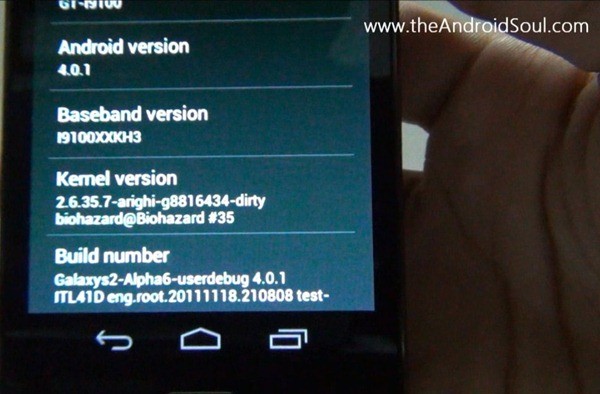
Even though Samsung UK has confirmed on twitter that an official update is in the works to update the company’s superphone Galaxy S2 to latest android version, 4.0, dubbed as Ice Cream Sandwich, we knew we’ll have it way earlier than the official version. We’re true, and we’ve an awesome custom ROM for you below to prove that.
Credits for this custom ROM goes to good team over at XDA, whose elite members are: biohazardious (he started this), gokhanmoral, Pete, Paradoxxx, chadouming, nebkat, Matri ak31, Coentje44, Tegrak, yjwong, Msaraiva, Xplowild and everybody (else).
This custom ROM is a port from the Android 4.0 AOSP code that Google released some days before, and it’s in alpha stage, a bit far from daily life use suitability. But those want to it badly, and have that required dare too, can use this team’s hard work to entertain themselves with ICS goodness by following easy-cheezy guide we’ve produced below.
Compatibility:
[error]This guide is applicable only for Samsung’s Galaxy SII international version (GT-i9100). Check your phone’s version in Settings – About Phone. It has to be “GT-i9100” for this Android 4.0 ROM to be compatible with your phone. Otherwise, simply don’t try this ICS port on your android handset — don’t even think about it if you care about your device.And, to be very very specific, this is not for Galaxy SII handsets at AT&T (both the first one and Skyrocket), T-Mobile and Sprint.[/error]
Warning!
Warning: Warranty may be void of your device if you follow the procedures given on this page. You only are responsible for your device. We won�t be liable if any damage occurs to your device and/or its components.Pre-Installation thoughts:
- Backup your Apps and important data — bookmarks, contacts, SMS, APNs (internet settings), etc. This Android backup guide would help you.
- If you have Samsung’s PC software Kies installed, un-install it first because it may interrupt the flashing process. If you’ve installed it for sake of drivers which otherwise weren’t working, make sure you exit the Kies completely before beginning the procedure below.
- Drivers! — it’s important you’ve the proper drivers installed. Download links below:
What Works/Changelog:
- Touchscreen fix implented!
- Updated kernel (ty bio)
- Made rom amazingly smooth and super fast!
- Updated Android runtime
- Updated Settings
- Updated Build.prop
- Updated libraries
- Added Music2.apk
- Added latest Android Market (not really important cuz we have no wifi >.<)
- New apps from Galaxy Nexus
- Fixed RIL (CALL and SMS)
What Doesn’t Work:
- WiFi
- Bluetooth
- And everything else that is not under ‘what works’
Guide to Update Galaxy S II to Android 4.0 Ice Cream Sandwich (ICS)
You can watch the video below to get the idea of how to install android 4.0 on your Galaxy S II i9100. It shows the installation procedure from recovery after you’ve downloaded and transferred the android 4.0 file to phone’s internal sdcard. See the guide below for complete info.
[youtube video_id=”1zwsy3pV_mY” width=”620″ height=”400″ /]Step-by-step guide:
- Download the Android 4.0 file (custom rom, that is). The latest version available right now is Alpha7. Download it from here, or here (direct link). (You can check and download the latest version of this ROM here, and then download it and continue the steps given below to flash it successfully, without any worries.)
- You need to have clockworkmod recovery installed on your Galaxy SII – i9100. If you don’t have it, do this:
- Transfer the Android 4.0 file you downloaded in step 1 above to phone’s internal sdcard. Just remember the location where you transfer it — you’ll need it in step 8 and step 10 below.
- Disconnect the phone from computer and power it off. Wait for 6-7 seconds for complete power off.
- Boot into recovery mode. For this, press and hold these 3 buttons together until Samsung’s screen shows up: Volume_UP+Home+Power. Phone will boot into CWM recovery. Use volume keys to scroll up and down between options and power/home key to select an option.
- Wipe system, data and Cache.
- In recovery, go to “mounts and storage”.
- To wipe system, select “format /system”. Choose “Yes – Format” on the next screen.
- To wipe data, select “format /data”. Choose “Yes – Format” on the next screen.
- To wipe cache, select “format /cache”. Choose “Yes – Format” on the next screen.
- Select “Go back” at the bottom to return to recovery’s main menu.
- Now, select “install zip from sd card”. Then, select “choose zip from sd card”. Now, browse through sd card and select the Android 4.0 file you downloaded in step 1 and transferred in step 3 above.
- This will flash the required files on your phone and will reboot your phone into recovery again. This is a slightly different recovery now. You need to flash the Android 4.0 File again.
- Select “install zip from sd card” again and then select “choose zip from sd card”. Browse through sd card and select the Android 4.0 file you downloaded in step 1 and transferred in step 3 above, as you did above.
- This time, the Android 4.0 custom ROM will be flashed/installed actually.
- When the flashing is done, go back and reboot your Galaxy S II by selecting ‘reboot system now’.
- The phone should boot up properly, wait for 5-10 mins. [I’ve tried this two times and first time it worked while second time I had to repeat steps 6 to 12 again, after which it booted successfully. So, initially, if after 10 mins the phone doesn’t boot up (it was stuck on the Galaxy S II screen, for me), press and hold Volume_UP+Home+Power keys together to boot into recovery mode. Do this from whatever screen you are on — no need to pull battery out or switch it off or anything. Just boot into recovery from your current screen, whatever it is. Then, follow steps 6 to 12. The phone should boot up properly next time.]
- [Optional] Support the development and appreciate the hard work put in by the team by donating to the team. Find link here.
- If you’ve any queries, shoot them in comments below. But do read this guide fully before to save both us time.
So, you have the most anticipated version of android, the Ice Cream Sandwich, v4.0, right on your Galaxy S II. This custom ROM will keep updating until it gets perfect, or nearly perfect. So, keep watching this space.
Check the official development page here for latest update and to thnak the devs. And use this discussion page to post your views, read other’s views and discuss the ROM. Keep it cool!
More screenshots:






how can use wifi and bluetooth on ics 4.0
Not usable right now, wait for an update on it.
We should be happy that development of this tablet has gone so far so quickly. Leaving Nexus S and Galaxy S aside, I think no other phone has got builds that works as much as this one does.
kapil then what to do now?install
Gingerbread 2.3.5 XWKI8 Firmware?
Ohh… yes. That’s what you can do — updating to any Android 2.3 firmware of Samsung.
What you say, was of worth the try?
how can use wifi and bluetooth on ics 4.0
Not usable right now, wait for an update on it.
We should be happy that development of this tablet has gone so far so quickly. Leaving Nexus S and Galaxy S aside, I think no other phone has got builds that works as much as this one does.
how can use wifi and bluetooth on ics 4.0
Not usable right now, wait for an update on it.
We should be happy that development of this tablet has gone so far so quickly. Leaving Nexus S and Galaxy S aside, I think no other phone has got builds that works as much as this one does.
kapil then what to do now?install
Gingerbread 2.3.5 XWKI8 Firmware?
Ohh… yes. That’s what you can do — updating to any Android 2.3 firmware of Samsung.
What you say, was of worth the try?
kapil then what to do now?install
Gingerbread 2.3.5 XWKI8 Firmware?
Ohh… yes. That’s what you can do — updating to any Android 2.3 firmware of Samsung.
What you say, was of worth the try?
I wanna see how the benchmark tests go on this…. thanks…
I wanna see how the benchmark tests go on this…. thanks…
I wanna see how the benchmark tests go on this…. thanks…
Galaxy S I?
Galaxy S I?
Galaxy S I?
* DO NOT EVEN TRY IT* !!! 😛
just tried it….nothing works…not a single thing(atlist didnt for me) !!!
looks very good though 🙂
Agree nothing works. But it is fun:))
* DO NOT EVEN TRY IT* !!! 😛
just tried it….nothing works…not a single thing(atlist didnt for me) !!!
looks very good though 🙂
Agree nothing works. But it is fun:))
* DO NOT EVEN TRY IT* !!! 😛
just tried it….nothing works…not a single thing(atlist didnt for me) !!!
looks very good though 🙂
Agree nothing works. But it is fun:))
Fantastic, but i think ill wait for the Beta Version at least. I kind of like having WiFi…
Can you guys let us mortals know when the next version is out. 🙂
Can’t give you a date when the next version will be out. But, you can subscribe to our daily free email newsletter so that you know it when we post it. Or, simply bookmark the article’s page and check it regularly.
Fantastic, but i think ill wait for the Beta Version at least. I kind of like having WiFi…
Can you guys let us mortals know when the next version is out. 🙂
Can’t give you a date when the next version will be out. But, you can subscribe to our daily free email newsletter so that you know it when we post it. Or, simply bookmark the article’s page and check it regularly.
Fantastic, but i think ill wait for the Beta Version at least. I kind of like having WiFi…
Can you guys let us mortals know when the next version is out. 🙂
Can’t give you a date when the next version will be out. But, you can subscribe to our daily free email newsletter so that you know it when we post it. Or, simply bookmark the article’s page and check it regularly.
why i cannot connect to my storage?
do you NEED to hav sdcard? They should indicated this at the beginning of the article so I know I cant do it.
internal sd card…its built in the galaxy s2
why i cannot connect to my storage?
why i cannot connect to my storage?
do you NEED to hav sdcard? They should indicated this at the beginning of the article so I know I cant do it.
internal sd card…its built in the galaxy s2
do you NEED to hav sdcard? They should indicated this at the beginning of the article so I know I cant do it.
internal sd card…its built in the galaxy s2
Finding update package…
Opening update package…
Installing update…
Checking state of …
assert failed: run_program(“/tmp/updater.sh”) == 0
E:Error in ICS_4.0.1_r1_Beta1.zip
(Status 7)
Installation aborted
WHYYY????
Maybe re-installing the CWM recovery would help.
Maybe re-installing the CWM recovery would help.
Finding update package…
Opening update package…
Installing update…
Checking state of …
assert failed: run_program(“/tmp/updater.sh”) == 0
E:Error in ICS_4.0.1_r1_Beta1.zip
(Status 7)
Installation aborted
WHYYY????
Finding update package…
Opening update package…
Installing update…
Checking state of …
assert failed: run_program(“/tmp/updater.sh”) == 0
E:Error in ICS_4.0.1_r1_Beta1.zip
(Status 7)
Installation aborted
WHYYY????
Maybe re-installing the CWM recovery would help.
Maybe re-installing the CWM recovery would help.
does anyone know it this available for the sprint galaxy s2…..?
does anyone know it this available for the sprint galaxy s2…..?
does anyone know it this available for the sprint galaxy s2…..?
When is an update coming out? Some sort or Beta version maybe where most things if not everything works?
When is an update coming out? Some sort or Beta version maybe where most things if not everything works?
When is an update coming out? Some sort or Beta version maybe where most things if not everything works?
bug cant fix yet??
how to get back to v2.3 ?
Search for xxkh3 on this site and install that firmware.
bug cant fix yet??
bug cant fix yet??
how to get back to v2.3 ?
Search for xxkh3 on this site and install that firmware.
how to get back to v2.3 ?
Search for xxkh3 on this site and install that firmware.
got chinese language?
got chinese language?
got chinese language?
What do you mean by saying:What doesn’t work: Wifi Bluetoooth ..?you mean the wifi can not be used if rooted to 4.0?
What do you mean by saying:What doesn’t work: Wifi Bluetoooth ..?you mean the wifi can not be used if rooted to 4.0?
What do you mean by saying:What doesn’t work: Wifi Bluetoooth ..?you mean the wifi can not be used if rooted to 4.0?
error occure while updating galaxy s2 to icereme sandwitch by zi, file
error— E:signature certificate invalid.
plaa give the solution how i uodate my galaxxy s2.
You need to have clockworkmod recovery installed. Search for it on Internet. Or, search for xxkh3 on our site and install that. Then, root and install clockworkmod (cwm) recovery using our guide linked there at bottom of the xxkh3 install guide. Then, you’ll be good to install ICS.
I have sony ericson xperia arc s i want to upgrade to 4.0 hw should i go please help.!
error occure while updating galaxy s2 to icereme sandwitch by zi, file
error— E:signature certificate invalid.
plaa give the solution how i uodate my galaxxy s2.
You need to have clockworkmod recovery installed. Search for it on Internet. Or, search for xxkh3 on our site and install that. Then, root and install clockworkmod (cwm) recovery using our guide linked there at bottom of the xxkh3 install guide. Then, you’ll be good to install ICS.
I have sony ericson xperia arc s i want to upgrade to 4.0 hw should i go please help.!
error occure while updating galaxy s2 to icereme sandwitch by zi, file
error— E:signature certificate invalid.
plaa give the solution how i uodate my galaxxy s2.
You need to have clockworkmod recovery installed. Search for it on Internet. Or, search for xxkh3 on our site and install that. Then, root and install clockworkmod (cwm) recovery using our guide linked there at bottom of the xxkh3 install guide. Then, you’ll be good to install ICS.
I have sony ericson xperia arc s i want to upgrade to 4.0 hw should i go please help.!
Hi,
I followed all the steps above, but forgot to copy the Android 4.0 zip file. I have formatted data, cache and system from the clockwork recovery mode. I dont have the zip file copied to internal storage sd card to proceed further. I am unable to boot to normal mode from here. Kindly help me boot my Galaxy s2 to normal mode so that I can copy the Android zip file and upgrade to ICS 4.0. Any help is very much appreciated as mine is a new phone and I want it back in working condition.
Thanks in Advance.
Pasha
If you’re still stuck, then this might help.
Go to mounts and storage option in recovery and select mount usb storage. Then, connect phone to PC. Your phone sdcard will show up as drive on PC. Paste the file now. Then, select unmount on phone’s recovery mode. Now, continue to next step.
I have exactly the same problem so any help apreciated
I’ve replied to him with a solution. It’s useful to you too, so follow that.
Hi,nnI followed all the steps above, but forgot to copy the Android 4.0 zip file. I have formatted data, cache and system from the clockwork recovery mode. I dont have the zip file copied to internal storage sd card to proceed further. I am unable to boot to normal mode from here. Kindly help me boot my Galaxy s2 to normal mode so that I can copy the Android zip file and upgrade to ICS 4.0. Any help is very much appreciated as mine is a new phone and I want it back in working condition.nnThanks in Advance.nnPashann
If you’re still stuck, then this might help.nnGo to mounts and storage option in recovery and select mount usb storage. Then, connect phone to PC. Your phone sdcard will show up as drive on PC. Paste the file now. Then, select unmount on phone’s recovery mode. Now, continue to next step.
I have exactly the same problem so any help apreciated
I’ve replied to him with a solution. It’s useful to you too, so follow that.
Hi,nnI followed all the steps above, but forgot to copy the Android 4.0 zip file. I have formatted data, cache and system from the clockwork recovery mode. I dont have the zip file copied to internal storage sd card to proceed further. I am unable to boot to normal mode from here. Kindly help me boot my Galaxy s2 to normal mode so that I can copy the Android zip file and upgrade to ICS 4.0. Any help is very much appreciated as mine is a new phone and I want it back in working condition.nnThanks in Advance.nnPashann
If you’re still stuck, then this might help.nnGo to mounts and storage option in recovery and select mount usb storage. Then, connect phone to PC. Your phone sdcard will show up as drive on PC. Paste the file now. Then, select unmount on phone’s recovery mode. Now, continue to next step.
I have exactly the same problem so any help apreciated
I’ve replied to him with a solution. It’s useful to you too, so follow that.
Hi,
I followed all the steps above, but forgot to copy the Android 4.0 zip file. I have formatted data, cache and system from the clockwork recovery mode. I dont have the zip file copied to internal storage sd card to proceed further. I am unable to boot to normal mode from here. Kindly help me boot my Galaxy s2 to normal mode so that I can copy the Android zip file and upgrade to ICS 4.0. Any help is very much appreciated as mine is a new phone and I want it back in working condition.
Thanks in Advance.
Pasha
If you’re still stuck, then this might help.
Go to mounts and storage option in recovery and select mount usb storage. Then, connect phone to PC. Your phone sdcard will show up as drive on PC. Paste the file now. Then, select unmount on phone’s recovery mode. Now, continue to next step.
I have exactly the same problem so any help apreciated
I’ve replied to him with a solution. It’s useful to you too, so follow that.
4.o is work nice but one thing on skype my cam r not working properly can you guide me how can i fix it ?
4.o is work nice but one thing on skype my cam r not working properly can you guide me how can i fix it ?
4.o is work nice but one thing on skype my cam r not working properly can you guide me how can i fix it ?
hey what about galaxy s2 t-mobile ? how to update for t-mobile?n
hey what about galaxy s2 t-mobile ? how to update for t-mobile?
hey what about galaxy s2 t-mobile ? how to update for t-mobile?n
hey what about galaxy s2 t-mobile ? how to update for t-mobile?
the cam and wifi and bluetooth not working ….. and when need to type any thing the keyboard come-out and the screen be black and i dont see any thing …. only keyboard …………u00a0 why any help pleasen
YES, IT HAPPEN FOR ME ALSO. WHAT WE CAN DO NOW?????? ugent
the cam and wifi and bluetooth not working ….. and when need to type any thing the keyboard come-out and the screen be black and i dont see any thing …. only keyboard ………… why any help please
YES, IT HAPPEN FOR ME ALSO. WHAT WE CAN DO NOW?????? ugent
and the screen dont rotate ….. :S … and network connection not go on …. omg …. this is not complete firmware…….. please no one do this software nu00a0
and the screen dont rotate ….. :S … and network connection not go on …. omg …. this is not complete firmware…….. please no one do this software
the cam and wifi and bluetooth not working ….. and when need to type any thing the keyboard come-out and the screen be black and i dont see any thing …. only keyboard …………u00a0 why any help pleasen
YES, IT HAPPEN FOR ME ALSO. WHAT WE CAN DO NOW?????? ugent
the cam and wifi and bluetooth not working ….. and when need to type any thing the keyboard come-out and the screen be black and i dont see any thing …. only keyboard ………… why any help please
YES, IT HAPPEN FOR ME ALSO. WHAT WE CAN DO NOW?????? ugent
and the screen dont rotate ….. :S … and network connection not go on …. omg …. this is not complete firmware…….. please no one do this software nu00a0
and the screen dont rotate ….. :S … and network connection not go on …. omg …. this is not complete firmware…….. please no one do this software
Guys its still alpha testing so expect issue
Guys its still alpha testing so expect issue
Guys its still alpha testing so expect issue
after upgraded can’t works wifi, bluetooth. so no more software become wifi, bluetooth works?
after upgraded can’t works wifi, bluetooth. so no more software become wifi, bluetooth works?
after upgraded can’t works wifi, bluetooth. so no more software become wifi, bluetooth works?
Hi Kapil,
I love the music that you posted on youtube with “Ice cream sandwich(ICS) on galaxy s2 [walkthrough]. Can you let me know which one is that.. 🙂
Besides your steps on upgrade rocks. I have got it right all the time.
Regards,
Adi
Hi Kapil,
I love the music that you posted on youtube with “Ice cream sandwich(ICS) on galaxy s2 [walkthrough]. Can you let me know which one is that.. 🙂
Besides your steps on upgrade rocks. I have got it right all the time.
Regards,
Adi
Hi Kapil,
I love the music that you posted on youtube with “Ice cream sandwich(ICS) on galaxy s2 [walkthrough]. Can you let me know which one is that.. 🙂
Besides your steps on upgrade rocks. I have got it right all the time.
Regards,
Adi
i try this rom on the att skyrocket it install right but when i reboot phone won’t turn on any suggestions
i try this rom on the att skyrocket it install right but when i reboot phone won’t turn on any suggestions
i try this rom on the att skyrocket it install right but when i reboot phone won’t turn on any suggestions
Someone help! I don’t want it anymore^_^ How to get back my android Gingerbread with TouchWiz 4.0???????? answer here [email protected]
Thanks.
Search here for xxkh3 firmware, and install that. It’s based on Gingerbread, with touchviz v4.
Thank you!
Someone help! I don’t want it anymore^_^ How to get back my android Gingerbread with TouchWiz 4.0???????? answer here [email protected]
Thanks.
Search here for xxkh3 firmware, and install that. It’s based on Gingerbread, with touchviz v4.
Thank you!
Someone help! I don’t want it anymore^_^ How to get back my android Gingerbread with TouchWiz 4.0???????? answer here [email protected]
Thanks.
Search here for xxkh3 firmware, and install that. It’s based on Gingerbread, with touchviz v4.
Thank you!
err..may i ask it…if i updated my s2 to android 4.0 ICS will my wifi and camera will not function-ing?
Camera and WiFi both will work absolutely fine.. so don’t worry. Flash the latest Samsung leak ‘XXLPH’ from here – https://nerdschalk.com/xxlph/ which will get you Android 4.0.3 (Ice Cream Sandwich).
Camera and WiFi both will work absolutely fine.. so don’t worry. Flash the latest Samsung leak ‘XXLPH’ from here – http://nerdschalk.com/xxlph/ which will get you Android 4.0.3 (Ice Cream Sandwich).
er….but i saw some comment cant use wifi or bluetooh
Erm..my s2 already update to 4.0 ics but my wifi and bluetooh not working at all….any body can hlp me to solve it?
Did you install XXLPH?
err..may i ask it…if i updated my s2 to android 4.0 ICS will my wifi and camera will not function-ing?
Camera and WiFi both will work absolutely fine.. so don’t worry. Flash the latest Samsung leak ‘XXLPH’ from here – https://nerdschalk.com/xxlph/ which will get you Android 4.0.3 (Ice Cream Sandwich).
er….but i saw some comment cant use wifi or bluetooh
err..may i ask it…if i updated my s2 to android 4.0 ICS will my wifi and camera will not function-ing?
Camera and WiFi both will work absolutely fine.. so don’t worry. Flash the latest Samsung leak ‘XXLPH’ from here – http://nerdschalk.com/xxlph/ which will get you Android 4.0.3 (Ice Cream Sandwich).
er….but i saw some comment cant use wifi or bluetooh
Erm..my s2 already update to 4.0 ics but my wifi and bluetooh not working at all….any body can hlp me to solve it?
Did you install XXLPH?
Erm..my s2 already update to 4.0 ics but my wifi and bluetooh not working at all….any body can hlp me to solve it?
Did you install XXLPH?
I can’t find the file when I root it.. I’ve already cleared all the things..! Now phone won’t turn on.. any options??
Install the XXLPH firmware — nerdschalk.com/xxlph/. It’s the best Samsung firmware right now for Android 4.0, Ice Cream Sandwich. It will fix your phone.
Will this work even if my phone won’t turn on..?
I’m trying to get to ICS. I think what I have done is that I’ve unzipped the Alpha7 file before putting it on.. was this a bad option?
Sorry It does turn on (can get to download mode and Clockworkmod recovery).
I mean it doesn’t go past the “Samsung Galaxy S II (And yellow triangle)” sign.
Yes, that was a bad option… now do as said into that guide and you’ll be okay.
Install xxlph , search here for it.
I can’t find the file when I root it.. I’ve already cleared all the things..! Now phone won’t turn on.. any options??
Install the XXLPH firmware — nerdschalk.com/xxlph/. It’s the best Samsung firmware right now for Android 4.0, Ice Cream Sandwich. It will fix your phone.
Will this work even if my phone won’t turn on..?
I’m trying to get to ICS. I think what I have done is that I’ve unzipped the Alpha7 file before putting it on.. was this a bad option?
Sorry It does turn on (can get to download mode and Clockworkmod recovery).
I mean it doesn’t go past the “Samsung Galaxy S II (And yellow triangle)” sign.
Install xxlph , search here for it.
Yes, that was a bad option… now do as said into that guide and you’ll be okay.
I can’t find the file when I root it.. I’ve already cleared all the things..! Now phone won’t turn on.. any options??
Install the XXLPH firmware — nerdschalk.com/xxlph/. It’s the best Samsung firmware right now for Android 4.0, Ice Cream Sandwich. It will fix your phone.
Will this work even if my phone won’t turn on..?
I’m trying to get to ICS. I think what I have done is that I’ve unzipped the Alpha7 file before putting it on.. was this a bad option?
Sorry It does turn on (can get to download mode and Clockworkmod recovery).
I mean it doesn’t go past the “Samsung Galaxy S II (And yellow triangle)” sign.
Install xxlph , search here for it.
Yes, that was a bad option… now do as said into that guide and you’ll be okay.
is that method gonna work for galaxy R (I9103)???????????? reply soon pls……….
Nope 🙁
is that method gonna work for galaxy R (I9103)???????????? reply soon pls……….
Nope 🙁
is that method gonna work for galaxy R (I9103)???????????? reply soon pls……….
Nope 🙁
what to do??? plz help, i just accidently turned of my samsung during the instalation of XXKH3 process!!!!! (yes yes, the battery was removed) and phone just stoped showng any signs of life…. 😀
however now even those “Volume_UP+Home+Power” can’t help with or without battery…please, help 😀
what to do??? plz help, i just accidently turned of my samsung during the instalation of XXKH3 process!!!!! (yes yes, the battery was removed) and phone just stoped showng any signs of life…. 😀
however now even those “Volume_UP+Home+Power” can’t help with or without battery…please, help 😀
what to do??? plz help, i just accidently turned of my samsung during the instalation of XXKH3 process!!!!! (yes yes, the battery was removed) and phone just stoped showng any signs of life…. 😀
however now even those “Volume_UP+Home+Power” can’t help with or without battery…please, help 😀
how if gt i19100g
s2
It wouldn’t work on i9100G 🙁
how if gt i19100g
s2
It wouldn’t work on i9100G 🙁
how if gt i19100g
s2
It wouldn’t work on i9100G 🙁
Any other way for GT I9100G upgrade???
Any other way for GT I9100G upgrade???
Any other way for GT I9100G upgrade???
Hello. Made a mistake here. accidently copied the alpha7.zip to the EXTERNAL sd card instead of internal. then steps 6, now, you understand, i cant install A4.0, but niether can startup the phone to copy alpha7.zip to internal sd.
Install XXLPQ firmware from here — http://nerdschalk.com/xxlpq/ Remove the battery, and go to download mode (read instruction is the link given). And follow the guide there.
Install XXLPQ firmware from here — https://nerdschalk.com/xxlpq/ Remove the battery, and go to download mode (read instruction is the link given). And follow the guide there.
Kapil. Thks very much. As even easy and to the point, it worked 100%. The first method i used, must be an old one. Your method worked within a few moments, phone is on 4.0 ics now.Kind regards, jan
Hello. Made a mistake here. accidently copied the alpha7.zip to the EXTERNAL sd card instead of internal. then steps 6, now, you understand, i cant install A4.0, but niether can startup the phone to copy alpha7.zip to internal sd.
Install XXLPQ firmware from here — https://nerdschalk.com/xxlpq/ Remove the battery, and go to download mode (read instruction is the link given). And follow the guide there.
Kapil. Thks very much. As even easy and to the point, it worked 100%. The first method i used, must be an old one. Your method worked within a few moments, phone is on 4.0 ics now.Kind regards, jan
Hello. Made a mistake here. accidently copied the alpha7.zip to the EXTERNAL sd card instead of internal. then steps 6, now, you understand, i cant install A4.0, but niether can startup the phone to copy alpha7.zip to internal sd.
Install XXLPQ firmware from here — http://nerdschalk.com/xxlpq/ Remove the battery, and go to download mode (read instruction is the link given). And follow the guide there.
Kapil. Thks very much. As even easy and to the point, it worked 100%. The first method i used, must be an old one. Your method worked within a few moments, phone is on 4.0 ics now.Kind regards, jan
Do you think these instructions would work on a GT-i9100T it should shouldn’t it?
Although meant for i9100 only, some users have reported they successfully did it on i9100T. So, yes it might just work, i9100T shares same Exynos processor with i9100 which i9100G doesn’t and hence these things are not compatible with i9100G.
Do you think these instructions would work on a GT-i9100T it should shouldn’t it?
Although meant for i9100 only, some users have reported they successfully did it on i9100T. So, yes it might just work, i9100T shares same Exynos processor with i9100 which i9100G doesn’t and hence these things are not compatible with i9100G.
Do you think these instructions would work on a GT-i9100T it should shouldn’t it?
Although meant for i9100 only, some users have reported they successfully did it on i9100T. So, yes it might just work, i9100T shares same Exynos processor with i9100 which i9100G doesn’t and hence these things are not compatible with i9100G.
Hello i Have a probleme i have my external, Is for this probleme a solution? could you give me instructions please . Loves Barbara (sorry for my bad english)
Hello i Have a probleme i have my external, Is for this probleme a solution? could you give me instructions please . Loves Barbara (sorry for my bad english)
Hello i Have a probleme i have my external, Is for this probleme a solution? could you give me instructions please . Loves Barbara (sorry for my bad english)
Upgraded the OS but unable to backup my SMS again on phone using kies 🙁
Upgraded the OS but unable to backup my SMS again on phone using kies 🙁
Upgraded the OS but unable to backup my SMS again on phone using kies 🙁
i think android 4.0 not good.,
what you think.,
just for opinion.,
i think android 4.0 not good.,
what you think.,
just for opinion.,
i think android 4.0 not good.,
what you think.,
just for opinion.,
My phone’s battery died during the 8. step and now I can’t turn on the mobile phone! It has Sg2 logo with an error sign. Please help!
My phone’s battery died during the 8. step and now I can’t turn on the mobile phone! It has Sg2 logo with an error sign. Please help!
My phone’s battery died during the 8. step and now I can’t turn on the mobile phone! It has Sg2 logo with an error sign. Please help!
have an update for the Motorola Spice Xt531? Grateful now you guys are fucking!
have an update for the Motorola Spice Xt531? Grateful now you guys are fucking!
have an update for the Motorola Spice Xt531? Grateful now you guys are fucking!
U fucked me very good this not work propertly
U fucked me very good this not work propertly
U fucked me very good this not work propertly